Best Prompt Management Tools for Teams in 2026
A prompt that works in testing breaks in production three weeks later, and nobody on the team can say why. Maybe someone edited the wording in a shared doc and forgot to tell the engineer who deployed it. Maybe the model version changed underneath it.
Maybe two people are running slightly different copies of the “same” prompt right now, in two different places, and neither one knows it. Prompt management software exists to make that scenario stop happening, and this guide compares the tools built to solve it.
The short answer: for most teams shipping AI features in 2026, PromptLayer and Langfuse cover the widest range of needs at the lowest cost of entry. Braintrust and Vellum suit teams that want evaluation and deployment folded into one platform, and Portkey and PromptHub fit narrower use cases built around a gateway or non-technical collaboration.
Two tools that show up constantly in other 2026 roundups, Humanloop and Helicone, need a caveat before you shortlist either one, covered in detail below. Skipping that caveat is the single most common mistake in competing comparisons right now.
What follows: what prompt management actually means once a team is involved rather than one person and a notebook, why the old way of doing this persists so long, why 2026’s wave of acquisitions changed how you should evaluate vendors, a decision framework for comparing tools on criteria that matter beyond a feature checklist, and a tool-by-tool look at what each platform is actually built for.
What “Prompt Management” Actually Means Once a Team Is Involved
Prompt management is the discipline of treating prompts like production assets rather than throwaway text: versioned, tested before release, deployed deliberately, and traceable back to what changed and why. For a single builder, a text file does that job well enough.
For a team, it stops working the moment more than one person can edit a prompt that’s live in front of customers. A useful way to see the gap: a solo builder needs a place to store prompts. A team needs a system of record.
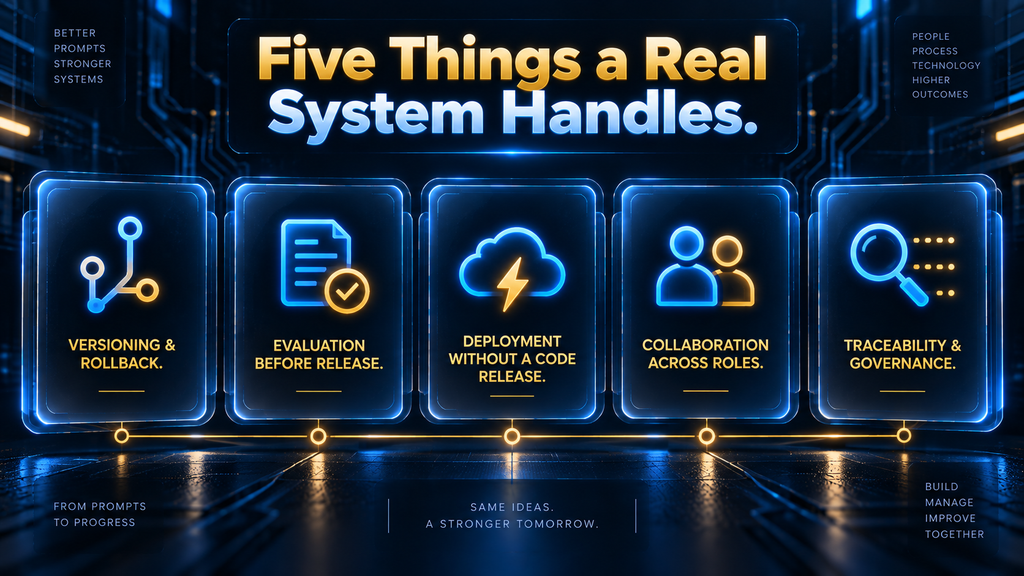
That distinction shows up in five places a tool either handles or doesn’t.
Versioning and rollback. Every meaningful change to a prompt should create a new, addressable version, not overwrite the old one. When a change makes output quality worse, the team needs to revert instantly, not reconstruct the previous wording from memory or a Slack message.
Evaluation before release. A prompt change should be tested against a dataset of real or representative inputs before it reaches production, the same way a code change goes through tests before merging. Without this, teams find out a prompt broke something only after users notice.
Deployment without a code release. Marketing copy, support scripts, and internal tools change more often than the codebase around them. A team that has to ask an engineer to redeploy the whole application every time a prompt needs a word changed will either stop iterating or work around the system.
Collaboration across roles. The person who best understands whether a support-bot prompt sounds right is often a support lead or product manager, not the engineer who wired up the API call. A tool that locks prompt editing behind a codebase quietly excludes the people best positioned to catch bad output.
Traceability and governance. When an AI feature produces a bad or risky output, the team needs to reconstruct exactly which prompt version, which model, and which input produced it. In regulated industries, that trail isn’t optional.
Even outside regulated industries, it’s the difference between fixing a problem in an hour and spending a day guessing. Most teams start without any of this, and that’s fine early on.
Prompts live in a shared doc, a Slack thread, or hardcoded in the application. That works until the team scales past one or two people touching prompts, at which point the absence of a system stops being a minor inconvenience.
Why the Old Way Sticks Around Longer Than It Should
If shared docs and Slack threads are so clearly inadequate, it’s worth asking why so many teams still run this way well past the point of pain. The honest answer is that the old way has real, if temporary, advantages a dedicated tool doesn’t automatically beat.
A shared doc has zero setup cost, no new login for the team to learn, and no vendor to evaluate. Early on, when a product is still finding its shape, that speed genuinely outweighs the structure a registry provides. The mistake isn’t starting this way; it’s not recognizing when the trade-off flips.
The trade-off flips quietly. Nobody decides on a specific day that the team has outgrown a shared doc. Instead, small costs accumulate: a few minutes lost reconstructing which version is live, then a support ticket nobody can trace to a specific prompt change, then a genuine incident.
By the time the incident happens, the team usually already suspected the old system wasn’t working. What a dedicated tool changes isn’t the destination, since most teams eventually agree they need one, but how much damage accumulates before they act on it.
Why Vendor Stability Now Belongs in the Buying Decision
2026 has been an unusually disruptive year for this specific product category, and it changes how this comparison should be read. A prompt registry is infrastructure: your team’s prompt history, evaluation datasets, and deployment configuration live inside it.
Picking a vendor that disappears, gets acquired, or quietly stops shipping features is not a hypothetical risk here. It has already happened multiple times this year, to some of the most frequently recommended tools in the category.
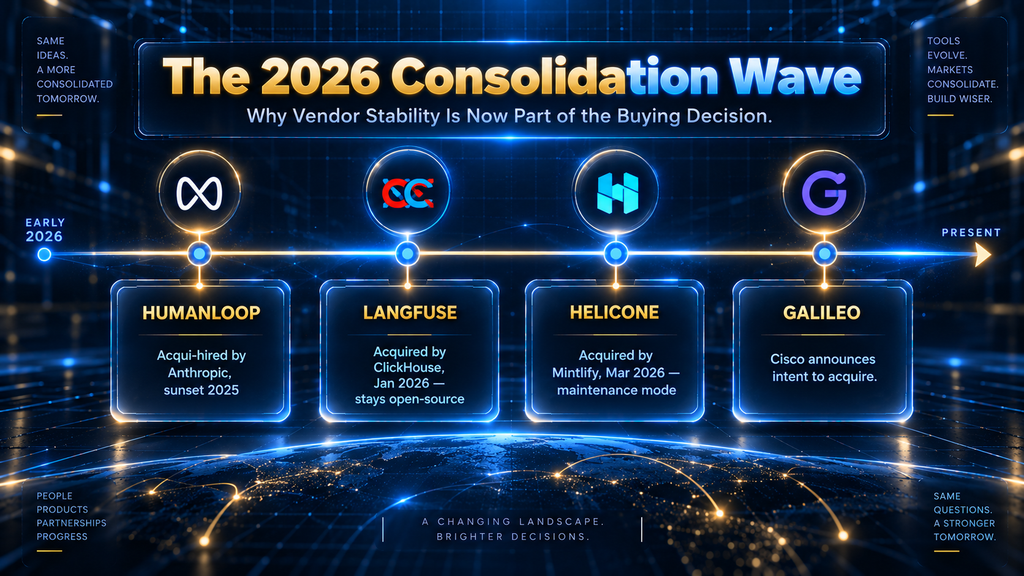
Humanloop, one of the earliest and most frequently recommended prompt management platforms, is no longer available as an independent product. Anthropic acquired the founding team in an acqui-hire in 2025, and Humanloop sunset the platform shortly after.
Several “best prompt management tools” articles published in 2026, including some still circulating at the time of writing, list Humanloop as an active recommendation with current pricing. It is not an active product, and any team evaluating it in 2026 is evaluating something that no longer exists.
Helicone was acquired by Mintlify in March 2026. Unlike Humanloop, Helicone has not been shut down: existing self-hosted and cloud deployments keep running, and the acquiring team has committed to security patches, bug fixes, and continued support for new model releases.
New feature development, however, has stopped. For a team that only needs what Helicone already does today, that may be an acceptable trade-off. For a team that needs the product to keep evolving with the category, it is a real constraint worth knowing before signing up.
Langfuse, the most widely deployed open-source option in this category, was acquired by ClickHouse in January 2026. This is a different kind of acquisition than the other two.
ClickHouse has stated publicly that Langfuse remains fully open-source under its existing MIT license, that self-hosted deployments are unaffected, and that Langfuse Cloud continues operating with its existing service commitments. ClickHouse has made similar acquisitions before, of PeerDB and HyperDX, and left both projects independently maintained rather than absorbed.
The acquisition is worth knowing about, but it does not currently change what Langfuse offers a team evaluating it today. Cisco separately announced its intent to acquire Galileo, an AI agent observability company adjacent to this category, reinforcing a broader pattern.
Large infrastructure and networking companies are buying their way into AI observability and prompt tooling rather than building it from scratch. That doesn’t mean the category is unstable in a way that should scare a team away from adopting a tool.
It means vendor continuity now deserves its own line item in the evaluation, not just feature coverage and price. The Buyer Fit Score below builds that consideration in directly, rather than treating it as an afterthought.
The AI Hustle World Buyer Fit Score
A feature list tells you what a tool can do. It doesn’t tell you whether that tool fits your team, your budget, or your risk tolerance. The AI Hustle World Buyer Fit Score is the framework we use across every tool comparison on this site going forward, built to answer the second question rather than just the first.
It scores any vendor across seven weighted criteria, each rated 1 (weak) to 5 (excellent) for your specific situation, then combined into a weighted total. The weighting below is a general-purpose default.
A team with hard compliance requirements might reasonably shift more weight onto governance. A two-person startup might shift more weight onto cost. The framework is meant to be adjusted, not followed rigidly.
| Criterion | Weight | What It Measures |
|---|---|---|
| Problem Fit | 20% | Does it solve the specific bottleneck your team actually has, not a generic version of the problem |
| Capability Depth | 15% | How far the product goes past basic storage and versioning into evaluation, deployment, and monitoring |
| Evidence & Reliability | 15% | Track record, uptime history, independent reviews, and whether claims hold up under scrutiny |
| Collaboration & Workflow Fit | 15% | How well it fits how your team actually works, including non-engineering roles |
| Governance & Vendor Stability | 15% | Security posture, compliance features, and the company’s continuity risk |
| Total Cost of Ownership | 10% | Subscription price plus migration effort, seat costs, and hidden usage fees |
| Time-to-Value | 10% | How fast a team sees a real, working benefit after adopting it |
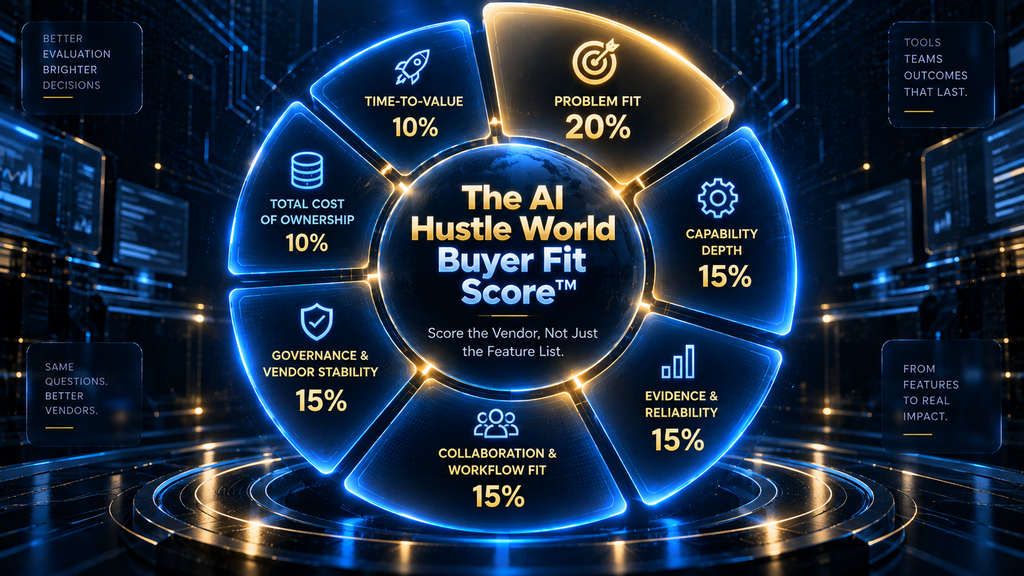
The resulting number is a decision aid, not a verdict. A tool that scores lower overall can still be the right pick if it wins decisively on the one or two criteria your team actually cares about.
The tool profiles below use this framework qualitatively, rating each tool High, Medium, or Low per criterion, rather than inventing per-tool point totals we can’t independently verify at scale. Self-reported vendor scores are exactly the kind of unverifiable claim this framework exists to cut through.
The Prompt Ops Maturity Ladder
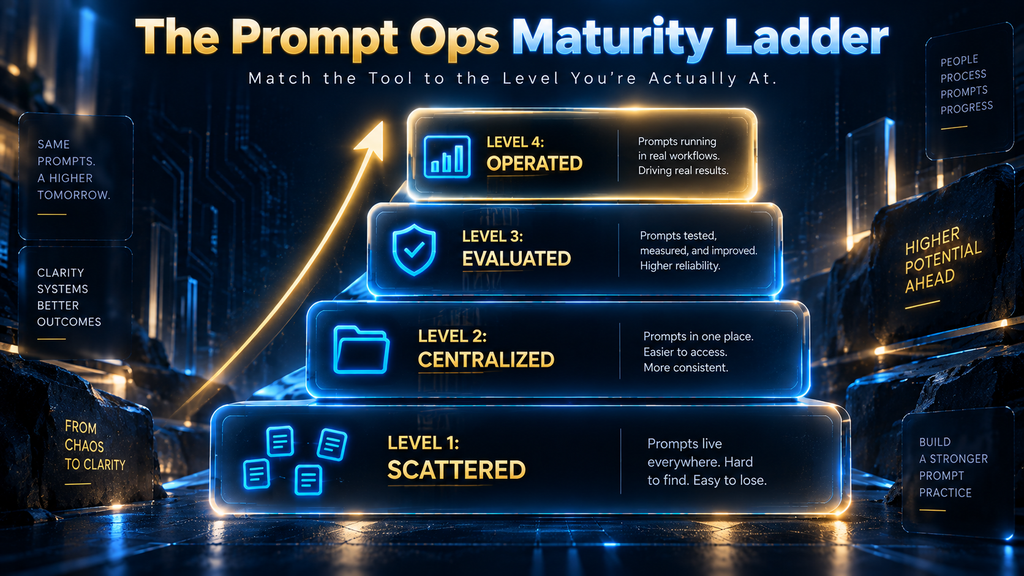
Before comparing tools, it helps to know where your team currently sits. The Prompt Ops Maturity Ladder is a four-level framework specific to this article’s topic, meant to help a reader self-diagnose rather than jump straight to “which tool is best.”
Level 1: Scattered. Prompts live across code comments, Notion pages, and Slack threads. Nobody can say with confidence which version is live. This is where almost every team starts, and it is fine for a solo project or an early prototype.
Level 2: Centralized. Prompts live in one registry with version history. Anyone can see what changed and when. This alone eliminates the most common failure mode: a prompt edited in one place that silently diverges from what’s actually running.
Level 3: Evaluated. No prompt change reaches production without running against a test dataset first. This is the level where a tool starts actively preventing regressions rather than just recording that one happened.
Level 4: Operated. The team has monitoring, rollback, environment separation across dev, staging, and production, and an audit trail tied to every release. This is the level regulated industries and larger AI-native teams need.
Jumping straight to a Level 4 tool while your team operates at Level 1 usually backfires. The tool’s more advanced features go unused, the migration effort feels disproportionate to the payoff, and the team quietly reverts to old habits.
Match the tool to the level you’re actually at, with room to grow into the next one. Most of the tools in this comparison are built to support a team all the way to Level 4, but a team doesn’t need to buy for Level 4 on day one.
How to Test Candidates Before You Commit
Every tool in this comparison offers a free tier, a trial, or a self-hosted option, which means there’s no good reason to pick one from a features page alone. A short, structured trial catches problems a spec sheet never will.
Start by importing five to ten of your team’s actual prompts, not the tool’s sample data. Sample prompts are designed to make every platform look good; your own prompts reveal how the tool handles real edge cases, like multi-step chains or long system instructions.
Next, have the person who is least comfortable with code try to edit and redeploy one prompt without help. If that person can’t do it in under ten minutes, the tool likely won’t get adopted by your non-engineering team members no matter how good its engineering-facing features are.
Then deliberately break something: revert a prompt version, or trigger a rollback. A platform’s rollback flow is the feature teams need most under pressure and test least during evaluation, which is exactly backward.
Finally, check what happens to your data if you cancel. A tool that makes export difficult or locks your prompt history into a proprietary format is telling you something about how it thinks about the relationship, regardless of what its marketing page says.
Best Prompt Management Tools for Teams in 2026
Each tool below is evaluated against the Buyer Fit Score criteria, with pricing as publicly listed at time of writing. SaaS pricing changes often, so treat these as a starting reference and confirm current numbers directly with each vendor before budgeting.
PromptLayer
PromptLayer is built around a visual prompt registry with git-style versioning, request logging, and template variables. It’s one of the few tools in this category explicitly designed so product managers, writers, and domain experts can work in the same registry as engineers, without a per-seat penalty for non-technical users.
Plans start in the mid-$20s per month, with a free tier for individuals and small projects, scaling to team and enterprise pricing for larger deployments. Strengths include a genuinely fast iteration loop and strong cross-functional usability.
The trade-off is that PromptLayer’s observability depth is narrower than platforms built observability-first. A team whose primary need is deep production tracing across complex agent chains may find it thinner than Langfuse or Braintrust in that specific area.
Buyer Fit Score read: High on Collaboration & Workflow Fit and Time-to-Value, Medium on Capability Depth, High on Total Cost of Ownership for small-to-mid teams. Best for a small-to-mid team where non-engineers actively write and refine prompts.
Langfuse
Langfuse is the open-source option most teams default to when data ownership and self-hosting matter. It’s MIT-licensed, self-hostable via Docker, and pairs prompt versioning with full tracing, so a prompt version and the production traces it generated stay linked.
It also supports composite prompts for multi-step workflows, which flatter, simpler tools often handle poorly. Self-hosting is free; Langfuse Cloud starts around $29 a month, with enterprise pricing from roughly $2,499 a year.
The tool has no built-in branching model and no native approval workflow, so teams that need formal review gates before a prompt goes live will need to build that discipline themselves or layer it on top.
As covered above, Langfuse was acquired by ClickHouse in January 2026. ClickHouse has publicly committed to keeping it fully open-source with unchanged self-hosting terms, which meaningfully de-risks this pick compared to how it might read on paper.
Buyer Fit Score read: High on Total Cost of Ownership (self-hosted) and Governance & Vendor Stability, Medium on Collaboration & Workflow Fit for non-technical users, High on Capability Depth for engineering-led teams. Best for teams that want data ownership and already have engineering capacity to run it.
Braintrust
Braintrust folds prompt management, evaluation, and production tracing into a single workflow rather than treating them as separate tools bolted together. Its playground supports side-by-side diff views between prompt versions, and evaluation is a first-class part of the release process rather than an afterthought.
Pricing is custom rather than published in fixed tiers, which typically means it’s aimed at teams with enough scale to justify a sales conversation rather than solo builders or very small teams. For a team that specifically wants evaluation and prompt versioning unified rather than stitched together from two separate products, Braintrust is one of the more coherent options available.
Buyer Fit Score read: High on Capability Depth and Problem Fit for eval-heavy teams, Medium on Total Cost of Ownership given custom pricing, Medium on Time-to-Value given the steeper initial setup. Best for teams that treat evaluation as core, not optional.
Vellum
Vellum has broadened considerably beyond pure prompt management. It now positions itself as a fuller AI application platform: a prompt playground with side-by-side model comparisons, environment-aware deployments across dev, staging, and production, online evaluations, and a visual workflow builder for assembling agents rather than single prompts.
That breadth is the appeal for a team that wants one platform to grow into as it moves from single prompts to multi-step agents, and the drawback for a team that just wants focused prompt management without adopting a broader workflow-building product.
Vellum offers a freemium entry point with enterprise pricing for larger deployments. Teams considering it should expect to formalize their own conventions around what counts as a release and which evaluations gate a promotion, since the platform provides the mechanism but not the policy.
Buyer Fit Score read: High on Capability Depth for teams building agents rather than single prompts, Medium on Problem Fit for teams that only need lightweight prompt storage, High on Collaboration & Workflow Fit for product-led teams.
Portkey
Portkey is an AI gateway first and a prompt management tool second: prompt templates are stored and served at runtime through the same gateway that routes and load-balances model calls. That means a prompt update can go live instantly without a redeploy.
Variable interpolation and model configuration live in the same place as your routing logic. Portkey has a free tier covering around 10,000 logs a month, with production pricing starting around $49 a month.
The core trade-off is scope: prompt management here is genuinely secondary to the gateway function, so it lacks branching and formal approval workflows found in more prompt-centric tools. It’s the strongest fit for a team already routing model calls through it.
Buyer Fit Score read: High on Time-to-Value if already using Portkey’s gateway, Low on Problem Fit if evaluated as a standalone prompt tool, Medium on Total Cost of Ownership.
PromptHub
PromptHub leans furthest into non-technical collaboration of any tool in this comparison, with branch-based workflows, separate deployment environments, and a multi-provider playground built so product and content teams can iterate without engineering in the loop for every change.
Plans start around $49 a month. It’s a strong fit for a team where the people writing and refining prompts are primarily non-engineers, and a weaker fit for an engineering-heavy team that wants deep tracing and evaluation infrastructure, where Langfuse or Braintrust go further.
Buyer Fit Score read: High on Collaboration & Workflow Fit for non-technical teams, Medium on Capability Depth for observability-heavy needs, Medium-High on Time-to-Value.
Agenta
Agenta is open-source with a genuinely no-code prompt builder, built-in A/B testing, and a self-hosted option, aimed squarely at teams that want visual experimentation without requiring every prompt change to go through a developer.
Self-hosting is free, making it one of the lower-cost entry points in this comparison for a team willing to run its own infrastructure. It’s a solid fit at Level 2 or 3 of the Prompt Ops Maturity Ladder.
It’s a less complete fit for a team that has already reached Level 4 and needs deep governance and audit tooling out of the box, where a more enterprise-oriented platform will save time. Buyer Fit Score read: High on Total Cost of Ownership (self-hosted), High on Collaboration & Workflow Fit for non-technical experimentation, Medium on Governance & Vendor Stability for teams needing formal compliance features.
Two Honorable Mentions: LangSmith and W&B Weave
LangSmith, built by the team behind LangChain, includes a Prompt Hub with versioning, commit history, and an interactive playground for side-by-side testing. Pricing runs a free tier and roughly $39 per seat monthly, scaling to custom enterprise plans.
Its biggest strength is a fast iteration loop for teams already built on LangChain; its clearest limit is that observability and prompt tracking both get noticeably weaker outside that ecosystem. Treat it as the default choice only if LangChain is already your framework, not a general-purpose pick.
W&B Weave extends Weights & Biases into prompt and LLM tracking, with experiment lineage tracking and a built-in evaluation framework. Pricing starts around $50 a month. It’s a natural fit for a team already using Weights & Biases for model training, and a less natural fit for anyone starting fresh.
Two Tools Worth a Caution Flag: Humanloop and Helicone
Humanloop is not included as an active recommendation because it no longer exists as an independent product. Anthropic acquired the founding team in 2025, and the platform was sunset shortly after.
If your team is currently on Humanloop, migration guides exist from several vendors in this list, including PromptLayer and Weights & Biases, both of which published step-by-step guides specifically for teams moving off the platform.
Helicone is still operating and still usable, so it isn’t excluded outright, but it belongs in a different category than the tools above. Following its March 2026 acquisition by Mintlify, the team has committed to security patches, bug fixes, and continued model support, while stopping active feature development.
A team that only needs what Helicone already does today can reasonably stay. A team that needs the product to keep pace with a fast-moving category should treat this as a real limitation, not a footnote.
Feature Comparison at a Glance
| Tool | Self-Hosting | Non-Technical UI | Built-In Evaluation | Starting Price | Vendor Stability Note |
|---|---|---|---|---|---|
| PromptLayer | No | Strong | Basic (A/B testing) | ~$25/mo | Independent, active |
| Langfuse | Yes | Moderate | Manual/custom | Free (self-host) / ~$29/mo cloud | Acquired by ClickHouse, Jan 2026 (open-source unaffected) |
| Braintrust | No | Moderate | Strong, native | Custom | Independent, active |
| Vellum | No | Strong | Strong, native | Freemium | Independent, active (broadened scope) |
| Portkey | Partial (open-source core) | Moderate | Basic | Free tier / ~$49/mo | Independent, active |
| PromptHub | No | Strong | Basic | ~$49/mo | Independent, active |
| Agenta | Yes | Strong | Moderate | Free (self-host) | Independent, active |
| Humanloop | N/A | N/A | N/A | N/A | Sunset in 2025; not available |
| Helicone | Yes | Basic | Basic | ~$20/mo | Acquired by Mintlify, Mar 2026; maintenance mode only |
Choosing by Team Structure
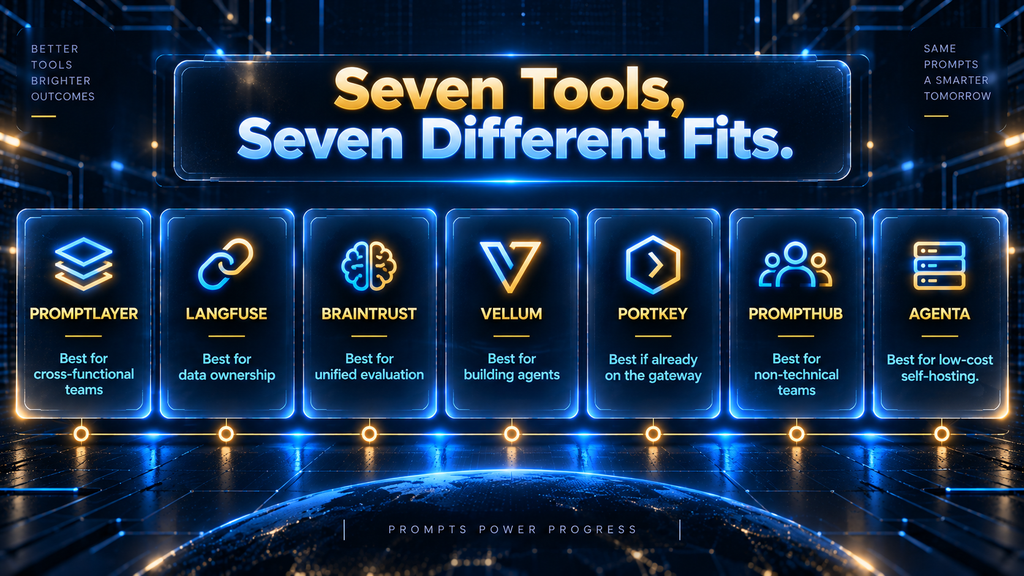
The right tool depends more on team structure than on any single feature. A small team without a dedicated ML engineer usually does better with PromptLayer or PromptHub, both built so non-engineers can operate the registry directly.
A team already committed to LangChain tooling will get the fastest integration from LangSmith or Langfuse, since both plug directly into that ecosystem. A team that wants evaluation and prompt management unified into one workflow is better served by Braintrust.
A team building toward multi-step agents rather than single prompts should look at Vellum, since that’s the direction the platform is explicitly built for. A team with hard compliance or audit requirements should weight Governance & Vendor Stability heavily and lean toward self-hosted options like Langfuse or Agenta.
None of this is a substitute for actually running the Buyer Fit Score against your own situation. A framework only earns its keep when it’s applied to the specific bottleneck your team has, not treated as a universal ranking.
Common Mistakes Teams Make When Adopting a Prompt Management Tool
The most common mistake is adopting a Level 4 tool while the team is still operating at Level 1 or 2. The advanced features go unused, the migration feels like overhead rather than a solution, and prompts start drifting back into Slack within a few months.
A second common mistake is picking a tool based purely on its observability and tracing depth while ignoring who on the team actually needs to edit prompts day to day. A platform with excellent engineering-facing tracing but no usable interface for a product manager just moves the bottleneck.
A third mistake is treating the initial setup as the finish line. A prompt registry only pays off once evaluation gates are actually enforced before release, not just available as a feature nobody uses.
Teams that install a tool and keep merging prompt changes without running them against a test set first get the versioning benefit but miss the regression-prevention benefit, which is usually the bigger one.
A fourth mistake, specific to 2026, is picking a tool purely from an older “best of” list without checking whether it’s still an active, maintained product. As this year has shown, that check now takes thirty seconds and can save a migration nobody budgeted for.
The Real Cost of Not Having a System
It’s worth being explicit about what “prompt sprawl” actually costs a team, because the number rarely shows up on a budget line the way a subscription fee does. When prompts live across Slack, Notion, and hardcoded strings, three costs accumulate quietly.
Onboarding time grows for anyone new who has to reconstruct which version is live. Incident response time grows when a bad output can’t be traced back to a specific change. And there’s a real opportunity cost when a non-engineer wants to improve a prompt but has to file a ticket and wait for a deploy.
None of those costs are visible in a spreadsheet the way a $29-a-month subscription is, which is exactly why teams underinvest in this category longer than they should.
The Total Cost of Ownership criterion in the Buyer Fit Score is deliberately framed to include this. The cheapest tool on paper is not the cheapest tool if it doesn’t get used, and a free option that requires a team to build its own evaluation and rollback tooling can cost more in engineering time than a paid platform that includes it out of the box.
A KPI Framework for Measuring Whether the Tool Is Working
Buying a tool isn’t the finish line, and it’s worth tracking a small number of metrics after adoption to confirm it’s actually changing behavior, not just adding a subscription line.
Prompt regression rate. The share of prompt changes that had to be rolled back after release. A working system should push this down over time as evaluation gates catch problems before they ship.
Mean time to rollback. How long it takes from noticing a bad prompt in production to reverting it. Before adopting a tool, this is often measured in hours; a working system should bring it down to minutes.
Cross-functional edit rate. The share of prompt changes made by non-engineers. If this number stays at zero after adopting a collaboration-focused tool, the tool isn’t being used as intended, regardless of its feature list.
Percentage of changes evaluated pre-release. The share of prompt changes that ran against a test dataset before going live. This is the single clearest signal of whether Level 3 discipline is actually happening or just theoretically available.
Track these quarterly for the first year. A team that adopts a tool and sees no movement on any of these four numbers within two quarters likely has an adoption problem, not a tool problem, and no amount of switching platforms will fix that on its own.
What Happens If You Do Nothing
Not every team needs to act on this today, and it’s worth being honest about what actually happens if a team keeps managing prompts the old way for another two or three months. In most cases: nothing dramatic, right up until it isn’t nothing.
The risk isn’t a single catastrophic failure. It’s a slow accumulation of small, invisible costs, onboarding friction, untraceable incidents, non-engineers routed around instead of included, that eventually surfaces as one visible, expensive problem with a long invisible tail behind it.
Teams that wait too long usually don’t regret the wait itself; they regret not having a clear trigger for when to stop waiting. The three conditions later in this article, more than one editor, a past incident, or shipping speed becoming the bottleneck, are meant to be that trigger.
What These Tools Don’t Solve
A prompt management platform makes prompts versionable, testable, and traceable. It does not make a bad prompt good, and it does not replace the judgment needed to write one in the first place.
Teams sometimes adopt a tool expecting output quality to improve on its own, then find the same underlying prompt-writing problems simply became easier to track rather than easier to solve.
These tools also don’t solve model selection, prompt engineering technique, or context design, all of which sit upstream of the registry itself. A team struggling with inconsistent outputs should first check whether the underlying prompt technique is sound.
Approaches like few-shot examples or well-structured system instructions are worth checking before assuming the fix is better tooling around a weak prompt.
Who Should Use a Dedicated Tool, and Who Should Wait
A team is ready for a dedicated prompt management tool once more than one person edits prompts that reach real users, once a single bad prompt change has already caused a real incident, or once the team is shipping AI features fast enough that manual tracking has become the bottleneck.
Any one of those three conditions is usually enough justification on its own. A team should probably wait if it’s a single builder still validating whether the product works at all, or if prompts change rarely enough that a shared doc genuinely isn’t causing problems yet.
Waiting also makes sense if the team is pre-product-market-fit, where every hour spent on tooling is an hour not spent on the product itself. Adopting infrastructure before it’s needed is its own kind of mistake, distinct from but just as real as adopting it too late.
A Practical Migration Path
For a team ready to move, the jump from Level 1 to Level 3 doesn’t need to happen in one push. A workable path spreads it across roughly a month.
Week one: inventory every prompt currently in production, wherever it lives, and import them into a single registry. This alone gets the team to Level 2 and usually surfaces at least one prompt nobody remembered was live.
Week two: build a small evaluation dataset, ten to twenty real inputs per prompt, covering both typical cases and known edge cases. This doesn’t need to be exhaustive to be useful; it needs to catch the failure modes that have already happened once.
Week three: require every prompt change to run against that dataset before release, even informally, before the tool enforces it automatically. Getting the habit right matters more than getting the tooling right on day one.
Week four: set up the rollback process and actually test it, deliberately reverting a version to confirm the whole team knows how it works before they need it under pressure. This completes the move to Level 3.
Future Outlook
The consolidation seen in 2026 is likely to continue rather than reverse. As AI features move from experimental to core product infrastructure, the tools that manage them look increasingly attractive to larger infrastructure companies, which is exactly the pattern behind the ClickHouse and Cisco moves this year.
For teams choosing a tool today, that means weighting self-hosting and data portability somewhat higher than a features page alone would suggest, since those two factors determine how painful a future acquisition would actually be, regardless of which vendor it happens to.
Final Thoughts
The prompt management category went through more consolidation in the first nine months of 2026 than most infrastructure categories see in several years, and that consolidation is a genuine input into the buying decision now, not a side note.
Humanloop is gone. Helicone is stable but frozen in place. Langfuse changed owners but, so far, not direction. None of that changes the underlying logic of picking a tool.
Match it to where your team actually sits on the Prompt Ops Maturity Ladder, weight the Buyer Fit Score criteria toward what actually matters for your situation, and resist the pull toward whichever platform has the longest feature list if that list doesn’t match how your team actually works. The best tool is the one your whole team will actually use six months from now, not the one that looked most impressive in a demo.
Still Mapping Out Your AI Workflow?
Prompt management is one piece of a bigger discipline. See how the whole picture fits together in our guide to context engineering, the practice of giving AI models the right information, structure, and constraints at the right time.
Read the Context Engineering Guide →FAQ
What’s the difference between prompt management and LLM observability?
Prompt management focuses on versioning, testing, and deploying the prompts themselves. LLM observability focuses on monitoring what happens after a prompt runs: latency, cost, output quality, and traces across a production system.
Most modern tools in this category do at least some of both, but they usually start from one side or the other, which shapes what they’re strongest at.
Do I need a dedicated tool if I’m only using one AI feature?
Probably not yet. A single prompt maintained by one person rarely needs a dedicated platform. The calculus changes once a second person starts editing that prompt, or once the feature is important enough that a bad output creates a real support or trust problem.
Is Langfuse safe to adopt now that it’s owned by ClickHouse?
Based on ClickHouse’s public statements, Langfuse remains fully open-source under its existing license, self-hosting is unaffected, and Langfuse Cloud continues under its existing terms. ClickHouse has a track record of acquiring open-source projects, including PeerDB and HyperDX, and keeping them independently maintained rather than absorbing them, which is a reasonable, though not guaranteed, signal for how this acquisition plays out.
What happened to Humanloop?
Anthropic acquired the Humanloop founding team in 2025, and the platform was sunset shortly afterward. Teams still on Humanloop should plan a migration; several vendors, including PromptLayer and Weights & Biases, publish migration guides for exactly this situation.
Can non-technical team members use these tools?
It depends heavily on the platform. PromptLayer and PromptHub are both built specifically so product managers, writers, and other non-engineers can edit and test prompts directly.
Portkey and Braintrust lean more engineering-facing, and a non-technical team member will likely need more support to use them effectively.
What does self-hosting actually require?
For tools like Langfuse and Agenta, self-hosting typically means running the platform via Docker on your own infrastructure, which gives you full data ownership but also means your team is responsible for uptime, backups, and updates. It’s a meaningful commitment, not a checkbox, and worth weighing honestly against the Time-to-Value criterion in the Buyer Fit Score.
How much should a small team expect to pay?
Entry-level paid tiers across this category generally range from around $20 to $50 a month, with several tools offering usable free tiers for small-scale use.
Self-hosted open-source options like Langfuse and Agenta can be free beyond infrastructure costs. Enterprise pricing for larger teams is typically custom and requires a direct sales conversation.
Should we pick a tool based on which model provider we use?
Model-agnostic tools give you more flexibility to switch providers later without a migration. Most of the tools covered here support multiple providers, though the depth of that support varies.
If your team is genuinely committed to one framework, like LangChain, a tool built around that ecosystem can offer a faster integration path at the cost of some portability.
What’s the biggest sign our team needs to move off spreadsheets and docs?
The clearest sign is a prompt change causing an incident nobody could immediately trace back to its source. If your team has already had that moment, or is one bad deploy away from it, that’s a strong enough signal to stop waiting.
Do these tools replace the need to write good prompts?
No. They make prompts easier to manage, test, and roll back, but the underlying skill of writing an effective prompt, including techniques like structured prompting for reliable output formats, still sits upstream of any tool.
Written by
Muntasir Ahmad Chowdhury
Founder, AI Hustle World
Muntasir Ahmad Chowdhury is the Founder of AI Hustle World, an independent publication dedicated to making Artificial Intelligence practical, trustworthy, and easy to understand. He researches AI tools, automation, customer service, productivity, and real-world business applications, helping readers make smarter technology decisions through research-driven, experience-backed content.
Expertise:
AI Tools • AI Automation • AI Customer Service • AI Productivity • Generative AI • AI Workflows
Get Smarter With AI
Enjoyed this guide? Get practical AI tools, tutorials, and honest reviews delivered to your inbox.
5 thoughts on “Best Prompt Management Tools for Teams in 2026”