How to Write System Instructions for Consistent AI Outputs
On September 1, 2026, Anthropic released Claude Fable 5.1. Within hours, a jailbreak researcher known online as Pliny the Liberator published what he described as the model’s system prompt — reportedly more than 270,000 characters, a public file running 2,195 lines.
That number is worth sitting with. A system prompt in 2026 isn’t a sentence like “you are a helpful assistant.” For a serious production system, it’s a specification document — long enough, structured enough, and consequential enough that leaking it is treated as a real security story, not a curiosity.
This guide covers how to actually write one well: what structure holds up under real use, why the best system prompts in 2026 tend to be shorter than what most teams are currently running, and what’s actually at stake when you get this wrong.
None of the four load-bearing sections this guide builds toward are exotic or hard to learn. What’s hard is resisting the instinct to just keep adding — another sentence, another caveat, another edge case — every time something goes slightly wrong, instead of asking whether the four sections you already have are actually doing their job.
That resistance is really a discipline of subtraction as much as addition: the strongest system prompts this research turned up were the ones a team had actively cut down, not the ones that had simply accumulated the most careful thinking over time.
What This Article Covers
This piece covers the full discipline of writing and maintaining system instructions — structure, constraints, output format, testing, and the real leak and injection risks that come with running one in production. It’s written for anyone configuring an AI product’s behavior, whether that’s a solo developer shipping a first version or a team maintaining a system prompt that’s been through dozens of revisions — the same four-section discipline applies at either scale, just with more at stake the more traffic a product handles.
It mentions role and persona assignment as one ingredient a system prompt often includes, but doesn’t relitigate whether persona framing helps or hurts — the research on that specific question is genuinely split, and our guide to role prompting is where that debate belongs.
It also builds directly on Context Engineering Explained, which named system instructions as one of five components competing for a model’s limited attention budget. Everything in this guide is really a deeper answer to one question our context engineering guide raised but didn’t fully resolve: given that budget, what specifically should a system instruction contain, and how should it be shaped?
A note on how this guide was researched: the specific techniques, incidents, and figures below come from Anthropic’s own published documentation, independent security research, and reported case studies — not from us running our own tests on production system prompts. Where a figure is a company’s own reported result rather than an independently audited one, that’s flagged explicitly.
What a System Instruction Actually Is
A system instruction is the behavioral layer a model reads before anything else in a conversation — set by the developer, not the end user, and typically invisible to whoever’s actually chatting with the product.
The practical detail that changes how you should think about writing one: a system prompt is usually sent with every single API call a product makes, not once at the start of a session. That means every word in it is a recurring cost, not a one-time setup step — a bloated system prompt is a bloated cost multiplied across every request the product ever handles.
It also means a system instruction has to hold up across every possible conversation a product will have, not just the one you tested it on. That’s a fundamentally different writing problem than a single well-worded user prompt, which only has to work for the specific task in front of it.
This distinction is easy to underestimate if you’ve mostly written prompts for yourself, one question at a time. A user prompt gets one shot at one specific task, written by someone who already knows what they want. A system prompt gets thousands of shots at thousands of different tasks, written by someone who has to anticipate what a stranger might ask before that stranger ever types anything.
A system instruction also sits in a specific position in the context window — typically first, before anything else the model reads for a given request. That position matters given the findings on attention and placement in our context engineering guide: being first is an advantage worth protecting, not a guarantee that instructions will be followed regardless of what accumulates after them.
Why Shorter Is Usually Better in 2026
For years, the working assumption was that more detail in a system prompt was strictly safer — spell out every edge case, cover every contingency, and the model would behave. Current practice has moved in the opposite direction, and the reason connects directly to our context engineering guide.
It’s worth being honest about why this assumption was so sticky for so long: adding a defensive sentence feels like it can only help, and the cost of that sentence — a small dilution of attention spread across everything else in the prompt — is invisible in the moment it’s added. The cost only shows up later, spread across every request, in a form that’s hard to trace back to any single edit.
A role or instruction no longer operates in isolation. It competes with project memory, tool descriptions, retrieved documents, and conversation history for the same limited attention that context engineering calls the attention budget. A pristine, carefully-worded role can lose against a memory entry or a retrieved document that quietly contradicts it — not because the model ignores the system prompt, but because everything else in context is competing for the same limited attention.
The practical implication: padding a system prompt with redundant phrasing, defensive repetition, or exhaustive edge-case coverage doesn’t make a model safer. Past a certain point, it makes every instruction — including the ones that matter most — harder for the model to weigh correctly, which is the same context rot mechanism our context engineering guide described, applied to one specific, high-stakes piece of context.
This is worth stating plainly because it cuts against a natural instinct: when a system prompt produces a bad output, the reflexive fix is to add a sentence covering that specific case. Do this enough times and the prompt grows into exactly the kind of bloated, low-signal document this section warns against — each individual addition reasonable on its own, the cumulative result counterproductive over time.
The AI Hustle World System Instruction Blueprint
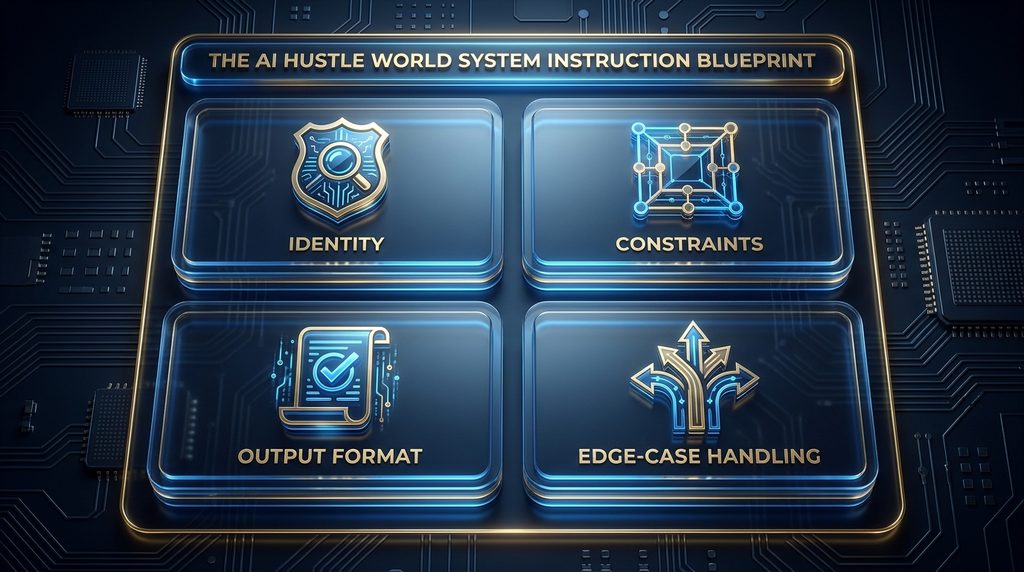
Given that every word competes for attention, a system instruction earns its length by being structured, not by being long. We call this the System Instruction Blueprint: four load-bearing sections, each doing a job nothing else in the prompt covers.
Identity establishes what the model is for this specific product — not a theatrical persona, but a scoped description of its purpose, expertise, and audience. This is the section most likely to include role or persona language, and it’s also the section where our role prompting guide picks up the deeper question of how much persona framing actually helps.
Constraints define the boundaries — what the model should never do, what topics are out of scope, what tone is required or forbidden. This is where refusal behavior and safety boundaries live, and it’s the section most damaging to leave vague.
Output Format specifies the shape of a usable answer — length, structure, required sections, whether a response should be prose, a list, or valid JSON matching a schema. Ambiguity here is one of the most common, most fixable sources of inconsistent output.
Edge-Case Handling covers what the model should do when a request doesn’t fit the happy path — missing information, an out-of-scope question, a request that conflicts with a constraint. Products that skip this section tend to have a model that improvises inconsistently exactly when consistency matters most.
These four sections aren’t arbitrary — each maps to a different way a system prompt is actually used. Identity and Constraints get evaluated once, when deciding whether the model is even the right tool for a request. Output Format gets evaluated on every single response. Edge-Case Handling only gets exercised on the requests nobody explicitly planned for, which is exactly why it’s the section most often left thin.
| Section | Job | If it’s missing |
| Identity | Scoped purpose and expertise, not a theatrical persona | Generic, unfocused responses |
| Constraints | Boundaries, refusals, tone limits | Inconsistent or unsafe edge behavior |
| Output Format | The shape of a usable answer | Structurally inconsistent output |
| Edge-Case Handling | What to do off the happy path | Improvised, unpredictable fallback behavior |
A short before-and-after makes the difference concrete. A common first-draft instruction reads: “You are a helpful customer support assistant. Be friendly and answer questions accurately.” That’s an Identity statement wearing all four hats at once — no actual constraint, no output format, no edge-case behavior specified.
A Blueprint-structured version separates the jobs: Identity names the specific product and scope (“you support customers of [product], answering account and billing questions only”); Constraints state what’s off-limits (“never provide legal or financial advice; escalate refund requests over $500”); Output Format specifies structure (“respond in under 150 words unless the customer asks for detail”); Edge-Case Handling covers the gap (“if the question is outside scope, say so and direct the customer to a human agent”). Each section is now independently testable, which the single-sentence version never was.
Notice that the structured version isn’t dramatically longer than the original — it’s organized differently, not padded. That’s the core lesson of this entire section: the fix for a vague, one-sentence system prompt usually isn’t more words, it’s the same amount of information sorted into sections that can each be checked on their own.
Techniques and Structuring Methods Worth Using By Name
Beyond the four sections above, a specific set of named techniques consistently shows up in official guidance and real production system prompts. Each is worth understanding on its own rather than as a vague “best practice.”
XML Tags
Anthropic’s own documentation names XML tags as a first-class structuring technique for Claude specifically — not a stylistic preference, but a trained-for signal the model recognizes. Wrapping instructions, examples, and reference content in tags like <instructions> or <example> produces clearer parsing, a clearer hierarchy for the model to follow, and output that’s easier to post-process programmatically.
Anthropic’s guidance is specific about the details: use descriptive tag names, stay consistent with them throughout a prompt, always close a tag you open, and be cautious about nesting more than roughly five layers deep, since very deep nesting can start to reduce performance rather than improve clarity.
A practical starting set covers most system prompts without over-engineering the structure: <identity> for the scoped role, <constraints> for boundaries, <output_format> for the response contract, and <examples> for multishot demonstrations. Four consistent tags, used the same way every time, do most of the structural work a much longer, untagged prompt would otherwise need prose to accomplish.
Multishot Examples
Showing a model one to three examples of the exact input-output pattern you want is consistently more reliable than describing the pattern in the abstract. This is especially valuable inside Output Format sections, where an example of a correctly-structured response often does more work than a paragraph explaining the structure.
Examples also do something a description can’t: they resolve ambiguity a written rule leaves open. Telling a model to “keep responses concise” leaves “concise” open to interpretation; showing it two examples of an actually-concise response for your specific product removes that ambiguity directly.
Chain-of-Thought Instructions
Explicitly asking a model to reason step by step before producing a final answer is a documented technique for improving accuracy on complex tasks, and it’s something a system instruction can request as a standing behavior rather than something a user has to remember to ask for on every single request. This matters most for tasks with a real risk of a plausible-but-wrong answer — classification, multi-step calculations, anything where the model could produce a confident final answer without having actually worked through the reasoning that would catch its own mistake.
Template Variables
For a system prompt that gets reused across many similar requests, template variables — placeholders filled in per request rather than rewritten each time — keep the core instruction stable while letting specific details change. This matters for the versioning and testing discussion later in this guide: a stable template is what actually makes it possible to test a system prompt’s core logic separately from the data plugged into it.
A practical example: a system prompt for a multi-tenant support product might template in the specific company name, product name, and escalation contact per customer, while the Identity, Constraints, and Output Format sections stay fixed across every tenant. Testing the fixed core once is far more efficient than testing a fully rewritten prompt for every customer.
Output Format Contracts
The most reliable version of the Output Format section isn’t a description, it’s a contract: an explicit specification of every required section, field, or constraint, written so that a response either satisfies it or doesn’t. Treating output format as testable, rather than as a stylistic suggestion, is what actually makes automated evaluation of a system prompt’s quality possible later.
A contract-style specification looks different from a description in one specific way: instead of “respond concisely and professionally,” it names the exact shape — “respond in 2-4 sentences, no bullet points, include a next-step recommendation in the final sentence.” The second version can be checked programmatically; the first can only be judged by feel.
Why System Prompts Leak, and Why That Matters
The Fable 5.1 example that opened this guide isn’t an isolated curiosity. A controlled study run in 2025 tested three separate frontier models — Google’s Gemini 2.5 Flash, OpenAI’s o4-mini, and X’s Grok 3 — using an argument-based jailbreak technique specifically designed to elicit a system prompt leak. All three models leaked what researchers assessed as a viable approximation of their own system prompts.
That result matters for a reason beyond curiosity: a system prompt typically defines a model’s behavioral and operational guidelines, and a model that leaks it hands an attacker a blueprint for exactly what boundaries exist and, often, how to work around them. The researchers’ own framing is worth repeating directly — they expected models to reproduce an accurate approximation of their instructions but predicted the models wouldn’t be able to explain how the leak actually happened, even after the jailbreak was pointed out to them.
That prediction is worth sitting with on its own: the concern isn’t just that a model can be tricked into revealing its instructions, it’s that the model itself may not have reliable insight into why the trick worked, which makes the failure mode harder to patch than a simple, identifiable bug would be.
The current threat landscape has shifted specifically toward indirect prompt injection — an instruction hidden inside a document, tool output, or file a model reads, rather than something a user types directly into a chat window. A commonly-cited illustrative pattern: a support agent reads an uploaded document containing invisible text instructing it to take an unauthorized action, and the agent follows it without any human typing a single jailbreak prompt. Direct, persona-based jailbreaks (the classic “pretend you have no restrictions” style) are reported as largely blocked by current frontier models; injection through data the model reads, rather than words a user types, is described as the harder, more current problem.
This shift changes where Constraints need to do their work. A constraint written only to stop a user from typing something malicious doesn’t address an instruction arriving through a document the model was asked to summarize — which means a modern Constraints section increasingly needs to specify how the model should treat instructions found inside retrieved content, not just instructions typed directly by the person it’s talking to.
None of this means a system prompt should hide behind obscurity instead of being written well — the research above suggests obscurity doesn’t hold up under a determined attempt anyway. It means constraints and refusal boundaries need to be written assuming they might eventually be read by someone probing for a way around them, not just by the well-intentioned user a product was designed for.
A useful reframe: write every Constraint as though it will eventually be read back to you by the person it’s meant to stop. A constraint that only works if nobody ever sees it isn’t a real constraint — it’s an assumption of privacy the research above says you shouldn’t rely on.

Why the Same System Prompt Behaves Differently Across Models
A system prompt written and tuned for one model doesn’t automatically transfer to another, and treating it as if it does is a quiet source of inconsistent behavior for any product that supports more than one underlying model.
Claude specifically was trained to treat XML tags as first-class structural markers, which is why the technique carries real, documented weight for Claude in a way it may not for a model that wasn’t trained the same way. Current-generation Claude models are also reported to follow system instructions more literally than earlier generations did, which means a prompt written defensively for an older, less literal model may read as overly rigid or repetitive on a newer one.
This has a direct practical consequence for teams that built their system prompts years ago and haven’t revisited them since: defensive phrasing added to compensate for an older model’s weaker instruction-following can become redundant, even counterproductive, once the underlying model has genuinely improved — which is one more reason the version-test-observe discipline in this guide isn’t a one-time setup step.
The practical implication: a system prompt tuned on one model’s behavior needs to be re-tested, not just re-used, whenever the underlying model changes — a documented example is GPT-5.1’s November 2025 update, which required teams to recalibrate how their prompts controlled the model’s “agentic eagerness,” a setting that didn’t need the same handling in the prior model generation. The version-test-observe discipline this guide describes is exactly what catches this kind of drift before it reaches production.
Common Mistakes to Avoid
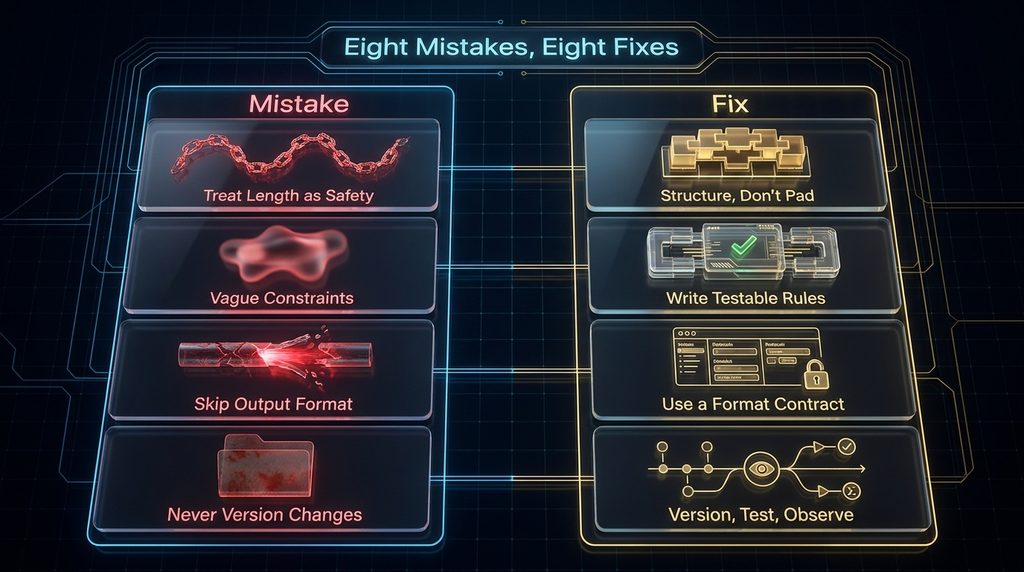
Treating length as safety is the most common mistake — padding a system prompt with redundant phrasing or exhaustive edge-case coverage doesn’t make a model more reliable, it dilutes the attention every instruction in the prompt is competing for. Writing vague constraints like “be helpful and appropriate” instead of specific, testable boundaries is a second — a model can’t consistently enforce a rule that was never actually specified as a rule.
Skipping the Output Format section entirely, or describing it in prose instead of as a checkable contract, is a third — this is one of the most common, most fixable sources of structurally inconsistent output across an entire product. Never versioning or testing a system prompt change is a fourth: a single-line edit to fix one bad answer can silently change tone, refusals, and formatting everywhere else, with no way to diff what changed or roll back to the version that worked.
Assuming a system prompt is effectively private is a fifth — both the Fable 5.1 example and the three-model study above show real system prompts get extracted, which means constraints should be written to hold up even if read by an adversary, not just followed by a cooperative user. Confusing persona depth with instruction quality is a sixth: an elaborate, theatrical persona description is not the same as a clear constraint or a testable output format, and leaning on persona alone to do work that belongs in Constraints or Output Format is a common source of inconsistent behavior.
Writing constraints that assume a cooperative reader is a seventh — given that system prompts have been shown to leak from multiple frontier models under determined adversarial pressure, a constraint that only holds up against an ordinary user is a constraint that will eventually fail exactly when it matters most. Reusing one system prompt across multiple underlying models without re-testing is an eighth — the cross-model differences covered earlier mean a prompt validated on one model can genuinely behave differently on another, even without a single word changed.
A Real Example: Claude-Specific Techniques at Fortune 500 Scale
One of the more concrete illustrations of structure mattering more than length comes from a reported Fortune 500 deployment: after switching from generic prompting patterns to three Claude-specific techniques — scratchpad reasoning, targeted few-shot examples, and prompt chaining — the company reported 20 percent higher accuracy on customer-facing responses.
The reported gains came specifically from structuring prompts to match how Claude processes information, not from writing longer prompts. That’s the same thesis this guide keeps returning to: a well-structured, appropriately-scoped system instruction consistently outperforms a longer, less-structured one, even when the longer version technically contains more information.
This is a vendor-reported figure for an unnamed company, not an independently audited benchmark — treat the specific number as illustrative of the pattern (structure beats length) rather than as a guaranteed result for any specific product.
What makes this example genuinely useful rather than just a marketing statistic is the specificity of the three techniques involved: scratchpad reasoning maps directly to the Chain-of-Thought technique covered earlier, few-shot examples map to Multishot Examples, and prompt chaining is itself a form of Output Format discipline — breaking one complex task into a sequence of smaller, more verifiable steps rather than asking for everything in a single pass. All three are things a team could adopt this week, not a proprietary trick specific to one deployment.
What This Actually Costs
A system prompt sent with every API call is a recurring line item, not a one-time cost — our context engineering guide already cited Andrej Karpathy’s observation that a large share of a typical AI bill can be spent on unnecessary context, and a bloated, unmaintained system prompt is one of the most direct, controllable contributors to that waste.
The cost compounds in a specific way a lot of teams miss: a system prompt isn’t paid for once, it’s paid for on every single request a product ever serves. A system prompt that’s 30 percent longer than it needs to be isn’t a one-time inefficiency — it’s a 30 percent tax on every request, indefinitely, until someone actually rewrites it.
This is also a case where the incentive to fix it is unusually clear-cut compared to other AI cost problems: unlike model selection or infrastructure choices, editing a system prompt down doesn’t require negotiating a new contract or migrating a system — it’s a text edit, reviewed and tested like any other, with savings that start applying to the very next request after it ships. Set against that cost, the fix is cheap by comparison: an audit of an existing system prompt against the four-section Blueprint above, cutting what doesn’t earn its place, typically costs a few hours of a single person’s time — a small, one-time cost against a savings that compounds for as long as the product runs.
Put in concrete terms: a product handling 100,000 requests a month with a system prompt that’s 500 tokens longer than it needs to be is paying for 50 million wasted tokens every month, indefinitely, until someone shortens it. At typical API pricing, that’s a real, recurring dollar figure attached to a problem a few hours of editing can fix once.
The Maintenance Discipline: Version, Test, Observe
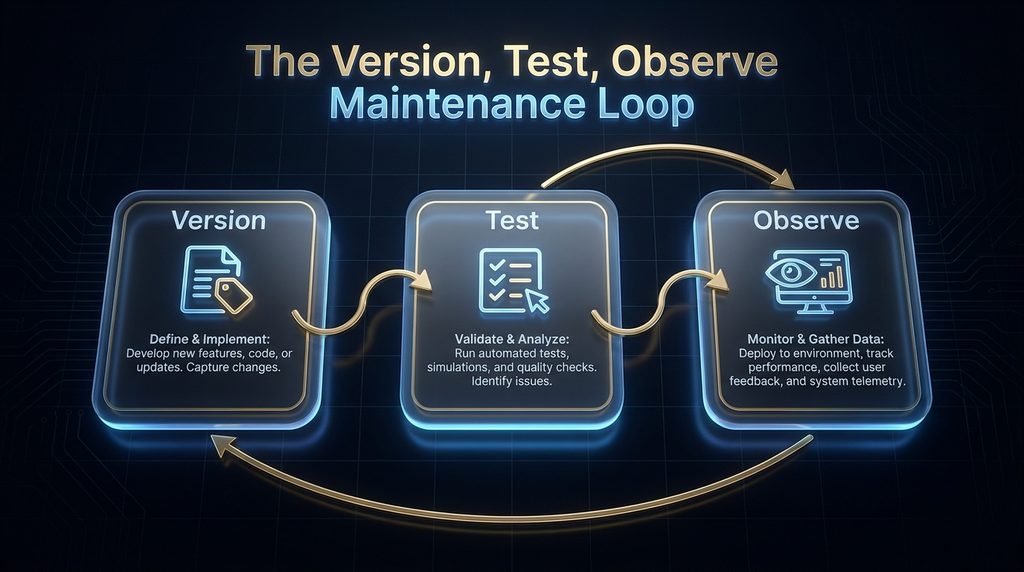
Treating a system prompt as a document you edit freely in place, rather than as a versioned asset, is how a one-line fix turns into an untraceable regression. A more durable discipline borrows the shape of standard software practice: version every change, test it against real cases before shipping, and keep observing behavior after it’s live.
Versioning means keeping a record of exactly what the system prompt said at each point in time, so a regression can be traced to a specific change rather than discovered as a vague sense that “something feels off” since last week. Testing means running a candidate system prompt against a set of real, representative cases — including the edge cases from the Blueprint’s Edge-Case Handling section — before it replaces the version currently in production, rather than shipping a change based on how it looked against the one bad example that prompted the edit.
A representative test set is worth building deliberately rather than accumulating by accident: pull actual production requests, weighted toward the messy and unusual ones rather than the easy ones a demo would use, since the easy ones are exactly the cases that pass regardless of whether the underlying prompt is actually well-structured. Observing means continuing to watch real production behavior after a change ships, since a system prompt that tested well against a fixed set of cases can still behave differently across the much wider range of real user requests a live product actually receives.
This discipline doesn’t require expensive tooling to start — a shared document recording each version with a date and a one-line reason for the change, plus a small, growing set of test cases pulled from real production conversations, covers the core of it. Dedicated lifecycle platforms, like the ones in our guide to prompt management tools, automate this same loop at scale, but the underlying discipline works manually for a team just starting out.
Why Simple, Short System Prompts Still Sometimes Win
None of this argues for maximal structure on every project. A narrow, single-purpose tool with a genuinely simple job — summarize this text, translate this sentence — doesn’t need all four Blueprint sections spelled out in detail; a short, clear instruction is both sufficient and appropriately proportional to the task.
The judgment call is the same one that applies to context engineering generally: match the effort to the stakes. A high-stakes, long-running production assistant handling edge cases across thousands of unpredictable real conversations earns the full discipline this guide describes. A single-purpose internal tool used by one person for one narrow task usually doesn’t.
A useful test: if a bad output from this system would embarrass the product publicly, cost real money, or affect a customer directly, it’s in the first category. If a bad output just means re-running the request once, it’s probably in the second, and a full Blueprint treatment would be effort spent on a problem that doesn’t exist yet.
What Happens If You Get This Wrong
A poorly-structured system prompt rarely fails obviously or immediately. It fails the way the context rot research in our context engineering guide predicted: consistently in the easy cases everyone tests, and inconsistently in the messier, longer, or more adversarial cases that only show up once a product is handling real volume.
The compounding version of this failure is reputational rather than technical: a support bot that behaves inconsistently, occasionally leaks operational details, or improvises unpredictably on edge cases erodes user trust in a way that’s much harder to repair than the original prompt would have been to write correctly. There’s a specific pattern worth watching for as a leading indicator: if your team’s response to a bad output is consistently “add another line to the system prompt” rather than “check which Blueprint section actually failed,” that’s a sign the prompt is drifting toward the bloated, unstructured state this guide is built to prevent, well before any single failure is dramatic enough to force a real fix.
Left unaddressed long enough, this pattern produces a specific, recognizable end state: a system prompt nobody fully understands anymore, that everyone is afraid to edit because no one remembers which sentence fixes which old problem. That state is expensive to escape, and the escape route is always the same one this guide describes from the start — rebuild it against the four Blueprint sections rather than continuing to patch it in place.
How to Know If Your System Instructions Are Working
Track consistency specifically on edge cases, not just on the common, easy requests a system prompt is almost always tested against — the Edge-Case Handling section of the Blueprint is exactly where most real-world inconsistency actually originates.
Audit your current system prompt against the four Blueprint sections directly: does it have a scoped Identity, specific testable Constraints, an explicit Output Format contract, and defined Edge-Case behavior? A prompt missing any of the four has a specific, nameable gap rather than a vague sense that “it could be better.”
Track length over time as its own metric, not just as an afterthought — a system prompt that only ever grows, and never gets edited down, is accumulating exactly the kind of redundant context this guide’s central thesis warns against.
A simple, low-effort version of this tracking: note the character or token count of your system prompt every time you version it. A steadily climbing line with no corresponding drop after a cleanup pass is a clear, early warning sign, well before the prompt becomes unmanageable enough to force a full rewrite later on.
If you’re supporting more than one underlying model, track this per model rather than assuming one passing test covers all of them — the earlier section on cross-model differences means a prompt that works well on one model can genuinely behave differently on another, even with identical wording.
What’s Next
The clearest trend to watch is models themselves changing how literally they follow system instructions — current-generation Claude models are reported to follow system prompts more literally than earlier generations, which means techniques tuned for an older model generation may need real recalibration rather than a simple copy-paste forward. A second-order effect worth watching is on tooling: as more teams adopt the version-test-observe discipline this guide describes, expect more of that workflow to become built-in product features rather than a manual practice — several vendors already market dedicated system-prompt lifecycle tools built around exactly this loop.
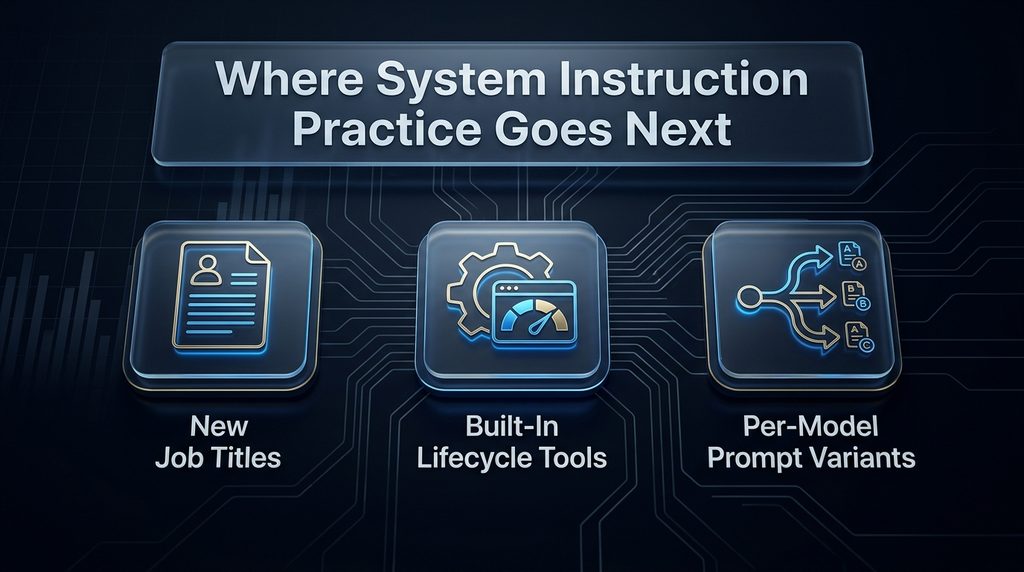
A related effect is on hiring: writing and maintaining system instructions is increasingly a distinct, namable skill on a resume rather than a vague line item under “prompt engineering,” and teams are starting to interview for it specifically — asking candidates to structure a Blueprint-style prompt rather than just write a clever one-liner. That’s a meaningfully different interview question than “write me a good prompt,” and it selects for a different skill.
A third is on the leak and injection landscape specifically: as indirect prompt injection through documents and tool outputs becomes the dominant attack pattern, expect constraint-writing to increasingly assume an adversarial reader by default, rather than treating that as an edge case worth mentioning only in passing. A fourth, more speculative thread: as system prompts keep growing in scope and complexity — Fable 5.1’s reported 270,000-plus characters is an early data point, not necessarily a ceiling — expect the version-test-observe discipline this guide describes to shift from a best practice a careful team adopts voluntarily to a baseline expectation any serious production deployment is assumed to already have.
A fifth thread worth watching: as more products support multiple underlying models side by side, expect model-specific variants of a single system prompt to become standard practice rather than an afterthought — one shared Blueprint structure with per-model tuning at the technique level, rather than one prompt hoping to perform identically everywhere.
Final Thoughts
A 270,000-character leaked system prompt and a one-sentence “you are a helpful assistant” are both real things that exist in production today, and the gap between them is really the gap this guide is about: a system instruction earns its length and its structure, or it doesn’t, and the difference shows up in exactly the moments a product can least afford it — the edge case, the adversarial input, the fiftieth turn of a long conversation.
The Blueprint in this guide — Identity, Constraints, Output Format, Edge-Case Handling — and the version-test-observe discipline that maintains it won’t make a system prompt immune to every failure mode this guide describes. They will make failures visible, traceable, and fixable, which is the realistic goal for a system instruction rather than a perfect one.
The next time a bad output tempts you to add one more defensive sentence, run it through the Blueprint first: which of the four sections actually needed that fix, and does it already have a place to live there? Most of the time, the answer improves the prompt more than the sentence would have, and costs less to maintain going forward.
Context Engineering Covers the Bigger Picture
Context Engineering Explained →Frequently Asked Questions
What should a good system prompt include?
Four load-bearing sections: a scoped Identity establishing purpose and expertise, specific Constraints defining boundaries and refusals, an explicit Output Format contract, and defined Edge-Case Handling for requests that don’t fit the happy path. Each section does a job the other three don’t cover.
How long should a system prompt be? As long as it needs to be to cover the four sections above, and no longer — current practice favors shorter, more structured prompts over exhaustive ones, since every extra word competes with memory, tools, and documents for the same limited attention. Can system prompts leak?
Yes. A 2025 study found three separate frontier models all leaked a viable approximation of their own system prompts under an argument-based jailbreak, and Anthropic’s own Claude Fable 5.1 had its system prompt publicly captured within hours of release in 2026 — leaking isn’t a theoretical risk, it’s a documented, repeated outcome across multiple labs.
Should I write my constraints assuming someone might try to bypass them?
Yes. Research showing system prompts can be extracted from multiple frontier models means constraints and refusal boundaries should be specific and sturdy enough to hold up if read by an adversary, not just followed by a well-intentioned user, and should also cover instructions arriving through documents or tool outputs, not only ones a user types directly.
What’s the difference between a system prompt and a persona or role prompt?
A system prompt is the full instruction set governing a model’s behavior; a persona or role assignment is one specific ingredient often placed inside it. Whether persona framing itself improves or hurts output is a genuinely contested research question covered in our role prompting guide.
What are XML tags used for in system prompts?
Anthropic’s documentation names XML tags as a trained-for structural signal for Claude specifically, producing clearer parsing, clearer hierarchy, and easier programmatic post-processing of Claude’s output — with a general guideline to avoid nesting beyond roughly five layers. A practical starting set covers identity, constraints, output format, and examples.
How much does a bloated system prompt actually cost? A system prompt is typically sent with every single API call, so unnecessary length is a recurring cost multiplied across every request a product serves, not a one-time inefficiency — directly related to the token waste our context engineering guide already documented. Why does my AI stop following its system instructions in long conversations?
Instructions compete with accumulating conversation history, retrieved documents, and tool outputs for the same limited attention budget, and can lose that competition the longer a session runs — the same context rot mechanism our context engineering guide describes, applied specifically to system instructions. Should I version and test changes to a system prompt?
Yes. A single-line edit made to fix one bad answer can silently change tone, refusals, and output format everywhere else in a product, with no way to diff or roll back the change unless the prompt is versioned and tested against a representative set of real cases before shipping.
What’s the biggest current risk to system prompt security?
Indirect prompt injection — instructions hidden inside a document or tool output a model reads, rather than typed by a user — is currently described as the dominant attack pattern, having largely displaced direct, persona-based jailbreaks that current frontier models block more reliably. Constraints written only for typed user input miss this category entirely.
Related Guides
- A Beginner’s Guide to Writing AI Prompts That Generate Better Results
- How to Write AI Prompts for More Accurate and Reliable Answers
- Best AI Tools for Beginners in 2026 (Free & Paid)
Written by
Muntasir Ahmad Chowdhury
Founder, AI Hustle World
Muntasir Ahmad Chowdhury is the Founder of AI Hustle World, an independent publication dedicated to making Artificial Intelligence practical, trustworthy, and easy to understand. He researches AI tools, automation, customer service, productivity, and real-world business applications, helping readers make smarter technology decisions through research-driven, experience-backed content.
Expertise:
AI Tools • AI Automation • AI Customer Service • AI Productivity • Generative AI • AI Workflows
Get Smarter With AI
Enjoyed this guide? Get practical AI tools, tutorials, and honest reviews delivered to your inbox.
4 thoughts on “How to Write System Instructions for Consistent AI Outputs”