Evidence: Documentation reviewed
Last checked: August 2026
What was done: Written from official documentation and the published sources linked in this article. Not hands-on tested.
Files: None
Affiliate links: No
Best Free AI Tools for Students in 2026
Last updated: August 2026
Students in 2026 have access to something that would have sounded unrealistic only a few years ago: AI that can explain a difficult concept, summarize course material, generate practice questions, analyze documents, help with research, improve writing, create presentations and even guide a student through a problem step by step. The problem is no longer access. The problem is knowing what to use, when to use it, and where to stop.
Search for the best free AI tools for students and you will find the same familiar names repeated across dozens of lists. ChatGPT. Gemini. Claude. Perplexity. NotebookLM. Grammarly. Canva. Maybe a math tool or a coding assistant.
Those lists are useful for discovery, but they often leave out the most important question: What should a student actually do with each tool?
A research tool is not necessarily a study tool. A writing assistant is not necessarily a learning assistant. A presentation generator can save hours of formatting work but teach you nothing about the subject if you let it do all the thinking.
That distinction matters because the best use of AI in education is not simply making academic work faster. It is making learning clearer, more structured and more efficient.
OpenAI’s current Study Mode is a good example of this shift. It is designed to guide students through concepts, ask questions, explain step by step, check understanding and create practice questions instead of simply returning a final answer. OpenAI also explicitly says Study Mode does not replace teachers, course materials or academic requirements.
Perplexity has similarly introduced Learn Mode, designed around interactive learning rather than simply returning an answer, and its Education Pro plan adds student-focused learning capabilities for verified students and educators. So this guide takes a different approach. Instead of asking only “Which AI tools are best?”, we will ask: Which tool belongs at which stage of a student’s actual learning workflow?
AI Hustle World takeaway: Use AI to reduce low-value academic work and strengthen high-value learning—not to outsource the thinking that makes the learning yours.
Quick Answer: The Best Free AI Tools for Students
The best tool depends on the task, not the brand.
| Tool | Best for students | Free-access reality | Main limitation |
|---|---|---|---|
| ChatGPT | General study help and guided learning | Strong free access with usage limits | Limits vary by capability |
| Google Gemini | General AI + Google-centered study | Free access available; limits and student offers vary | Availability can vary by region/program |
| Claude | Long-form explanations and writing | Free plan available | Usage limits |
| NotebookLM | Studying from your own notes and PDFs | Free access available | Depends heavily on source quality |
| Perplexity | Research and finding sources | Free Standard plan | Advanced research is limited |
| Grammarly | Grammar, clarity and editing | Free plan available | Advanced writing features are paid |
| Canva | Presentations and visual projects | Free plan; education access varies | Premium/education features depend on eligibility |
| Wolfram Alpha | Math and STEM computation | Free access with paid upgrades | Best for computational problems, not general learning |
| Quizlet | Flashcards and active recall | Free access with paid features | Some advanced AI/study features are restricted |
| Otter.ai | Lecture transcription and notes | Free tier available | Usage limits make heavy recording less suitable |
The table is intentionally not a universal ranking. A student writing an essay should not choose the same tool as a student solving calculus problems, and a student studying from lecture PDFs should not use a general chatbot when a source-grounded workspace may be more useful.
The right way to choose is: Task → Bottleneck → Tool → Workflow → Review. That becomes the foundation for everything else in this article.
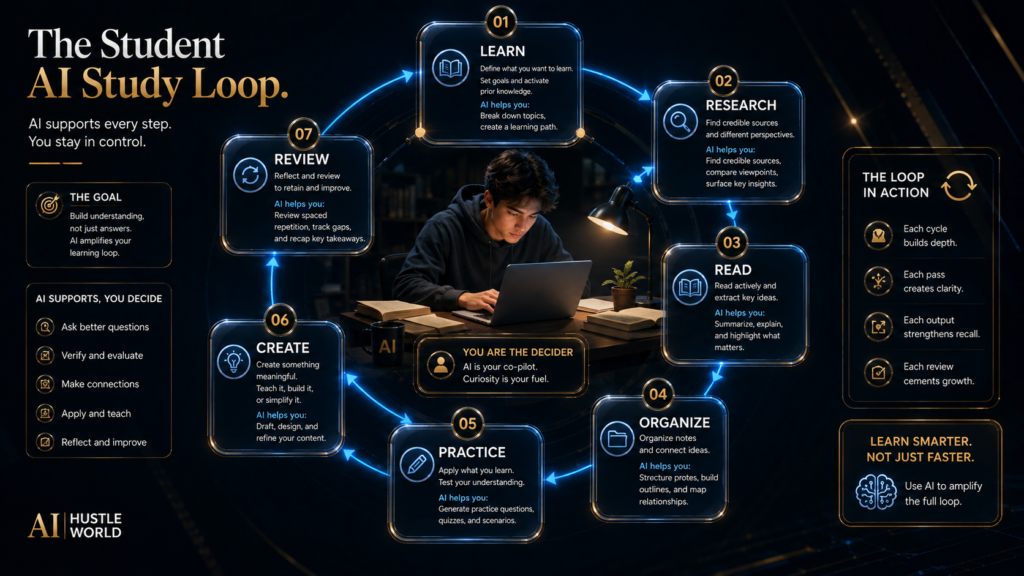
The Student AI Study Loop
Students do not actually have one “study task.” They have a loop: LEARN → RESEARCH → READ → ORGANIZE → PRACTICE → CREATE → REVIEW. The tool that helps most at one stage may be completely wrong at another.
Learn
You are trying to understand something you do not know yet, such as a new concept, a formula or a piece of terminology from a reading. ChatGPT, Claude and Gemini fit this stage, but only if you use them for explanation and questioning rather than answer retrieval: ask for an explanation at your level, then a simple example, then a question that checks whether it actually landed.
Research
You need current information or credible sources from outside your own notes, such as background on a policy change or a competing viewpoint. Perplexity and other research-first systems fit this stage because they are built to surface and cite sources rather than only generate an answer from memory. The point is not the AI-written summary; it is finding and verifying where its claims actually come from.
Read
You have a textbook chapter, lecture slides, papers or notes, and you need to work through material you already have rather than search the open web. NotebookLM and other document-focused AI are built for exactly this, since they let you ask questions that stay grounded in what you uploaded instead of pulling in outside information. The goal is to make your own source material easier to navigate, not to replace it with a general answer.
Organize
You have scattered notes, links and half-finished summaries spread across different apps, and you need them in one place before you can study from them. Notion and other document or workspace tools fit this stage because their AI features can group related notes and turn a pile of fragments into something you can actually review. The goal is a usable system, not a longer list of unsorted notes.
Practice
You need to remember what you learned or apply it to a new problem, which is a different skill from having heard the explanation once. Quizlet, AI-generated quizzes, Study Mode and other specialist learning tools fit this stage because they force retrieval instead of rereading: generate a question, answer it without looking at your notes, then check where you went wrong. The goal is retrieval and application, not familiarity with the material.
Create
You need an essay, presentation, project or other academic output that someone else will read or watch. Grammarly, Canva, AI writing assistants and presentation tools can speed up the mechanical parts of that work, such as phrasing, formatting and layout. The goal is to improve the quality and efficiency of your work, not to replace the intellectual responsibility of deciding what the work should say.
Review
You need to identify what you actually misunderstood, which usually only becomes visible after you have tried to use the material rather than before. AI tutoring, quizzes, source checking and teacher feedback all serve this stage by pointing at the specific gap instead of repeating the whole topic again.
The goal is correction. This is the key distinction: AI becomes more educationally useful when it moves you through the loop rather than skipping the loop.
1. ChatGPT — Best Overall AI Tool for Students
Best for: General study help, explanations, practice, brainstorming and guided learning. ChatGPT is the strongest general starting point for most students because it can handle many different academic tasks inside one environment.
Its current Study Mode can explain topics step by step, ask questions, work through homework or practice problems, help prepare for exams, review class material and create practice questions or flashcard-style reviews. OpenAI states that Study Mode is available across ChatGPT plans globally.
A student rarely has only one kind of problem: you might start with “I don’t understand this chapter,” move to “Give me an example,” then “Quiz me,” then “Show me where I made the mistake.” A general-purpose AI assistant can stay with that whole workflow, which is more useful than switching to a separate application for every individual question.
The strongest study workflow is: Explain → Example → Practice → Feedback → Retry.
- Ask the AI to explain a concept at your current level.
- Ask for a simple example.
- Try a similar problem yourself.
- Ask for feedback rather than the answer.
- Retry the problem.
This creates a learning loop. The weak workflow is: Question → final answer → copy. The stronger workflow is: Question → explanation → attempt → feedback → understanding. ChatGPT is particularly good at explaining difficult concepts, turning complicated material into simpler language, creating study questions, brainstorming project ideas, reviewing drafts, analyzing documents, organizing study plans, and practicing interview or presentation questions.
Free vs paid: The free version can be a strong starting point. Do not pay immediately simply because a premium plan exists; upgrade only when usage limits repeatedly interfere with work or a premium capability creates enough value to justify the cost.
The limitation: AI can still be wrong. Study Mode itself notes that it may sometimes provide a direct answer rather than perfectly maintaining a tutoring approach, so the student remains responsible for checking important information against course materials, instructors and authoritative sources. Best student use: General study assistant and AI tutor. Who should avoid relying on it heavily: Students who use it primarily to produce assignments without understanding them.
2. Google Gemini — Best for Google-Centered Student Workflows
Best for: Students who already use Google Search, Docs, Drive and other Google services heavily. Gemini is a strong general-purpose alternative for students, particularly when the rest of their academic workflow already sits inside Google’s ecosystem.
Google has increasingly connected Gemini with its broader productivity and learning environment, while paid Google AI plans expand access and usage to advanced capabilities. Because student programs and benefits can vary by region and eligibility, students should verify the current offer available to their account rather than assuming every student receives the same plan.
Consider two students: Student A researches in Google, writes in Docs and stores everything in Drive, while Student B uses several unrelated platforms. The same AI capability may produce a different amount of value for each student because Student A has less friction moving information between tools, which points to a broader rule: integration can be more valuable than feature count. Gemini can help with concept explanations, brainstorming, summaries, research, writing assistance, multimodal questions, study planning and other Google-centered workflows.
Do not assume that an AI assistant knows what your lecturer expects: course-specific terminology, required sources and marking criteria still come from the course. AI can help interpret those requirements, but it should not replace them.
Free vs paid: Start with the available free access. Paid plans make more sense when you use Gemini heavily, when higher limits or advanced models matter, when Google ecosystem integration creates real value, or when you are eligible for a specific student program.
Limitation: Student offers can be time-limited, regional or eligibility-dependent, so always verify the current terms before treating a student promotion as permanent. Best student use: Students already living inside Google’s ecosystem.
3. Claude — Best for Long Explanations and Dense Writing
Best for: Long-form reasoning, difficult reading, essay improvement and detailed explanations. Claude is especially useful when the task involves a lot of text or requires a more deliberate explanation. That makes it a good complement to a general student AI workflow.
Use it for understanding long passages, simplifying difficult writing, comparing arguments, brainstorming essays, improving structure, reviewing drafts, analyzing documents and practicing explanations. The important distinction is that the student should ask for reasoning support, not simply the finished assignment: “Here is my thesis. Challenge it. What assumptions am I making?” is a stronger educational use than “Write my essay.”
Academic work contains ambiguity, and a strong student needs to understand why an argument works, where evidence is weak, what assumptions are present, and how two interpretations differ. AI can be useful in this role because it can challenge a draft before a teacher or examiner does.
Free vs paid: Claude offers a Free tier and paid plans. The exact value of upgrading depends on how frequently you use it and whether higher usage limits and additional features matter to your workload. The right approach for a student is simple: use free first, and upgrade when the workflow proves the need.
Limitation: A fluent explanation can still be wrong. The more consequential the academic claim, the more important source verification becomes. Best student use: Deep explanation, long-form writing and critical review.
4. NotebookLM — Best for Studying Your Own Course Material
Best for: PDFs, lecture notes, readings, slides and source-grounded study. NotebookLM is one of the most strategically interesting tools for students because it changes the relationship between AI and information.
Instead of asking: “What does AI know about this topic?” you can ask: “What do my actual course materials say about this topic?” That distinction is extremely valuable.
Imagine you have a 100-page textbook chapter, lecture slides, a professor’s notes, research papers and a syllabus all at once. A general AI assistant can discuss the subject, but a source-grounded workflow lets you organize the discussion around your actual materials, which reduces the chance of drifting away from what the course actually teaches.
A strong NotebookLM workflow follows Upload → Ask → Compare → Quiz → Review: for example, “Explain this chapter using only the uploaded material,” then “What are the three concepts most likely to be confused?”, then “Create ten practice questions from the material,” then “Quiz me one question at a time.” This transforms a static PDF into something more interactive.
The limitation: Source-grounded AI does not magically make the source correct — bad notes remain bad notes, and incomplete material remains incomplete, so the student should still compare important information against the official course material and instructor guidance. It can still be more useful than a general chatbot for certain tasks because the source boundary is part of the workflow: when studying for an exam, being able to ask questions about your actual lecture material can beat a broad internet-based explanation. Best student use: Studying from your own notes, PDFs and readings.
5. Perplexity — Best for Research and Finding Sources
Best for: Web research, source discovery and current information.
Perplexity’s free Standard plan currently provides practically unlimited basic searches, while advanced features such as Pro Searches, Research Queries, advanced models and image generation are more restricted. Its Education Pro plan is available to verified students and educators and includes features such as Learn Mode, advanced models, file uploads and expanded research access.
Perplexity’s Learn Mode is particularly relevant for students because it is designed to make the research process more interactive and learning-oriented rather than simply returning answers.
A good workflow is: Question → Search → Open sources → Compare → Verify → Write. Suppose you need to research “How did renewable energy policy change between 2015 and 2025?” — instead of immediately asking AI to write the answer, use research-first tooling to identify key sources, understand the chronology, compare different claims, locate primary documents and verify the dates, then write your own explanation.
Research is not just finding information; it is learning how to decide which information deserves trust, a skill that becomes more important as AI-generated information becomes easier to produce. Free vs paid: The Standard free plan is enough for many students, while Education Pro can be more useful for verified students who need advanced research access and learning-focused features.
Limitation: Never treat a search answer as a replacement for reading the underlying source. A citation is a doorway to evidence—not proof that the generated summary is correct. Best student use: Research, source discovery and evidence gathering.
6. Grammarly — Best for Writing Improvement
Best for: Grammar, clarity, tone and editing. Grammarly is not the tool you need when your main problem is understanding a textbook. It is the tool you use when you already have something to say and want to communicate it more clearly.
That distinction makes it particularly useful for essays, scholarship applications, resumes, emails, reports, presentations and project documentation. The better academic workflow is not AI writes essay → student submits but Student writes → Grammarly checks → student decides, which preserves ownership of the thinking; it is useful for grammar, spelling, clarity, conciseness, tone and sentence-level improvement.
What it cannot guarantee is that a grammatically perfect sentence is free of a false claim, a weak argument, missing evidence, a bad citation or an unsupported conclusion, so editing should be the last layer, not the foundation of academic work.
Free vs paid: The free version can provide useful writing correction. Students who write frequently may consider paid features when they need more advanced rewriting and higher AI usage. Best student use: Editing work you have already thought through.
7. Canva — Best for Presentations and Visual Projects
Best for: Slides, presentations, posters, project visuals and student content. Canva is useful because it reduces the mechanical part of visual communication. Instead of spending an hour aligning boxes, selecting templates and formatting slides, you can start from a structure and spend more time deciding what the audience should actually understand.
Canva offers free student access, while Canva for Campus can provide higher-education students access to broader features when their institution participates. Canva Education is currently free for eligible K–12 students and teachers; Canva states that higher-education access depends on the university’s Canva for Campus arrangement.
Good student uses include class presentations, posters, research presentations, project diagrams, infographics, club materials and visual study notes. The common mistake is assuming a presentation that looks beautiful is automatically academically strong: AI can help with structure, visuals, layout and first-draft copy, but the student must still decide what matters, what evidence supports it, what needs explanation and what should be left out.
The better workflow is Research → Outline → Story → Visual hierarchy → Design → Review, not Prompt → Generate 20 slides → Submit.
Limitation: Access differs between regular Canva accounts, K–12 Canva Education and university Canva for Campus arrangements, so students should check their institution’s access before assuming premium features are available. Best student use: Presentations and visual communication.
8. Wolfram Alpha — Best for Math and Computational STEM Work
Best for: Mathematical calculations, symbolic work and computational questions. General AI models are useful at explaining mathematics, but they are not dedicated mathematical computation engines. That difference matters.
When the task is: “Explain why this equation works.” a general AI tutor can be useful. When the task is: “Calculate this precisely.” a computational system can be a better verification layer.
Use: AI explanation → Wolfram verification → Student solves independently.
- Ask a general AI tool to explain the concept.
- Attempt the equation yourself.
- Use a computational engine to check the result.
- Compare your steps with the explanation.
- Reattempt without assistance.
That turns a calculator into a learning tool, and it is especially useful for algebra, calculus, statistics, physics, engineering and symbolic mathematics.
The limitation: A computational answer is not the same as understanding. Students who copy the final result without understanding the process gain very little. Best student use: Verification and computational support for STEM subjects.
9. Quizlet — Best for Active Recall and Revision
Best for: Flashcards, memorization and exam preparation. Students often spend too much time rereading. Rereading feels productive because the material looks familiar.
But familiarity is not the same as retrieval. Flashcards and practice questions force the brain to retrieve information. That is why a tool like Quizlet can fit the Practice stage of the Student AI Study Loop.
A useful workflow is Notes → Flashcards → Quiz → Weak areas → Repeat: after finishing a lecture, convert the most important concepts into questions, then test yourself later without looking at the notes. The objective is not to create 300 flashcards; it is to identify what you genuinely cannot recall.
AI can accelerate question generation, concept extraction, practice tests and answer explanations, but the student should still review whether the generated material accurately reflects the course.
Limitation: Automated flashcards can create low-quality questions — a bad flashcard may test a trivial detail while ignoring a concept that actually matters. Best student use: Revision, retrieval practice and exam preparation.
10. Otter.ai — Best for Turning Lectures Into Searchable Notes
Best for: Lecture transcription, meeting-style class notes and reviewing spoken material. Lecture transcription can be particularly useful for students who struggle to take notes while listening. The key value is not the transcript itself.
It is what happens afterward: a long transcript becomes useful when you can turn it into key concepts, questions, summaries, review notes, action items and exam topics. The better workflow is Lecture → Transcript → Clean notes → Key concepts → Questions → Review, which is far more useful than simply storing hundreds of pages of raw transcription.
The limitation: Transcription accuracy depends on audio quality, accents, background noise, multiple speakers and technical vocabulary, so a transcript should be reviewed before being treated as an authoritative record of the lecture. Best student use: Capturing spoken material so it can be reviewed later.
The Most Useful Student AI Stack
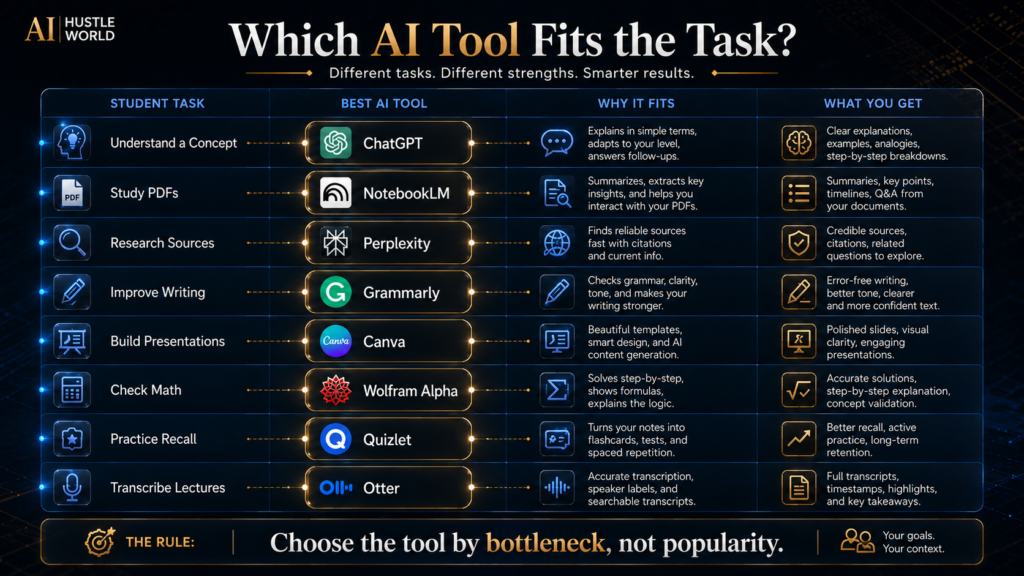
A student does not need all ten tools. A practical stack might look like this:
| Role | Tool |
|---|---|
| General learning | ChatGPT |
| Source-grounded studying | NotebookLM |
| Research | Perplexity |
| Writing | Grammarly |
| Presentations | Canva |
| STEM | Wolfram Alpha |
| Revision | Quizlet |
| Lectures | Otter |
That already covers a large portion of a student’s academic workflow. The goal is not to install everything. The goal is to create clear roles.
Best AI Tool by Student Task
| Student task | Best starting tool | Why |
| Understand a difficult concept | ChatGPT | Guided explanations and Study Mode |
| Work through practice problems | ChatGPT | Step-by-step tutoring workflow |
| Study from your own PDFs | NotebookLM | Source-grounded study |
| Find research sources | Perplexity | Research-first workflow |
| Improve an essay draft | Grammarly | Editing and clarity |
| Make presentation slides | Canva | Fast visual communication |
| Check math | Wolfram Alpha | Computational verification |
| Make flashcards | Quizlet | Active recall |
| Transcribe a lecture | Otter | Converts spoken material into searchable notes |
| Google-centered study | Gemini | Strong ecosystem fit |
This is more useful than a simple 1–10 ranking because it answers the question students actually face: “What should I use right now?”
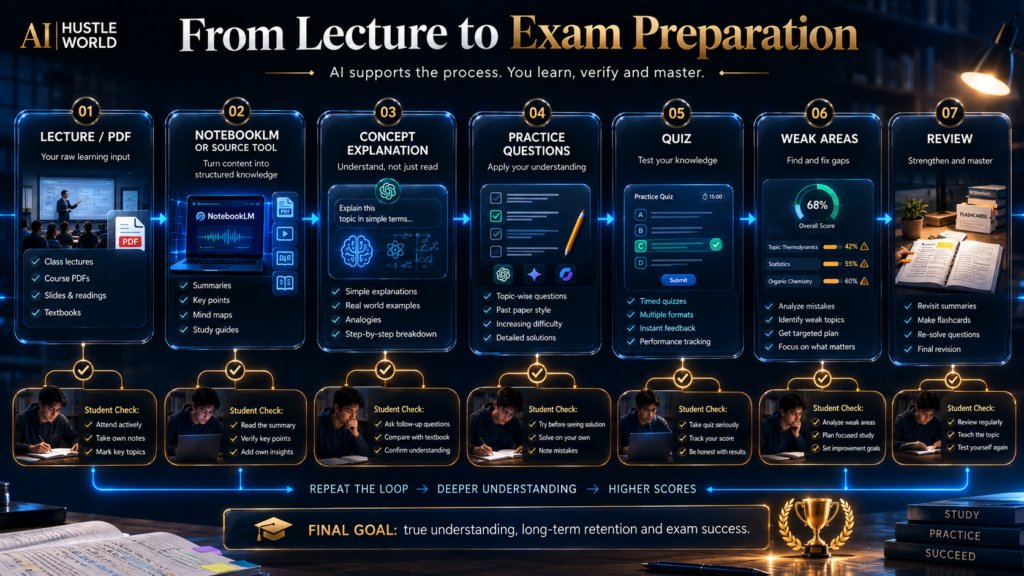
The Student AI Study Loop in Practice
Let’s make the framework concrete. Suppose you have a university exam in economics.
Step 1: Learn
Use ChatGPT or Gemini to explain the concept in simple language. Then ask:
“What would a professor expect me to understand rather than memorize?”
Step 2: Read
Load the relevant lecture notes and readings into NotebookLM. Ask it to identify:
- major concepts
- definitions
- competing viewpoints
- unclear sections
Step 3: Research
Use Perplexity to investigate whatever the lecture notes do not fully explain, such as a real-world policy example or a recent figure. Open the underlying sources instead of copying the generated summary, since the exam will reward the reasoning behind a number, not just the number itself.
Step 4: Organize
Create a one-page study structure from everything gathered so far, separated into three tiers: Must know → Should know → Useful context. This keeps the highest-value material visible instead of buried inside a long document.
Step 5: Practice
Generate practice questions from the same material, then answer them without looking at the notes. Review the mistakes afterward and note which tier they came from, since a wrong answer on a “must know” question matters more than one on background context.
Step 6: Create
Build a presentation or a one-page study sheet with Canva if the course requires a visual output, using the same three-tier structure from Step 4 so the format reinforces what is already organized instead of starting over.
Step 7: Review
Ask an AI tutor to challenge your understanding directly:
“Don’t give me the answer. Ask me questions until you find the part I do not understand.”
That is where AI becomes genuinely powerful. It is not simply generating material. It is creating feedback loops.
How to Use AI Without Replacing Your Learning
This is probably the most important section of the article. There is a fundamental difference between: Using AI to reduce friction and Using AI to avoid thinking.
The first can make you more capable. The second can make you less capable while producing a better-looking assignment.
Good uses of AI
Use AI to:
- explain confusing concepts
- generate practice questions
- challenge your arguments
- summarize material you have already read
- identify gaps in your reasoning
- improve grammar
- organize notes
- compare explanations
- suggest study plans
- help you brainstorm
Riskier uses
Be cautious when using AI to:
- write a complete graded assignment
- fabricate citations
- invent references
- generate a final answer you do not understand
- solve every problem before you attempt it
- submit generated text without checking course rules
OpenAI’s own Study Mode guidance says students should use it as a study aid and follow the rules that apply to their course, school or organization. The exact rules vary. Some instructors may allow brainstorming and editing but prohibit generated text in submitted work.
Others may allow certain AI use if disclosed. There is no universal academic-integrity rule across every institution. So the safest principle is: Know the policy before you automate the work.
The “Understand First” Rule
Here is a simple rule students can apply to almost every AI interaction:
First attempt it yourself.
Then use AI. Why? Because struggle contains information.
If you immediately ask AI for the answer, you lose the opportunity to discover exactly where your understanding breaks. The weak workflow is: Question → AI answer → copy. The stronger workflow is: Question → student attempt → AI feedback → correction.
The second workflow may take slightly longer per question. But it creates learning. That is the difference between performance support and learning support.
Free vs Paid: When Should a Student Pay?
Students should be especially careful with subscriptions because many AI tools have overlapping capabilities. You rarely need to pay for all of them.
Pay when the bottleneck is real
Suppose the free plan gives you everything you need for three assignments a month. Don’t pay. Now suppose your research workflow uses the tool every day and your free limit constantly interrupts important work.
Paying may make sense. The decision is: Value created > subscription cost. Not: Paid = automatically better.
A practical student upgrade checklist
Before paying, ask:
- Do I use this tool every week?
- Does the free plan actually block something important?
- Can another free tool solve the same problem?
- Is the paid feature relevant to my course or workflow?
- Will I still use it next semester?
- Can I cancel easily if it stops being useful?
That last question matters. Students often accumulate subscriptions during exams and forget about them afterward.
Common Student AI Mistakes
A few patterns show up often enough to name directly:
- Using the same AI for everything. General assistants are useful, but specialists exist for a reason; use the tool that matches the task.
- Starting with 20 tools. A beginner stack should be small, since every new tool adds another interface, another login, another workflow and another thing to learn. Complexity is a cost.
- Asking for the answer before attempting the problem. This weakens the feedback loop that creates learning.
- Trusting generated citations. AI can misstate or fabricate sources, so open the source and verify the claim yourself.
- Confusing polished writing with good thinking. AI can improve grammar while leaving a weak argument untouched.
- Using AI to produce generic presentations. A visually attractive presentation is not automatically an intelligent one.
- Recording lectures without considering privacy or policy. Check your institution’s rules and any consent requirements before recording.
- Ignoring the free-tier limit. A tool may look free but provide too little capacity for your actual workflow, so check what is really included.
- Paying because everyone else is. A friend having an AI subscription does not make it economically useful for you.
- Letting AI replace feedback from a teacher. AI can simulate questions and critique, but it cannot replace an instructor’s understanding of your course’s exact requirements.
Academic Integrity: The Boundary Students Need to Understand
The central issue is not: “Did I use AI?” The more useful questions are:
- What did AI do?
- What did I do?
- Can I explain the final work myself?
- Did my course permit that use?
- Did I verify the information?
This creates four increasingly responsible levels of AI use:
| Level | What AI does |
|---|---|
| 1 — Tutor | AI explains a concept. |
| 2 — Coach | AI asks questions and gives feedback. |
| 3 — Editor | AI helps improve your own work. |
| 4 — Generator | AI produces substantial portions of the submission. |
The further you move toward the last level, the more important course-specific policy becomes.
There is no universal rule that every educational institution uses. Your institution, lecturer or assessment instructions are the authority.
What Happens If Students Use AI Only to Finish Faster?
There is a short-term advantage. The task may take less time. But the second-order effect can be negative.
Consider a student who uses AI to generate every explanation, solve every problem and draft every essay. Their output may increase. Their independent ability may not.
Then the student reaches:
- an exam without AI
- a live interview
- a presentation
- an oral defense
- a job requiring independent judgment
The gap becomes visible. That is why the long-term objective should not be: “How much work can AI do for me?”
It should be: “How much better can AI make me at doing the work?” That is a much more durable skill.
Why Students Should Learn AI as a Workflow
The AI market is changing quickly. A tool that is dominant today may be integrated into another platform tomorrow. Features move.
Prices change. Free limits change. Interfaces change.
Workflows last longer. A student who learns: How to research → verify → organize → practice → create → review can switch tools without losing the underlying skill.
A student who only memorizes: “Use Tool X for Topic Y” may have to start over every time the market changes. This is why the deeper educational skill is AI workflow literacy.
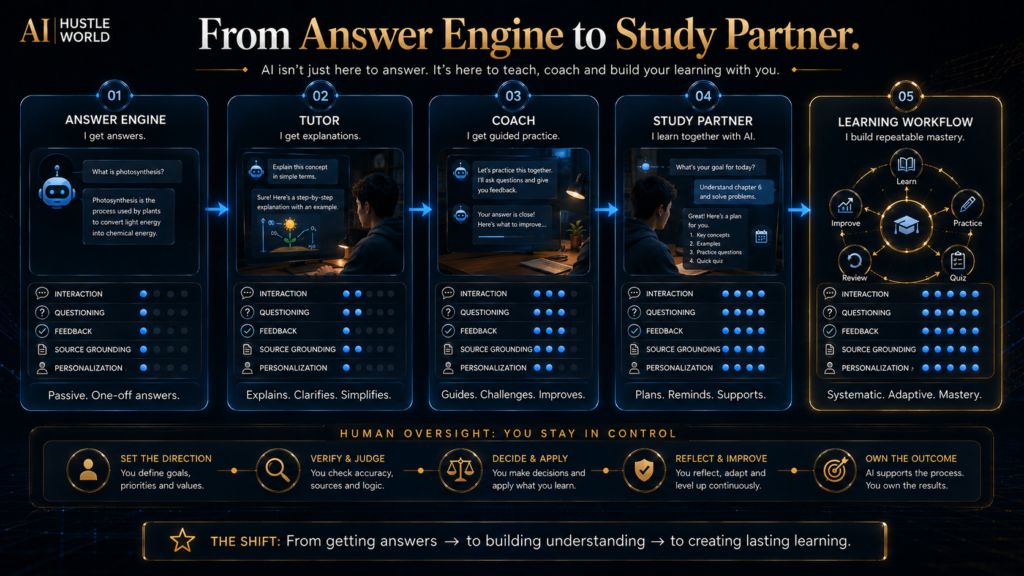
The Future of Student AI
The future of AI in education is moving toward systems that do more than answer isolated questions. ChatGPT’s Study Mode already illustrates the direction: AI can guide a learner, ask questions, use uploaded material and adapt the interaction based on understanding. Perplexity’s Learn Mode similarly moves research toward a more interactive learning process.
The broader direction is: Answer engine → Tutor → Study partner → Workflow assistant. That shift matters. The winning student AI experience may not be the platform with the biggest model.
It may be the platform that best understands:
- what the student is learning
- what material the course uses
- where the student is struggling
- what needs practice
- what should be reviewed next
That is a much more interesting future than simply generating essays faster.
A Simple Student AI Setup
You can start with:
- One general assistant: ChatGPT, Claude or Gemini.
- One source/research layer: NotebookLM or Perplexity.
- One production layer: Grammarly or Canva, depending on your coursework.
- One specialist when necessary: Wolfram Alpha for STEM, Quizlet for revision, or Otter for lectures.
That is enough for most beginners. You can add more only when a real bottleneck appears.
Final Thoughts
Students do not need more AI tools. They need a better way to use the tools they already have. The strongest student workflow starts with a simple principle: Use AI to strengthen the learning loop.
Use a general assistant to understand difficult concepts. Use a source-grounded tool to work through your own notes and readings. Use a research platform to discover and verify external information.
Use writing tools to improve clarity. Use design tools to communicate ideas. Use math tools to verify calculations.
Use flashcards and quizzes to test what you actually remember. Then review your mistakes. The point is not to create the fastest possible path from assignment prompt to submission.
The point is to create the fastest path from: confusion → understanding → practice → mastery. That difference becomes increasingly important as AI becomes more capable. The student who uses AI only to finish work faster may become dependent on the tool.
The student who uses AI to improve how they learn can become more capable because of the tool. So don’t ask: “Which AI can do this assignment for me?”
Ask: “Which AI can help me understand this well enough to do it myself?” That question will lead you to better tools—and, more importantly, better learning.
Study smarter does not mean think less. It means spend less time on low-value work so you can spend more time on understanding, judgment and practice.
Ready to Build a Smarter Student AI Workflow?
You don’t need dozens of AI tools to study better. Start with one strong assistant, add specialist tools when a real bottleneck appears, and keep your own thinking at the center of the workflow.
See More AI Tools for Beginners →Frequently Asked Questions
What is the best free AI tool for students in 2026?
For general study help, ChatGPT is a strong starting point because its current Study Mode is available across plans and is specifically designed to guide learning through questions, explanations, practice and feedback. But there is no universal winner. NotebookLM may be better for source-based studying, Perplexity for research, Canva for presentations and Wolfram Alpha for computational STEM work.
Is ChatGPT free for students?
ChatGPT has a Free plan, and Study Mode is currently available globally across ChatGPT plans. Free access still has usage and capability limits.
Students should check their own current account limits rather than assuming every capability is unlimited.
Is NotebookLM free for students?
NotebookLM has free access, and its main advantage for students is working with their own source materials. The exact limits and feature set can change, so check the current product terms when planning a heavy study workflow.
Is Perplexity free for students?
Perplexity currently offers a Standard Free plan with practically unlimited basic searches, plus limited advanced usage. Verified students and educators can also access Education Pro at a discounted price with additional research and learning capabilities.
Can students use AI to write essays?
That depends on the course and institution. The important question is not whether a tool technically can write the essay.
It is whether your academic rules allow that level of AI assistance. A safer general practice is to use AI for brainstorming, outlining, explanation, critique and editing unless your course explicitly permits more extensive generation.
Can AI replace studying?
It can reduce some low-value study work. It cannot replace the need to understand the material. The strongest student workflow uses AI to create better explanations, practice and feedback.
Which AI tool is best for research papers?
Perplexity is useful for discovery and source-finding, while NotebookLM can be useful once you have collected your own papers and course materials. For serious academic work, always read and verify the original sources.
Which AI tool is best for math?
A combination is often stronger than one tool. Use a general AI tutor to understand the concept and a computational tool such as Wolfram Alpha to verify calculations.
Which AI tool is best for presentations?
Canva is a strong starting point for visual communication, especially when you want templates and easy editing. Access to education features varies by student type and institution.
Which AI tool is best for memorizing?
Flashcard and retrieval-practice tools such as Quizlet can be useful, especially when paired with AI-generated practice questions.
Should students pay for ChatGPT, Claude or Gemini?
Usually not immediately. Start with one free option.
Use it on a real workflow. Pay only when limits or premium capabilities create a measurable benefit.
How many AI tools should a student use?
Start with one. Two or three complementary tools are usually more useful than ten overlapping subscriptions.
Is AI cheating?
AI use itself is not automatically equivalent to cheating. Whether a particular use is permitted depends on your institution, instructor and assignment rules.
The responsible approach is to understand the policy and use AI in a way that supports your learning rather than disguising work you were required to perform yourself. OpenAI likewise directs Study Mode users to follow the rules that apply to their course or organization.
Related Guides
- Best AI Research Assistants (Free & Paid): Top 10 Tools Compared
- Best AI Productivity Tools for Beginners: 10 Tools Compared
- A Beginner’s Guide to Writing AI Prompts That Generate Better Results
- Best AI Email Assistants (Free & Paid): 10 Tools Compared
Written by
Muntasir Ahmad Chowdhury
Founder, AI Hustle World
Muntasir Ahmad Chowdhury is the Founder of AI Hustle World, an independent publication dedicated to making Artificial Intelligence practical, trustworthy, and easy to understand. He researches AI tools, automation, customer service, productivity, and real-world business applications, helping readers make smarter technology decisions through research-driven, experience-backed content.
Expertise:
AI Tools • AI Automation • AI Customer Service • AI Productivity • Generative AI • AI Workflows
Get Smarter With AI
Enjoyed this guide? Get practical AI tools, tutorials, and honest reviews delivered to your inbox.