Evidence: Documentation reviewed
Last checked: August 2026
What was done: Written from official documentation and the published sources linked in this article. Not hands-on tested.
Files: None
Affiliate links: No
Last updated: August 2026. This update substantially revises the comparison, workflow framework, current product capabilities, pricing information, decision criteria, and recommendations.
Best AI Tools for Creating Social Media Content
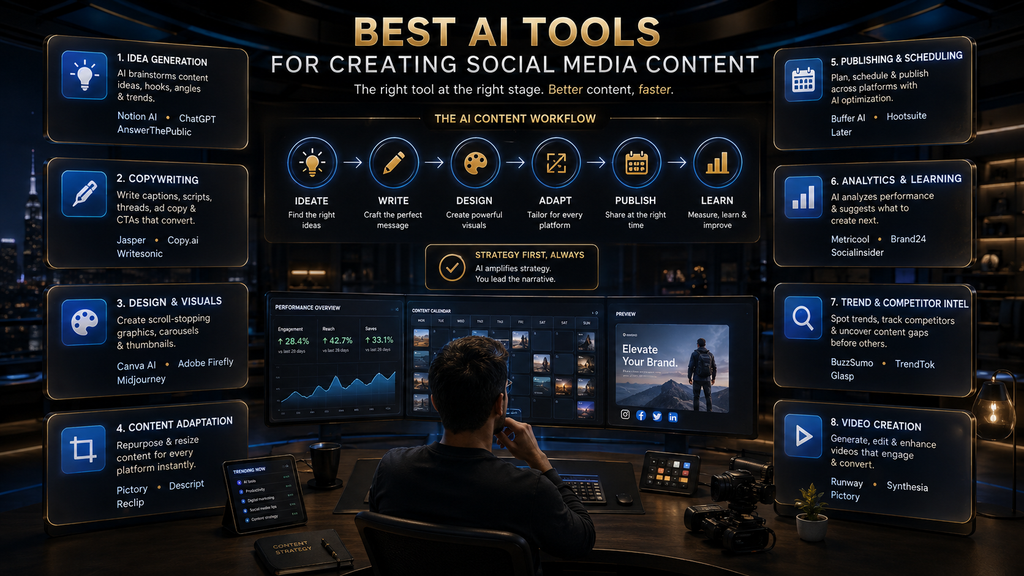
The best AI social media content tool depends on where your content workflow is actually breaking. Canva is the strongest fit when visual creation is the bottleneck; Buffer is attractive for creators who want lightweight AI-assisted creation plus publishing; Predis.ai is built more directly around AI-generated social content; Hootsuite and SocialBee make more sense when creation needs to connect with scheduling and management; Later is particularly useful for visual planning and multi-profile workflows; Jasper is better suited to brand-heavy marketing teams; and Adobe Express is a strong option for creators who want design, AI, resizing, and scheduling inside the Adobe ecosystem.
That distinction matters because “AI social media tool” now covers several very different products. Some generate captions, some create graphics and video, some repurpose existing material, and some combine content creation with publishing, analytics, inbox management, or social listening. Current 2026 comparisons from Hootsuite and Buffer also emphasize choosing according to the specific workflow bottleneck rather than assuming one platform is universally best.
So the right question is not “Which AI tool has the most features?” It is:
Which tool removes the most expensive bottleneck in your social-content production process without creating more work somewhere else?
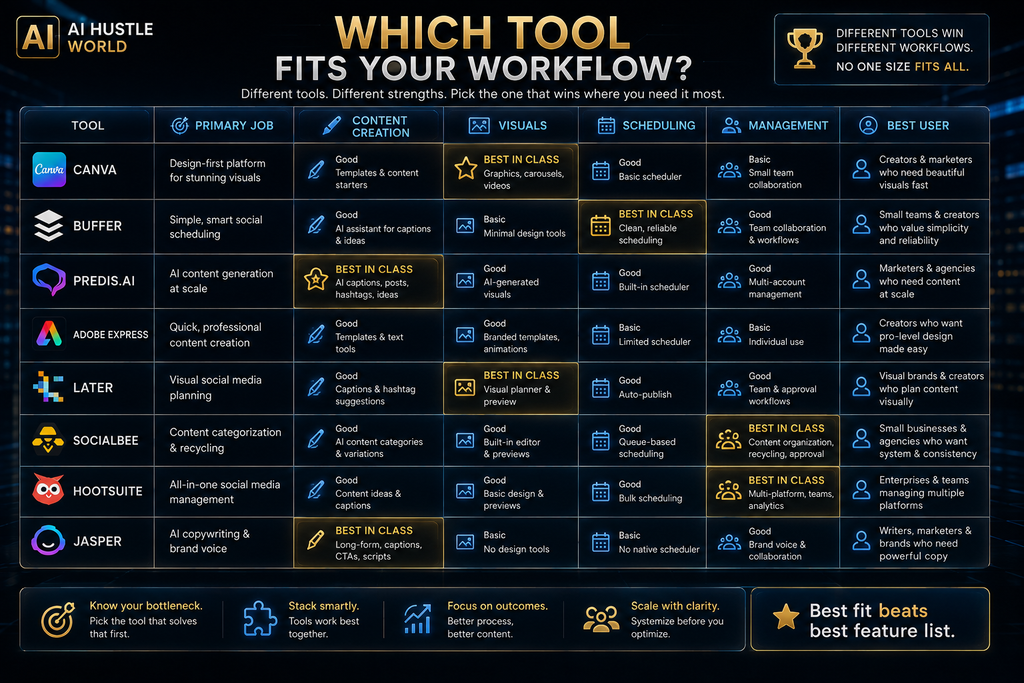
Best AI Social Media Content Tools at a Glance
| Tool | Best For | Strongest Layer | Creation | Scheduling | Brand / Workflow | Price Position |
|---|---|---|---|---|---|---|
| Canva | Visual social content | Design | Excellent | Yes | Strong | Free / Paid |
| Buffer | Solo creators & small teams | Create + Publish | Strong | Excellent | Strong | Free / Low |
| Predis.ai | AI-first content generation | Create + Adapt | Excellent | Strong | Strong | Low / Mid |
| Adobe Express | Design + AI + resizing | Design | Excellent | Yes | Strong | Free / Low |
| Later | Visual planning & creators | Plan + Publish | Strong | Excellent | Strong | Mid |
| SocialBee | Structured publishing systems | Create + Manage | Strong | Excellent | Excellent | Mid |
| Hootsuite | Teams & social operations | Manage + Measure | Strong | Excellent | Excellent | High |
| Jasper | Brand-led marketing | Brand + Content | Excellent | Workflow-focused | Excellent | High |
Important: these aren’t eight versions of the same product. They solve different problems, which is why a $5-per-channel publishing tool and a $99-per-user social-management platform shouldn’t be judged as if they were direct substitutes. Buffer currently prices its Essentials plan from $5/month for one channel when billed annually, while Hootsuite’s Standard plan starts at $99/month when billed annually.
Why Choosing an AI Social Media Tool Is Harder Than It Looks
The social-media content workflow has changed faster than the terminology used to describe it.
A few years ago, “social media tool” often meant a scheduler. Then AI caption generators became popular. Now a single platform may brainstorm topics, write captions, create images, generate video, resize content, adapt posts for multiple networks, schedule them, analyze performance, and recommend what to publish next.
That sounds like progress, but it creates a new problem: feature abundance can make purchasing decisions worse rather than better. A creator who only needs better Instagram graphics can easily end up paying for analytics, team approvals, social listening, competitor monitoring, and automation they never use.
The result is a common trap: you buy software to eliminate one bottleneck and accidentally create another. Hootsuite’s current 2026 comparison makes a similar point, emphasizing that the right tool depends on whether the problem is writing, visual creation, video repurposing, or scheduling—and warning against tools that create additional steps downstream.
That is why this comparison focuses on workflow fit, not feature count.
What Counts as an AI Social Media Content Tool?
An AI social media content tool is software that uses AI to assist with one or more parts of creating, adapting, organizing, publishing, or improving social-media content. The important distinction is between content creation and social-media management. Content creation includes things such as:
- ideas and hooks,
- captions,
- scripts,
- images,
- carousels,
- short-form videos,
- content variations,
- repurposing,
- platform-specific adaptations.
Management includes:
- scheduling,
- publishing,
- inboxes,
- approvals,
- analytics,
- social listening,
- competitor monitoring,
- reporting.
The categories overlap, but they aren’t identical.
For example, Canva’s Content Planner connects design with social scheduling, while Buffer combines AI-assisted content creation with publishing and analytics. Hootsuite goes further into management, bringing content creation, scheduling, engagement, monitoring, analytics, and AI insights into one platform.
That difference should influence what you buy. If you already have a great scheduler and your problem is making better graphics, buying another management platform may solve the wrong problem.
The AI Social Content Production Stack
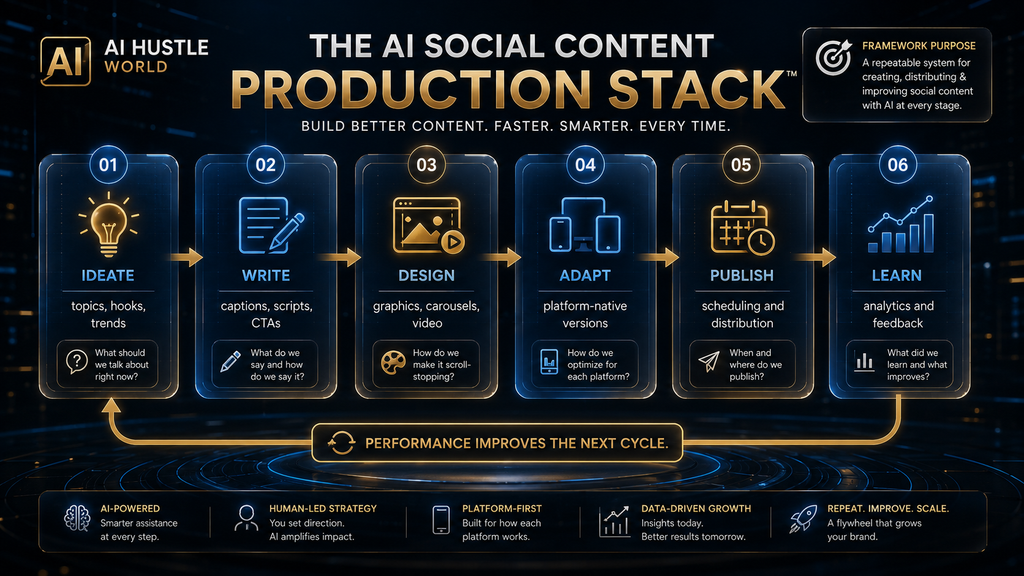
The easiest way to understand this market is to stop thinking about “AI social media” as one task. A complete social-content workflow has six layers: IDEATE → WRITE → DESIGN → ADAPT → PUBLISH → LEARN. This is the AI Social Content Production Stack.
IDEATE
Find topics, angles, hooks, trends, content pillars, and opportunities.
WRITE
Create captions, scripts, headlines, CTAs, descriptions, and variations.
DESIGN
Turn the idea into graphics, carousels, thumbnails, videos, or other visual assets.
ADAPT
Transform the core idea into platform-native versions instead of simply copying the same post everywhere.
PUBLISH
Schedule and distribute the content.
LEARN
Study performance and feed what you learn back into the next content cycle. The key insight is that no single tool is automatically best at every layer.
Canva is exceptionally strong in design. Buffer is strong at combining lightweight AI creation with publishing. Predis.ai is more directly focused on AI-generated social content. Hootsuite and SocialBee extend further into management. Jasper emphasizes brand-controlled marketing workflows. Adobe Express combines design, AI and social scheduling. Later emphasizes planning, scheduling, visual workflows and creator-oriented social management.
Once you see the stack, the buying decision becomes much easier.
1. Canva — Best for Visual Social Media Content
Best for: Creators, bloggers, small businesses, and marketers whose biggest bottleneck is producing polished social graphics, carousels, videos, and branded visual content.
Canva is the strongest choice in this comparison when visual production is the primary problem. Its social workflow connects design, templates, AI capabilities, brand assets, and content scheduling, which makes it especially useful when the person creating the content is also responsible for making it look professional. Canva’s current Content Planner supports planning and scheduling social posts across platforms including Facebook, Instagram, X, and LinkedIn.
The important advantage isn’t simply that Canva has templates. Templates reduce the amount of design work required, while AI features reduce the amount of manual production required. Together, those capabilities can compress the distance between idea → visual asset → scheduled post.
Canva’s current paid offerings also include substantially expanded AI allowances, brand kits, content scheduling, premium assets, and team-oriented features. Its current Business plan lists 3.6 million-plus templates, 141 million-plus premium photos/videos/graphics/audio, 100 Brand Kits, scheduling, approvals, and larger AI allowances.
Where Canva wins
Canva is particularly strong for:
- Instagram carousels,
- Pinterest graphics,
- social quote graphics,
- branded educational posts,
- thumbnails,
- short videos,
- promotional graphics,
- resizing content for different formats.
That makes it especially relevant for the AI Hustle World audience because visual social content often requires more manual production than caption writing.
Where Canva falls short
Canva shouldn’t automatically be treated as a complete social-management replacement. If your primary need is sophisticated:
- social listening,
- competitor monitoring,
- community management,
- advanced reporting,
- large-scale approval workflows,
then a dedicated social-management platform may be more appropriate.
Who should choose Canva?
Choose Canva if you frequently think:
“I know what I want to publish, but making it look good takes too long.”
Verdict: Best overall for AI-assisted social visual creation. Canva Content Planner.
2. Buffer — Best for Solo Creators Who Want Creation + Publishing
Best for: Solo creators, bloggers, freelancers, and small businesses that want a relatively simple workflow from idea to published post. Buffer is interesting because it doesn’t try to turn social media into an enterprise command center.
Its current free plan supports up to three channels, includes an AI Assistant, ideas, drafts, analytics, and up to 10 scheduled posts per channel. The Essentials plan starts at $5/month for one channel when billed annually and adds unlimited scheduled posts, advanced analytics, hashtag management, and other features.
The AI Assistant can generate posts from prompts, brainstorm ideas, repurpose content, and adjust tone, length, or style. Buffer also explicitly supports adapting AI-generated copy for different social channels.
That makes Buffer particularly useful when the problem isn’t simply “I need AI-generated captions.” The real problem is:
“I need to get from an idea to a usable, scheduled social post without opening five different tools.”
Where Buffer wins
Buffer’s simplicity is a feature. It works well for:
- content calendars,
- captions,
- repurposing,
- scheduling,
- lightweight analytics,
- multi-channel publishing.
Its per-channel pricing also means you don’t necessarily have to buy a large management package simply because you manage several social profiles.
Where Buffer falls short
If visual design is the heart of your workflow, Canva is likely the better specialist. If you need deep enterprise-level social listening, competitive intelligence, approvals, and advanced reporting, Hootsuite or another enterprise platform is more appropriate.
Who should choose Buffer?
Choose Buffer if your workflow is: Idea → Caption → Adapt → Schedule → Measure and you want the process to remain simple. Verdict: Best lightweight AI-assisted content and publishing workflow for creators and small teams. Buffer pricing and features.
3. Predis.ai — Best AI-First Social Content Generator
Best for: Creators and small businesses that want AI to generate a larger portion of the social-content production process. Predis.ai is more directly aligned with the concept of an AI social-content production system than a traditional scheduler with AI features added later.
Its current pricing page positions the platform around generating, designing, and optimizing social-media content with AI. The Core plan currently lists 1,300 credits per month, approximately 86 AI images or nine videos based on its own estimates, one brand, and publishing to up to 10 channels; the Rise plan increases capacity and adds auto-posting and additional brands.
This makes Predis particularly interesting for users who don’t want to build every social asset manually.
Where Predis.ai wins
The strongest use case is high-volume content production. A small business that needs frequent:
- product posts,
- promotional graphics,
- social creatives,
- captions,
- variations,
- scheduled content,
may find a specialized AI-first platform more efficient than assembling those capabilities separately.
The catch: credits matter
This is exactly where commercial buyers need to look beyond the headline subscription price.
Predis uses credits, and the number of images or videos you can generate depends on how those credits are consumed. Its current plans explicitly translate credits into estimated image/video generation volumes.
So the correct question isn’t:
“Does Predis cost $19?”
It is:
“How much useful content can I realistically produce within the credit allocation my workflow needs?”
That distinction can materially change the economics.
Who should choose Predis.ai?
Choose it if AI-generated content itself is the bottleneck and you want a more automated production workflow. Verdict: Best AI-first option for creators who want to generate a substantial portion of social content inside one platform. Predis.ai pricing and plans.
4. Adobe Express — Best for Adobe Users and Fast Visual Production
Best for: Creators who want AI-assisted design, video editing, resizing, templates, and social scheduling without leaving the Adobe ecosystem. Adobe Express is a strong competitor to Canva because it approaches the same problem from a different ecosystem.
Its current free plan includes basic editing, 100,000-plus static and video templates, more than one million royalty-free Adobe Stock assets, limited generative AI, and scheduling to one account per social network. Premium is currently listed at $9.99/month and adds 250 generative credits per month, larger asset libraries, one-click resize, brand kits, and scheduling to three accounts per social network.
The one-click resize capability is particularly important for social workflows.
A single creative often needs to become several different dimensions and formats. Reducing that manual resizing work can be more valuable than generating another caption.
Where Adobe Express wins
It makes sense when your workflow includes: Design → Edit → Resize → Brand → Schedule and you already use Adobe products.
Where it falls short
If your primary concern is advanced social analytics, social listening, or community management, Adobe Express is not designed to compete head-on with a full social-management platform.
Who should choose Adobe Express?
Choose it if visual production is important and you value Adobe’s creative ecosystem. Verdict: Best Canva alternative for creators who want AI, design, video, resizing, and social scheduling in an Adobe environment. Adobe Express pricing.
5. Later — Best for Visual Planning and Creator Workflows
Best for: Creators and growing teams that care about visual planning, multi-profile scheduling, and an organized social publishing workflow.
Later’s current Starter plan is listed at $18.75/month when billed yearly and includes one social set with eight profiles, scheduling up to 30 posts per profile, analytics, and five AI Ideas/Caption Writer credits per month. Its Growth plan increases the number of profiles and users, adds approvals, inbox functionality, more scheduling capacity, and 50 AI credits per month.
That makes Later different from a pure AI content generator. The platform is valuable when the challenge is organizing content across visual-first channels, rather than simply generating posts.
Where Later wins
Later is particularly useful when:
- content is highly visual,
- Instagram is important,
- multiple profiles need coordination,
- scheduling is central,
- collaboration and approvals matter.
Its Visual Instagram Planner and multi-profile scheduling reinforce that positioning.
Where it falls short
If you want AI to generate a large volume of complete visual posts automatically, Predis.ai is more directly positioned around that problem. If you want enterprise-grade social listening and deep analytics, Hootsuite is more appropriate.
Who should choose Later?
Choose Later when your workflow problem is planning and coordinating visual social content, not simply generating it. Verdict: Best for visual-first creators and teams that need stronger planning and publishing structure. Later pricing.
6. SocialBee — Best for Structured Content Systems and Recycling
Best for: Solopreneurs, small businesses, and social-media managers who want AI-assisted content creation connected to organized publishing and content recycling. SocialBee is valuable because it treats social content as a system, rather than a series of isolated posts.
Its current plans include AI content generation, content categories, content sources, scheduling, analytics, and content recycling. The annual Bootstrap plan is currently listed at $24.17/month, while Accelerate is $40.83/month and Pro is $82.50/month; monthly prices are higher.
The platform supports multiple social networks and uses categories to structure content, which can be useful for accounts with recurring content pillars.
Why this matters
Suppose a creator has five content categories:
- educational,
- promotional,
- motivational,
- customer proof,
- behind the scenes.
Instead of inventing the publishing schedule from scratch every week, a structured system can rotate those categories and maintain a predictable content mix. That is a different problem from simply asking AI to “write ten captions.”
Where SocialBee wins
It is particularly strong for:
- structured content calendars,
- recurring content,
- AI-assisted generation,
- content recycling,
- multi-profile management,
- small teams.
Where it falls short
If your main bottleneck is visual design, Canva remains more directly relevant. If your operation is heavily enterprise-oriented, Hootsuite offers a broader management and analytics environment.
Verdict: Best for creators who want AI content generation embedded inside a repeatable publishing system. SocialBee pricing.
7. Hootsuite — Best for Teams That Need Creation, Management and Measurement
Best for: Businesses and teams that need social content creation connected to publishing, engagement, monitoring, analytics, and workflow management. Hootsuite is much bigger than an AI caption generator.
Its current Standard plan supports up to 10 social accounts and includes unlimited scheduled posts, AI-generated posts and images, messaging, brand and competitor monitoring, analytics, and AI-powered insights. Hootsuite currently lists Standard at $99/month, Professional at $199/month, and Advanced at $399/month when billed annually.
That price difference compared with Buffer is not simply a question of “which one is better.” They’re solving different operational problems. Hootsuite makes more sense when social media has become a business function involving multiple people, multiple accounts, reporting, engagement, monitoring, and approvals.
Where Hootsuite wins
Its biggest strength is connecting the content lifecycle: Create → Schedule → Engage → Monitor → Analyze → Improve. The platform’s AI layer can help generate content and images, while its broader environment connects those outputs to audience and performance information.
Where Hootsuite falls short
For a solo creator running one Instagram account, it can be overkill. Paying $99/month to solve a $5/month problem is not efficiency.
Who should choose Hootsuite?
Choose it when social content has become an operational system rather than a solo publishing task. Verdict: Best for teams that need AI-assisted content inside a broader social-management operation. Hootsuite plans and pricing.
8. Jasper — Best for Brand-Controlled Social Content
Best for: Marketing teams that need consistent brand voice, knowledge, audiences, and repeatable marketing workflows. Jasper occupies a premium position because its value isn’t primarily “generate a caption.”
Its current Pro plan is listed at $59/month when billed annually or $69/month monthly and includes one seat, Canvas, marketing Agents, and brand customization capabilities. Business is custom-priced and adds more advanced controls, agents, governance, API access, and enterprise features.
That makes Jasper much more relevant to organizations where brand consistency is itself a production problem. Imagine a company with multiple marketers producing content for different campaigns. The challenge isn’t merely generating words.
It is ensuring that:
- the tone remains consistent,
- product information stays aligned,
- different campaigns don’t contradict each other,
- content reflects the company’s positioning,
- multiple contributors can work within the same system.
That’s where Jasper’s brand and knowledge controls become strategically useful.
Where Jasper wins
It is strongest when: Brand → Knowledge → Audience → Content → Campaign needs to operate as one system.
Where it falls short
A solo creator who only wants better Instagram captions may not need this level of infrastructure. The price makes more sense when the software is supporting a marketing operation rather than one person’s occasional content.
Verdict: Best for brand-heavy marketing teams and organizations where consistency matters more than cheap content generation. Jasper pricing.
The Most Important Distinction: Creation vs Management
One of the easiest mistakes is comparing Canva, Buffer, Hootsuite, and Jasper as if they were direct competitors. They aren’t.
Think about the workflow this way: Canva: “Help me make the asset.” Predis.ai: “Help me generate much of the content.”
- Buffer: “Help me create and publish it simply.”
- Later: “Help me visually plan and schedule it.”
- SocialBee: “Help me build a repeatable publishing system.”
- Hootsuite: “Help me run the social operation.”
- Jasper: “Help my marketing team produce on-brand content at scale.”
- Adobe Express: “Help me create, resize, edit, and schedule visual content.”
Those differences are more useful than a generic five-star ranking.
Best AI Social Media Tool by Job
| Your Main Problem | Best Fit | Why |
|---|---|---|
| Creating polished graphics | Canva | Strong visual design ecosystem |
| Generating social posts with AI | Predis.ai | AI-first social content workflow |
| Simple AI + scheduling | Buffer | Lightweight creation and publishing |
| Adobe-based design workflow | Adobe Express | Design, AI, resize and scheduling |
| Visual content planning | Later | Strong planning and scheduling |
| Repeatable content system | SocialBee | Categories, recycling and AI |
| Full social operations | Hootsuite | Creation, engagement, monitoring and analytics |
| Brand-controlled marketing | Jasper | Brand and marketing workflow controls |
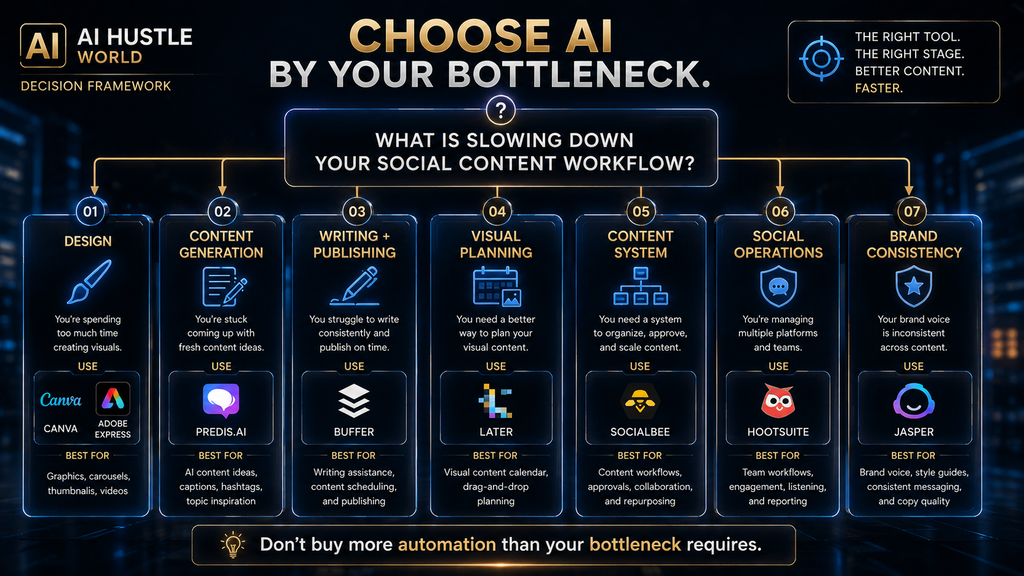
This is the table that should drive the buying decision.
How AI Social Media Content Tools Actually Work
Most tools in this category follow the same underlying logic, even when their interfaces look completely different. First, the system receives context: your topic, audience, brand, platform, product, campaign, or content goal. Then AI generates or transforms the content.
After that, the platform applies some combination of:
- templates,
- brand rules,
- platform constraints,
- content formats,
- scheduling rules,
- publishing workflows,
- analytics.
The important difference is where the AI stops. A basic AI caption generator may stop after generating text. A visual platform may continue into design.
A publishing platform may continue into scheduling. A management platform may continue into engagement and measurement. An advanced marketing platform may connect the entire workflow to brand knowledge and campaign operations.
That is why “AI-powered” is not a useful buying criterion by itself. Almost every modern product can claim it. The useful question is:
What happens after the AI generates the first output?
Why Platform Adaptation Matters More Than Most AI Tool Lists Admit
One of the weakest social-content workflows is: Create one post → copy it everywhere. That saves time initially but often creates poor platform fit. A LinkedIn post, Instagram carousel, Pinterest description, TikTok script, and X post can communicate the same idea while requiring different:
- openings,
- lengths,
- visual structures,
- calls to action,
- audience assumptions,
- formatting conventions.
Buffer’s AI Assistant explicitly supports adjusting content for different channels, while social platforms such as Later and Hootsuite provide multi-profile publishing workflows. But there is an important boundary: platform adaptation is not the same as platform understanding. An AI can transform the format.
It cannot automatically know whether the idea itself deserves to be published on that platform. That still requires editorial judgment.
The One-Idea-to-Multiple-Platforms Workflow
A stronger social workflow begins with a content source, not a pile of isolated posts. Suppose you publish an article about AI productivity. The source idea can become: Blog article → LinkedIn insight → Instagram carousel → Pinterest infographic → Short-form video script → X thread → Email teaser.
The AI’s job is to reduce the transformation cost. The human’s job is to decide whether each version actually makes sense.
That distinction matters here because we already have a dedicated article on repurposing one piece of content across YouTube, Pinterest, and Instagram. This article therefore explains the tool-selection layer without covering that broader repurposing topic.
One Tool vs a Specialized AI Stack
There are two legitimate strategies.
Strategy A: One Main Platform
Use one platform for most of the workflow. For example: Canva → create → resize → schedule or: Buffer → write → adapt → schedule → measure. This is simple and reduces tool switching.
Strategy B: Specialist Stack
Use different tools for different layers. For example: ChatGPT → ideas and strategy → Canva → visual creation → Buffer → scheduling → Analytics → performance review. This can produce better specialist results but adds cost and complexity.
The correct answer isn’t always “use the all-in-one tool.” The correct answer is:
Use a specialist only when its improvement is large enough to justify the extra handoff.
The Hidden Cost of AI Tool Stacking
Software pricing is only one part of the cost. The real equation is: Subscription Cost + Switching Cost + Editing Cost + Adaptation Cost + Human Review = Total Workflow Cost. Imagine you save ten minutes generating a caption but spend another eight minutes exporting, moving files, adjusting formatting, rewriting the output, and scheduling it elsewhere.
Your AI tool saved ten minutes on paper. It saved two minutes in reality. That’s why workflow compression matters more than feature count.
A good tool should remove steps. A bad stack simply moves the steps around.
Free vs Paid AI Social Media Tools
Free plans are often enough when your content volume is modest and you can tolerate some manual work. For example, Buffer’s current free plan supports up to three channels and includes its AI Assistant, while Adobe Express’s free plan includes basic creation, limited generative AI, templates, assets, and scheduling to one account per social network. Paid plans become rational when the workflow itself becomes expensive.
That usually happens when you need:
- more channels,
- higher content volume,
- more AI generation,
- team collaboration,
- approvals,
- advanced analytics,
- more brands,
- automated publishing,
- content recycling,
- stronger brand controls.
Predis.ai, for example, uses credits and different brand/channel allowances across its plans, while Later’s AI usage is also credit-based across its current plans. So don’t ask:
“Is the paid plan better?”
Ask:
“Which manual step does the paid plan remove, and how often do I perform that step?”
When Paying for an AI Social Media Tool Is Worth It
A simple ROI model can help. Suppose your current social workflow takes:
- 2 hours for ideation,
- 3 hours for copy,
- 4 hours for design,
- 2 hours for adaptation,
- 1 hour for scheduling.
That’s 12 hours per content batch. If a $20/month tool realistically saves 3 hours per batch and you produce four batches per month, that’s 12 hours saved. The subscription is probably easy to justify.
But if the tool saves 30 minutes per month, the economic argument is much weaker. The exact value of your time will differ, so the important principle is not the example itself. It is: Measure the time removed from the workflow, not the number of AI features advertised on the pricing page.
Why the Traditional Social-Media Workflow Exists
The traditional workflow looks inefficient from the outside: Strategist → Copywriter → Designer → Video Editor → Social Manager → Analyst. But those roles exist for a reason. Each stage contains different judgments.
The strategist decides what is worth saying. The copywriter decides how to communicate it. The designer decides how to make it visually understandable.
The editor decides whether the video holds attention. The social manager decides how and when to distribute it. The analyst determines what actually worked.
AI can compress portions of all six jobs. It does not eliminate the underlying decisions.
That is why a mature AI workflow should not be: AI creates everything → human clicks publish. It should be: Human defines direction → AI accelerates production → human reviews consequence-sensitive decisions → data informs the next cycle.
Where AI Social Media Tools Still Fail
AI has made production faster, but several failure modes remain.
Generic Content
The easiest AI output is often the least differentiated. A generic:
“Here are five productivity tips…”
post can be technically correct and commercially useless. The problem isn’t grammar. It’s lack of insight.
Platform Mismatch
A tool can adapt a sentence to Instagram or LinkedIn, but formatting isn’t the same as strategy. A platform-native post needs to understand the audience’s expectations and the reason they are there.
Brand Drift
If AI continually creates new posts without a stable brand system, the voice can slowly become generic. This is one reason brand-control features matter more to businesses than to casual creators.
Visual Sameness
Generative design can produce attractive graphics while still making an account visually interchangeable with thousands of others. Templates solve speed. They don’t automatically solve differentiation.
Content Inflation
AI removes production friction. That creates a dangerous temptation: If creating ten posts is easy, publish ten posts. But the audience hasn’t necessarily asked for ten posts.
The Automation Trap
The most dangerous misconception is:
More automation = more productivity.
It doesn’t. Automation increases throughput. Productivity increases useful output per unit of effort.
Those aren’t the same thing. If AI doubles your publishing volume but halves the average usefulness of your content, you may have increased activity while decreasing business value. Google’s current guidance makes the same broader principle clear for AI-assisted web content: focus on accuracy, quality, relevance, originality, and people-first value rather than producing large volumes of low-value content.
The principle applies beyond Google. Social algorithms, audiences, and brands also respond to the quality of what you publish—not simply the number of times you publish.
A Better Human + AI Social Content Workflow
Use AI where repetition is expensive. Keep humans in control where ambiguity or consequence is high.
Human owns:
- audience understanding,
- positioning,
- content strategy,
- originality,
- brand judgment,
- factual accuracy,
- final approval,
- sensitive topics,
- major commercial claims.
AI assists with:
- brainstorming,
- variations,
- first drafts,
- resizing,
- formatting,
- repurposing,
- repetitive transformations,
- content calendars,
- routine analysis.
This division creates a more durable workflow than trying to automate every decision.
Common Mistakes When Choosing AI Social Media Tools
Choosing by the longest feature list
More features can mean more unused complexity.
Confusing content creation with social management
A scheduler isn’t automatically a great content generator.
Buying an enterprise platform as a solo creator
You may pay for functionality you never use.
Buying a design tool when your problem is scheduling
The tool can be excellent and still be wrong for you.
Ignoring usage limits
Credits, channels, AI generations, profiles, exports, and storage can change the actual economics.
Publishing AI content without editing
AI-generated content should be treated as an input to editorial work, not automatically as the final output.
Copying the same content everywhere
One idea can be repurposed without becoming identical across platforms.
Measuring output instead of outcomes
“Generated 500 posts” is not a meaningful business KPI.
How to Choose the Right Tool in Five Minutes
Start with one question:
What takes too much time?
If the answer is “design”
Choose Canva or Adobe Express.
If the answer is “writing captions and publishing”
Choose Buffer.
If the answer is “generating lots of social content”
Consider Predis.ai.
If the answer is “visual planning and scheduling”
Consider Later.
If the answer is “maintaining a structured publishing system”
Consider SocialBee.
If the answer is “running multiple social accounts as a business operation”
Consider Hootsuite.
If the answer is “keeping content consistent across brands and teams”
Consider Jasper. This is the decision framework that matters more than a universal ranking.
Best AI Social Media Tools by User Type
| User | Best Starting Point | Why |
|---|---|---|
| Beginner creator | Canva / Buffer | Low complexity |
| Blogger building social traffic | Canva + Buffer | Create + distribute |
| Visual creator | Canva | Strong design workflow |
| Adobe user | Adobe Express | Integrated creative ecosystem |
| High-volume AI content creator | Predis.ai | AI-first generation |
| Instagram-focused creator | Canva / Later | Visual planning and creation |
| Small business | Buffer / SocialBee | Publishing system |
| Social-media manager | SocialBee / Hootsuite | Management + workflow |
| Marketing team | Jasper / Hootsuite | Brand + operations |
| Multi-account organization | Hootsuite | Broad management and analytics |
The Best AI Social Media Stack for a Solo Creator
For most solo creators, I would not recommend buying eight subscriptions. A lean setup is more rational.
Option 1: Visual-first
Canva → Buffer
Canva handles creation. Buffer handles publishing.
Option 2: AI-first
Predis.ai → publishing workflow
Use this when generating social assets is the biggest bottleneck.
Option 3: Simple all-around
Buffer alone
If your visual requirements are modest, one platform can cover a surprising amount of the workflow.
Option 4: Adobe workflow
Adobe Express → social scheduling
Useful if you’re already invested in Adobe. The goal is not to build the most sophisticated stack. The goal is to build the smallest stack that removes your real bottleneck.
The Best AI Social Media Stack for a Small Business
A small business usually has a different problem. The owner may be responsible for:
- content,
- design,
- publishing,
- customer communication,
- reporting.
In that situation, reducing context switching becomes valuable. A reasonable setup could be: Canva or Adobe Express → SocialBee or Buffer.
The design platform handles creative production while the publishing platform handles distribution. If the business has enough channels, people, and customer interactions to justify deeper monitoring and analytics, Hootsuite becomes more relevant.
How to Measure Whether Your AI Tool Is Actually Working
Don’t measure AI productivity by how many captions it generates. Measure the workflow.
Production KPIs
Track:
- hours per content batch,
- time spent writing,
- time spent designing,
- time spent adapting,
- time spent scheduling.
Quality KPIs
Track:
- percentage of AI drafts you actually keep,
- average editing time,
- factual corrections,
- brand corrections,
- rejected posts.
Social KPIs
Track:
- reach,
- engagement rate,
- saves,
- shares,
- comments,
- follower growth,
- profile visits,
- clicks.
Business KPIs
Where relevant, track:
- leads,
- sales,
- affiliate clicks,
- email signups,
- conversion rate,
- revenue attributed to social.
The most important metric is often:
Useful content produced per hour of human effort.
That metric tells you whether the AI tool is actually improving the system.
What Happens If You Don’t Automate Anything?
If your social workflow is small, nothing catastrophic happens. Manual production can be perfectly reasonable. But as volume increases, repetitive tasks accumulate:
- finding ideas,
- writing variations,
- resizing graphics,
- adapting formats,
- scheduling,
- maintaining calendars.
Eventually the problem isn’t creativity. It’s production capacity.
At that point, automation can create meaningful leverage. But there is an equal and opposite risk.
What Happens If You Automate Too Much?
You may produce more content while learning less about your audience. That sounds strange, but it matters. If AI creates, adapts, schedules, and analyzes everything automatically, humans can gradually stop questioning:
- whether the topic is worth covering,
- whether the brand still sounds authentic,
- whether the audience actually cares,
- whether the content is becoming repetitive,
- whether a high-performing post reflects a durable insight or a temporary trend.
The second-order effect is important: When production becomes cheap, judgment becomes more valuable. AI reduces the cost of making content. It does not reduce the value of knowing what content deserves to exist.
The Future of AI Social Media Content
The market is moving from isolated generators toward connected content systems. Today’s tools increasingly combine: Generation + Design + Adaptation + Publishing + Analytics and the next stage is likely to connect those functions more tightly.
Hootsuite already positions its platform around creation, publishing, engagement, monitoring, analytics, and AI-powered insights. Buffer is opening APIs that allow publishing, scheduling, and management to connect with other tools and AI agents. Predis.ai is combining generation, design, optimization, competitor analysis, and publishing within its platform.
That points toward an important shift. The future social-media tool won’t merely ask:
“What should I post?”
It will increasingly help answer:
“What should I create, for whom, in what format, on which platform, when should it be published, and what should I learn from the result?”
But that doesn’t mean the human disappears. It means the human moves further upstream. The strategic work becomes more important:
- What should the brand stand for?
- What deserves attention?
- What should the audience remember?
- What should the business optimize for?
Those are not problems that become less important because AI can generate a caption in seconds.
Our Final Recommendations
Best Overall for Visual Social Content: Canva
If you need to create polished graphics, carousels, branded visuals, and other social assets quickly, Canva is the strongest starting point.
Best Simple Creation + Publishing Tool: Buffer
Choose Buffer when you want a clean workflow connecting AI-assisted writing, repurposing, scheduling, and basic analytics.
Best AI-First Social Content Generator: Predis.ai
Choose Predis.ai when you want AI to participate deeply in the actual content-generation process and you’re comfortable managing credit-based usage.
Best Adobe Alternative: Adobe Express
Choose Adobe Express if you want AI-assisted design, editing, resizing, templates, and scheduling in an Adobe-centered workflow.
Best Visual Planning Tool: Later
Choose Later if visual planning, creator workflows, scheduling, and collaboration are more important than high-volume AI generation.
Best for Repeatable Content Systems: SocialBee
Choose SocialBee if you want AI-assisted creation combined with categories, recycling, scheduling, and structured publishing.
Best for Social Operations: Hootsuite
Choose Hootsuite when social media has become a multi-account business operation requiring creation, engagement, monitoring, analytics, and collaboration.
Best for Brand-Controlled Marketing: Jasper
Choose Jasper when multiple marketers or teams need AI-generated content that stays aligned with brand knowledge and marketing workflows.
Which AI Social Media Tool Should You Actually Buy?
If you remember only one framework from this article, use this:
- DESIGN BOTTLENECK → CANVA / ADOBE EXPRESS
- CONTENT-GENERATION BOTTLENECK → PREDIS.AI
- WRITING + PUBLISHING BOTTLENECK → BUFFER
- VISUAL PLANNING BOTTLENECK → LATER
- RECURRING CONTENT SYSTEM BOTTLENECK → SOCIALBEE
- SOCIAL OPERATIONS BOTTLENECK → HOOTSUITE
- BRAND CONSISTENCY BOTTLENECK → JASPER
That is a better way to choose than simply searching for “the number one AI social media tool.”
Final Thoughts
The AI social-media market has reached the point where “AI-powered” is no longer a meaningful differentiator by itself. Almost every serious platform now has some form of AI generation. The real difference is what happens around that generation.
Canva turns ideas into visual assets. Buffer connects AI-assisted creation with lightweight publishing. Predis.ai pushes further into automated social-content generation. Adobe Express combines creative production with AI and scheduling. Later organizes visual publishing. SocialBee builds repeatable content systems. Hootsuite connects content with the broader social operation. Jasper focuses on brand-controlled marketing production.
So don’t choose the platform with the longest feature list. Choose the platform that removes the most expensive bottleneck in your workflow. If your problem is design, use a design-first tool.
If your problem is content volume, use an AI-first generator. If your problem is publishing, use a publishing-first platform. If your problem is brand consistency, use a brand-first platform.
And if your workflow is already working, don’t add another subscription just because the software says “AI.” The most durable social-media advantage isn’t publishing more content. It is building a system that lets you create better content, for the right audience, in the right format, with less wasted human effort.
AI should compress the production workflow—not replace the judgment that makes the content worth producing.
Ready to Build a Smarter Social Content Workflow?
Get more from every post by turning one idea into many social assets with a repeatable system.
Read the AI Content Repurposing Guide →Frequently Asked Questions
What is the best AI tool for creating social media content?
There is no universal winner. Canva is the strongest choice for visual content, Predis.ai for AI-first content generation, Buffer for lightweight creation and publishing, Hootsuite for broader social operations, and Jasper for brand-controlled marketing workflows.
What is the best free AI social media content tool?
For basic visual content, Canva’s free plan is a strong starting point. Adobe Express also offers a free plan with basic editing, templates, limited generative AI, assets, and social scheduling. Buffer’s free plan is useful when scheduling and AI-assisted writing are more important.
Is Canva good for social media content?
Yes. Canva is particularly strong for visual social content because it combines design tools, templates, AI capabilities, brand features, and social scheduling.
Is Buffer good for social media content creation?
Yes. Buffer’s AI Assistant can generate, brainstorm, repurpose, and refine social copy, while Buffer also provides scheduling and analytics.
Is Predis.ai worth paying for?
It can be worthwhile if you need high-volume AI-generated social content. The important consideration is its credit-based economics: the amount of content you can generate depends on the plan and how credits are consumed.
Is Hootsuite worth it for a small creator?
Usually not if you only need basic content creation and scheduling. Hootsuite becomes more compelling when you need multiple accounts, engagement management, monitoring, analytics, and team workflows.
Which AI tool is best for Instagram content?
Canva is a strong choice for visual Instagram posts and carousels, while Later is particularly useful for visual planning and scheduling. Predis.ai is more appropriate if you want AI to generate a larger portion of the content itself.
Which AI tool is best for social media captions?
Buffer is a strong simple option for AI-assisted captions and repurposing, while Jasper is more appropriate when brand voice and marketing controls are central.
Can AI create social media content automatically?
Yes, many tools can generate captions, ideas, images, videos, or content variations and some can also schedule or publish them. However, automatic generation does not eliminate the need for human review. AI-generated content can be inaccurate, generic, repetitive, or poorly suited to a particular platform.
Should I use one AI social media tool or several?
Start with one unless a specialist tool solves a genuine bottleneck. Adding tools increases subscriptions, context switching, file transfers, and workflow complexity. A specialist is worth adding when its improvement is large enough to offset those costs.
Can AI replace a social media manager?
Not reliably as a blanket replacement. AI can automate repetitive production, scheduling, analysis, and some communication tasks, but strategy, brand judgment, audience understanding, crisis handling, originality, and high-consequence decisions still require human oversight.
Does AI-generated social content hurt SEO?
AI itself is not the issue. Google’s guidance focuses on whether content is accurate, useful, original, and created for people rather than primarily to manipulate rankings. Google specifically warns against using generative AI to produce large amounts of low-value content without adding value.
Related Guides
- Best AI Tools for Pinterest Content Creation
- AdCreative.ai vs Predis.ai: Which AI Ad Tool Is Better?
- Best AI Tools for Instagram Reels & Carousels
Written by
Muntasir Ahmad Chowdhury
Founder, AI Hustle World
Muntasir Ahmad Chowdhury is the Founder of AI Hustle World, an independent publication dedicated to making Artificial Intelligence practical, trustworthy, and easy to understand. He researches AI tools, automation, customer service, productivity, and real-world business applications, helping readers make smarter technology decisions through research-driven, experience-backed content.
Expertise:
AI Tools • AI Automation • AI Customer Service • AI Productivity • Generative AI • AI Workflows
Get Smarter With AI
Enjoyed this guide? Get practical AI tools, tutorials, and honest reviews delivered to your inbox.