How to Match Voice Tone, Pace and Pronunciation in AI Narration
Play two AI narrations side by side, both reading the exact same script, and one will sound like a professional voiceover artist while the other sounds like a talking spreadsheet. The words are identical. What differs is tone, pace, and pronunciation — the three variables that separate narration people actually finish watching from narration they skip past in the first ten seconds.
Most creators treat these three variables as luck: generate a clip, hope the voice lands right, regenerate if it doesn’t. That approach wastes credits and produces inconsistent results across a video series or course. There is a more reliable path, and it runs through understanding exactly what tone, pace, and pronunciation control, and how to adjust each one deliberately rather than by trial and error.
The gap between an amateur-sounding AI narration and a professional one is rarely the underlying model quality at this point — the leading platforms are all capable of genuinely natural speech. The gap is almost always configuration: whether someone took the time to select an appropriate voice, correct the pronunciation issues, and shape the pacing to match the content, or simply accepted whatever the default settings produced on the first try.
This guide breaks down the practical mechanics behind matching an AI voice to your content: the settings that actually move the needle, the markup language working underneath the interface, how to fix a mispronounced name permanently instead of regenerating and hoping, and a repeatable workflow for getting narration right the first time. If you have not yet read our breakdown of how AI text-to-speech actually works, it is worth reading first since this guide builds directly on that foundation.
What “Matching Tone, Pace and Pronunciation” Actually Means
These three terms get used loosely, but they control genuinely different things, and confusing them is why so many people tweak the wrong setting when a narration sounds off.
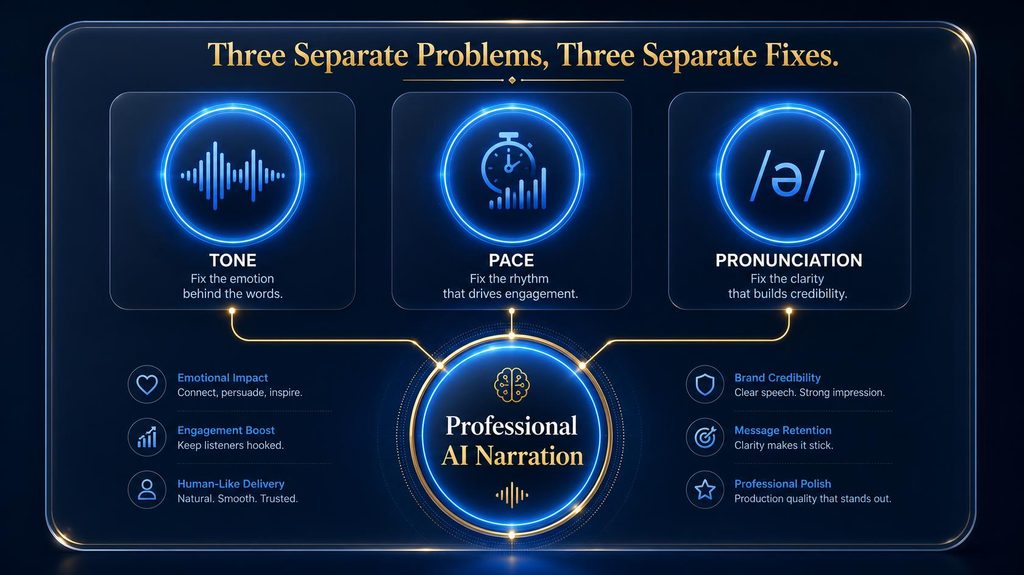
Tone is the emotional and stylistic character of the delivery: whether it sounds warm, authoritative, playful, urgent, or calm. Pace is the speed and rhythm of delivery: how fast words come out, where pauses land, and how sentences breathe. Pronunciation is narrower and more mechanical: whether individual words, names, and numbers are spoken correctly.
A narration can nail two of the three and still fail. A voice with perfect tone and pace that mispronounces your product name repeatedly will undermine trust immediately. A technically accurate narration with flat tone and no pacing variation will bore a listener before the content ever lands. All three need deliberate attention, not just the one that happens to be broken today.
Test Tone Control on Your Own Script
Generate one paragraph in ElevenLabs at default settings, then adjust stability and style to hear how much the delivery changes.
Try Voice Settings in ElevenLabs →Affiliate disclosure: We may earn a commission if you subscribe through this link, at no additional cost to you.
Why Default AI Narration Often Misses the Mark
Most TTS platforms ship with a sensible default configuration built to sound acceptable on generic content. That default is a compromise, not an optimization for your specific script, and understanding why helps explain what to fix.
Default settings are tuned for broad acceptability across millions of unrelated use cases, which means they are rarely tuned for your specific genre, audience, or brand voice. A setting that sounds appropriately neutral for a corporate explainer will sound lifeless for a dramatic story, and a setting tuned for expressive storytelling will sound erratic for a compliance disclosure.
Pronunciation failures happen for a separate reason entirely: the model’s grapheme-to-phoneme conversion is trained on common vocabulary, so anything outside that distribution — brand names, technical jargon, non-English names embedded in English text — gets a best guess rather than a verified pronunciation. No amount of tone or pace tuning fixes a pronunciation problem, because it originates at a completely different stage of the pipeline.
There is also a training-data mismatch specific to pacing: most TTS models learn rhythm from narrated audiobooks, news reading, or conversational speech, none of which necessarily matches the specific cadence a tutorial, advertisement, or dramatic story actually needs. The model is not wrong so much as trained on a different genre than the one you are asking it to perform, which is exactly why manual adjustment closes a gap that better training data alone has not yet fully solved.
Controlling Tone: Voice Selection and Emotional Settings
Tone control starts before you ever touch a slider, at the point where you pick the base voice. Not every voice in a provider’s library supports the same emotional range, and picking a flat, neutral voice as your foundation puts a hard ceiling on how expressive the final narration can ever sound.
Providers increasingly label voices by supported emotional range — friendly, cinematic, informative, playful — and starting with a voice already suited to your genre saves far more tuning effort than trying to force a mismatched voice into the right character through settings alone. A voice built for calm instructional content will resist being pushed into excited, high-energy delivery no matter how aggressively you adjust its parameters.
Once the base voice fits, most modern platforms expose either discrete emotion presets (happy, sad, urgent, inspiring) or continuous sliders that blend expressiveness. The presets are faster and more predictable for creators who are not doing fine technical tuning; the sliders offer more precision for teams willing to test and iterate.
The Sliders Behind the Curtain: Stability, Similarity and Style
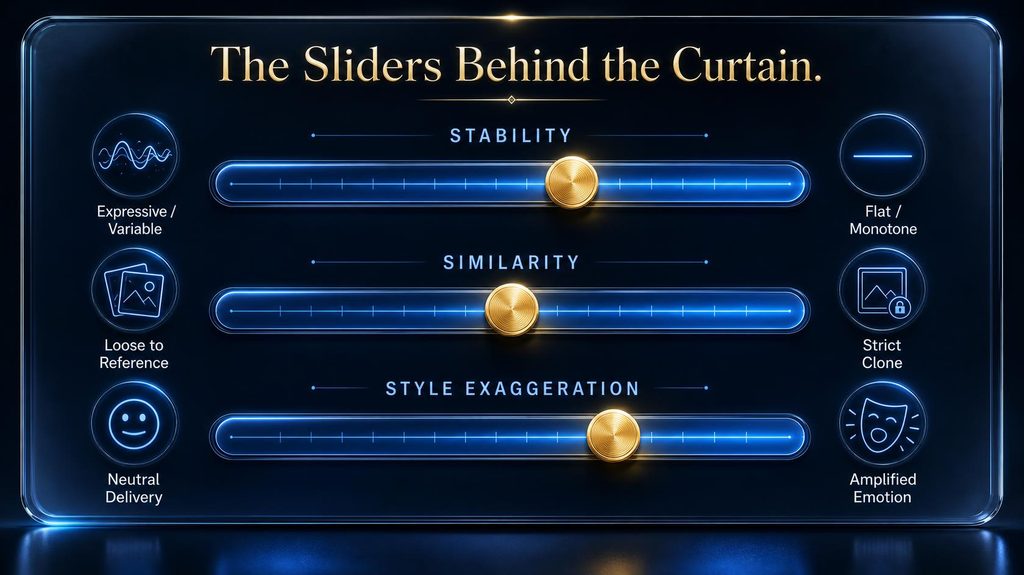
ElevenLabs‘ three core voice settings are worth understanding in detail because most competing platforms expose some version of the same underlying trade-offs, even under different names.
Stability governs how much the voice varies between generations and within a single take. Lower stability produces more performative, expressive delivery with shifting inflection; pushed too low, it risks unpredictable artifacts. Pushed too high, it flattens the voice into a monotone that sounds robotic regardless of how good the base voice is.
Similarity controls how closely the output matches the reference voice’s timbre and character. Higher similarity produces a more faithful reproduction, but that fidelity is not selective — it also faithfully reproduces any noise or inconsistency present in the original reference audio, which matters if you are working from a cloned voice rather than a stock library voice.
Style exaggeration amplifies the speaker’s characteristic vocal quirks and emphasis patterns. It is computationally heavier, can increase generation latency, and is the setting most likely to compound badly when combined carelessly with the other two. High stability paired with high style creates an internal tug-of-war — one setting restraining expression while the other pushes exaggeration — that produces stiff, over-performed output rather than natural delivery.
These three settings interact rather than operate independently, which is why copying someone else’s “perfect settings” from a forum post rarely works identically on your content. The right combination depends on your specific voice, script, and genre, which is why testing on a short clip before committing to a full render matters more than finding a universal formula.
A disciplined way to find your own combination is changing one slider at a time in small increments, generating the same short test line after each change, and keeping a simple log of which value produced which result. This is slower than guessing, but it converges on a working configuration in far fewer total generations than randomly adjusting two or three sliders together and trying to reverse-engineer which change mattered.
Controlling Pace: Speed, Pauses and Rhythm
Pace is not just a single speed dial. Real speech varies rhythm constantly — speeding through familiar information, slowing for emphasis, pausing before a key point lands. Flat, uniform pacing is one of the fastest ways to make a technically correct narration feel synthetic.
Match your baseline pace to content type rather than defaulting to whatever a platform ships with. Fast pacing suits advertisements and hype-driven content where energy matters more than absorption time. Medium pacing suits tutorials and explainers where the listener needs processing time between ideas. Slow, deliberate pacing suits storytelling and dramatic narration where pauses carry emotional weight.
Punctuation is a simple, underused pacing lever. Commas, ellipses, and sentence breaks all signal pause points to most modern TTS engines without any technical markup at all. Rewriting a script’s punctuation to reflect the rhythm you actually want is often more effective than fighting a speed slider after the fact.
SSML: The Technical Layer Behind Precise Control
For creators who need more control than sliders and punctuation provide, Speech Synthesis Markup Language (SSML) is the underlying standard that many TTS engines support, and understanding its core tags gives you a level of precision most casual users never touch.
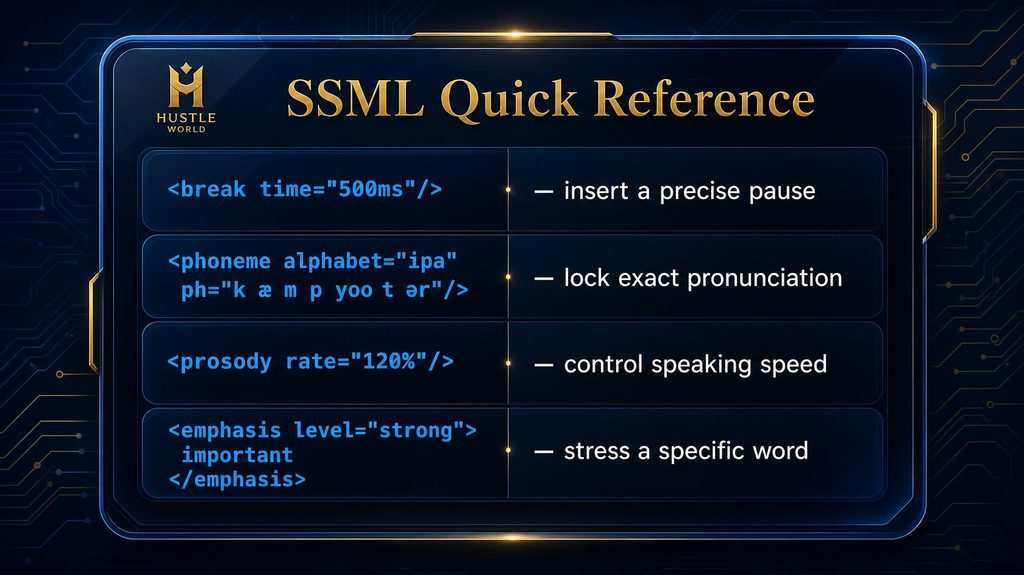
The <break> tag inserts a pause with either an exact duration (time="500ms") or a relative strength (strength="strong") when precise timing does not matter. It is the single most commonly used SSML tag because pacing problems are the most common complaint about default narration.
The <prosody> tag adjusts rate, pitch, and volume together, accepting values like rate="slow" or pitch="+10%", which lets you build dramatic emphasis by combining a slower rate with a lower pitch in a single wrapped phrase rather than fighting global settings for one sentence.
The <emphasis> tag stresses specific words at configurable strength levels (strong, moderate, reduced), which is how you make a single word in a sentence stand out without restructuring the entire phrase. The <say-as> tag controls how structured content like numbers, dates, and abbreviations get interpreted, converting “42” into “forty-second” when interpret-as="ordinal" is specified, which matters enormously for scripts full of statistics or dates.
Two additional tags round out the practical toolkit. The <sub> tag substitutes an alternate pronunciation string for display text, useful for abbreviations you want spoken out in full without changing what appears in the visible script. The <voice> tag, supported on platforms with multi-speaker capability, lets a single script switch between distinct voices mid-document, which matters for dialogue-style content or narrated conversations between two characters.
A combined example shows how these tags stack in practice: wrapping a critical warning in <prosody rate="slow" pitch="-5%"><emphasis level="strong">do not skip this step</emphasis></prosody> slows delivery, lowers pitch slightly for gravity, and stresses the key phrase, all within one wrapped span rather than three separate global adjustments affecting the whole script. The practical guidance from experienced SSML users is to avoid over-nesting more than three or four tag levels deep, always test markup on your specific provider before a full production run since implementations vary, and combine tags strategically rather than wrapping every sentence in multiple overlapping controls.
What Happens If You Skip Tuning Entirely
It is worth being honest about the realistic cost of simply publishing whatever a default generation produces, since not every piece of content justifies the tuning effort described in this guide.
For low-stakes, disposable content — an internal note, a quick social clip that will be replaced next week — default settings are usually fine, and the tuning cost genuinely is not worth paying. For anything published under a brand name, tied to a paid product, or intended to run for months as evergreen content, skipping tuning trades a small upfront time cost for a compounding downstream one: every viewer who hears a mispronounced product name forms an impression, and that impression accumulates across the content’s entire lifetime rather than costing you once.
The realistic middle path most creators land on is applying full tuning discipline to flagship, recurring, or brand-facing content, while accepting default settings for genuinely disposable material where the audience and stakes do not justify the extra step.
Second-Order Effects: How Consistent Narration Builds Trust
Beyond the immediate listening experience, consistent tone, pace, and pronunciation across a content series compounds into something less obvious but arguably more valuable: audience familiarity with a recognizable “sound” for your brand.
Viewers who return to a channel or course episode after episode build an association between that consistent voice and the trustworthiness of the content itself, similar to how a familiar narrator’s voice on a long-running podcast becomes part of the brand identity. Inconsistent tuning — where the voice sounds noticeably different from one episode to the next — quietly undermines that familiarity even when no single episode sounds objectively bad on its own.
This is the strongest practical argument for documenting settings rather than re-tuning from scratch each time: the value is not just saved setup time, it is the audience-facing consistency that only comes from genuinely reusing the same configuration across an entire series.
Fixing Mispronunciation: Custom Pronunciation Dictionaries
Pronunciation is the one problem SSML’s <phoneme> tag and custom pronunciation dictionaries solve permanently, rather than the temporary workaround of regenerating a clip and hoping the model guesses differently.
A pronunciation dictionary is a lookup table mapping specific written terms to their correct spoken form. Instead of relying on the model’s grapheme-to-phoneme guess — which skews toward common vocabulary and struggles with brand names, technical terms, and non-English names — you specify exactly how a term should sound, and that correction applies automatically across every future project using that dictionary.
Real examples make this concrete: a stylized brand name like “NGEN-X” gets mapped to sound like “Engine X,” a name like “Siobhan” gets mapped phonetically to “Shih-vawn,” and a technical term like “kubectl” gets mapped to “cube control.” Once defined, these corrections are permanent and reusable, which matters enormously for anyone publishing a content series where the same problem terms recur episode after episode.
The <phoneme> tag achieves the same result inline using International Phonetic Alphabet notation for one-off cases where building a full dictionary entry is not worth the setup time. It is the most precise tool available for pronunciation accuracy, but it should be reserved for problematic words specifically rather than applied broadly, since manually writing IPA for every word in a script is neither practical nor necessary.
Using Reference Audio to Anchor Tone
Beyond stock voice libraries, many platforms let you anchor tone using a short reference audio clip rather than describing the desired delivery in words. This works especially well when you already have one well-delivered clip and want every subsequent piece of content to match its character exactly.
A clean, well-recorded reference clip of ten to thirty seconds is usually enough to anchor timbre and general delivery style, though it will not fully lock in pacing or emphasis for content the reference clip never actually said. Treat reference audio as a starting anchor for tone specifically, not a substitute for the pacing and pronunciation work covered elsewhere in this guide.
The quality ceiling here is set by the reference recording itself: background noise, inconsistent volume, or an atypical delivery style in the reference clip will carry through into every piece of content generated from it, which is why a rushed or noisy reference recording tends to produce compounding problems rather than a one-time issue.
Building a Pronunciation Style Guide for Your Brand
Individual pronunciation dictionary entries solve one term at a time, but a documented style guide solves the problem at the operational level, especially once more than one person is generating narration for the same brand. A useful style guide tracks four things per term: the written form as it will appear in scripts, the correct phonetic spoken form, the platform-specific implementation (a dictionary entry, an inline phoneme tag, or a respelling trick), and the date it was last verified against the platform’s current behavior, since provider updates occasionally reset or alter pronunciation handling.
Maintaining this as a living document rather than tribal knowledge in one person’s head is what allows a content operation to onboard a new writer or switch TTS providers without re-discovering the same ten mispronunciation problems from scratch. Treat it the same way a style guide handles preferred terminology or brand voice — as a shared reference, not a one-off fix.
A Step-by-Step Workflow: Matching All Three in One Pass
Rather than tuning tone, pace, and pronunciation as three separate, disconnected fights, a sequential workflow catches problems in the right order and avoids wasted regeneration cycles.
Start by auditing the script itself for pronunciation risks before generating anything: flag brand names, technical jargon, numbers, and any non-English names, and build dictionary entries or phoneme overrides for each one in advance. Fixing pronunciation after tone and pace are dialed in means redoing that tuning work if the correction changes timing.
Next, select a base voice matched to genre, then adjust tone settings (stability, similarity, style, or your platform’s equivalent) using a short representative clip rather than the full script, since testing on thirty seconds reveals most tone problems without burning a full render’s worth of credits.
Finally, layer in pacing adjustments — punctuation rewrites, SSML break and prosody tags, or speed settings — and generate the full narration only once tone and pronunciation are both confirmed correct on the test clip. This order prevents the common trap of perfecting pacing on a script that still has pronunciation errors baked into it.
Fix Pace and Pronunciation in One Pass
Apply the workflow above in ElevenLabs with a pronunciation dictionary and pauses, then compare the tuned version with your first draft.
Tune a Narration in ElevenLabs →Affiliate disclosure: We may earn a commission if you subscribe through this link, at no additional cost to you.
A Real-World Walkthrough: Fixing a Problem Narration
Abstract principles land better with a concrete example. Consider a ten-minute product tutorial where the generated narration has three specific problems: the product name is mispronounced every time it appears, the pacing feels rushed through a critical setup step, and the tone sounds identical whether describing a routine step or warning about a common mistake.
The pronunciation fix comes first, as the workflow above recommends: add a dictionary entry mapping the product name to its correct phonetic form, verify it on a short test clip containing just that word, and confirm it sticks before touching anything else. Fixing this first also matters because a corrected pronunciation can shift syllable timing slightly, which affects the pacing work that follows.
Next, the rushed setup section gets addressed with an SSML <prosody rate="slow"> wrap around that specific paragraph rather than slowing the entire narration, preserving normal pace everywhere else while giving the listener more processing time exactly where it is needed. A <break time="400ms"> inserted before the warning about the common mistake creates a natural pause that signals “pay attention here” without any wording change at all.
Finally, the flat tone on the warning gets addressed with a moderate <emphasis> tag on the key warning phrase itself, paired with a slightly lower stability setting applied only to that generation pass. The result is a narration that sounds like it was directed by someone who understood the content’s structure, built from four small, targeted interventions rather than one large, imprecise adjustment to the whole clip.
Common Listener Complaints and What Actually Causes Them
Matching a listener’s vague complaint to its actual technical cause is often the hardest part of troubleshooting narration, since “it sounds weird” describes a dozen different underlying problems.
| Listener Complaint | Likely Cause | Fix |
|---|---|---|
| “Sounds robotic” | Stability set too high | Lower stability moderately |
| “Sounds rushed” | Default pace too fast for content density | Add breaks, slow prosody on dense sections |
| “Keeps saying [name] wrong” | No pronunciation override defined | Add a dictionary entry or phoneme tag |
| “Sounds the same everywhere” | No emotional or pacing variation | Layer emphasis and pacing at key points |
| “Sounds exaggerated or fake” | Style exaggeration set too high | Lower style, especially with low stability |
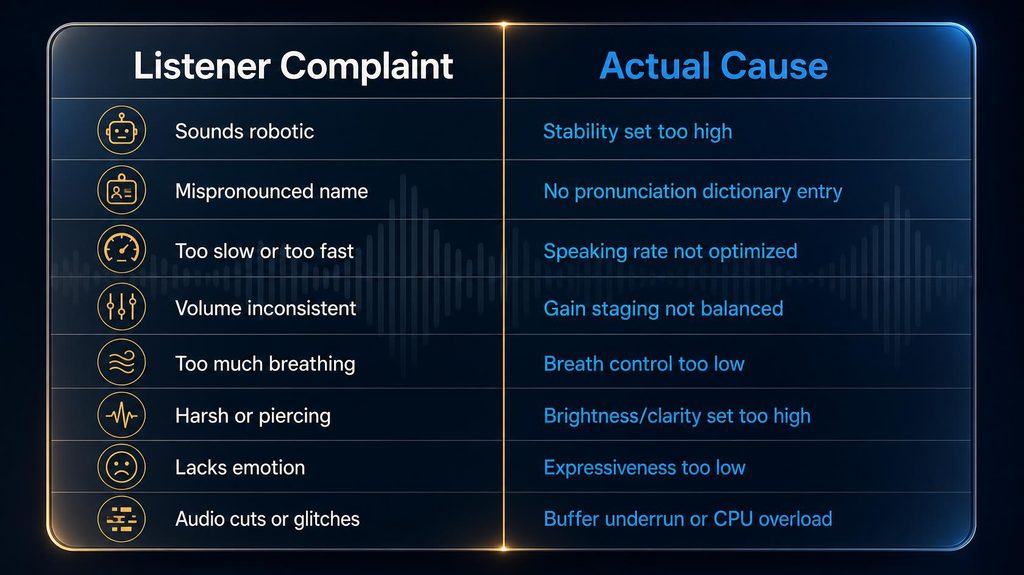
Working from this kind of mapping rather than guessing turns a vague listener complaint into a specific, testable setting change, which is far faster than regenerating an entire clip repeatedly with random adjustments hoping something improves.
Multilingual and Accent Considerations
Everything covered so far gets meaningfully harder once a script mixes languages or needs to serve listeners with different accent expectations, and treating multilingual narration as “the same process in a different language” tends to produce disappointing results.
Pronunciation dictionaries generally need separate entries per language, since a phonetic override tuned for English pronunciation rules will not transfer correctly to a Spanish or French rendering of the same brand name. Pacing norms also shift by language: languages with different average syllable density read naturally at different paces, so a pacing setting tuned for English will often sound unnaturally slow or rushed when applied unchanged to a different language’s narration.
For code-switched scripts — a primarily English script with an embedded non-English name or phrase — testing that specific transition point in isolation matters more than testing the surrounding sentences, since seams between languages are where most multilingual narration problems concentrate.
Layering Emotion Within a Single Narration
Real narrators do not deliver an entire script in one flat emotional register, and neither should AI narration for any content longer than a single sentence. The most natural-sounding AI voiceovers deliberately shift emotional intensity to match the content’s own arc.
A practical technique is starting a section calm and measured, then shifting to more energetic or urgent delivery at the specific moment a key point lands — a statistic, a call to action, a plot turn. Most platforms support this through inline emotion tags such as “[excited]” or “[whispering]” placed at the sentence level, or through generating a script in emotionally distinct segments and stitching them together in post-production.
The failure mode to avoid is overusing emotional shifts until every sentence feels like a dramatic beat, which exhausts listeners faster than flat delivery does. Reserve deliberate emotional shifts for genuine emphasis points, and let transitional or explanatory content sit in a calmer, more neutral register.
Genre-Specific Settings: What Actually Works Where
There is no universal “best” setting combination, because different content genres have fundamentally different tolerance for expressiveness versus predictability.
| Content Type | Stability | Style | Pace |
|---|---|---|---|
| Tutorials / explainers | Mid-high | Low | Medium, clear |
| UGC-style ads | Low-mid | Low-mid | Fast, energetic |
| Brand narration | Mid | Low | Medium, consistent |
| Dramatic storytelling | Low | Mid-high | Slow, variable |
| Accessibility audio | High | Very low | Medium, predictable |
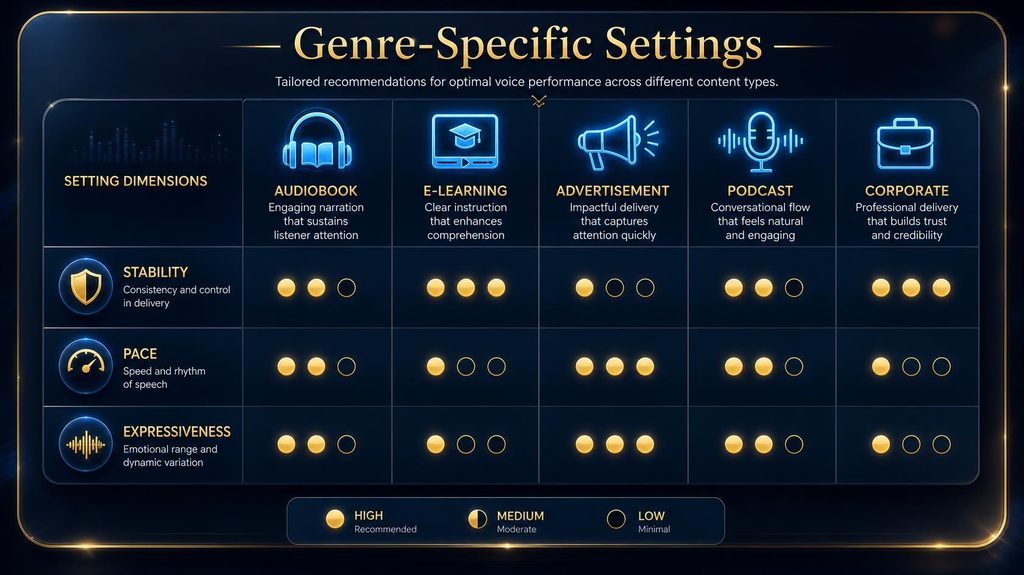
The pattern across this table is not arbitrary: content where predictability and clarity matter most (accessibility, tutorials) pushes toward high stability and low style, while content where emotional range matters most (drama, brand storytelling) tolerates lower stability and higher style. Knowing which category your content falls into before you start tuning saves most of the trial and error.
Content that straddles two categories deserves its own decision rather than an automatic compromise. A tutorial with an embedded emotional testimonial, for instance, often benefits from switching configuration mid-script rather than settling on one blended setting that serves neither section well — treating the testimonial as a short dramatic segment and the surrounding instruction as a standard tutorial segment, generated and stitched separately if your workflow allows it.
Common Mistakes When Tuning AI Narration
Most tuning frustration traces back to a small set of repeated mistakes rather than genuinely difficult technical problems.
The most common is adjusting multiple settings simultaneously after a bad generation, which makes it impossible to tell which change actually fixed or worsened the result. Change one variable at a time and listen before adjusting the next.
A close second is testing settings on a short, easy sentence and assuming they will hold across an entire long-form script; pacing and stability settings that sound fine on one sentence can drift noticeably across ten minutes of continuous narration. The third is fixing a mispronunciation by rewording the sentence around it instead of using a phoneme override or dictionary entry, which works once but does not scale and has to be repeated manually every time the term reappears.
The fourth is over-nesting SSML tags until the markup becomes unreadable and unpredictable across providers, when a simpler combination of two or three tags usually achieves the same practical result with far less maintenance overhead.
A fifth, easy-to-miss mistake is assuming a setting that worked well on one voice will transfer identically to a different voice in the same platform’s library. Stability, style, and similarity all interact with a voice’s own underlying character, so a configuration tuned for one voice can sound noticeably different, sometimes worse, on another voice entirely, even at identical slider values.
Tools That Support Fine-Grained Control
Not every TTS platform exposes the same depth of control, and choosing a tool without checking its tuning capabilities is a common reason creators hit a ceiling on narration quality.
Full SSML support, granular voice sliders, and custom pronunciation dictionaries together represent the deepest level of control currently available, and platforms vary meaningfully in which of these three they support natively versus which require workarounds. Our full ElevenLabs review covers its specific slider behavior and pronunciation dictionary feature in detail, and our ElevenLabs vs. alternatives comparison breaks down which competing platforms match or fall short of that control depth.
For creators building faceless video content specifically, our guide to using ElevenLabs for YouTube and faceless videos walks through applying these tuning principles inside an actual production workflow rather than in isolation.
The Economics of Getting Narration Right the First Time
Tuning time feels like overhead until it is measured against the alternative cost of not tuning, which is regeneration cycles, re-editing published content, and in the worst cases, a visible embarrassment tied to a brand name.
A single generation on most platforms costs a small, predictable amount of characters or credits. A poorly tuned narration that gets regenerated five or six times before landing acceptably has quietly burned five or six times the credits of a properly planned first pass, without necessarily producing a better result than deliberate tuning would have on the first attempt.
The larger cost sits downstream of generation entirely. Content published with a mispronounced brand name that has to be pulled, corrected, and re-published carries a real reputational cost beyond the wasted production time, particularly for content tied to a paid product or service where accuracy signals credibility. Weighing fifteen minutes of upfront pronunciation dictionary setup against the cost of a public correction makes the upfront investment look inexpensive by comparison.
A simple way to track this over time is logging, per project, how many regeneration passes a narration required before final approval. A pattern of high regeneration counts on similar content usually points to a settings or workflow problem worth fixing once, rather than a series of unrelated bad luck generations.
How to Test Settings Without Wasting Credits
Most platforms charge per character or per minute generated, which means testing an entire ten-minute script every time you adjust a slider is an expensive way to iterate toward the right configuration.
Build a short test script — three to five sentences — that deliberately includes a proper noun, a number, a moment that calls for emphasis, and a pause point. This compact script exercises all three variables covered in this guide at once, so a single short generation reveals tone, pace, and pronunciation problems together rather than requiring separate tests for each.
Once a configuration passes on the test script, generate one representative section of the real content — not the whole piece — before committing to a full render. Long-form pacing and stability drift, covered earlier as a source of common mistakes, only shows up over several minutes of continuous narration, so a middle section of genuine length is a better final check than another short test clip.
Document whatever configuration passes both tests immediately, including the exact slider values or SSML pattern used, so the next piece of similar content starts from a known-good baseline instead of repeating the same testing cycle from zero.
Why Some Creators Still Hire Human Narrators
Everything in this guide assumes AI narration is the right choice, and for the large majority of content volume published today, it is. But it is worth naming honestly where a human narrator still outperforms even carefully tuned AI settings.
Genuine improvisational delivery — a narrator adjusting emphasis in real time based on how a live audience or director reacts — is not something current AI tuning replicates, since every AI adjustment happens before generation rather than in response to a live reaction. Flagship, brand-defining content where a recognizable human voice carries commercial or emotional weight on its own also typically justifies the cost of professional narration regardless of how good AI tuning has become.
For the much larger volume of supporting content, tutorials, course material, and routine video narration, the tuning techniques in this guide close most of the practical gap, which is exactly why AI narration has become the default for high-volume content while human narration remains reserved for the pieces where it earns its higher cost.
Why Manual QA Still Matters
Even a perfectly tuned voice configuration will occasionally produce a bad take, and skipping a listen-through before publishing is one of the most expensive mistakes a growing content operation can make.
The cost asymmetry is stark: a five-minute listen-through catches a mispronounced brand name or an oddly paced sentence before it reaches an audience, while the same error discovered after publishing means re-editing, re-uploading, and in some cases explaining an embarrassing mistake to viewers who already noticed it. For any content published under a brand name, that five-minute check is cheap insurance against a much larger cost.
Automated tools can catch some of this — running the generated audio back through a speech-to-text system and diffing it against the original script surfaces obvious word-level errors without a human listening to every second. What automated checks cannot catch is whether the tone actually fits the content’s intent or whether pacing feels natural to a human ear, which is exactly the gap a short manual listen-through is meant to close. Treat automated transcription checks and manual listening as complementary rather than substitutes for one another.
Building a lightweight QA step into your workflow — even something as simple as listening to the first and last thirty seconds plus any section containing a proper noun or number — catches the majority of narration errors without requiring a full re-listen of every long-form piece you publish.
Measuring Success: What “Good” Narration Actually Sounds Like
Without a concrete definition of success, tuning becomes an endless, subjective loop of “does this sound better.” A simple three-part check turns that subjective judgment into something repeatable.
First, does the tone match the content’s actual purpose, not just sound pleasant in isolation — a warm, friendly voice is wrong for a serious compliance disclosure even if it sounds nice on its own. Second, does the pace let a first-time listener absorb the content without straining to keep up or getting bored waiting for the next idea. Third, does every proper noun, number, and technical term get pronounced correctly on a full listen-through, not just a spot check of the sentences you remember writing.
Tracking these three questions consistently across a content series, rather than re-litigating “does this sound right” from scratch every time, is what lets a team scale narration quality without scaling the time spent second-guessing every clip.
Who Should Invest in Fine-Tuning vs. Use Defaults
Deep SSML markup, custom pronunciation dictionaries, and careful slider tuning are not free — they cost setup time that has to be worth it for your specific content volume and stakes.
A creator publishing occasional, low-stakes content can reasonably rely on sensible defaults and a quick listen-through, since the time investment in deep tuning would exceed the value of marginal quality improvement. A brand publishing a recurring content series, a course, or anything tied to commercial trust should invest in dictionary entries and documented settings early, because the setup cost gets paid back across every future piece of content that reuses the same brand names and terminology.
The break-even point tends to arrive faster than expected: once the same three or four proper nouns or technical terms have caused pronunciation problems twice, building a permanent dictionary entry almost always costs less time than continuing to catch and manually fix the same error repeatedly.
A useful rule of thumb for deciding how much setup effort a given piece of content deserves is estimating how many times its script’s vocabulary will realistically recur across future content. A one-off video script rarely justifies a full style guide entry; a recurring product name that will appear in every episode of an ongoing series almost always does, often within the very first two or three episodes.
What’s Next: Toward Automatic Prosody Matching
The current state of tone, pace, and pronunciation control still requires deliberate manual tuning, but the trajectory is toward models that infer appropriate delivery directly from context rather than requiring explicit markup for every adjustment.
Expect continued improvement in models that read surrounding sentence structure and punctuation to infer natural emphasis and pacing without SSML markup, reducing but not eliminating the need for manual tuning on high-stakes content. Pronunciation dictionaries are also likely to become more portable and shareable across platforms, reducing the setup cost every time a creator switches TTS providers.
Until that shift fully arrives, the manual techniques covered in this guide remain the most reliable way to close the gap between generic default output and narration that actually sounds intentional, and the underlying skills — diagnosing which of the three variables is actually broken, testing changes methodically, and documenting what works — will still transfer even as the specific tools and interfaces around them keep evolving.
Final Thoughts
Tone, pace, and pronunciation are three separate problems wearing one complaint: “this AI voice sounds off.” Treating them as distinct, diagnosable variables rather than one vague quality issue is what turns narration tuning from a frustrating guessing game into a repeatable process.
Start with the base voice and genre-appropriate settings, fix pronunciation permanently through dictionaries rather than temporarily through rewording, layer pacing through punctuation and SSML rather than a single speed dial, and always listen through the full result before publishing. That sequence, applied consistently, closes most of the gap between narration that sounds generated and narration that sounds intentional.
Decide Whether Fine-Tuning Is Worth Your Time
Use ElevenLabs on a recurring series for a week and check whether tuned settings cut retakes enough to justify the extra setup.
Start Tuning With ElevenLabs →Affiliate disclosure: We may earn a commission if you subscribe through this link, at no additional cost to you.
Frequently Asked Questions
What is the fastest way to fix a mispronounced brand name in AI narration?
Create a custom pronunciation dictionary entry mapping the written name to its correct spoken form, or use an inline SSML phoneme tag for a one-off case. Both apply the fix permanently rather than requiring you to reword the sentence every time the name appears.
Why does the same voice sound different across different clips?
Lower stability settings intentionally introduce more performative variation between generations. If you need consistent delivery across a series, raise stability and document your exact settings so future clips match.
What is SSML and do I need to learn it?
SSML (Speech Synthesis Markup Language) is a markup standard for controlling pauses, emphasis, rate, and pronunciation in text-to-speech. Casual creators can rely on sliders and punctuation; anyone needing precise, repeatable control over specific words or phrases benefits from learning its core tags.
How do I make an AI voice sound less monotone?
Lower the stability setting slightly to introduce natural variation, vary sentence-level pacing through punctuation, and consider layering emotional shifts at key emphasis points rather than delivering the entire script in one flat register.
Can I control pacing without using technical markup?
Yes. Punctuation choices — commas, ellipses, sentence length — signal pause points to most modern TTS engines without any SSML at all. Rewriting a script’s punctuation is often more effective than adjusting a global speed setting.
Should I use the same voice settings for every type of content?
No. Tutorials, advertisements, storytelling, and accessibility content each tolerate different levels of expressiveness and predictability. Match your settings to content genre rather than reusing one configuration everywhere.
How much does high stability affect voice expressiveness?
Significantly. Pushed too high, stability flattens delivery into a monotone regardless of how expressive the base voice is capable of being. Most genres benefit from a mid-range setting rather than either extreme.
Is it worth building a pronunciation dictionary for a single video?
Usually not, unless the video is high-stakes or the term is likely to recur. Dictionaries pay off fastest for recurring brand names, technical terms, or a content series where the same vocabulary appears repeatedly across episodes.
What is the most common mistake people make when tuning AI voice settings?
Changing multiple settings at once after a disappointing result, which makes it impossible to identify which adjustment actually caused the improvement or the new problem. Change one variable at a time.
Do all TTS platforms support SSML and pronunciation dictionaries the same way?
No. Support varies significantly by provider, and some implementations differ even when both claim SSML compatibility. Always test your specific markup on your specific provider before committing to a full production run.
Related Guides
- ElevenLabs Voice Cloning Explained: How It Works & What You Need to Know
- Best AI Voice Cloning Tools in 2026: Compared for Realism, Licensing and Control
- 7 Best AI Video Tools for a Phone-Only Faceless YouTube Channel (2026)
Written by
Muntasir Ahmad Chowdhury
Founder, AI Hustle World
Muntasir Ahmad Chowdhury is the Founder of AI Hustle World, an independent publication dedicated to making Artificial Intelligence practical, trustworthy, and easy to understand. He researches AI tools, automation, customer service, productivity, and real-world business applications, helping readers make smarter technology decisions through research-driven, experience-backed content.
Expertise:
AI Tools • AI Automation • AI Customer Service • AI Productivity • Generative AI • AI Workflows
Get Smarter With AI
Enjoyed this guide? Get practical AI tools, tutorials, and honest reviews delivered to your inbox.
4 thoughts on “How to Match Voice Tone, Pace and Pronunciation in AI Narration”