Best AI Audio Editors for Podcasts, Voiceovers and Content Creators
A podcaster who’d spent years moving from Audacity to Audition to Descript, and had become a genuine Descript loyalist, sat down to edit a multi-voice mini-series and reached for something else entirely: Hindenburg Journalist Pro. Not because Descript stopped working. Because a different kind of show exposed a gap Descript’s transcript-based workflow doesn’t fill as well as a purpose-built multitrack tool does.
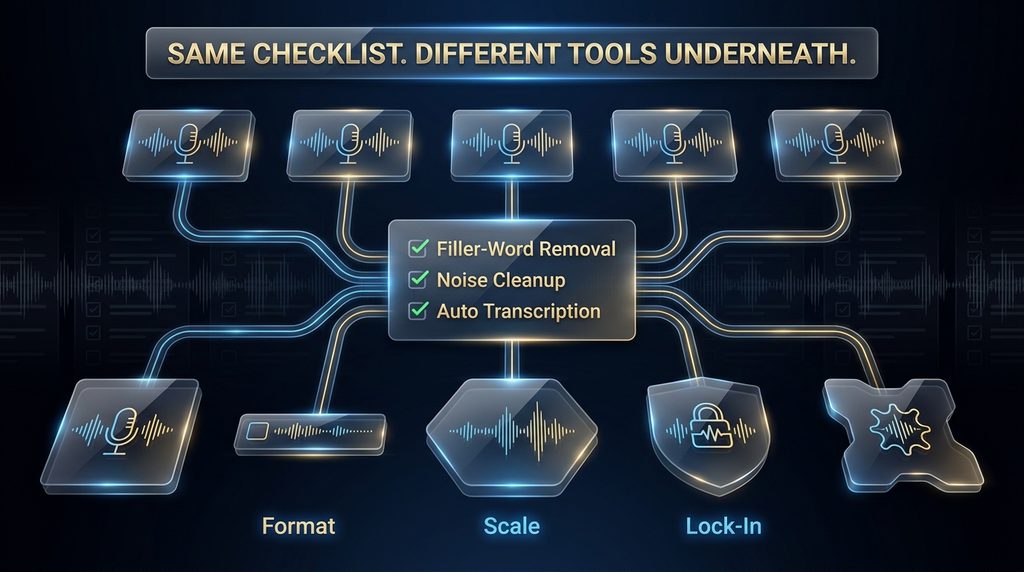
That’s the real story this comparison keeps running into. Every AI audio editor on the market advertises roughly the same checklist — filler-word removal, noise cleanup, automatic transcription. The checklist doesn’t tell you which tool survives contact with your actual show.
This guide compares the current field of AI-powered audio editors on the conditions that actually separate them: what format of show you’re producing, whether you’re working solo or with a team, and how much you’re locking yourself into a specific platform’s ecosystem. Nine platforms are covered here, spanning transcript-first editors, remote-recording specialists, post-production-only layers, and classic multitrack DAWs with AI bolted on — deliberately more ground than most comparisons in this space cover, because the right answer changes completely depending on which of those categories your actual production falls into.
Disclosure: this article may contain affiliate links. If you sign up through one, AI Hustle World may earn a commission at no extra cost to you. Every recommendation here is based on documented features, real user reviews, and named producer testimony — never on which program pays the most.
What This Article Covers
This piece compares full editing platforms — the software creators actually use to assemble, clean up, and finish an episode or recording — on workflow, collaboration, learning curve, and platform lock-in.
It does not re-litigate which tool cleans noise best; our guide to cleaning background noise with AI and its Noise Triage framework already cover that comparison. It also isn’t the podcast-workflow guide’s step-by-step pipeline; this article evaluates editing platforms against each other as products, not as one stage in a larger process.
How Podcast Editing Got This Automated
Ten years ago, editing a podcast meant learning an actual digital audio workstation — understanding tracks, gain staging, crossfades — well enough not to introduce more problems than you solved. That skill floor was a real barrier, and it’s a big part of why so many shows historically either sounded rough or never got past a handful of episodes.
Transcript-based editing, pioneered commercially by Descript, changed the interaction model entirely: instead of manipulating a waveform, you delete a sentence and the audio disappears with it. That’s a genuinely different mental model, not just a faster version of the old one, and it’s why Descript’s learning curve for basic edits is so much shallower than a traditional DAW’s.
Purpose-built spoken-word tools like Hindenburg took a different path: keep the multitrack waveform model traditional producers already understood, but automate the tedious parts — leveling, gain-matching between speakers — that used to eat the most time. Neither approach is strictly newer or better; they’re different bets on which part of the old workflow was actually the bottleneck.
Why Every Tool’s Feature List Looks the Same
Open the marketing page for almost any AI audio editor released in the last two years and you’ll find the identical trio: automatic transcription, one-click filler-word removal, and AI-powered noise cleanup. That convergence is real — these features have become table stakes, not a differentiator, the same way our voice cloning comparison found realism had converged across the top cloning tools.
What the checklist doesn’t show is what happens once your show doesn’t match the demo reel. A clean, single-speaker interview is what every vendor demo uses, because it’s the easiest case for any of these tools to handle well. A multi-voice produced show, a long-form video podcast, a spotty-internet remote guest, or a two-person editing team all stress a different part of the platform, and that’s exactly where real differences between these tools show up.
The AI Hustle World Editor Fit Test
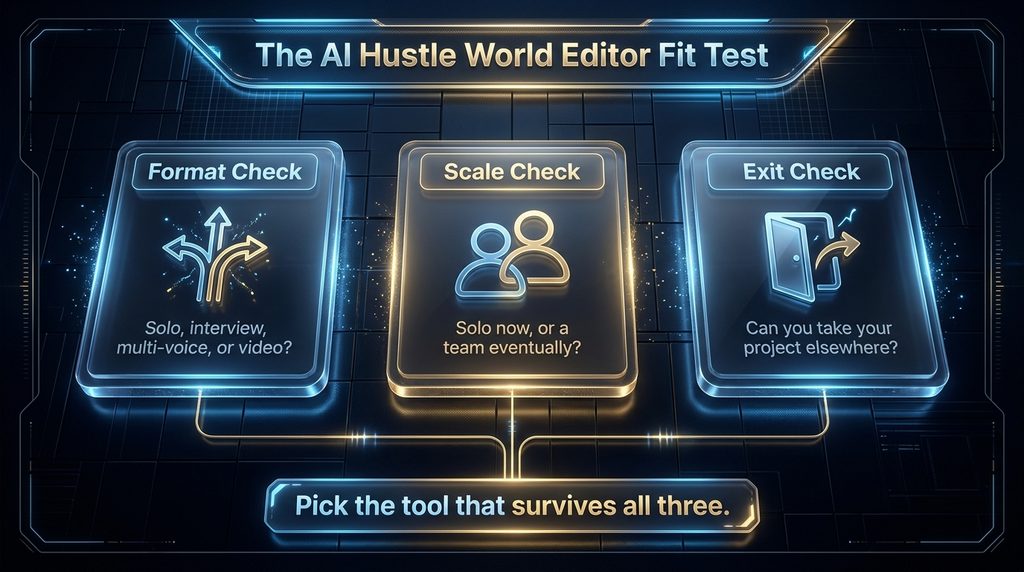
Before choosing a platform from the comparison below, run your actual production through three checks. We call this the Editor Fit Test, and it’s built specifically to catch what a feature checklist can’t.
The Format Check: is your show a solo monologue, a single-guest interview, a multi-voice produced piece with recurring segments, or video content? Tools built around transcript-based editing shine on the first two and can feel like the wrong tool entirely for the third.
The Scale Check: are you editing alone, or will a second person eventually need to comment, suggest changes, or edit alongside you? Real-time collaboration is a genuine strength in some tools and simply absent in others, and it matters far more once a second person is involved than it does for a solo creator.
The Exit Check: if you needed to leave this platform in a year, could you take your project with you cleanly? Some tools export to standard, portable formats; others keep your edit history and structure locked inside a proprietary project file that doesn’t transfer easily to a different editor or a professional you might hire later.
| Check | Question | If it fails |
| Format | Solo, interview, multi-voice, or video? | The tool fights your format instead of fitting it |
| Scale | Solo now, or a team eventually? | Collaboration becomes a bottleneck once a second person joins |
| Exit | Can you take your project elsewhere? | You’re locked into a platform that stops fitting your needs |
The Editors, Compared
A note on how this comparison was built: pricing and feature detail come from vendor documentation, and the real-world assessments below draw on named producer testimony, independent reviews, and actual user discussion — not from us editing episodes on every platform ourselves. Treat every price as a snapshot worth reconfirming before you subscribe.
Descript is the category leader by mention volume, built around a genuinely different editing model: you edit the transcript, and the audio or video follows. Free plan available; Creator runs roughly $12/month, Pro roughly $24/month on annual billing.
Its standout features are Overdub, which uses a trained voice clone to fix a flubbed word by typing a replacement, and Studio Sound, its noise-and-room cleanup pass. A “remove retakes” feature catches duplicate takes automatically, and the 3.x series added nondestructive editing plus a plugin manager for bolting on extra AI features.
For teams specifically, real-time collaboration means multiple people can comment, suggest edits, and work on the same project simultaneously rather than passing files back and forth by email — a workflow improvement that matters more the moment a second editor or producer enters the picture, echoing the Scale Check this guide builds around. Descript also leans hardest into repurposing of any tool in this comparison: the same project that produces a finished episode can generate social clips and a rough draft of show notes without leaving the app, which matters for solo creators trying to get more than one piece of content out of a single recording session.
It’s strongest for solo creators and interview shows that want to skip timeline editing entirely, and for teams, since real-time commenting and simultaneous editing are genuine strengths. It’s weaker on multi-speaker or overlapping dialogue, where transcription accuracy drops, and several real user reports describe reliability issues on long-form video specifically — covered in more detail in the honest reality check later in this guide.
Descript’s pricing has also grown more complicated as the feature set expanded: AI-credit-based add-ons for Overdub and Studio Sound sit on top of the base subscription tiers, which means a heavy user of those specific features can end up paying meaningfully more than the advertised $12-24/month range suggests once real usage is factored in.
Riverside.fm pairs cloud-first remote recording with AI editing: free plan available, Pro roughly $24/month annually. Each guest records locally, which keeps quality high even over a poor connection, and the platform adds AI noise removal, filler-word deletion, transcript-based editing, speaker labeling, and scene detection for video.
That local-recording architecture is Riverside’s real differentiator, not the AI editing layer on top of it — any of the transcript-based editors in this comparison can clean up and edit a recording, but only a handful solve the underlying problem of a remote guest’s unstable internet connection wrecking the source audio in the first place. Real user feedback flags a few recurring frustrations: pricing has shifted more than once, AI credits can run out faster than expected on transcription-heavy workflows, render times slow down on longer episodes, and the mobile app is noticeably thinner than the desktop experience.
Adobe Podcast centers on Enhance Speech, marketed under the name “Magic Dust AI” for its one-click cleanup of bad-room recordings. Free tier covers 1 hour/day at a 500MB file limit; Storyteller runs $11.99/month, Pro $23.99/month, with annual billing saving up to 40 percent.
It also offers voice-cloning-based phrase regeneration to fix a missed word without re-recording. Real, G2-sourced criticism notes the generated voice output can sound synthetic next to ElevenLabs specifically, and the overall editor feels less polished than Descript — fair points for a tool whose real strength is the free cleanup pass, not the full editing experience.
That distinction matters for how to actually use Adobe Podcast well: treat it as the free first-pass cleanup step in a pipeline that finishes somewhere else, the way our noise cleanup and podcast workflow guides both frame it, rather than expecting it to replace a dedicated editor on its own.
Cleanvoice AI is a post-production layer rather than a recorder or full editor: you drop in a file recorded elsewhere (Audacity, Reaper, Audition) and it strips filler words, mouth clicks, stutters, and long silences automatically. Pricing runs from about €10/month for 10 hours up to €80-85/month for 100 hours.
Auphonic takes a similar post-production-layer approach but focuses specifically on audio: automated, single-pass adaptive leveling, noise reduction, and loudness normalization. It’s the tool one direct comparison recommends specifically over Descript when your workflow is audio-only rather than video-and-audio.
Podcastle offers browser-based recording plus AI cleanup and filler-word removal, with a free plan and paid tiers roughly $14.99-23.99/month annually — a reasonable middle ground between Riverside’s remote-recording focus and Descript’s editing-first approach.
Gling is a newer, less-established entrant focused specifically on automatically removing pauses, silences, and filler words, with a free tier (1 hour/month) and paid plans from roughly $10-40/month. Worth watching rather than betting a production workflow on yet, given its shorter track record next to the tools above.
Hindenburg (Journalist and Journalist Pro) takes the most different approach in this entire comparison: a multitrack waveform DAW purpose-built for spoken-word and field-audio production, with automated leveling baked in rather than built around transcript editing at all. Its most distinctive feature, per real producer testimony, is a “Clipboard” panel for managing recurring structural elements — intros, outros, recurring segments — across a multi-voice production.
The tool has a longer institutional history than most names in this comparison, having been built specifically for radio journalists and field-audio work rather than emerging from the recent wave of AI-first creator tools — which shows up in its interface philosophy as much as its feature set: fewer automated shortcuts, more direct manual control over exactly what gets cut and how tracks are arranged. Classic DAWs with AI features layered on — Adobe Audition, Reaper, and Audacity (extensible via third-party AI plugins) — round out the field for creators who want full manual control and don’t mind a steeper learning curve than any of the AI-first tools above require.
Worth noting across the post-production-layer tools specifically (Cleanvoice, Auphonic): none of them record audio or offer a real editing timeline at all — they’re a processing step you run a finished recording through, which makes them cheap and fast to add to an existing workflow but useless on their own if you haven’t recorded anything yet. Pair one with whatever you already use to record, not instead of it.
The Honest Reality Check: What Happens When the Demo Ends
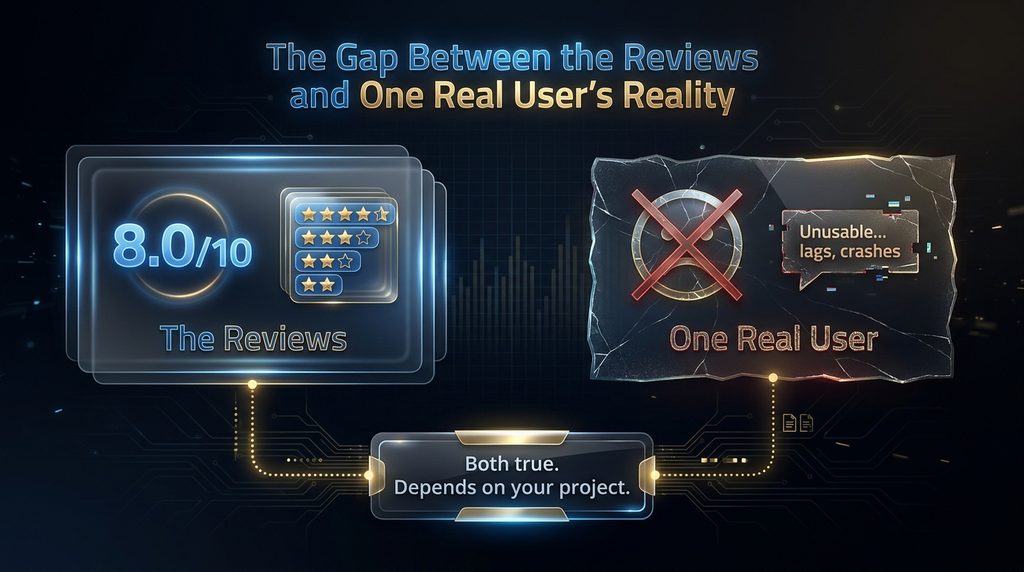
Descript’s praise online is loud and mostly deserved — a 30-day hands-on review scored it 8.0 out of 10, and G2 reviewers report real productivity gains. But a Reddit r/podcasting thread titled “Descript is unusable” is worth reading in full before you commit a production workflow to any single tool based on marketing alone.
Its author, paying $40 a month, described the app lagging and crashing specifically on long-form video, so much AI feature bloat that it started working against itself, contacting support every other week, and openly questioning whether the tool saved any time at all once a project ran long.
That’s not a reason to avoid Descript — it’s a reason to test any tool on your actual longest, messiest project before assuming a glowing review or a slick demo predicts your experience. The gap between a tool’s best-case reviews and one paying user’s worst-case reality is exactly what the Format Check in this guide’s Fit Test exists to catch.
A separate, more measured Substack review of Descript adds specific texture to the same pattern: transcription struggles with accents and specific names, the AI doesn’t adapt to a given user’s voice or preferences over time the way some users expect, features lean heavily on a stable internet connection, there’s no mobile app for on-the-go fixes, and customer support response times are frequently reported as slow. None of these are dealbreakers on their own — together, they’re a realistic picture of a genuinely good tool that still has real edges.
It’s worth being explicit about what this reality check is and isn’t saying. It isn’t evidence that Descript is a bad product — the 8.0/10 hands-on review, the G2 rating, and the sheer volume of creators building their workflow around it all say otherwise. It’s evidence that even a genuinely strong, category-defining tool has real failure modes that only show up under specific conditions, which is exactly why the Format Check exists rather than a simple popularity ranking.
What This Actually Costs
Subscription pricing across the platforms in this comparison runs roughly $10-40 a month, with professional surgical tools like iZotope RX (covered in our noise cleanup guide) sitting well above that range for specialized repair work. Against that, our noise cleanup guide already established outsourced podcast editing at $50-200 per episode for basic cleanup, up to $200-400 for full-service editing, with a $199 average for a professionally edited hour-long episode — the same baseline applies here, since noise cleanup was always one line item inside that broader editing scope.
The AI podcast editing software market itself is projected at roughly $5.36 billion in 2026, growing at about 32 percent annually — a fast-scaling category, consistent with the pattern across cleanup, music, and voice tools: AI absorbed a cost line item rather than eliminating professional editing outright.
Put concretely: a weekly show paying $150 per episode for full editing spends roughly $600 a month on that single line item. A $24/month platform subscription doesn’t just undercut that on price — it removes the multi-day turnaround of sending a file out and waiting, which matters as much as the dollar figure for a show publishing on a fixed schedule.
Real-World Examples: Where Format Actually Changes the Answer
The Hindenburg migration story that opened this guide is worth returning to directly: a committed Descript user didn’t abandon Descript generally, they reached for a different tool specifically because a multi-voice mini-series needed something transcript-editing wasn’t built around. Producer Chhavi Sachdev of Sonologue put a finer point on why: Hindenburg’s Clipboard panel, which manages recurring structural elements like intros, outros, and recurring segments, is “a godsend for producing features and multiple voice podcasts” — a specific, verifiable feature endorsement rather than generic praise, and exactly the kind of format-specific advantage a checklist comparison misses.
A B2B finance-podcast-focused comparison makes the opposite kind of case: for a firm publishing a podcast under its own name, the editing platform choice is treated as an operational and brand-risk decision, not just a convenience one, since the audio represents the firm’s credibility rather than just its content calendar. That’s a genuinely different weighting of the same tools than a solo creator would apply.
A fourth example worth naming is the negative case: the Reddit user paying $40 a month for Descript specifically on long-form video work is a real account of a format (video, not audio-only) and a scale (heavy, sustained use) where the tool’s own feature richness became a liability rather than an asset — exactly the kind of mismatch the Format Check exists to catch before it costs you a deadline.
Common Mistakes to Avoid
Picking a tool from its AI-feature checklist without testing export flexibility is the most common mistake — Descript’s project format and Riverside’s cloud-based workflow both create a real switching cost if you later want to move to a different tool or hand files to a professional editor. Underestimating the learning curve on a tool marketed as simple is a close second: several reviews note that basic editing in these tools is genuinely easy, but deeper features like Overdub or advanced audio manipulation still take real time to learn well.
Expecting one all-in-one platform to cover the entire production chain is a third — recording, cleanup, editing, voice generation, clips, and show notes are separate jobs, and the strongest real-world setups tend to pair one core platform with one specialist tool rather than asking a single app to do everything. Ignoring collaboration features because you’re currently solo is a fourth — real-time commenting and simultaneous editing matter far more the moment a second editor or producer joins, and retrofitting that need onto a tool that never supported it well is a painful, avoidable migration.
Assuming transcript-based editing works equally well on multi-speaker or heavily-accented audio is a fifth — several independent sources flag this as a recurring weak point across transcript-based editors generally, not a flaw unique to one product. Judging a tool only by its easiest episode is a sixth: the Reddit thread covered earlier specifically describes problems that only appeared on long-form video projects, which never would have shown up in a quick trial on a short, simple audio-only episode.
Forgetting that pricing tiers gate features differently across tools is a seventh: Descript’s AI-credit system, Cleanvoice’s hourly tiers, and Riverside’s shifting plan structure all mean the advertised entry price rarely reflects what a heavy real-world user actually pays month to month.
Who Should Use Which Editor
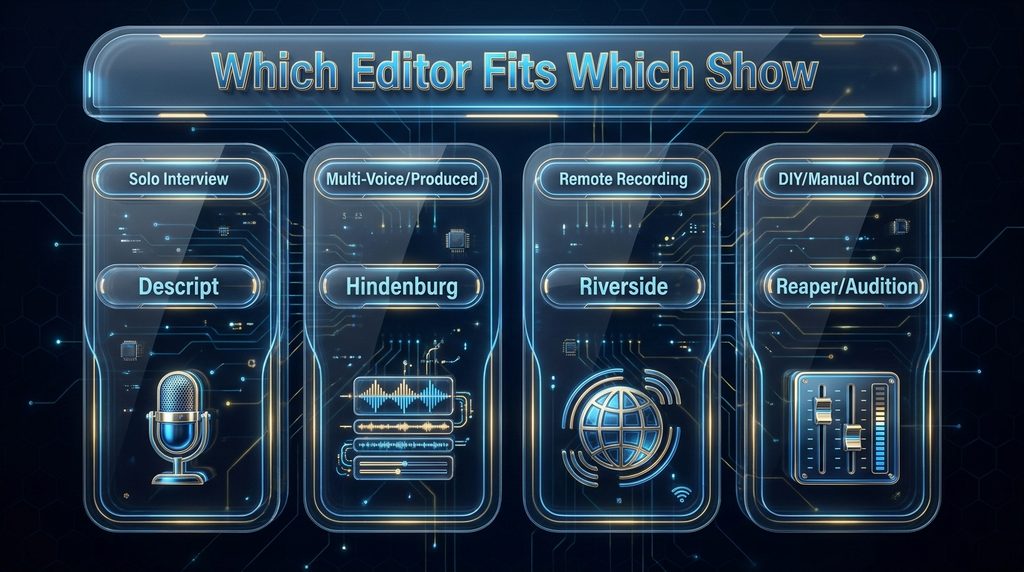
If you’re a solo creator running a single-guest interview show and want the lowest learning curve, Descript’s transcript-based editing is still the strongest starting point, provided you test it on your actual longest episode before committing. If you’re producing a multi-voice, segment-heavy show — recurring intros, outros, multiple recorded voices — Hindenburg’s Clipboard-centered workflow is worth serious consideration even though it has a steeper learning curve than the transcript-editing tools.
If your priority is remote recording quality with guests on unreliable connections, Riverside’s local-recording-per-guest architecture solves a problem none of the post-production-only tools even attempt to address. If you already record elsewhere and just want the cleanup pass automated, Cleanvoice or Auphonic are better fits than a full editing suite you’d only use for one feature.
If you’re scaling from a solo operation to a small team, weight the Scale Check heavily — Descript’s real-time collaboration is a genuine advantage here that several of the single-user-focused tools in this comparison don’t offer at all. If your show represents a brand or a regulated business rather than a personal project, treat the decision the way the B2B finance-podcast comparison does: audio quality and consistency are a credibility question, not just a convenience one, which may justify a higher-tier plan or professional oversight regardless of which tool you pick.
If you’re not sure which category you fall into yet, start with whichever tool has the shortest commitment — most of the platforms compared here offer a free tier or a short trial specifically so you can run the Format Check on your own material before paying for a year upfront.
Why Some Producers Still Use Classic DAWs
None of this makes Reaper, Audition, or plain Audacity obsolete, and the reason connects directly to the Format and Exit checks above. A classic multitrack DAW gives a producer complete manual control over every edit decision, with no AI model making an automated judgment call about what counts as a filler word or a retake worth removing.
That control matters most exactly where the stakes are highest — a documentary-style production with dozens of tracks, a legally sensitive interview where an automated cut could change meaning, or a producer whose entire value is a specific, idiosyncratic editing style no automated tool replicates. The realistic pattern mirrors the pattern in music, narration, and podcast production generally: AI-first tools absorb the high-volume, straightforward editing work, while producers who need full manual control, or whose show doesn’t fit any AI tool’s sweet spot, keep reaching for the DAWs that give them that control.
There’s also a simpler, less romantic reason some producers stay on classic tools: muscle memory. Someone who has spent a decade inside Reaper’s keyboard shortcuts and routing has real, transferable expertise that doesn’t carry over to a transcript-based tool’s very different interaction model, and relearning an entire workflow has a real cost even when the new tool is objectively faster for someone starting fresh.
What Still Goes Wrong
Transcription accuracy drops on multi-speaker, overlapping, or heavily-accented audio across every transcript-based editor in this comparison, not just one — a structural limitation of the underlying approach, not a bug in any single product. AI feature bloat is a real, reported failure mode on the platform with the most AI features layered in: more automated capability doesn’t always mean a smoother experience, and the Reddit thread covered earlier is a specific, credible example of that trade-off going wrong on a real paying user’s longest projects.
Rendering and export times scale worse than expected on longer projects across several tools in this comparison, not just one — a pattern serious enough that it’s worth explicitly testing your typical episode length, not a five-minute sample, before trusting a platform with a real production schedule. Platform lock-in is easy to underestimate until you actually need to leave — a proprietary project format that doesn’t export cleanly can turn a routine tool switch into a full re-edit from raw audio.
What Happens If You Pick the Wrong Tool
Picking a tool that doesn’t match your format doesn’t usually show up immediately — it shows up three months in, when a multi-voice special episode takes twice as long as a normal one because you’re fighting a transcript-editing workflow that was never built for it. The compounding version of that mistake is worse: a team that outgrows a solo-focused tool without switching loses real time to workarounds — emailing files back and forth, manually merging feedback — that a tool with real collaboration features would have handled natively from day one.
How to Know If It’s Actually Working
Track total editing time per episode over your first month on a new tool, not just your impression from the first easy episode — the real test is what happens on your hardest, longest, or most complex piece, not your simplest one. Run your own accent, your own overlapping-dialogue moments, and your own multi-voice structure through a trial before committing annually — vendor demos are chosen specifically to avoid exactly these edge cases.
If you’re on a team, track how often work gets duplicated or lost between editors as a direct signal of whether the platform’s collaboration features are actually solving the Scale Check or just papering over it. Revisit the Exit Check periodically, not just before you sign up: export a real project partway through your subscription and confirm it still opens cleanly elsewhere, since a platform update can change file compatibility without much warning, and the worst time to discover a lock-in problem is during an actual deadline.
Keep a short log of every tool switch you make and why, if you end up making more than one — over a year, that log becomes the clearest evidence of whether your production setup is genuinely stable or quietly churning through tools without ever fixing the underlying Format or Scale mismatch actually causing the switching.
What’s Next
The clearest trend to watch is platforms racing to add each other’s strengths: transcript-editing tools are adding better remote-recording support, and remote-recording-first tools are adding deeper transcript-based editing, which should narrow some of the format-specific gaps this guide describes over time. Watch specifically for consolidation between the recording-first and editing-first camps: a platform that solves both Riverside’s remote-recording-quality problem and Descript’s transcript-editing convenience in one product would eliminate a real portion of the Format Check this guide describes, and several of the platforms compared here are visibly moving in that direction already.
A second-order effect worth watching is on freelance audio editors specifically — the same pattern seen in noise cleanup, music, and podcast production: editors who differentiate on judgment, structural sense, and handling exactly the multi-voice or brand-critical work AI tools still struggle with are likely to hold their value better than editors competing purely on doing the mechanical cleanup pass faster. A third is the AI feature bloat problem itself potentially becoming a genuine differentiator: as more platforms pile on features the way the Reddit thread described, expect at least one competitor to market itself specifically on doing fewer things reliably rather than everything adequately.
A fourth, quieter effect is on listener expectations broadly: as automated cleanup and leveling become the default rather than the exception, the baseline for “acceptable” audio quality keeps rising industry-wide, which makes a genuinely rough, unedited recording stand out as a negative signal far more than it would have a few years ago.
Final Thoughts
The Hindenburg migration story that opened this guide isn’t really about Hindenburg beating Descript, or vice versa. It’s about a producer who’d built real expertise on one tool recognizing, for one specific project, that the format in front of them needed something different — and being willing to switch rather than force the wrong tool to work.
That’s the actual decision this guide is built to support. Every platform compared here does the checklist well enough. The Editor Fit Test — format, scale, exit — is what tells you which one survives contact with the show you’re actually making, not the one in the demo reel.
The Reddit thread, the Clipboard endorsement, and the finance-podcast comparison all point at the same underlying truth from three different directions: there is no single best AI audio editor, only the one that fits the specific show, team size, and stakes you’re actually working with.
Editing Is Only One Piece of the Pipeline
See how cleanup, narration, music and editing all fit into the same production loop — and which stages actually need a human checkpoint before you publish.
See the Full Podcast Production Loop →Frequently Asked Questions
What is the best AI audio editor for podcasters in 2026? It depends on your format: Descript is the strongest starting point for solo interview shows, Riverside for remote recording with unreliable guest connections, and Hindenburg for multi-voice, segment-heavy productions — there isn’t one universal answer across all three, which is the entire point of running the Fit Test before choosing. Is Descript actually as good as its reviews suggest?
Largely yes for its core use case, but not universally — a 30-day hands-on review scored it 8.0/10, while a real Reddit thread from a paying user described crashes and AI feature bloat specifically on long-form video projects. Test it on your hardest project, not your easiest, before committing to an annual plan.
What’s the difference between Descript and Auphonic?
Descript is a full editing suite built around transcript-based editing for audio and video; Auphonic is a focused, audio-only automated post-production layer for leveling and cleanup. One direct comparison recommends Auphonic specifically when your workflow doesn’t involve video.
Why would anyone use Hindenburg instead of an AI-first tool like Descript? Hindenburg’s multitrack, waveform-based approach and its Clipboard feature for managing recurring segments make it a stronger fit for multi-voice, structured productions than transcript-based editors, which are built more around single-speaker or interview content. How much does AI podcast editing software cost?
Most platforms in this comparison run $10-40 a month, against $50-400 per episode to outsource editing professionally — with a $199 average for a fully edited hour-long episode, per our noise cleanup guide. Can AI audio editors handle multiple speakers well? Less reliably than single-speaker content — transcription accuracy drops on overlapping dialogue and multiple simultaneous speakers across transcript-based editors generally, which is part of why purpose-built multitrack tools like Hindenburg remain popular for multi-voice shows.
What should I check before committing to an AI editing platform? Run the Editor Fit Test: confirm the tool matches your actual format (not the demo’s), check whether its collaboration features fit your team size now and later, and verify you can export your work in a format that isn’t locked to that one platform. Do AI audio editors replace professional audio editors?
They absorb the routine, mechanical editing work more than replacing professional judgment — editors who handle multi-voice structure, brand-critical work, and the edge cases AI tools still struggle with are likely to keep their value, the same pattern seen across music and podcast production. Is it worth paying for a higher tier if I’m a brand or business podcast?
Often yes — a B2B-focused comparison treats editing-platform choice as a brand-credibility and operational decision for firms, not just a convenience one, which can justify a higher tier or added human oversight even when a cheaper plan covers the basic feature set. What’s the biggest risk in choosing an AI audio editor?
Platform lock-in you don’t notice until you need to leave — a proprietary project format that doesn’t export cleanly can turn a routine switch into a full re-edit from raw audio, which is exactly what the Exit Check in this guide’s Fit Test is meant to catch before you commit.AI SEO : What It Is, How It Works, and How Search Is ChangingComplete Guide to Retrieval-Augmented Generation (RAG)
Sources and Further Reading
- ITU-R BS.1770: The international standard algorithm for measuring programme loudness.
- EBU R 128: Loudness normalisation and permitted maximum level of audio signals: European Broadcasting Union recommendation on loudness.
Related Guides
- Repurpose Podcasts Into Short-Form Content With AI
- Best AI Voice Generators in 2026
- ElevenLabs vs Alternatives: Which AI Voice Tool Is Best for You?
Written by
Muntasir Ahmad Chowdhury
Founder, AI Hustle World
Muntasir Ahmad Chowdhury is the Founder of AI Hustle World, an independent publication dedicated to making Artificial Intelligence practical, trustworthy, and easy to understand. He researches AI tools, automation, customer service, productivity, and real-world business applications, helping readers make smarter technology decisions through research-driven, experience-backed content.
Expertise:
AI Tools • AI Automation • AI Customer Service • AI Productivity • Generative AI • AI Workflows
Get Smarter With AI
Enjoyed this guide? Get practical AI tools, tutorials, and honest reviews delivered to your inbox.
9 thoughts on “Best AI Audio Editors for Podcasts, Voiceovers and Content Creators”