How to Create an AI-Assisted Podcast Workflow from Script to Publish
Katie Harbath, who writes the Anchor Change newsletter, used to pay $100 an episode for editing on her podcast. That’s not a huge sum, but it’s real money to spend out of pocket on a show, every single episode, before anything else gets paid for.
She still believes in hiring professionals when you can — she’s said as much about the editor who helped shape an earlier season. But she needed a way to keep publishing without that recurring cost, so she built her own AI-assisted pipeline: Riverside for recording, ChatGPT for interview questions and outlines, Canva for show notes, transcripts and social clips.
That’s the real version of what this guide covers — not a single tool, but a full pipeline stitched together from several, and the judgment calls about where a human still needs to step in.
What This Article Covers
To be specific about scope: this piece covers the end-to-end sequence of producing a podcast episode with AI assistance — scripting, recording or voice generation, cleanup, music, transcription and show notes, and publishing — plus an honest look at whether this actually saves time.
It does not re-explain how text-to-speech, noise cleanup, or music generation work mechanically — our dedicated guides on each already do that, and this guide links to them at the relevant stage. It also doesn’t rank specific tools; for rankings, see our best AI audio editors comparison.
It also covers two mechanisms that our other audio guides don’t cover: how AI actually drafts a script or outline, and how transcription and clip-generation tools turn a finished recording into show notes, social clips, and repurposed content — not just that these things are possible, but roughly how the underlying models do it.
The AI Hustle World Podcast Production Loop
Every AI-assisted podcast pipeline, no matter which specific tools you use, moves through the same six stages. We call this the Production Loop, and the useful part isn’t the stage list — it’s knowing which stages need a human checkpoint and which don’t.
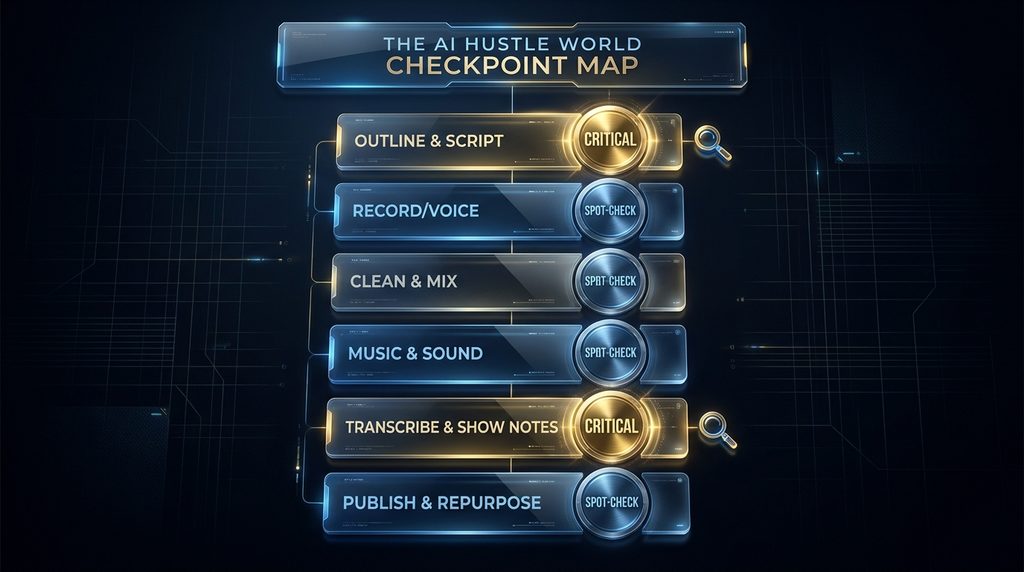
A checkpoint here means a deliberate human review before moving to the next stage, not just letting the AI output pass through untouched. Skipping a checkpoint that matters is where the time AI supposedly saves you gets spent right back, later, in the form of a fix, a re-record, or a published mistake.
| Stage | AI Role | Checkpoint |
| 1. Outline & Script | Draft outline, questions, angle | Critical |
| 2. Record or Generate Voice | TTS narration or cleaned recording | Critical |
| 3. Clean & Mix | Noise cleanup, leveling | Spot-check |
| 4. Music & Sound Design | Intro/outro generation | Spot-check |
| 5. Transcribe & Show Notes | Draft transcript, notes, title | Critical |
| 6. Publish & Repurpose | Auto-generate clips, posts | Spot-check |
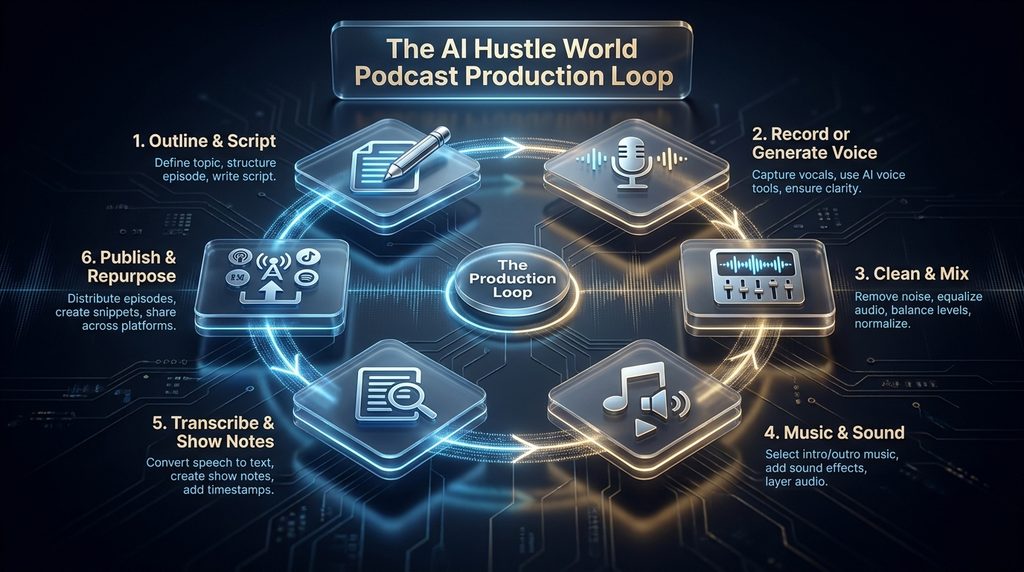
Two stages are marked Critical rather than Spot-check for a specific reason: they’re the two places where AI’s default output is most likely to sound generic rather than like your show — the angle of your episode, and the words a potential listener sees before they ever press play.
How Podcast Production Got This Fast
For most of podcasting’s history, producing an episode meant learning actual audio-editing software, understanding levels and EQ well enough not to ruin a recording, and either building or renting something resembling a home studio. That skill floor is a big part of why so many podcasts historically stalled after a handful of episodes.
The tools covered in this guide didn’t remove any single step so much as they collapsed the skill requirement at every step — cleanup that used to require knowing what a noise gate was now runs from a single upload, show notes that used to mean transcribing by hand now draft themselves from audio in minutes. That’s a genuinely different situation from five years ago, and it’s worth naming plainly: the six-stage Loop in this guide was not really optional or manual-only before AI tools existed — it’s the same production reality podcasters always faced, just with most of the technical skill floor removed from each step.
Stage 1: Outline & Script
Manual pre-production for a 30-minute conversational episode typically runs 2 to 4 hours — researching the topic, structuring segments, drafting guest questions that don’t dead-end in a yes or no. This is the stage AI outlining tools compress the most, and the stage most workflow guides oversell the most.
A workable prompt structure, adapted from how real solo-podcast pipelines are actually built: describe your topic and audience, then ask for a cold-open hook, four to six segments each with two or three specific questions, and one contrarian angle most episodes on the topic miss. That last part is what keeps the output from sounding like every other AI-drafted outline on the same subject.
The difference shows up immediately in practice. A generic prompt — “write me a podcast outline about productivity” — produces a generic outline any productivity podcast could have used. Adding the specific ask for a contrarian angle and audience forces the model to commit to a point of view instead of a topic summary, which is closer to what actually makes an episode worth finishing.
This is a Critical checkpoint because a script or outline that sounds fine in isolation can still miss what actually makes your specific show worth listening to. Read it out loud before you record from it — not just silently — since AI-drafted text sometimes reads fine on a page and lands awkwardly spoken.
Worth naming plainly: an outlining tool isn’t doing anything conceptually different from the token-by-token prediction described in our text-to-speech and music generation guides — it’s predicting likely next words given your prompt and everything generated so far. The reason a specific, detailed prompt beats a vague one isn’t a trick; it’s that a richer prompt narrows what “likely” even means, the same way a more specific reference melody narrows what a music generator produces.
Stage 2: Record or Generate the Voice
This is where the pipeline splits depending on your format: a solo or interview show typically records real human voices, while a narration-style show might generate the voice track directly. Either path runs through mechanism already covered elsewhere on this site — the text-to-speech guide for generated narration, the voice tone and pacing guide for controlling how a generated voice actually delivers a line.
If you’re recording real voices, tools like Riverside handle the capture in a way that’s already easier to clean up later, since consistent input quality reduces how much correction the next stage has to do.
This is a Critical checkpoint for the same reason narration tone matters throughout AI narration: a technically clean voice track that delivers your script in the wrong tone or pace undermines the episode as much as a noisy recording would. Listen to at least the opening minute before moving on, not just the transcript.
Consistency across episodes matters more here than a single good take: a recurring guest segment or a generated co-host voice needs to sound like the same presence week to week, which means locking in voice settings once you’re happy with them rather than re-tuning from scratch every episode and introducing small, cumulative inconsistencies a regular listener will notice even if they can’t name them.
Stage 3: Clean & Mix
Noise cleanup and level-matching happen here, and our noise cleanup guide covers the actual mechanism — source separation, the Noise Triage framework, which tool fits which noise type. What’s specific to a full pipeline is level consistency: a recorded interview segment, a generated narration segment, and generated intro music can all come out at different loudness levels since they were never actually captured together.
This is a Spot-check rather than Critical stage because the failure mode is usually audible immediately — a jarring volume jump between segments — rather than subtle, so a single listen-through at real volume catches most problems here.
Stage 4: Music & Sound Design
Intro and outro music, and any transition stings, get generated or selected at this stage. Our music generation guide covers the mechanism and includes an original framework — the Music Readiness Test — for judging whether a generated track is actually ready to use.
Run any generated music through that test before locking it into your episode template: does it hold together structurally, and do you actually know the tool’s licensing and litigation status. A podcast intro gets reused every single episode, which means a rights problem here isn’t a one-time mistake — it’s baked into your entire back catalog.
Stage 5: Transcribe, Show Notes & Metadata
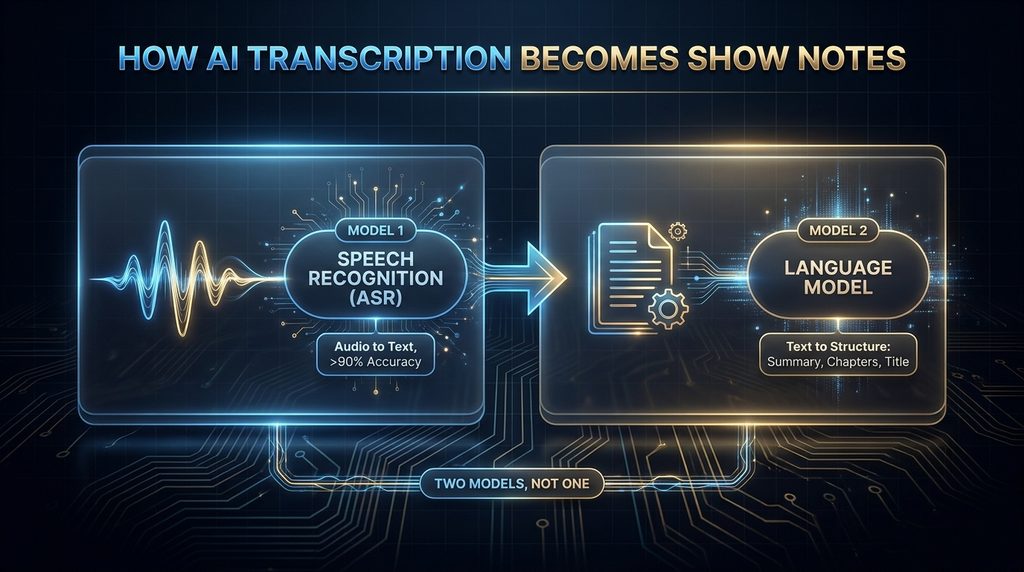
This is new territory, and it’s actually two separate models working in sequence, not one. The first is automatic speech recognition — a model trained specifically to convert audio into text — which by 2026 generally holds above 90 percent accuracy and turns a full episode into a transcript in a few minutes rather than the hours manual transcription used to take.
The second is a language model reading that finished transcript the way it would read any other document, and generating a summary, chapter markers, timestamps and a title from it. That second step is the same prediction mechanism behind the scriptwriting stage, just running on your own words instead of a topic prompt — which is exactly why its output tends to be accurate but generic: it’s summarizing what you said, not what makes your show distinct.
The draft is usually competent and generic at the same time — accurate, but not written the way you’d actually describe your own episode to a friend. This is the second Critical checkpoint in the Loop: show notes and a title are frequently the only thing a potential listener sees before deciding whether to press play, and a generic AI draft is a worse first impression than a rougher, more specific one you wrote yourself.
A quick note on how this section was researched: the specific tools and time estimates above come from published workflow guides and creator accounts, not from running episodes through these tools ourselves. Hands-on comparison of specific transcription or show-notes tools is beyond the scope of this guide.
Stage 6: Publish & Repurpose
Publishing distributes the episode itself — audio, transcript and show notes together, ideally, rather than days apart, which matters more than it sounds like it should for early momentum on a new episode. Clip-generation tools like OpusClip work on a genuinely more involved mechanism than “find the good part”: they combine visual analysis, audio processing and sentiment analysis of the transcript to score potential clips for “virality” based on signals like complete self-contained thoughts, stories with a clear beginning and end, and how similar past clips with those traits have performed.
Once a moment is selected, a second layer of automation handles the technical conversion — reframing horizontal footage into vertical video, active-speaker detection to keep whoever’s talking centered in frame, and automatic captions. According to the vendor, that combination turns an hour-long episode into multiple clips in minutes, against a 24-to-48-hour turnaround for manually reviewing and cutting the same footage by hand, and OpusClip alone reports serving more than 300,000 creators, agencies and marketers at pricing starting around $15 a month.
The same repurposing logic extends past clips: one industry toolkit built around this stage claims a single transcript can become upward of ten distinct marketing assets — newsletters, social threads, articles, short-form scripts — in minutes rather than the hours it would take to draft each one separately, turning a single recording into a full week of content rather than one episode. This is a Spot-check stage rather than Critical: an awkwardly-cut clip is embarrassing but rarely damaging the way a bad episode angle or misleading show notes would be, so a quick review of clip selections before they post is usually enough.
Does AI Actually Save Time?
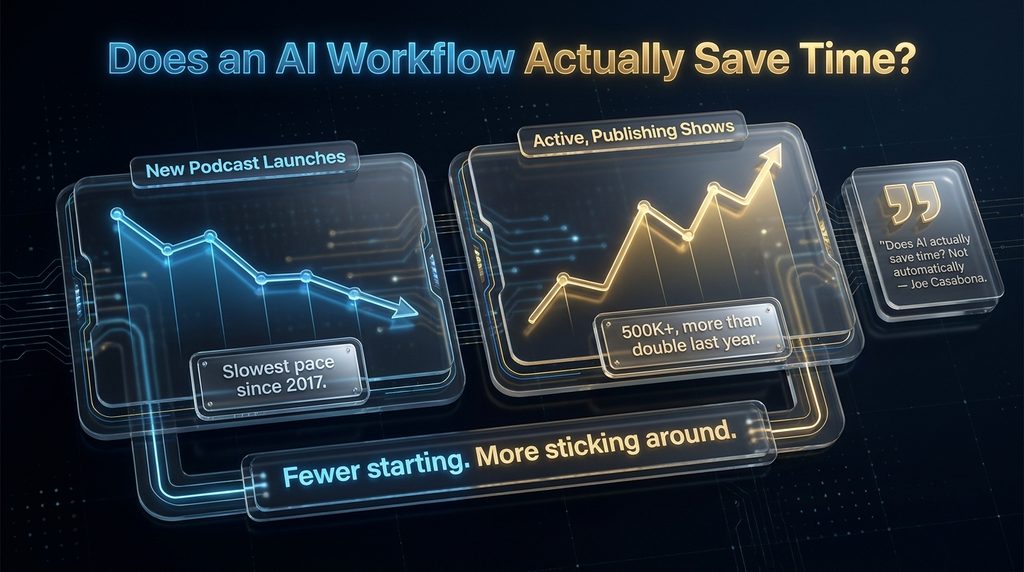
Every vendor page answers this question the same way, and it’s worth taking seriously that not everyone in the podcasting world agrees. Podcasting-productivity coach Joe Casabona has publicly questioned the assumption, pointing to The Podcast Host’s 2025 Independent Podcaster Report, which found roughly 30 percent of podcasters still feel time-starved and worried about burnout despite widespread AI tool adoption.
That’s not an argument against using these tools — it’s evidence that the tools alone don’t solve the problem. A pipeline with six stages and no clear sense of which checkpoints matter can easily turn into six new places to second-guess yourself, which costs time rather than saving it.
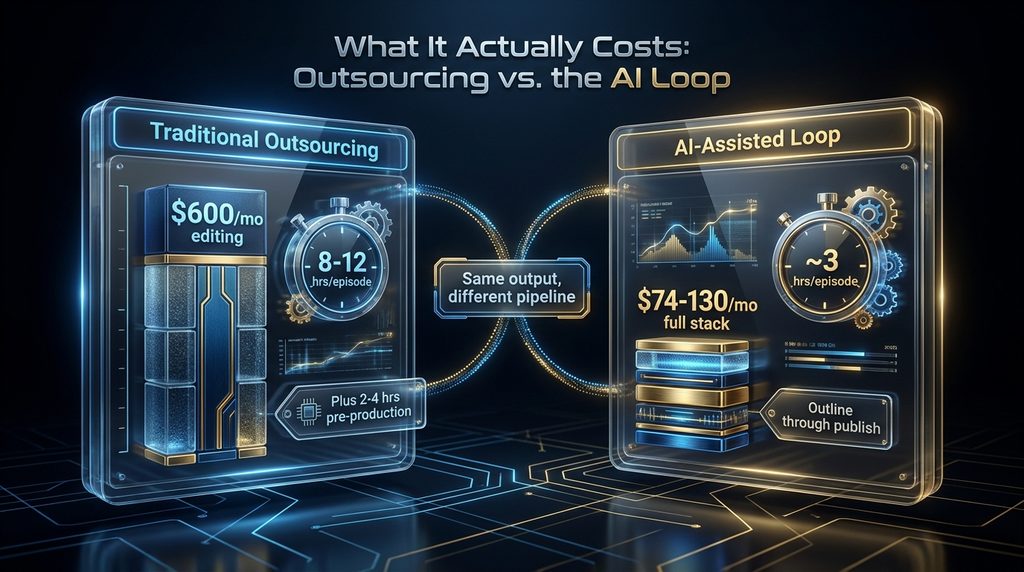
The honest version of the time-savings claim is conditional: a well-designed pipeline with clear checkpoints, like the version in this guide, can plausibly take total production from something like 8-12 hours down to roughly 3, per real workflow benchmarks. A pipeline assembled without that structure can easily cost more time than doing it the old way, just spread across more tools.
Who it saves time for also matters: a creator who already knows their format well, and mainly needs the mechanical stages sped up, benefits fastest. A creator still figuring out what their show is even about gets less from a faster pipeline, since Stage 1’s checkpoint — does this actually sound like your show — is exactly the part no tool can answer for someone who hasn’t answered it themselves yet.
What This Actually Costs
A full AI-assisted stack — recording, outlining, cleanup, voice, show notes and clip generation across several tools — typically runs $74 to $130 a month, according to published pipeline breakdowns, with the higher end covering AI voice generation and automated clip creation. Against that, our noise cleanup guide already established that outsourcing just the editing portion of a podcast runs $50-200 per episode for basic cleanup, up to $200-400 for full-service editing, with a $199 average for a professionally edited hour-long episode — and that’s before paying separately for pre-production research, which manually runs 2-4 hours per episode on top.
The comparison that actually matters for a solo creator isn’t tool cost versus editor cost in isolation — it’s total cost (money plus your own time) against how many episodes you can realistically sustain. A cheaper pipeline that takes so long you quit at episode 6 costs more than a slightly pricier one you actually keep running past episode 7.
In concrete terms: a weekly show outsourcing just editing at $150/episode spends roughly $600 a month on that one stage alone, before pre-production time. A $100-130/month AI stack covering outlining, cleanup, voice and clips isn’t just cheaper on paper — it also removes the multi-day back-and-forth of sending a file to an editor and waiting, which matters as much as the dollar figure for anyone publishing on a fixed schedule.
The repurposing stage changes that math again: if a single recording reliably becomes an episode plus several clips plus show notes plus a handful of social posts, the effective cost per piece of finished content drops well below the per-episode number, even though the pipeline’s monthly subscription cost hasn’t changed at all.
What Still Goes Wrong
Level inconsistency between separately generated or recorded segments is the most common technical problem — a human voice, a TTS narration segment and generated intro music were never captured together, so nothing guarantees they match without an explicit mixing pass. Tone mismatch is a subtler version of the same issue: an AI-drafted script read by a human in a different register than it was written for, or a fully generated narration segment that doesn’t match the conversational tone of an otherwise human-recorded interview, creates a seam listeners notice even if they can’t name why.
Full automation with no human checkpoint at all is the extreme failure mode, and it’s not hypothetical. A July 2026 report from Quill Podcasting described a Los Angeles podcast studio that has published more than 200,000 episodes hosted by over 100 entirely AI-generated personalities — in some weeks accounting for roughly 1 percent of every podcast published on the internet, at about a dollar per episode.
That scale illustrates exactly what the Critical checkpoints in the Loop exist to prevent at a normal, one-show level: when nobody checks an episode’s actual angle or reviews what an AI-generated host says before it publishes, the volume of content goes up while there’s no longer anyone positioned to catch a bad take, an error, or a moment that just doesn’t represent what a real host would actually say. Generic show notes and titles are a quieter failure — technically accurate, structurally correct, and still worse than what you’d write yourself, because they read like a summary of the episode rather than a reason to listen to it.
Metadata drift is a subtler fifth problem specific to multi-tool pipelines: episode numbering, category tags, and cover art can fall out of sync when show notes come from one tool and publishing happens through another, especially once a few episodes have been produced by whoever was available that week rather than by one consistent process.
Common Mistakes to Avoid
Treating the AI-drafted script as final without reading it aloud is the most common mistake, and it’s usually the Stage 1 checkpoint that would have caught it — text that scans fine silently can land badly spoken. Skipping the level-consistency pass because each individual segment sounds fine in isolation is a close second; the problem only becomes obvious when segments are played back to back, which is exactly the condition your finished episode will actually be heard in.
Publishing AI-drafted show notes verbatim is a third — accurate and generic is a worse first impression on a potential new listener than rougher and specific. Reusing a generated intro track across an entire back catalog without running it through the Music Readiness Test first is a fourth — a rights problem in a one-time intro becomes a rights problem in every episode that uses it.
Running every stage through the same single tool because it’s convenient, rather than because it’s actually good at that stage, is a fifth — an all-in-one platform can be a fine starting point, but defaulting to it for every stage without checking whether a dedicated tool would produce a better outline, cleanup, or clip is optimizing for convenience over quality.
Repurposing a mediocre episode into ten pieces of content is a sixth, and it’s easy to miss because it feels productive: turning one weak episode into ten weak social posts multiplies the problem the Stage 1 checkpoint was supposed to catch, rather than fixing it. Repurposing works on an episode that already earned its angle — it doesn’t create one.
Who Should Use This Pipeline — and Who Shouldn’t
This pipeline is a strong fit for solo creators and small teams who are currently either not publishing consistently because production takes too long, or paying per-episode for editing they’d rather handle themselves with the right structure in place. It’s a weaker fit for shows built specifically around a distinctive, idiosyncratic production style — unusual pacing, a specific sound design identity, deliberately unconventional structure — where the Loop’s efficiency comes partly from following a fairly standard shape that a more experimental show might not want.
There’s a middle case worth naming: shows that have outgrown solo production but aren’t ready for a full team. For them, the Loop works best as a division of labor rather than a full replacement — AI handling the stages marked Spot-check in the framework above, a part-time editor or the creator’s own remaining time going specifically to the two Critical checkpoints.
Brands and businesses running a podcast as a marketing channel rather than a personality-driven show sit somewhere between these cases: the Critical checkpoints still matter, but they’re often best owned by whoever manages the brand’s voice generally, rather than a single host, since the same generic-vs-distinctive judgment call applies to a company’s tone as much as an individual’s.
Why Some Shows Still Do This Manually
As more shows adopt roughly the same AI-assisted pipeline, a real risk emerges that’s separate from any single technical failure: structural sameness. If enough podcasts use similar outlining prompts, similar cleanup tools and similar intro-music generators, episodes across completely different shows can start to feel structurally interchangeable even when the content differs.
Shows that lean hardest into a distinctive voice or format — the ones whose whole appeal is not sounding like anything else — have a real reason to keep more of the process manual, the same way some musicians keep composing by hand rather than leaning on generation tools covered in our music generation guide. Efficiency and distinctiveness aren’t always the same goal.
The Los Angeles studio publishing 200,000-plus AI-hosted episodes is the sameness argument taken to its logical end: enormous volume, minimal cost, and a roster of personalities built specifically to be produced at scale rather than to sound like one particular, irreplaceable person. That’s a legitimate business model for certain content categories, and a real cautionary example for any show whose actual value is a specific human’s judgment and voice.
This isn’t an argument against the Loop for most creators — it’s a reason to treat Stage 1’s checkpoint as more than a formality if standing out is specifically your show’s value proposition. A distinctive angle, once it exists, survives being paired with an efficient pipeline for everything after it.
What Happens If You Skip This
Doing nothing here doesn’t mean staying neutral — it means continuing to spend 8-12 hours per episode, or $200-400 outsourcing it, while a structured alternative exists that published workflow breakdowns put closer to 3 hours and under $130 a month.
The more direct cost is the one the “quits after 7 episodes” pattern points at: most new podcasts don’t fail because nobody wants to listen, they fail because production time burns out the person making them before an audience has a chance to build. A pipeline that gets you to episode 20 beats a perfect pipeline you abandon at episode 5.
For a business or brand running a podcast as one channel among several, the cost of ignoring this isn’t creator burnout so much as opportunity cost: a single recording that could become an episode, a transcript, show notes, and ten repurposed content pieces instead just becomes an episode, while a competitor running the same interview through a full pipeline gets a week of content out of the same hour of work.
How to Know If It’s Actually Working
Track total time per episode, not just recording time — outline through publish, including every checkpoint. If that number isn’t meaningfully below what it took you before adopting a pipeline, something upstream is being redone, not saved.
Track checkpoint outcomes specifically: how often does the Stage 1 script get substantially rewritten, how often does Stage 5’s show notes draft get replaced rather than lightly edited. A high rewrite rate at a specific stage tells you exactly where your prompt or tool choice needs to change, rather than a vague sense that “AI isn’t helping.”
And watch listener-facing signals, not just your own time savings — completion rate and early drop-off are the actual test of whether the checkpoints you’re running (or skipping) are landing the way you think they are.
What’s Next
The clearest platform trend is consolidation: YouTube is actively rolling out its own AI tools for podcasters — title and thumbnail generation, an in-platform assistant, audio enhancement, and automatic video clip generation — which points toward more of this Loop happening inside one platform rather than across several separate tools.
A second-order effect worth watching is competition itself, though the real 2026 data complicates the obvious guess. New podcast launches have actually slowed to their lowest pace since 2017, per podcast-database tracking — but active, consistently-publishing shows have surged past 500,000, more than double the prior year and the highest since the pandemic-era boom.
Read together, that’s not “more shows flooding in” — it’s fewer people starting, and more of the people who do start actually sticking around past the point they’d previously have quit. That’s the Production Loop’s thesis playing out at an industry level: production time, not audience interest, was always the real bottleneck, and a workflow that gets a creator to episode 20 changes the survival math more than any single tool does.
A fourth thread, sitting at the far end of automation, is what happens when a studio removes every checkpoint at scale rather than just speeding up a normal show — the Los Angeles operation covered earlier is an early data point, not an outlier that stays contained. Whether platforms and listeners keep treating that content the same as a human-hosted show is an open question that will need revisiting as the tools evolve.
A third is on the editing and production-services market specifically — the same split seen in music and noise cleanup: routine stages get absorbed by AI, while editors and producers who differentiate on judgment, structure, and a show’s specific voice are likely to hold their value better than ones competing purely on doing the mechanical steps faster.
Final Thoughts
Katie Harbath didn’t stop believing in professional editors when she built her own pipeline — she said as much herself. She built a structure that let her keep publishing without $100 leaving her pocket every single episode, and she still knew which parts of that structure needed her own judgment rather than a tool’s default output.
That’s the actual lesson underneath the Production Loop, and it sits between two real extremes this guide has covered: a solo creator keeping two deliberate checkpoints, and a Los Angeles studio running 200,000 episodes with none. The time AI saves you is real, but it’s conditional on knowing which two or three checkpoints you can’t skip — skip the wrong one, and the hours you saved on Stage 3 get spent back with interest on a fix to Stage 1 or Stage 5, after it’s already published.
Every Stage of This Loop Has Its Own Deep-Dive
Cleanup, narration, and music generation each get their own dedicated guide on this site — see how the mechanism behind every stage of this pipeline actually works.
Explore Our Generative Audio Guide →Frequently Asked Questions
What’s the fastest way to make a podcast with AI? The fastest reliable path follows a structured pipeline rather than any single tool — outline, record or generate voice, clean and mix, add music, transcribe and write show notes, then publish and repurpose — with a human check at the outline and show-notes stages specifically. Does using AI actually save time making a podcast?
Only if the pipeline has clear checkpoints. Published benchmarks suggest a well-structured pipeline can cut production from roughly 8-12 hours to about 3, but a pipeline without clear checkpoints can just move the same hours around rather than actually saving them.
How much does an AI-assisted podcast workflow cost? Published pipeline breakdowns put a full stack — recording, outlining, cleanup, voice generation, show notes and clips — at roughly $74 to $130 a month, against $50-400 per episode to outsource just the editing portion. Can AI write a full podcast script?
It can draft a strong starting outline — a hook, several segments with specific questions, and an angle — in a fraction of the 2-4 hours manual pre-production typically takes, but it should be read aloud and checked before recording, since text that scans fine silently can land awkwardly spoken. What’s the biggest risk in an AI-assisted podcast pipeline?
Skipping the human checkpoints that actually matter — the episode’s angle and the show notes a potential listener sees first — in favor of only checking the technical audio quality, which is usually the easiest problem to spot and the least likely to actually cost you listeners. Should I use AI to generate my podcast’s voice or record it myself?
It depends on your format: interview and conversational shows generally still record real voices, while narration-style content is a stronger fit for generated voice. Either way, tone and pacing need a human check — covered in our AI narration guide.
Can AI generate my show notes and episode titles? Yes, and transcription-based tools now do this in minutes with generally high accuracy, but the draft tends to be accurate and generic at once — worth a human edit specifically for the title and opening line, since that’s what a potential listener sees first. Is it safe to use AI-generated intro music for every episode?
Run it through the Music Readiness Test from our music generation guide first, particularly the rights check — an intro track gets reused every episode, so a licensing problem in it isn’t a one-time mistake, it’s baked into your entire back catalog. Why do most new podcasts fail?
Production time, more often than audience size — a commonly cited pattern in the podcasting industry is that most new shows quit around episode 7, and the reason is usually that 8-12 hours of production per episode becomes unsustainable before an audience has time to build. Will AI replace podcast editors and producers?
It’s absorbing the routine, mechanical stages — noise cleanup, transcription, basic show notes — more than replacing editors outright. Editors and producers who differentiate on judgment, structure and a show’s specific voice are likely to hold their value, echoing the same pattern seen in music and audio cleanup.
Related Guides
- Repurpose Podcasts Into Short-Form Content With AI
- Best AI Script and Idea Generation Tools for YouTube Creators (2026)
- How to Use ElevenLabs for YouTube & Faceless Videos
Written by
Muntasir Ahmad Chowdhury
Founder, AI Hustle World
Muntasir Ahmad Chowdhury is the Founder of AI Hustle World, an independent publication dedicated to making Artificial Intelligence practical, trustworthy, and easy to understand. He researches AI tools, automation, customer service, productivity, and real-world business applications, helping readers make smarter technology decisions through research-driven, experience-backed content.
Expertise:
AI Tools • AI Automation • AI Customer Service • AI Productivity • Generative AI • AI Workflows
Get Smarter With AI
Enjoyed this guide? Get practical AI tools, tutorials, and honest reviews delivered to your inbox.
10 thoughts on “How to Create an AI-Assisted Podcast Workflow from Script to Publish”