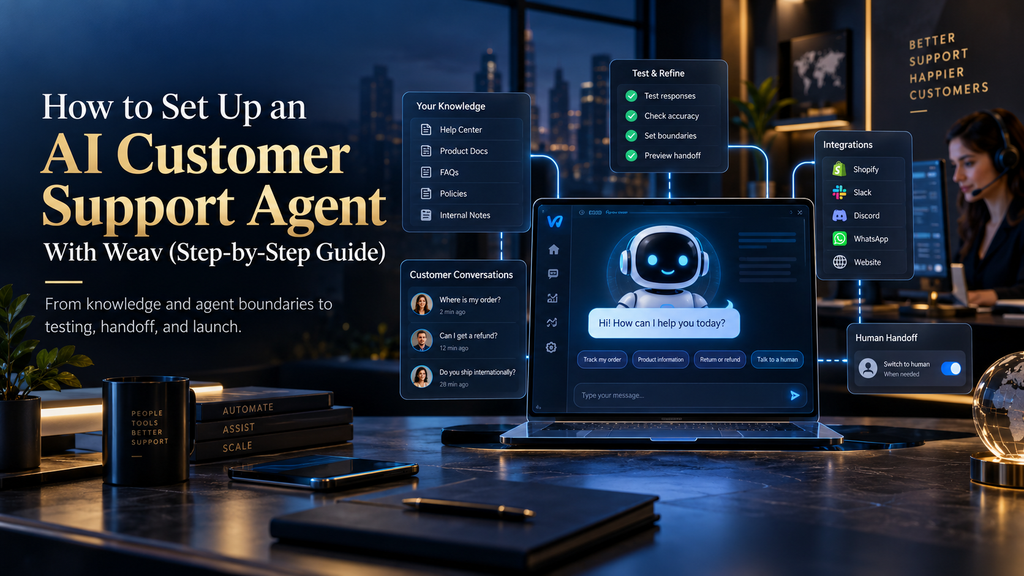
How to Set Up an AI Customer Support Agent With Weav (Step-by-Step Guide)
Setting up an AI customer support agent sounds like the kind of project that should require a long technical implementation. In practice, Weav has made the mechanics relatively straightforward: create an agent, give it access to your support knowledge, test its behavior, and connect it to the channels where customers already contact you. Weav’s current documentation describes essentially that path, with additional capabilities for human handoff, integrations, custom actions, and multi-channel support.
The part that takes more thought is everything surrounding those clicks. An agent can be technically active while still being badly prepared for production because its knowledge is incomplete, its instructions are vague, its scope is too broad, or its escalation rules have never been tested. The difference between a useful support agent and an expensive source of customer frustration is usually not the creation step itself; it is how deliberately you design what happens before, during, and after the agent answers a customer.
That is the approach this guide takes. Rather than treating Weav as a widget you switch on and forget, we will build the system from the workload upward: identify what should be automated, prepare the information the agent can trust, configure its behavior, connect actions only where they are necessary, establish a human escape route, test realistic conversations, and then launch in a way that gives you evidence rather than assumptions.
Affiliate Disclosure: Some links in this article are affiliate links. If you choose to sign up through them, AI Hustle World may earn a commission at no additional cost to you. Our recommendations are based on product fit, features, limitations, and practical usefulness—not commission rates.
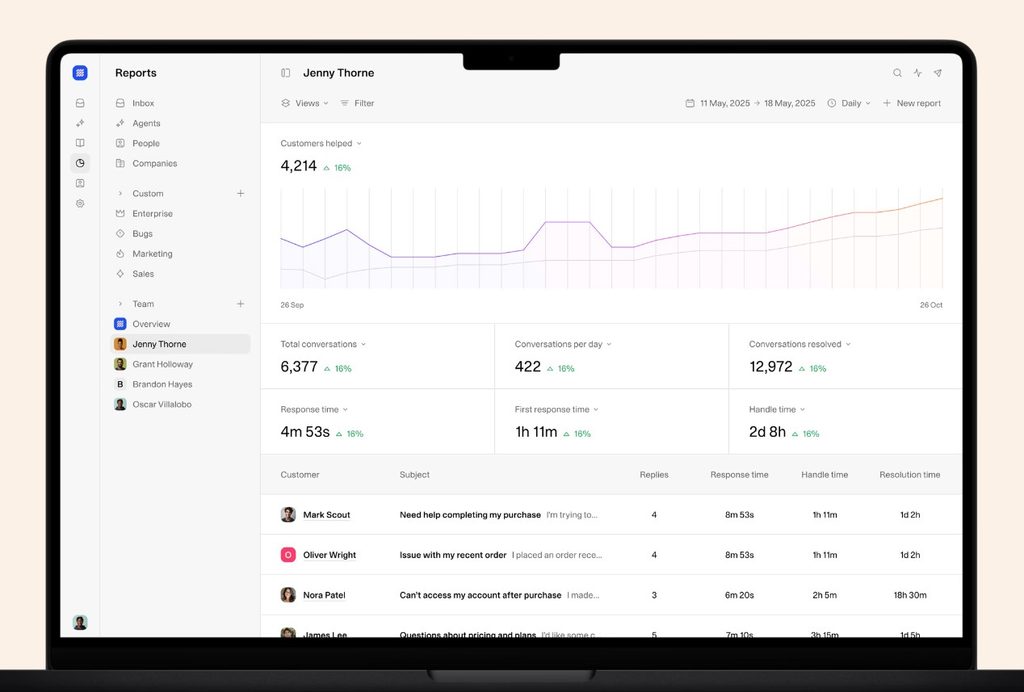
Quick Answer
To set up an AI customer support agent with Weav, first decide which repetitive support requests you want the agent to handle, then prepare the knowledge it should rely on, create and customize the agent, connect those knowledge sources, define its boundaries and escalation rules, add integrations or actions where live business data is required, test the agent in Weav’s Playground, and only then deploy it to your chosen support channels. Weav’s official quick-start documentation currently follows the same basic sequence: create and customize the agent, train it with sources such as website links, files, text and FAQs, test it in the Playground, and deploy it to channels such as chat or email. The full Weav review has the complete verdict.
The important qualification is that “set up” and “ready for customers” are not the same thing. Weav gives you the infrastructure to build the agent quickly, but your business still has to decide what the agent is allowed to handle, which information is authoritative, which requests require a human, and how you will judge whether the automation is actually resolving problems. That is why the safest setup is a controlled progression from narrow workload to validated production system rather than a race to turn every support interaction over to AI.
Start Your Weav Setup With One Workflow
Pick a single high-volume question type and configure Weav around it before you expand to the rest of your support.
Start Setting Up Weav →Affiliate disclosure: We may earn a commission if you subscribe through this link, at no additional cost to you.
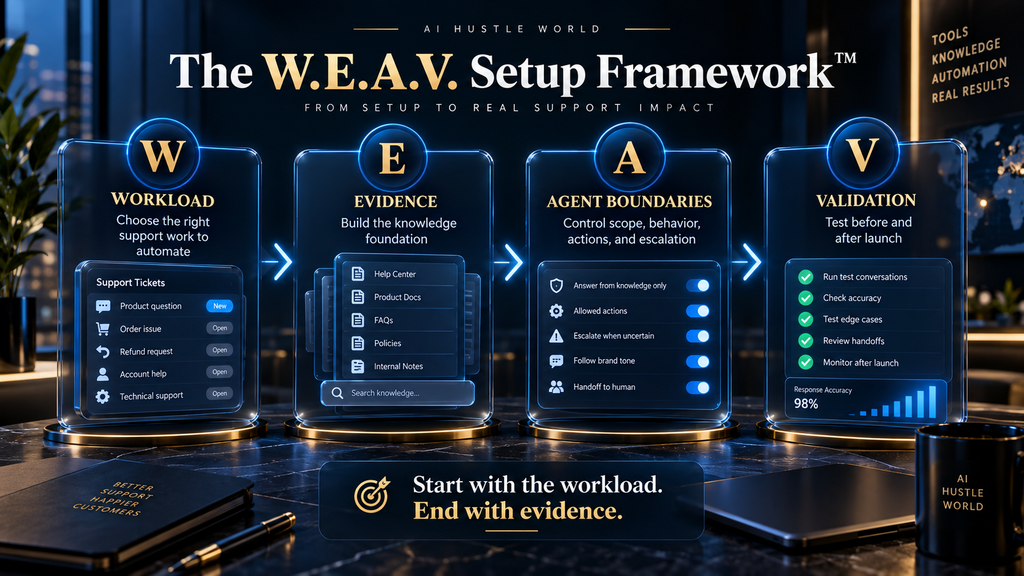
The W.E.A.V. Setup Framework
A useful way to organize the implementation is with four stages: Workload, Evidence, Agent Boundaries, and Validation. The framework is intentionally broader than Weav’s interface because the interface only solves part of the problem; it helps you make the operational decisions that determine whether the configuration will work once real customers start using it.
| Stage | What You Decide | Why It Matters |
|---|---|---|
| W — Workload | Which support requests the AI should own first | Prevents over-automation |
| E — Evidence | Which information the AI can trust | Improves answer reliability |
| A — Agent Boundaries | What the agent can answer, do, and escalate | Reduces risky behavior |
| V — Validation | Whether the agent performs well enough for production | Turns configuration into evidence |
The sequence matters. If you begin with the product interface before deciding the workload, you tend to configure an agent around what the software can do rather than around what the customer actually needs. A better implementation begins with the queue, then builds the AI around the queue.
Decide What Your Weav Agent Should Handle Before You Build It
The strongest first use cases for an AI support agent are usually questions that occur frequently, follow a reasonably predictable pattern, and have answers your business can define clearly. Weav’s own setup guidance recommends starting with the highest-volume, lowest-complexity ticket categories and using the most common customer questions as the initial workload rather than attempting to automate the entire support function at once. (Weav) For the difference between the two approaches, read AI chatbots vs AI agents.
This sounds simple, but support categories often hide very different levels of complexity. “Billing” might include simple invoice questions as well as fraud claims, failed payments, refunds, disputes, and requests for exceptions. “Returns” could mean a straightforward policy question in one conversation and a complicated case involving damaged goods or an unusual order in another. The right unit of automation is therefore not always the department or ticket label; it is the specific resolution pattern inside that category.
A useful starting exercise is to review your recent support conversations and identify questions that satisfy four conditions: they happen often, the answer is reasonably stable, the business can define the correct outcome, and there is a clear fallback when the case stops being routine. “How long does standard shipping take?” is usually easier to automate safely than “Can you make an exception to the refund policy because of my situation?” even though both technically belong to customer support.
This gives you a practical first scope. An ecommerce store might begin with shipping times, return instructions, product information, and order-status questions. A SaaS company might start with password resets, account configuration, billing dates, plan information, and common product questions. The goal is not to prove how many things the agent can answer; it is to create a workload where good performance is both useful and measurable.
Prepare the Source of Truth
Once you know which work you want the agent to handle, prepare the information behind those conversations before you start adding sources to Weav. The platform currently supports multiple knowledge formats, including website links, files and documents, text snippets, and FAQs, while its broader documentation also describes videos as a supported knowledge-source type. (Weav Documentation)
That flexibility is useful, but it creates an important responsibility: not every piece of information in your organization should automatically become customer-facing truth. If your website contains one return policy, an older PDF contains another, and a support document written six months ago contains a third version, adding all three does not solve the contradiction. It simply gives an AI agent access to the contradiction.
Before you connect your knowledge, decide which source should be authoritative for each important topic. Current product documentation may be the right source for features, a formal policy page may be the right source for refunds, and a dedicated support FAQ may be the best source for recurring customer questions. The exact hierarchy depends on your organization, but the underlying rule is the same: the agent should have a clear information source, not a pile of documents.
This is also the point where you should remove stale material, rewrite ambiguous policies, and identify gaps in the documentation. Weav’s own setup guidance makes the same broader point: the first useful information source does not need to be perfect, but early customer questions and failures will show you where the documentation needs improvement. The important distinction is that you should improve the knowledge base deliberately rather than expecting the model to infer your company’s current policy from conflicting evidence.
Create the Weav AI Agent
With the workload and knowledge foundation defined, you can move into the actual Weav workspace. The current Weav quick-start process is straightforward: navigate to the Agents area, create a new agent, and configure its basic identity, role, instructions, tone, and quick prompts. Weav describes its product on its own site.
This is where many teams make a subtle mistake. They treat the agent’s name and personality as the main configuration work because those settings are visible and easy to change. In reality, the more important part is the operating instruction that tells the agent what its job is, how it should behave, what information it should rely on, and what it should do when it cannot safely resolve something.
A useful instruction does not need to become a 2,000-word manifesto. It needs to remove ambiguity. For example, a support agent might be instructed to answer routine product and policy questions using the connected knowledge sources, avoid inventing information, acknowledge when the available information is insufficient, and escalate conversations involving sensitive account issues, requests for exceptions, or explicit requests for human support. That gives the AI a clear operating boundary instead of a vague command to “be helpful.”
You should also decide how much personality the agent actually needs. Weav lets you choose a tone that can range from professional and casual to enthusiastic and empathetic. The right answer depends on the brand, but customer support usually benefits from clear behavioral expectations rather than excessive personality. A support agent that sounds warm but gives vague answers is not more useful than a neutral agent that gives the correct answer quickly.
Configure the Agent Around Real Customer Behavior
Weav’s quick prompts allow you to surface common questions that customers can select when they begin a conversation. The official documentation gives examples such as shipping times and password-reset questions, which are useful precisely because they are common, predictable requests.
Use this feature to expose the support paths that your agent already handles well, rather than creating prompts that merely advertise capabilities. If customers regularly ask about order status, returns, shipping, or account access, those questions are better candidates than generic prompts such as “Ask me anything.” The former establishes expectations around a known workflow; the latter suggests a level of coverage your agent may not actually have.
There is also a deeper reason to keep the initial prompt set narrow. Every prompt is effectively an invitation into a particular support journey. When those journeys are clearly defined, it becomes easier to monitor their success, identify missing information, and determine whether the agent is actually reducing workload.
Add Your Knowledge Sources
Now connect the sources you prepared earlier. Weav’s documentation currently supports website URLs, uploaded files and documents, direct text snippets, and explicit Q&A pairs, giving you several ways to provide business-specific information. We compare it with a leading chatbot builder in Weav vs Chatbase.
Website and help-center links are useful when your business already maintains structured public documentation. Files are useful for manuals, internal policy material, and other documents that are not necessarily hosted publicly. Direct text snippets are useful for focused information that does not yet exist as a full document, while explicit Q&A pairs can be valuable for recurring questions where you want the intended answer to be particularly clear.
The important thing is to match the source type to the information rather than treating them as interchangeable storage buckets. A temporary promotion does not need to become a huge PDF. A complex product manual should not be reduced to a single sentence because it is easier to paste. A high-risk refund rule may deserve an explicit FAQ entry even when the general return policy already exists elsewhere.
Weav says that once you add a source, training is processed automatically in the background, allowing you to continue working on the agent while the content is being processed. That makes the mechanical part of knowledge ingestion convenient, but the quality of the resulting support still depends on the quality and currency of the underlying information.
Treat Knowledge Quality as a Support-System Problem
It is tempting to think of the knowledge base as something you “feed into AI” once and then forget. That mental model becomes dangerous as soon as your business changes. A new pricing policy, product update, shipping restriction, return rule, or feature release can make yesterday’s support answer wrong even though the model itself has not changed.
The better approach is to treat support knowledge as living operational infrastructure. Someone should know who owns it, how changes are approved, where the authoritative version lives, and how outdated material is removed or updated. This becomes especially important when the same information exists across marketing pages, help-center articles, product documentation, internal notes, and customer-service macros.
Weav’s recent product development has also focused on improving knowledge retrieval, including contextual search and re-ranking improvements, which reinforces an important point: better retrieval can help an agent find relevant material, but retrieval cannot rescue information that is absent, contradictory, or wrong in the first place.
So when a test fails, ask two questions rather than one. Did the agent fail to retrieve the right information, or was the right information never there in a usable form?
Those are different problems, and they require different fixes.
Understand the Difference Between Knowledge and Actions
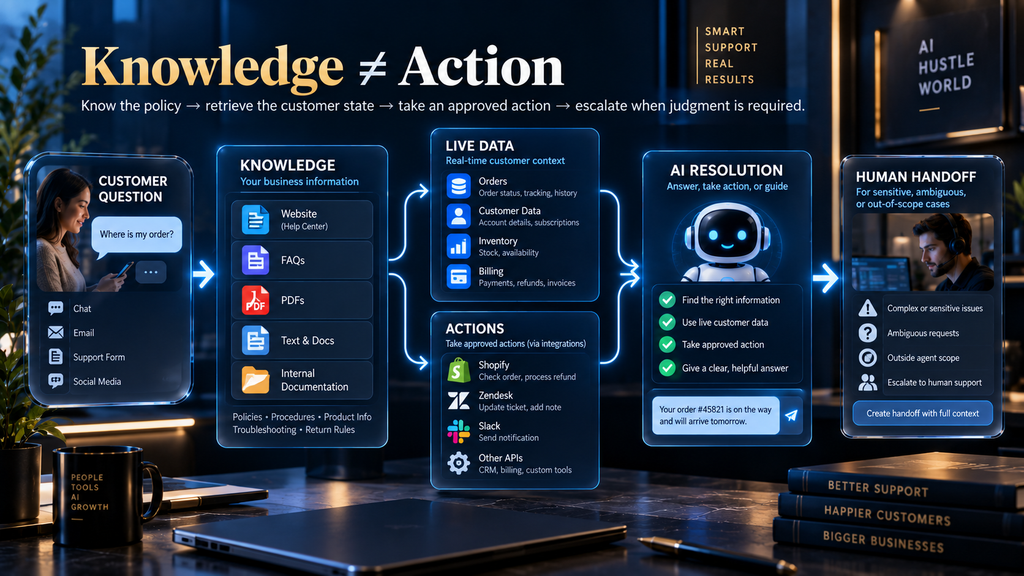
The next important distinction is between answering from knowledge and performing work through an action.
Suppose a customer asks, “What is your refund policy?” A policy document may be enough to answer that question. But if the customer asks, “Has my refund been processed?” the answer may live in an external system such as a payment platform, ecommerce system, CRM, or internal database. The AI needs more than information about the process; it needs a way to access the current state of the customer’s case.
Weav’s current custom-actions system is designed for this distinction. Its documentation says custom actions can call external HTTPS APIs so an agent can fetch live data or perform approved operations such as looking up an order, checking subscription information, creating a support ticket, updating an appointment, or initiating a return or cancellation workflow.
That turns the support architecture into something more powerful than a knowledge chatbot. Instead of stopping at “Here is the information I found,” the agent can potentially move toward “Here is the current state of your request” or “I have started the approved workflow.” But this added capability comes with a corresponding increase in risk, which is why actions should be introduced deliberately rather than simply enabled wherever possible.
Add Actions Only When They Solve a Real Problem
Weav’s documentation recommends giving each custom action a clear purpose, describing when it should be used, defining the information the agent needs before calling it, and limiting the data returned to what is necessary. Actions use HTTPS endpoints, can include variables collected during the conversation, and can be assigned selectively to specific agents.
Those details point toward a broader operational rule: give the agent the smallest amount of authority required to complete its job. A read-only order lookup is generally easier to control than an action that changes an order. Checking whether an invoice exists is a different risk from issuing a refund. Confirming availability is a different class of operation from modifying inventory.
This is one area where “more capable” and “better” can move in opposite directions. If an agent has access to ten actions but only needs two, the additional permissions create more opportunities for incorrect triggering, poor input collection, and unintended outcomes. The best action design is not the one with the longest capability list; it is the one that gives the agent precisely enough authority to resolve its assigned workload and no more.
Weav also recommends focused API responses and limited data access where appropriate, because returning unnecessarily large or sensitive records increases complexity and risk. This is good support architecture even outside Weav: an AI agent should not receive a full customer record when it only needs an order status and tracking URL.
Define What the Agent Must Not Handle
One of the biggest conceptual improvements you can make during setup is to stop asking only what the AI should answer and explicitly document what it should not attempt. Our Weav vs Intercom Fin comparison covers the enterprise-scale option.
That might include account-security incidents, fraud claims, sensitive personal-data requests, unusual refund exceptions, managerial complaints, legal issues, or situations where the correct outcome depends on human judgment. The exact list will differ by business, but there should be a deliberate boundary rather than an assumption that the AI will “know when to stop.”
A strong boundary also defines what happens when information is missing. The agent should not improvise a policy because a customer asks the question confidently. It should not claim that an action happened when an external system did not confirm it. It should not turn uncertainty into certainty merely because a confident tone sounds more helpful.
This is where a good AI support system begins to look less like a chatbot and more like a controlled operating process.
Knowing when not to answer is part of being a reliable support agent.
Configure Human Handoff Before Going Live
Human escalation is not a backup plan that you add after the AI fails. It is one of the primary paths in a properly designed customer-support workflow. Our comparison of AI customer support vs human support and the guide to human-in-the-loop AI cover when people should stay involved.
Weav’s current documentation places handoff inside the deployment process and describes using rules that can move conversations to a human support team when, for example, a customer explicitly requests a person or the AI cannot resolve the issue after several attempts. The platform’s unified inbox is designed around conversations that can be handled by AI, humans, or both, which makes the handoff part of the same support environment rather than a separate experience.
Your escalation design should answer four practical questions: what triggers the handoff, where the conversation goes, what context the human receives, and what the customer is told. Those details matter because a technically correct escalation can still produce a poor experience if the customer has to explain the entire problem again.
For example, a customer who has already provided an order number, explained the problem, and answered several AI questions should not be handed to a human with a blank conversation window. The better workflow preserves the context that has already been collected so the human starts with the information the customer has already provided.
The AI Support Launch Gate
Before you turn the agent on for meaningful customer traffic, use five simple gates to decide whether it is ready. Our guide to Weav pricing breaks down the cost per resolution.
| Gate | The Question You Need to Answer |
|---|---|
| Knowledge | Can the agent reliably find the correct business information? |
| Scope | Is it clear what the agent owns and what it escalates? |
| Action | Are its connected actions necessary, limited, and testable? |
| Handoff | Can a human take over without restarting the conversation? |
| Validation | Has the agent been tested with realistic support cases? |
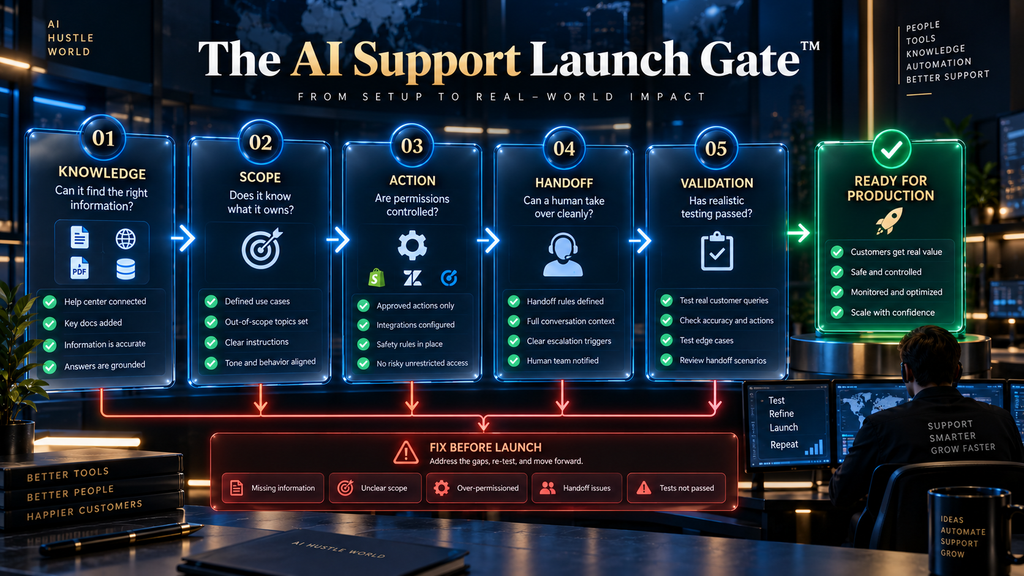
The important distinction is between configuration and readiness. A Weav agent can be active in the dashboard before your support operation has gathered enough evidence to trust it. These five gates force you to test the complete system rather than simply verifying that the buttons work.
Test the Agent in the Weav Playground
Weav provides an Agent Playground as an internal testing environment where you can check responses before deployment. The official documentation specifically recommends evaluating accuracy, tone, and formatting, and using poor responses as signals that you may need better training data or clearer base instructions.
Do not make the mistake of testing only the questions you already know the AI can answer.
Your test set should begin with the top real customer questions, but then expand into variations. Ask the same thing using shorthand, incomplete sentences, typos, different wording, missing context, and follow-up questions. The purpose is not to trick the agent; it is to reproduce the way customers actually communicate.
Consider a billing example. Your help center might describe the process as “How do I update my billing information?” A real customer may type, “need to change my card,” “old card expired,” or simply “new debit card.” Weav’s own setup guidance explicitly recommends using real customer language during testing rather than clean documentation phrasing.
That distinction matters because the real support environment is messy. If your test set is artificially clean, your confidence will be artificially high.
Test Failure Modes, Not Just Happy Paths
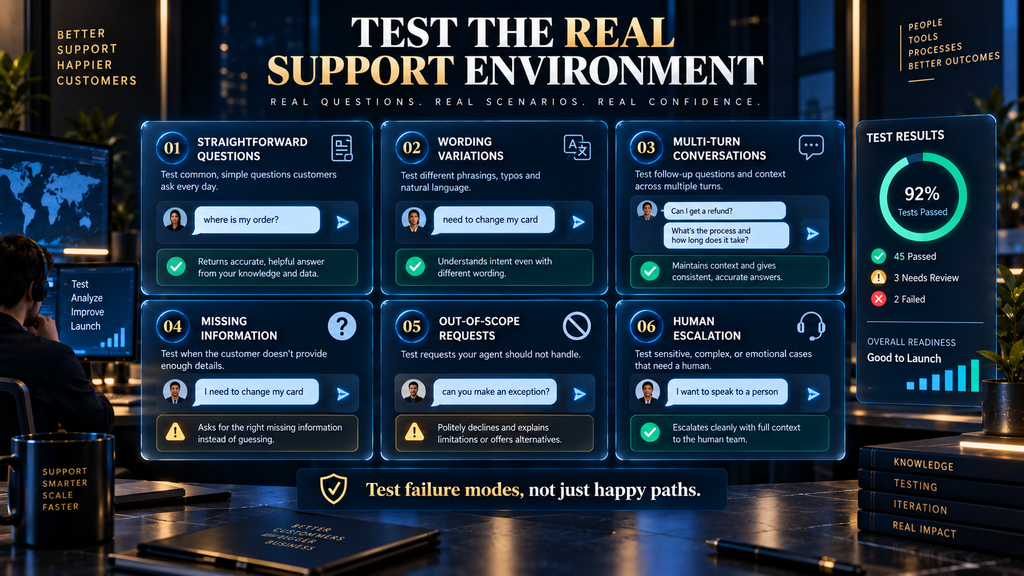
A mature support test set should include at least six kinds of conversation.
First, test straightforward questions where the answer clearly exists in your knowledge base. These establish basic accuracy and tone. Next, test variations of the same intent so you can see whether the agent recognizes the underlying question rather than a single wording pattern.
Then test multi-turn conversations, where the customer reveals information gradually. Follow that with missing-information tests, where the correct behavior is to acknowledge uncertainty rather than invent an answer. After that, test out-of-scope requests and explicit human requests, because these reveal whether your escalation boundaries are actually working.
Finally, test frustrated customers and exception scenarios. A customer saying “This is the third time I have contacted you” is not equivalent to a customer asking a neutral FAQ, even when the underlying topic is technically the same. Weav’s own implementation guidance includes frustration and repeated attempts among examples of situations where escalation may be appropriate.
The goal is not to achieve a perfect score in a controlled test environment. It is to discover the failures that would matter most once a real customer is standing on the other side of the conversation.
Test the Agent on Real Conversations
After you connect your help content, replay real customer questions and check the answers and handoffs before you go live.
Test Your Weav Agent →Affiliate disclosure: We may earn a commission if you subscribe through this link, at no additional cost to you.
Test the Handoff as a Complete Workflow
Many teams test whether the AI can answer and then stop. That leaves one of the most important parts of the system untested.
Run a full escalation scenario from beginning to end: customer asks a difficult question, the AI reaches its boundary, the conversation routes to a human, the human can see the relevant context, and the customer can continue without unnecessary repetition. Then repeat the exercise for several different escalation triggers.
You should also check what happens when the action itself fails. If the agent calls an external system and receives an error, the customer should not be told that the transaction succeeded simply because the AI expected it to. That is exactly the kind of boundary where the underlying system response needs to remain authoritative.
This is particularly important as you introduce more integrations. The more actions your agent can take, the more important it becomes to distinguish between requested, attempted, and confirmed outcomes.
Deploy to the Right Channel First
Once the agent performs well enough in testing, the next decision is where to expose it.
Weav’s current documentation supports deployment through website chat and email, while its newer product updates have expanded the platform into additional channels such as WhatsApp. The right first channel is usually not the channel with the most exciting technology; it is the channel where your customer questions are repetitive enough to learn from and controlled enough to monitor.
For some businesses, website chat will be the obvious starting point. For others, email may contain the largest volume of repetitive support. A business that receives substantial support through WhatsApp may now have a strong reason to evaluate that channel because Weav’s August 2026 integration brings WhatsApp conversations into the same unified inbox and allows the AI agent to respond using its existing training data.
The strategic principle is simple: start where the learning value is highest, not where the feature list is longest.
WhatsApp Requires a Different Operational Mindset
Weav’s August 2026 WhatsApp integration is a meaningful update because it expands AI support beyond traditional website and email workflows. According to Weav, setup uses Meta’s official flow, the conversations enter the unified inbox, and the AI agent can respond to incoming WhatsApp messages using the same training data it uses across other channels.
There is also a channel-specific constraint worth understanding: Meta’s 24-hour customer-service window governs outbound WhatsApp replies after a customer’s most recent message. Weav states that inside that window the agent can reply normally, while after it closes the business can add internal notes but cannot send a reply until the customer messages again.
That example illustrates a broader lesson about multi-channel AI support. The agent may share the same underlying knowledge and logic, but the operational rules of the channel still matter. A good setup therefore treats channel behavior as part of implementation rather than assuming one deployment configuration works identically everywhere.
Ecommerce Businesses Can Go Beyond FAQ Support
Weav’s August 2026 Shopify integration shows how this architecture changes when the AI can work with live store information. Weav says the Shopify app connects an agent to product catalog data, store policies, and live order information, allowing it to respond to common ecommerce questions such as order status, returns, product fit, and stock availability.
Consider the difference between these three customer conversations. The first asks, “What is your return policy?” and can be answered from static knowledge. The second asks, “Where is my order?” and may require a live order lookup. The third asks, “Can you start my return?” and may require an actual business action.
Those are three different levels of support capability, and a successful implementation should recognize the distinction. Knowing the policy, retrieving the customer’s state, and changing the customer’s state are not the same task.
That framework also helps prevent a common mistake: assuming that an AI support agent becomes “advanced” simply because it has more information.
The real progression is from knowledge retrieval to contextual resolution to controlled action.
Start Small, Then Learn From Live Traffic
Weav’s own implementation guidance recommends starting narrowly and using the first 48 hours of real traffic as an especially valuable source of information. It argues that escalation clusters can reveal where the underlying documentation or workflow needs improvement.
That is a useful way to think about launch. Your first production conversations are not merely transactions; they are evidence about how your customers actually ask questions. A question that never appeared in your planning meeting may suddenly occur fifty times after launch, revealing a documentation gap you did not know existed.
The key is to look for patterns rather than obsessing over isolated mistakes. If one customer asks an unusual question, that may be noise. If fifteen customers struggle with the same policy, there is probably a system-level problem somewhere in your setup.
That is why a controlled launch is so valuable. It creates a manageable feedback loop where you can correct knowledge, configuration, escalation, or scope before expanding the agent’s responsibilities.
Diagnose the Failure Before You Change the Prompt
When an AI support agent produces a poor answer, the instinct is often to rewrite its instructions. Sometimes that is the right fix. Quite often it is not.
If the correct policy was missing, update the knowledge source. If the information existed but the agent did not retrieve or interpret it properly, investigate retrieval and instructions. If the answer required live customer data, consider whether the agent needs an integration or custom action. If the situation should never have been automated, change the scope or escalation rule instead of adding another paragraph to the prompt.
This distinction becomes increasingly important as systems grow more complicated. A giant instruction block can conceal rather than solve an architecture problem. The cleaner approach is to diagnose the layer that failed and fix that layer.
Weav’s custom-action documentation makes this separation particularly clear: action behavior depends on activation status, assignment, “when to use” instructions, required inputs, API availability, and response structure. A failure in any of those areas is not necessarily an “AI intelligence” problem.
Measure Resolution, Not Just Automation
The easiest metric to celebrate is the percentage of conversations touched by AI. It is also one of the easiest metrics to misunderstand.
A customer can receive an answer, leave the chat, and still have an unresolved problem. They might return later, contact another support channel, or ask a human agent the same question. From a dashboard perspective, the AI interaction happened. From the customer’s perspective, nothing was solved.
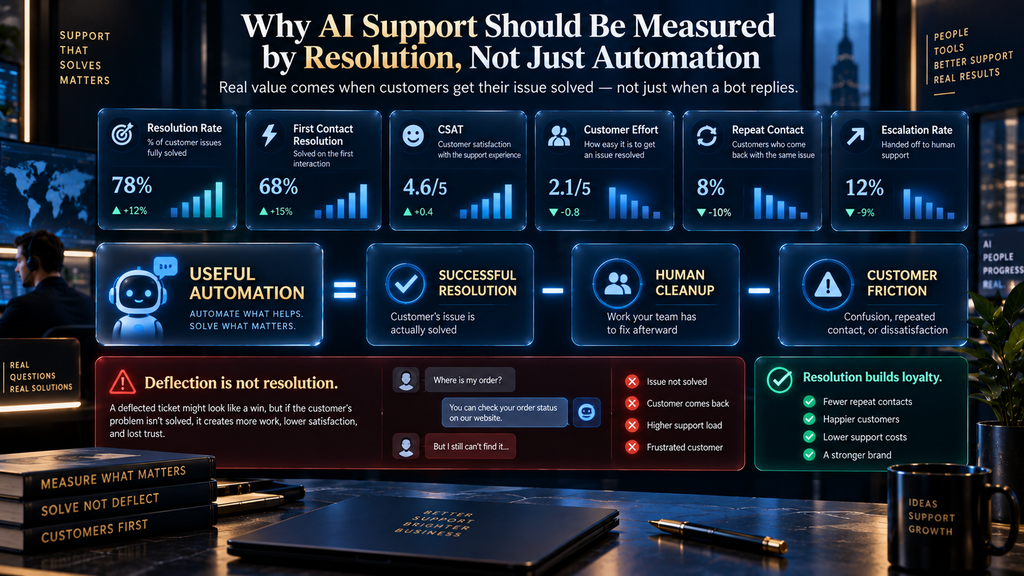
A better measurement system therefore combines several indicators. You should look at resolution rate, escalation rate, repeat-contact rate, customer satisfaction or effort, time to resolution, and the amount of human rework created after AI interactions. If live actions are involved, you should also monitor failed or incomplete transactions.
The principle is straightforward:
Automation is valuable when it removes work without creating more work somewhere else.
That means a lower AI-handling percentage can sometimes represent a better system if the conversations the agent does handle are resolved cleanly and the escalations arrive with useful context. Optimization should follow customer outcomes, not a vanity percentage.
The AI Hustle World Resolution Model
A useful way to think about performance is: For the basics, see how AI chatbots work and AI customer service explained.
Useful Automation = Successful Resolution − Human Cleanup − Customer Friction
This is not an industry-standard accounting equation; it is a practical decision model. It forces you to include the costs that disappear from simple automation dashboards.
Imagine an agent that handles 80% of routine questions but produces frequent wrong answers that humans have to correct. Now imagine another agent that handles 60% of conversations but resolves those cases cleanly and escalates the difficult 40% with complete context. The second system could be far more valuable operationally even though its headline automation percentage is lower.
That is why support automation should be evaluated as an operating system rather than a chatbot score. The question is not simply “How much did AI handle?” It is “What happened to the total support workload and customer experience after AI was introduced?”
Common Weav Setup Mistakes
Automating too much too early
The temptation is understandable. If the platform can support a large range of questions and actions, why not turn them all on? Because every additional category increases the number of edge cases you need to understand, test, and monitor. A smaller workload with reliable performance is a much stronger foundation than broad automation that nobody fully trusts.
Feeding the agent everything
More content is not automatically better content. Outdated policies, duplicated explanations, conflicting documents, and internal-only notes can make the system harder to govern. The knowledge layer should be curated around the support work the agent is actually expected to perform.
Writing vague instructions
Instructions such as “be helpful” or “answer customer questions professionally” leave too much room for interpretation. Define the role, scope, desired behavior, uncertainty handling, and escalation conditions in language that a human reviewer could actually evaluate.
Giving the agent unnecessary permissions
A support agent does not need every available action simply because those actions exist. Weav’s custom-action system lets you define when actions are used, what information must be collected, and which agents can access them, so treat those controls as safety mechanisms rather than configuration bureaucracy. Plan data for other tools is in our AI Tool Pricing Database.
Treating human escalation as failure
Some requests should go to humans. The failure is not escalation itself; the failure is either escalating routine work unnecessarily or failing to escalate when human judgment is required. The objective is an efficient division of labor, not a zero-human workflow.
Testing only polished questions
Your customers will use shorthand, typos, vague references, frustration, incomplete sentences, and multi-turn conversations. A support agent that works beautifully with “How do I update my billing information?” may behave very differently when the customer simply writes “old card expired help.”
Testing the answer but not the workflow
A correct answer means little if the conversation routes incorrectly, the action fails silently, or the human receives no useful context. Test the entire path from customer request through escalation or action completion.
Treating launch as the finish line
The first real conversations should make the system better, not merely prove that it went live. Weav’s own guidance recommends reviewing the first 48 hours closely and continuing to improve the agent based on what the traffic reveals.
A Real-World Example: Base Case
Weav’s published customer story about Base Case provides a useful example of why the goal of AI support should not necessarily be replacing humans. According to Weav, founder Arthur Jessop had been personally handling customer support because the quality of those conversations was closely tied to the business, and the resulting setup handled approximately 70% of Base Case’s support inquiries while leaving the remaining conversations available for escalation.
That 70% figure should be treated as a vendor-reported customer case study, not as a performance guarantee. What makes the example useful is the operating model behind it: repetitive support work is absorbed by AI while the founder remains available for cases where direct involvement creates more value.
That is much closer to the practical opportunity for many small businesses than the idea of completely replacing a support organization. The agent does not have to own every conversation to create meaningful leverage.
The Difference Between a Configured Agent and a Trusted Agent
There is a useful mental test you can apply before launch. A configured agent has a name, instructions, data, and a deployment channel.
A trusted agent has those things plus a defined workload, reliable information, controlled permissions, tested failure behavior, predictable escalation, measurable performance, and a person responsible for maintaining the system. The difference is operational maturity.
That distinction is particularly important because Weav’s interface is intentionally streamlined. Its documentation makes it possible to move from creation to training, testing, and deployment quickly. The ease of configuration is a strength, but it should not be mistaken for proof that the underlying support process is ready.
Who Should Use Weav This Way?
Weav is most compelling when your business has a meaningful amount of repeatable support work, reasonably reliable documentation, and enough operational consistency to define what the AI should and should not handle. It becomes particularly interesting when the business wants to combine AI responses with a human team rather than force every conversation through a fully automated path. See where it sits among the best AI customer service tools.
Ecommerce businesses can use connected data for questions around products, orders and returns, while SaaS and service businesses can build agents around product documentation, account questions, billing information, and other recurring support issues. Weav’s current platform also supports a wider channel model than a simple website chatbot, including email, chat, WhatsApp, and integrations such as Shopify.
The fit becomes weaker when every customer conversation is fundamentally unique, documentation changes constantly without clear ownership, support decisions are highly sensitive, or there is no realistic human escalation process. In those cases, the first project may need to be fixing the support operation itself, not automating it.
Who Should Wait Before Automating?
You should be cautious if your team cannot agree on basic policies. An AI agent cannot reliably resolve a question that your own organization has not resolved, and adding automation to that ambiguity can make the inconsistency more visible and harder to correct.
You should also be cautious when the support volume is too small to create a meaningful return, or when almost every conversation requires negotiation, discretion, or individualized judgment. AI support is most useful where some portion of the workload can be turned into a repeatable resolution process.
And finally, you should wait if nobody owns the system after launch. Someone needs responsibility for reviewing failures, maintaining the knowledge base, checking the escalation patterns, and deciding when new capabilities should be added. Without ownership, even a well-configured agent eventually drifts out of sync with the business.
The First 30 Days After Launch
The first month should be treated as a learning period rather than a maintenance period. During the first week, review real conversations and look for repeated failures, unexpected questions, unnecessary escalations, and situations where humans had to correct or repeat the AI’s work. Weav’s own guidance specifically recommends using early traffic to identify where documentation gaps are appearing.
During the second week, focus on fixing the underlying knowledge and workflow problems. During the third, review your boundaries and actions: are you escalating too much, too little, or giving the agent capabilities it does not actually need? By the fourth week, you should have enough evidence to decide whether the initial workload is ready to expand.
This creates a healthy rhythm: Observe → classify failures → fix the right layer → retest → expand carefully. That rhythm matters more than any individual prompt.
What Happens If You Do Nothing?
Traditional customer support is not inherently a problem. Human agents remain better suited to many situations involving ambiguity, emotion, negotiation, and judgment, and some businesses genuinely need a high-touch model.
The issue appears when customer volume grows while the support process remains dependent on people repeatedly answering the same low-complexity questions. In that environment, support capacity tends to grow with the workload, which can push the company toward hiring more people simply to preserve the same level of service.
A carefully implemented AI support agent offers another option: allow some portion of repetitive support work to scale without requiring a proportional increase in human attention. That does not eliminate the need for people; it changes where their time is spent.
The strategic benefit is therefore not “AI replaces customer service.”
It is AI handles the predictable layer so humans can concentrate on the consequential layer.
The Second-Order Effect Most Teams Miss
When an AI agent takes over routine conversations, the human support team’s work changes even when headcount stays exactly the same.
The repetitive questions gradually disappear from the human queue, while exceptions become a larger share of what humans see. That means the team needs stronger judgment, better escalation context, and clearer access to the information required for complex cases.
In other words, AI support can change the composition of human work, not just its volume.
That is why a successful deployment should not be judged only by how much work AI removes. It should also be judged by whether the remaining human workload becomes more valuable, more manageable, and easier to resolve well.
Future Outlook: From Answering Questions to Resolving Problems
The direction of AI customer support is increasingly moving beyond simple knowledge retrieval. Weav’s current product development reflects several pieces of that progression: AI agents connected to support conversations, a unified inbox for AI and humans, integrations with business systems, custom actions, WhatsApp support, and Shopify-connected live order information. You can check current plans on the Weav pricing page, Chatbase pricing and Intercom pricing.
That suggests an important change in how support automation should be evaluated. The meaningful question is no longer simply whether an AI can produce a fluent answer. It is whether the system can understand the customer’s objective, retrieve the right information, access the right live data, take an approved action when necessary, and recognize when the situation belongs to a human.
That is a much higher bar, but it is also much closer to actual customer support.
A Practical Weav Launch Checklist
Before exposing the agent to meaningful production traffic, you should be able to explain the following without hesitation.
- Workload: We know which support requests the agent handles first, and we know which requests remain human-owned.
- Knowledge: We know which sources are authoritative, and we have removed or updated conflicting and outdated information.
- Behavior: The agent’s role, tone, instructions, and fallback behavior are clearly defined.
- Actions: Every connected action has a specific purpose, defined inputs, controlled access, and an understandable failure path.
- Handoff: Customers can reach a human when they need one, and the human receives enough context to continue the conversation efficiently.
- Testing: We tested realistic language, follow-up questions, missing information, out-of-scope requests, frustration, action failures, and human escalation.
- Measurement: We know which support outcomes we will monitor after launch, not just how many conversations the AI touches.
- Ownership: Someone is responsible for reviewing performance and keeping the system aligned with the business.
When those conditions are in place, the final deployment becomes much less mysterious. You are no longer asking whether an AI chatbot “seems ready.” You have a defined support workflow with explicit boundaries and a way to measure whether it works.
Final Thoughts
Weav makes the mechanical side of AI customer-support setup surprisingly accessible. You can create an agent, connect documentation, configure its behavior, test it in the Playground, and deploy it through supported channels without building a custom AI system from the ground up.
But the ease of setup can create the wrong expectation.
Getting a Weav agent live is easy. Getting it ready to be trusted is the real setup.
That means starting with the right support workload instead of trying to automate everything. It means treating your documentation as operational infrastructure, not a pile of files. It means giving the agent only the authority it needs, building human escalation into the workflow, testing the conversations customers actually have, and measuring whether the automation genuinely improves resolution rather than simply increasing the number of AI-handled conversations.
The strongest implementation is therefore not the one with the most capabilities enabled on day one. It is the one that starts narrow, produces evidence, learns from real customer conversations, and expands only when the system has earned that expansion.
That is how Weav becomes more than an AI chatbot.
It becomes part of a customer-support operation that is designed around resolution, not automation for its own sake.
Decide Whether Weav Is Ready for Your Team
Compare plan limits, handoff rules and cost per resolution with your ticket volume before you launch.
Review Weav Plans →Affiliate disclosure: We may earn a commission if you subscribe through this link, at no additional cost to you.
Frequently Asked Questions
1. Is Weav difficult to set up?
The core setup is relatively straightforward. Weav’s current documentation takes users through creating an agent, connecting knowledge, testing in the Playground, and deploying to support channels without requiring a traditional model-training workflow.
The harder part is deciding the workload, preparing reliable information, defining boundaries, and testing the system thoroughly enough for production.
2. Do I need coding skills to create a Weav support agent?
You do not need to build an AI model from scratch or create a conventional chatbot codebase for the basic workflow. Weav provides a no-code-oriented setup path for configuring agents and connecting standard knowledge sources.
Technical work becomes more relevant when you want custom API actions or deeper integrations. Weav’s custom-action system requires an HTTPS endpoint and structured JSON responses, so those advanced workflows may involve technical assistance.
3. What can I use as Weav knowledge?
Weav currently supports website links, files and documents, text snippets, and FAQs as knowledge sources in its quick-start workflow. Its broader documentation also lists videos among supported knowledge-source types.
The important consideration is source quality rather than source quantity. Outdated or contradictory information can undermine an otherwise well-configured agent.
4. Should I upload my entire knowledge base?
Not automatically. Start with the information needed for the workload you have decided to automate, make sure the important sources are current, and then expand based on actual support gaps.
A smaller, well-governed knowledge foundation is often easier to understand and maintain than a huge collection of loosely related documents.
5. Can Weav use live customer or order data?
Yes, when the relevant integration or action is configured. Weav’s custom actions can call external APIs to retrieve live data, and its Shopify integration can use live order information for supported ecommerce workflows.
That is an important distinction from a knowledge-only chatbot because live data can allow the agent to answer questions about the customer’s current situation rather than only explain a general policy.
6. Can Weav perform actions, not just answer questions?
Yes. Weav’s current custom-action functionality allows an AI agent to call external HTTPS APIs to retrieve information or perform approved workflows, depending on how the action is configured.
Those permissions should be introduced carefully, because an action that changes business data carries more operational risk than an action that simply retrieves information.
7. Can customers talk to a human when the AI cannot help?
Yes. Weav’s current workflow supports human handoff rules and routing to human support, including scenarios where the customer explicitly asks for a person or the AI cannot resolve the issue.
A strong implementation makes escalation easy and preserves enough context that the customer does not have to restart the conversation.
8. Does Weav support WhatsApp?
Yes. Weav launched a WhatsApp integration in August 2026. According to Weav, conversations appear in the same unified inbox as chat and email, and the AI agent can respond using its existing training data.
The integration also follows Meta’s 24-hour customer-service window for outbound replies.
9. Can Weav work with Shopify?
Yes. Weav launched a Shopify App Store integration in August 2026. The company says the integration can connect an AI agent to real catalog, policy, and order information so it can handle common ecommerce support questions such as order status, returns, product fit, and inventory.
That makes Shopify a particularly useful example of how an AI support agent can move from static answers toward live, context-aware resolution.
10. What should I test before launching a Weav AI agent?
Start with your highest-volume customer questions, then test wording variations, multi-turn conversations, missing information, out-of-scope requests, explicit human requests, frustrated customers, and any actions or integrations the agent will use. Weav itself recommends testing with real customer language before going live.
The goal is not to prove that the agent can answer easy questions. It is to discover where the system should answer, where it should act, and where it should stop.
Written by
Muntasir Ahmad Chowdhury
Founder, AI Hustle World
Muntasir Ahmad Chowdhury is the Founder of AI Hustle World, an independent publication dedicated to making Artificial Intelligence practical, trustworthy, and easy to understand. He researches AI tools, automation, customer service, productivity, and real-world business applications, helping readers make smarter technology decisions through research-driven, experience-backed content.
Expertise:
AI Tools • AI Automation • AI Customer Service • AI Productivity • Generative AI • AI Workflows
Get Smarter With AI
Enjoyed this guide? Get practical AI tools, tutorials, and honest reviews delivered to your inbox.
3 thoughts on “How to Set Up an AI Customer Support Agent With Weav: Step-by-Step”