
Evidence: Documentation reviewed
Last checked: September 2026
What was done: Written from official documentation and the published sources linked in this article. Not hands-on tested.
Files: None
Affiliate links: No
AI Cold Email Strategy Explained: How to Scale Outreach Without Hitting Spam
The promise of AI cold email is easy to understand. Give a system a list of prospects, let AI research them, write personalized messages, automate the follow-ups, and suddenly a salesperson can do the work that once required hours of manual research and writing. The problem is that the same technology that makes relevant outreach cheaper also makes bad outreach dramatically easier to scale.
That is the part most AI cold-email advice gets wrong.
The difficult part of outbound email has never been typing sentences into a mailbox. It is identifying the right people, understanding why they might care now, finding enough evidence to make the outreach relevant, sending from infrastructure that can maintain a healthy reputation, and recognizing quickly when a campaign is producing the wrong kind of activity. AI can improve every one of those steps, but it can also amplify mistakes at every one of them.
That changes the strategy completely. The objective should not be to send more emails with less human effort. It should be to increase the number of relevant sales conversations created per unit of sending capacity and human time while keeping the sender’s reputation, the prospect’s trust, and the economics of the campaign intact.
This is why a good AI cold email system starts with targeting and evidence, not copy generation. A strong system uses AI aggressively for repetitive work while deliberately keeping human judgment where ambiguity, reputation, or commercial consequences are high. That balance is the difference between automation that creates leverage and automation that simply creates more noise.
What AI Cold Email Actually Means
AI cold email is best understood as a sales workflow in which artificial intelligence assists with prospect research, data enrichment, message drafting, personalization, sequencing, reply classification, or campaign analysis. It is not simply a tool that writes emails, and it should not be treated as an autonomous machine whose primary job is maximizing send volume.
That distinction matters because cold email consists of several different problems that happen at different points in the funnel. A campaign can have excellent writing and still fail because the wrong people were targeted. It can have a great list and a compelling offer but fail because the sending domain has a poor reputation. It can achieve a strong reply rate while producing almost no qualified opportunities because the campaign is attracting curiosity rather than genuine buying intent.
A useful way to think about AI is therefore to separate production assistance from decision authority. AI is extremely useful when the task is repetitive, structured, and relatively easy to verify. It becomes more dangerous when it is asked to infer facts that are not actually known, make high-consequence judgments, or act on weak signals at scale.
That is why “AI-powered” should never be treated as synonymous with “fully automated.” The better question is where intelligence creates useful leverage without removing the controls that protect the campaign.
Why Most AI Cold Email Campaigns Fail
Most weak AI-powered outreach does not fail because the language model cannot write a convincing paragraph. It fails earlier, usually at the level of targeting, evidence, offer relevance, or infrastructure.
Consider a campaign targeting CFOs at mid-sized software companies. The team gives an AI system a company name, job title, and industry, then asks it to personalize the message. The model produces a sentence about the company’s growth, congratulates the executive on its expansion, and introduces a generic service. The sentence looks personalized because the company name is correct. The problem is that nothing in the message establishes why that particular executive should care now.
Now imagine the same campaign with excellent writing but a poor list. Half the contacts are irrelevant, some addresses are stale, and the targeting includes people who have no buying authority. The copy can be improved indefinitely without solving the fundamental problem.
There is an even more subtle failure mode. Suppose the company has the right audience, a credible offer, accurate data, and strong copy, but suddenly increases sending volume because the first test batch looks promising. The campaign may create more activity while simultaneously increasing the risk of bounces, complaints and reputation damage. Google currently recommends controlled, consistent sending and warns senders to avoid bursts and to monitor spam rates and reputation rather than treating volume as a simple growth lever. (Google)
The deeper lesson is that cold email behaves like a system. Improving one component does not compensate indefinitely for failures somewhere else.
The T.R.U.S.T. Framework for AI Cold Email
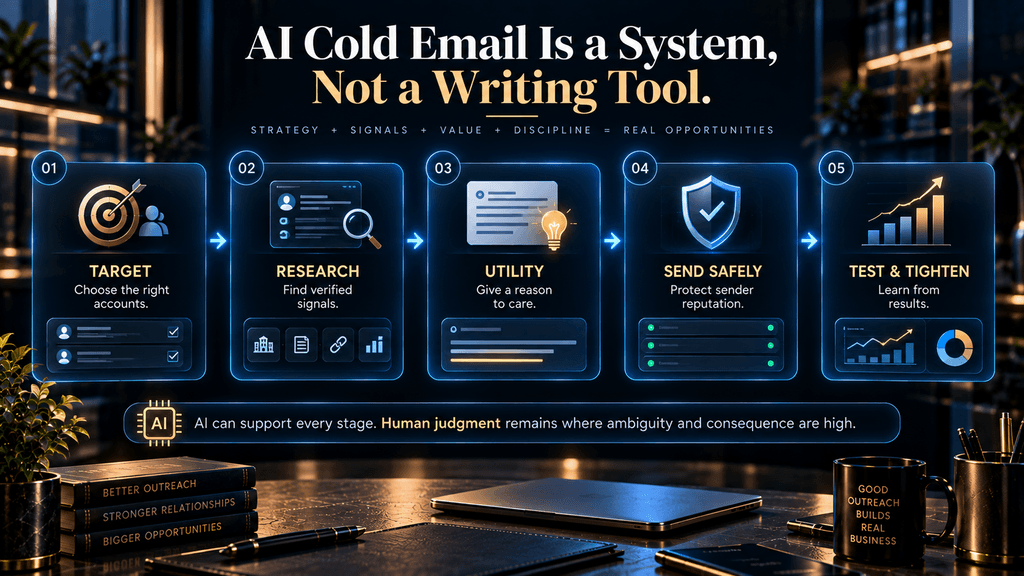
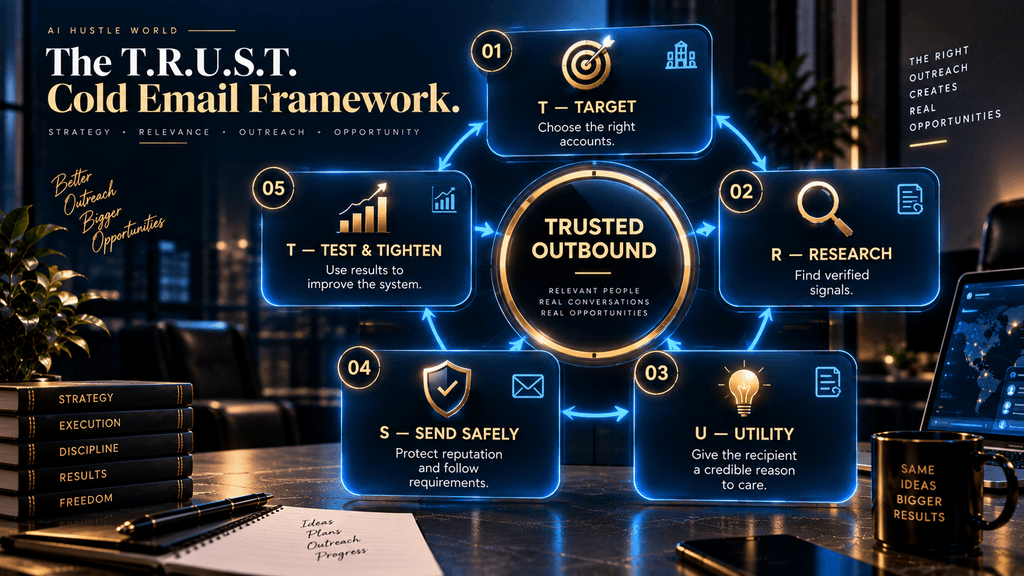
A practical framework for AI-assisted outbound is T.R.U.S.T.: Target → Research → Utility → Send Safely → Test & Tighten. The sequence matters because each stage creates the conditions for the next.
Target defines who should receive the message and why the account belongs in your market. Research identifies the evidence that makes the outreach timely and specific. Utility turns that evidence into a plausible reason to start a conversation rather than simply a clever personalized sentence. Send Safely protects the infrastructure that carries the campaign. Test & Tighten turns campaign results into better targeting, better offers and better decisions rather than simply more volume.
The framework is deliberately different from a traditional “write, send, follow up” sequence because writing is no longer the main bottleneck when AI can generate thousands of drafts. In an AI-assisted environment, judgment and control become more important because generation becomes cheap.
T — Target: Start With the Right Accounts
The most valuable AI capability in cold outreach often appears before the first sentence is written.
A campaign needs a clear ideal customer profile, but “company size + industry + job title” is usually not enough. An effective ICP should describe the circumstances in which the problem you solve becomes commercially relevant. That might include technology choices, organizational changes, hiring patterns, geographic expansion, product launches, leadership changes, or other observable conditions that affect the probability of a need.
This is where many teams misunderstand AI. They use AI to personalize a message before using it to improve the selection of the recipient.
That reverses the economics.
If better targeting increases the probability that each message reaches a relevant prospect, the value of every downstream AI capability increases. Better research becomes more useful because it is being applied to better accounts. Personalization becomes more credible because it is built around a real commercial context. Sales reps spend less time handling conversations from people who were never good prospects.
The first AI task, therefore, should often be segmentation rather than writing.
R — Research: Find a Reason to Contact the Prospect
Research is where AI can create some of the most meaningful leverage, provided the system works from real information.
Traditional personalization often depends on simple merge fields: first name, company name, job title and perhaps industry. Those fields are useful for data integrity, but they are weak evidence of relevance. A prospect is not impressed because an automated system knows the name of the company they work for.
The more valuable layer is the signal. A signal might be a recent hiring push, a new market launch, a product announcement, a technology adoption, a leadership change, an expansion, a strategic initiative, or another verifiable event that changes why the prospect might care about your offer.
Current 2026 cold-outreach analysis increasingly emphasizes this shift from field-level personalization toward signal-based personalization. Tomba’s current playbook, for example, describes a workflow centered on data quality, enrichment, AI-assisted drafting and controlled sending rather than treating copy generation as the whole value proposition. Prospeo similarly emphasizes that data quality and infrastructure can be more important than endlessly improving the wording of an email. (Tomba; Prospeo)
AI is useful here because a human sales rep cannot efficiently read every public signal for thousands of accounts. A model can organize research, summarize relevant information, identify potential triggers and prepare a compact evidence set for review.
But research automation needs one non-negotiable rule: the source of the signal should remain inspectable.
If the system says a company recently expanded into a new market, there should be a source behind that claim. If it says the prospect is hiring heavily, the job information should be current. If it says the company uses a specific technology, that information should come from something more reliable than a model’s guess.
The fastest route to bad personalization is allowing AI to turn uncertainty into confidence.
U — Utility: Make the Outreach Worth Opening
Once you know who you are contacting and why the timing is relevant, the message has a much easier job.
The purpose of cold email is not to prove that you researched someone. It is to give them a credible reason to spend another minute with you.
That is why a personalized sentence can still be useless. “I saw that your company is growing quickly” may be true, but it does not explain why the recipient should care about the sender. Personalization becomes commercially meaningful when it connects an observed circumstance to a plausible problem, cost, risk, opportunity, or outcome.
This is where AI can help with synthesis. Instead of generating a random compliment from scattered data points, the system can take several pieces of evidence and formulate a hypothesis about why the outreach might be relevant.
The final message should still be modest about that hypothesis. You are initiating a conversation with incomplete information, not writing a forensic report on the prospect’s business.
That means a good cold email often leaves room for correction. It may say, in effect, “Given X, I thought Y might be relevant,” rather than pretending to know exactly what is happening inside the company.
This is one of the simplest ways to make AI-generated outreach feel more credible: state only what the evidence can actually support.
S — Send Safely: Deliverability Is Part of the Strategy
Deliverability is not a technical detail that happens after the email is written. It is a core part of the strategy because an excellent message has no commercial value if it repeatedly fails to reach the inbox.
Google’s current sender guidance requires senders to personal Gmail accounts to authenticate with SPF or DKIM, maintain valid forward and reverse DNS, use TLS, follow message-format requirements, and keep spam rates below the stated thresholds. For senders exceeding 5,000 messages per day to personal Gmail accounts, Google requires additional controls including SPF, DKIM, DMARC, alignment requirements and one-click unsubscribe for marketing and subscribed messages.
Google also recommends keeping reported spam rates below 0.10% and avoiding rates of 0.30% or higher. These requirements create an important strategic boundary for AI. AI can make it much easier to draft and send at scale.
It cannot make reputation problems disappear. In fact, the more automated the sending system becomes, the more important operational controls become because a bad decision can be propagated across a much larger number of messages.
SPF, DKIM and DMARC in Practical Terms
These three terms are often explained as though they were interchangeable, but they serve different purposes.
SPF establishes an authorized-sender mechanism for the domain. DKIM adds a cryptographic signature that helps receiving systems verify the message’s integrity and authorized origin. DMARC adds policy and alignment around the authentication mechanisms.
For the article’s purposes, the important strategic lesson is not memorizing every DNS record. It is understanding that authentication establishes legitimacy; it does not establish relevance. A perfectly authenticated campaign can still produce terrible sales results if the recipients do not want the message.
That is why technical deliverability and message quality have to be treated as separate systems. Fixing one does not automatically fix the other.
Why the 5,000-Messages-a-Day Rule Is Frequently Misquoted
The 5,000-message threshold is often repeated online as if it were a universal rule applying to every email environment. It is not.
Google’s current documentation describes the enhanced requirements in relation to senders exceeding 5,000 messages per day to personal Gmail accounts. That scope matters because enterprise and consumer environments are not identical.
This may sound like a technical distinction, but it matters for strategy. A company should understand which recipient environment it is actually operating in before copying infrastructure advice from another campaign.
The same principle applies more broadly to deliverability benchmarks: a number without context can be misleading.
Why Volume Is the Wrong Definition of Scale
The natural temptation with AI is to define scale as more emails sent per day. That is a weak definition. A better definition is more qualified conversations produced without proportionally increasing risk or labor.
Suppose Campaign A sends 20,000 emails and creates 30 replies, while Campaign B sends 4,000 emails and creates 25 qualified conversations. Campaign A has greater volume but may be the less scalable system because it consumes more infrastructure, creates more noise and generates fewer commercially meaningful outcomes per message.
Google’s current guidance also supports the operational logic behind controlled volume: the company advises senders to avoid bursts, maintain consistency, start with lower volumes and increase gradually while monitoring delivery, reputation and spam indicators. The right scaling question is therefore not “How many more emails can we send?” It is: How much additional qualified pipeline can we create without degrading the system that produces it?
Why “Warm-Up” Is Not a Magic Shield
Cold-email communities often discuss warm-up as if it were a universal formula, complete with precise schedules and fixed sending targets. The evidence is much less tidy.
There is a defensible operational principle behind the concept: new or materially changed sending infrastructure should not suddenly be pushed into aggressive volume, and senders should monitor performance as volume increases. Google explicitly advises gradual, consistent volume rather than bursts.
What is much harder to defend is the idea that completing a particular warm-up schedule makes a sender “safe” regardless of what happens afterward. Warm-up cannot compensate for invalid addresses, high complaints, poor targeting, irrelevant offers or a campaign that suddenly sends thousands of unwanted messages.
That is why warm-up should not be treated as a checkbox. Sending reputation is a continuing operating condition, not a one-time onboarding task.
T — Test and Tighten: Measure the System, Not Just the Email
AI makes testing cheaper, but cheap testing creates a new temptation: testing everything at once. That usually produces ambiguous results.
A disciplined campaign changes a limited number of variables at a time. You might test the audience segment, trigger, offer angle, opening, or follow-up sequence, but you should know what the experiment is actually trying to establish.
More importantly, the measurement hierarchy should extend beyond replies.
A reply can be positive, negative, neutral, confused, automated, unqualified or completely irrelevant to the commercial objective. Treating every response as a success distorts the economics.
A stronger measurement structure separates: Delivery health from engagement quality from sales outcomes from economic outcomes. That distinction allows the campaign to diagnose where the problem actually exists rather than endlessly editing copy.
The AI Autonomy Ladder
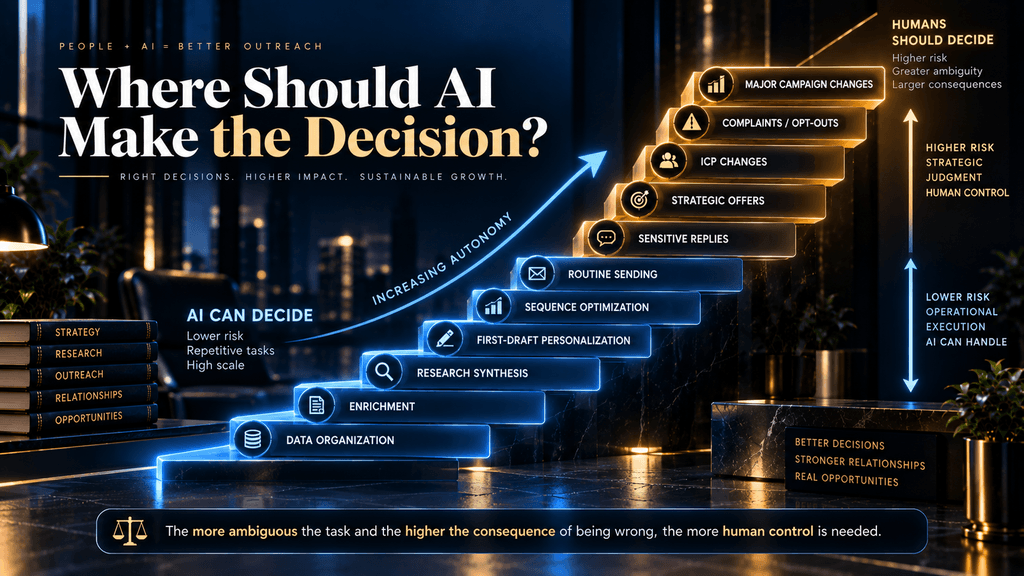
One of the most important decisions in AI cold outreach is not what AI can do. It is what AI should be allowed to do without human approval. The following autonomy ladder provides a practical boundary.
Level 1 — Data Organization
AI can safely help clean, categorize and structure prospect information when deterministic rules can catch obvious errors.
Level 2 — Enrichment
AI can assist in summarizing firmographic or contextual information, but source validation should remain available.
Level 3 — Research Synthesis
AI can identify patterns and organize signals across multiple data points, while a human remains responsible for deciding whether the evidence is sufficient.
Level 4 — First-Draft Personalization
AI can produce the initial email, but the sender should review the factual grounding, relevance and tone before it goes out.
Level 5 — Sequence Optimization
AI can identify which message structures or segments appear to perform better, but major changes should remain under human control.
Level 6 — Rule-Based Sending
Routine scheduling, throttling and campaign operations can be automated when the boundaries are explicit.
Level 7 — Sensitive Replies
Replies involving complaints, pricing disputes, security questions, legal issues, unusual objections, or relationship-sensitive situations should move toward human-led handling.
Level 8 — Strategic Direction
Major changes to the ICP, offer, messaging strategy, or market positioning should remain human decisions. The reason for this ladder is simple: the more ambiguous the task and the higher the consequence of being wrong, the more human control you need. That principle scales well across any AI-assisted sales workflow.
Personalization Is Not One Thing
The word “personalization” has become so broad that it is almost useless without a level attached to it.
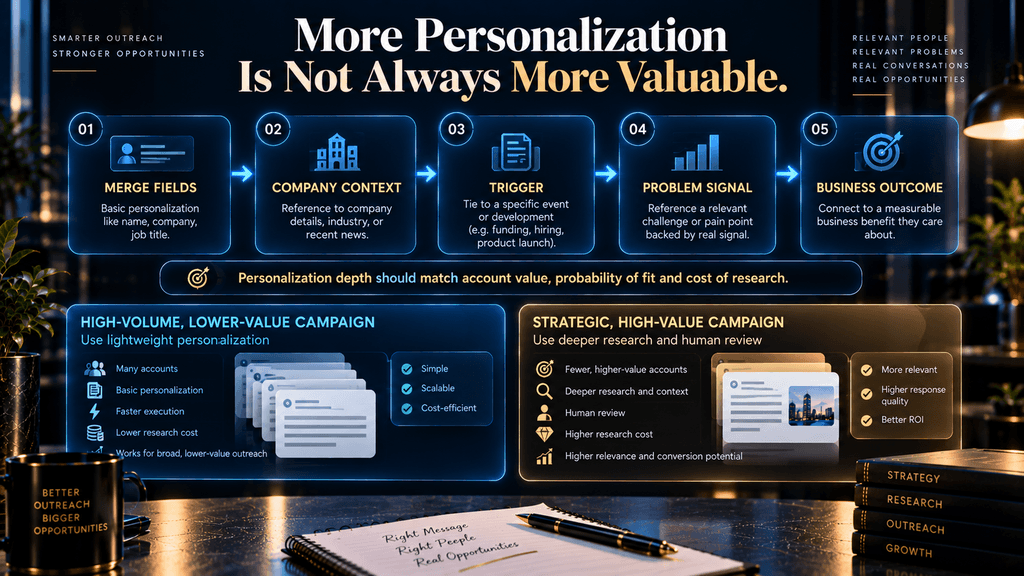
At the lowest level, there are merge fields. The system changes “Hello there” to “Hi Sarah” and inserts the prospect’s company name.
The next level adds company context: industry, employee size, geography, technology stack or some other account attribute. This is more useful for segmentation but can still produce generic outreach.
The third level introduces a trigger. Now the message is tied to a recent event or circumstance that plausibly changes the prospect’s priorities.
The fourth level connects that trigger to a problem hypothesis. The fifth level connects the problem to a relevant business outcome.
The higher levels can be much more powerful, but they also require better evidence and more judgment. If the AI makes a wrong assumption at Level 5, the result can feel more intrusive than a generic email because the sender appears to have done research and still misunderstood the situation.
The right strategy is therefore not “maximize personalization.” It is use enough personalization to establish relevance, without making claims that the evidence cannot support.
Why Signal-Based Personalization Is More Valuable
Suppose you are selling an operational software product to companies with distributed teams. A basic personalized line might say that the recipient’s company is “a leading software organization.” That sentence adds almost nothing.
A stronger signal might be that the company has announced a major expansion into three new markets and is hiring operations staff in each region. That creates a plausible reason for a conversation about coordination, process consistency, reporting or operational visibility.
The final email does not have to pretend the sender knows which of those problems exists. It only needs to show why the topic might be worth discussing.
That distinction turns personalization from decoration into commercial context.
Current 2026 industry research increasingly describes this type of signal-based workflow, although performance claims vary considerably by study and source. Tomba, for example, emphasizes enrichment and context before drafting, while DemandLab reports materially higher reply rates in its own client data for signal-based personalization compared with earlier mail-merge campaigns. The DemandLab figures are agency-reported results, not a universal industry benchmark, and should be treated as evidence of a possible mechanism rather than a guaranteed outcome. (DemandLab)
That caveat is important because cold-email performance depends heavily on the audience, offer, data quality, measurement definitions, sending environment and sales process.
How Much Personalization Is Economically Rational?
This is where many cold-email strategies become unrealistic. If you sell a $100 product, it may be irrational to spend five minutes doing manual research on every prospect.
If you sell a $100,000 enterprise solution, deep account research may be entirely rational. The economics of personalization should therefore depend on expected account value and probability of fit.
High-volume outbound campaigns for lower-value opportunities may benefit from lightweight but accurate personalization based on reliable signals. Strategic accounts may justify deeper research, highly specific messaging, multiple stakeholders, and human review.
The right question is not: “How personalized can we make every email?” It is: “How much additional personalization is worth paying for at this account value and conversion probability?” That is a fundamentally different way to think about AI because it treats personalization as an economic resource rather than a virtue that should always be maximized.
Why AI Should Not Write Every Email From Scratch
It sounds efficient to generate a completely unique message for every prospect. Sometimes it is. But total uniqueness can be an expensive illusion.
A strong outreach system often benefits from a stable underlying structure: a clear problem, a concise reason for contact, a relevant proof point, and a low-friction next step. AI can then adapt that structure according to audience, trigger and context.
This gives you controlled variability rather than randomness. The system remains measurable because the core logic is stable.
The emails remain adaptable because the evidence and wording change where needed. This is another reason a good AI cold-email strategy looks more like an operating system than a collection of prompts.
The Offer Still Matters More Than the Prompt
No prompt can compensate indefinitely for a weak offer.
AI can make an email clearer. It can make the message more concise. It can find a more relevant signal. It can vary the opening.
But it cannot manufacture genuine market value where none exists.
This becomes obvious when campaigns are analyzed beyond the reply stage. A message may generate curiosity because it is novel, but if the recipient cannot see a meaningful economic reason to change what they are doing, the conversation will not progress.
That is why outbound strategy should be built around a chain: Right account → relevant circumstance → credible problem → useful offer → easy next step. AI belongs across the chain, but it does not replace the logic of the chain.
The Follow-Up Problem
AI makes follow-ups almost free. That creates a behavioral risk.
A salesperson who has manually sent three follow-ups may feel that another message is socially uncomfortable. An automated system has no such hesitation. It can continue because the incremental cost of another email is effectively negligible.
That is exactly why the sequence needs rules.
A follow-up should add something useful, clarify something important, reference a new development, or create an easy opportunity to disengage. It should not simply take the same sentence and rewrite it four different ways.
“Just following up.” “Wanted to circle back.” “Checking whether you saw my previous email.”
“Bumping this to the top of your inbox.” Those messages may be operationally easy to generate, but they rarely provide a strong reason to continue the conversation. The deeper principle is that a follow-up should earn the right to exist.
When AI Follow-Ups Become Dangerous
There is a particularly important failure mode when a prospect has already demonstrated disinterest. An automated sequence may interpret silence as “send again.” That is a technical interpretation, not a human one.
Silence can mean:
The message was irrelevant. The recipient is busy. The recipient does not buy the category. The prospect has changed priorities. The recipient never saw the message. The recipient does not want further outreach. These possibilities are not equivalent.
An advanced system can therefore use AI to classify engagement signals, but decisions around complaints, clear opt-outs, or sensitive responses should be handled conservatively. The goal is not maximizing contact attempts. It is preserving the expected value of continued contact.
Deliverability and Copy Quality Are Separate Systems
A useful way to diagnose campaigns is to think of deliverability and persuasion as two different funnels. The first question is: Did the message reach the recipient without damaging the sender? The second is: Once it reached them, did the recipient find it relevant enough to respond?
A high bounce rate points toward list quality or infrastructure. A low reply rate with healthy delivery may point toward targeting, offer, relevance or messaging. A high reply rate with poor qualification may point toward positioning or audience selection.
A strong reply rate with weak meetings may indicate that the call-to-action or qualification is attracting the wrong kind of interest. A strong meeting rate with weak revenue may reveal a problem further down the sales process.
This is why “optimize the email” is often too vague to be useful. The campaign has to be diagnosed at the level where it is actually breaking.
The Metrics That Matter
A mature AI cold-email program should have a measurement hierarchy.
Infrastructure Metrics
These establish whether the sending environment is healthy. Bounce rate, authentication status, delivery errors, spam complaints, and domain or mailbox reputation belong here.
Engagement Metrics
These show whether the audience is responding. Reply rate is useful, but positive reply rate and qualified reply rate are more informative because they distinguish activity from commercial interest.
Sales Metrics
Meetings booked, meetings held, opportunities created, pipeline generated and closed-won revenue connect outreach to the actual sales process.
Economics Metrics
Cost per delivered email is interesting, but cost per qualified opportunity and customer acquisition cost are much more useful for business decisions. That hierarchy matters because different problems require different interventions. You should not solve a bounce problem by rewriting the subject line.
You should not solve a weak offer by increasing sending volume. You should not solve poor qualification by celebrating a high reply rate. Good measurement makes those distinctions visible.
A Practical Cold-Email Economics Model
A simple campaign can illustrate why this matters.
Imagine a company spends $300 on data, software, email infrastructure and related services during a campaign, plus $200 worth of internal labor for research, review and sales handling. The total campaign cost is therefore $500.
Suppose the campaign generates 50 replies. That sounds promising until you investigate the quality of those responses and discover that only eight are positive, three become qualified sales conversations, and one becomes a customer.
The useful business calculations are then not simply “$10 per reply.” They are closer to: $500 ÷ 3 qualified opportunities = $166.67 per qualified opportunity and: $500 ÷ 1 customer = $500 acquisition cost from the campaign.
Those numbers are illustrative rather than industry benchmarks. Their purpose is to show why the campaign’s economics cannot be understood from reply count alone.
AI can improve these economics when it reduces unnecessary research, improves targeting, increases qualified response quality, or lowers the cost of producing a useful message. It can hurt the economics when it increases volume without improving qualification or when it creates enough infrastructure and reputation problems that the sender needs to spend money repairing the campaign.
AI Can Lower Labor Cost Without Increasing Sales Efficiency
This distinction is worth making explicit because it is easy to confuse the two.
Suppose a sales representative used to spend three hours researching and drafting 50 emails. AI reduces that to 30 minutes.
That is a real productivity improvement. But if the 50 emails still target the wrong people and produce the same number of qualified opportunities, the sales efficiency of the campaign has not improved nearly as much as the labor efficiency. This matters for management decisions.
The correct question is not: “How many emails can AI help the rep write?” It is: “How much qualified pipeline can the rep produce after AI changes the workflow?” That shifts the focus from output quantity to business outcomes.
Why the Traditional Manual Process Exists
Manual cold outreach sometimes appears inefficient because a salesperson may spend several minutes researching a prospect, checking context, deciding whether the account is worth contacting, and reviewing the final message. Those steps are not all waste. Some of them are quality controls.
The salesperson is implicitly answering questions such as: Does this person actually seem relevant? Is the timing appropriate? Could this statement be wrong?
Is the offer credible? Would this email feel intrusive? Should I send at all?
AI can remove the mechanical cost surrounding those decisions, but eliminating the decisions themselves may reduce quality. The better transformation is therefore not human process → no humans.
It is human process → automate repetition → preserve judgment where it matters. That is the central operating philosophy behind a trustworthy AI cold-email system.
How to Build an AI Cold Email Workflow From Scratch
A practical implementation starts with the ICP rather than the software.
Define the account characteristics that actually correlate with your offer. Then define the buying circumstances that make your solution particularly relevant. Only after that should you select data sources and enrichment methods.
Next, build a small test list rather than immediately importing every contact you can find. Verify the addresses and collect the minimum evidence necessary to establish relevance.
Then use AI to organize and synthesize the research. The output should not be a 500-word profile of every prospect. It should be a compact evidence set: what changed, why it might matter, and which assumption is still uncertain.
From there, generate a short draft based on a stable structure. Review every factual claim that creates a personalization effect. Remove anything that sounds like fabricated familiarity or an unsupported assumption.
Before sending, confirm the infrastructure. Authentication, sending behavior, list hygiene, unsubscribe handling, and monitoring need to be operational before volume increases. Google’s current sender guidance is the appropriate authority for Gmail-specific requirements. (Google)
Then launch a controlled test. Only after the campaign produces useful evidence should you expand the audience or increase volume.
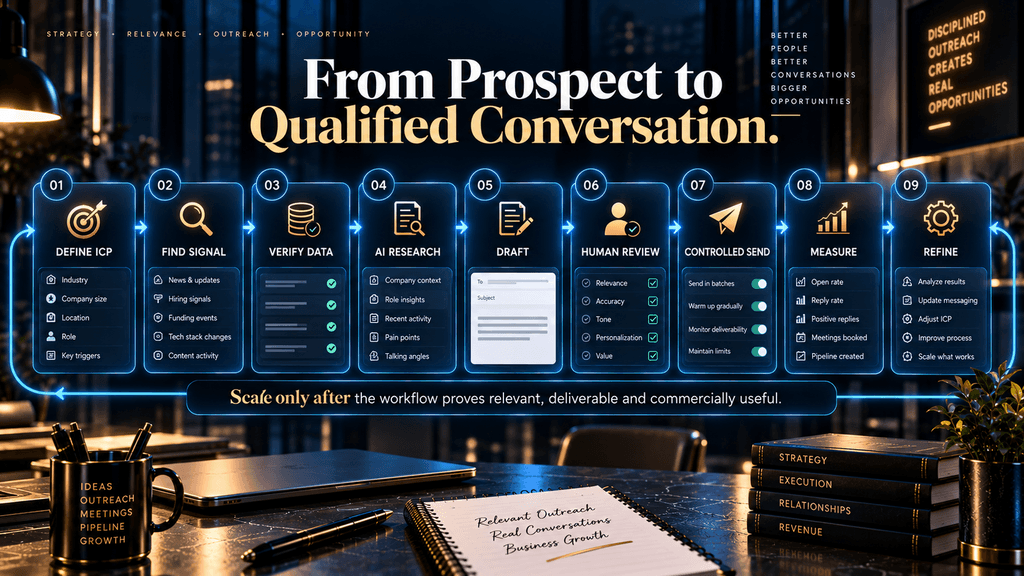
A 30-Day AI Cold Email Rollout
A responsible rollout does not begin by automating thousands of emails.
During the first week, the priority should be the ICP and infrastructure. Define the target accounts, decide which signals indicate relevance, verify the sending domain configuration, establish authentication, select the data sources, and decide which metrics will determine success.
The second week should focus on research and message design. Build a small prospect sample, identify current signals, create AI-assisted drafts, review them manually, and test different value propositions without changing every variable at once.
The third week is about controlled sending. The goal is not maximum volume. It is determining whether the targeting, signal and offer combination produces qualified conversations while the sending environment remains healthy.
The fourth week should be used for optimization. Identify which segments, triggers and offers produce the strongest commercial signals, then reduce or remove the components that create noise. Only after the system demonstrates stable economics should additional automation or volume be considered.
This sequence may feel slower than launching a fully automated campaign on day one, but it protects the most valuable asset in outbound: the ability to learn before mistakes become expensive.
Choosing the Right Level of Automation
Not every campaign needs the same automation level.
A small consulting business targeting 30 highly valuable accounts may benefit from deep AI-assisted research followed by human-written messages. A SaaS company targeting thousands of similar mid-market accounts may justify more automation because the economics of each prospect are lower and the audience is more structurally consistent.
The difference is not simply company size. It is account value, data quality, audience consistency, message complexity and cost of error. The higher the value per account and the more ambiguous the buying context, the more valuable human judgment becomes.
The lower the value per account and the more predictable the problem, the more automation may make economic sense. That is a much more useful framework than telling every business to “automate cold email.”
When AI Cold Email Should Not Be Scaled
There are situations where scaling is the wrong decision. If the ICP is still unclear, more AI-generated outreach simply produces more uncertainty. If the offer is weak, more personalized emails do not manufacture demand.
If the audience rarely buys through outbound, the business may be optimizing the wrong channel. If the list contains unreliable or stale data, increasing volume only increases the rate at which the campaign encounters problems. If the domain or mailbox reputation is already unhealthy, sending more messages before diagnosing the issue can make recovery harder.
And if the campaign consistently produces replies that never become meaningful sales conversations, the answer may be to change the audience or offer rather than to generate more sophisticated copy. AI lowers the cost of execution. It does not lower the cost of having the wrong strategy.
The Role of Cold Email in a Broader Acquisition System
Cold email works best when it is treated as one acquisition channel rather than as the entire growth strategy. A company may use outbound to create initial conversations, content to build credibility, referrals to increase trust, paid acquisition to create inbound demand, and account-based marketing to coordinate outreach across several stakeholders.
AI can connect those activities by organizing research and identifying signals across the funnel, but that does not mean every channel needs to be automated in the same way. The strategic advantage comes from understanding where outbound fits.
For example, an account that has just engaged with a company’s content, hired a relevant leader, and announced a strategic initiative may deserve a different outreach approach from a completely cold account. AI can help identify that context, but the sales team still decides what level of contact is appropriate.
That is another reason to think in terms of signals rather than volume.
The Biggest Mistake: Optimizing for Reply Rate
Reply rate is a useful metric, but it is one of the easiest metrics to manipulate accidentally. A provocative subject line can increase opens or replies. A vague curiosity hook can create responses.
A controversial statement can generate engagement. None of those outcomes necessarily mean the campaign is generating sales value. A better metric is qualified positive response rate because it asks whether the right kind of prospect has shown meaningful commercial interest.
Even that should not be the final goal. The ultimate question is what happens after the reply. Do qualified conversations become meetings?
Do meetings become opportunities? Do opportunities become customers?
Does the revenue justify the campaign cost? Those are the signals that should govern optimization.
How AI Can Improve Reply Quality Instead of Just Reply Volume
The best AI systems can help marketers become more selective. Instead of generating three times as many messages, the system can help identify which prospects deserve deeper personalization. It can summarize multiple account signals, compare them against the ICP, identify missing information, and recommend whether the account should be contacted now, later, or not at all.
That changes AI from a content multiplier into a decision-support system. This is a more valuable role because the opportunity to avoid a bad email is sometimes worth more than the ability to write a good one. In high-value outbound, deciding not to send can be a success.
Data Quality Is an AI Problem Too
AI-generated outreach depends on the quality of the information it receives. If the contact database says a prospect is a VP when they changed roles three months ago, the personalization system can produce a beautifully written email that is still wrong.
If the database identifies an outdated technology stack, AI can turn stale information into a confident statement. If the trigger event is old, the message may feel strangely late.
This means the AI layer cannot be evaluated independently from the data layer. A useful operational concept is confidence-aware personalization.
Where evidence is strong, the system can be more specific. Where evidence is weak, the message should become more general. Where the evidence is contradictory, the safest decision may be to avoid the personalization entirely.
That is a much better model than forcing every prospect into a “fully personalized” category.
AI Agents Will Change Outbound—But They Increase the Need for Controls
The next stage of AI cold email is likely to move beyond assistance into more autonomous outbound systems. An agent can potentially discover prospects, enrich them, research triggers, draft emails, classify replies, schedule follow-ups, and suggest changes to the campaign.
That sounds attractive because it reduces human labor across the whole funnel. But autonomy changes the risk profile.
An assistant can make one wrong decision. An autonomous system can repeat that decision thousands of times. A human can notice that a personalized claim feels suspicious. An automated agent may treat the same claim as valid because it passed a rule. A salesperson may stop a campaign after noticing that recipients are consistently confused. An autonomous system may interpret the resulting replies as a reason to “optimize” the wrong variable.
That means the future advantage may not belong to the company with the most autonomous agent. It may belong to the company with the best control architecture around its agents.
The Second-Order Effect: Personalization May Become Less Valuable
There is a deeper market effect that is easy to overlook. As AI makes personalized outreach cheaper, more companies will use personalization. That means personalization itself can become less distinctive.
A sentence referencing a recent company event may feel impressive today because relatively few senders do it well. Once every outbound system can automatically find and reference those events, the presence of a signal in the email stops being the differentiator.
The scarce resource then shifts again. It becomes the quality of the reason for contacting the person. This could make future cold email increasingly dependent on timing, relevance and offer quality rather than clever copy.
In other words, AI may gradually commoditize the writing layer while making commercial judgment more valuable. That is one of the most important reasons not to build an outbound strategy around the idea that AI writes better emails. The better strategy is that AI helps the sales team make better decisions before, during and after the email.
Common AI Cold Email Mistakes
One common mistake is using AI to personalize emails before deciding whether the prospect is actually a fit. This creates the appearance of sophistication while leaving the basic targeting problem untouched.
Another is treating every public data point as a valid personalization opportunity. Information can be technically true and still commercially irrelevant, and forcing it into the email can make the sender sound like they are trying too hard to prove that they researched the prospect.
A third is allowing AI to infer unsupported facts. If the system is uncertain about a company’s priorities, it should not turn that uncertainty into a confident claim simply because a confident sentence sounds better.
A fourth is scaling too quickly after an encouraging pilot. Early success may reflect a particular segment, trigger or list quality that does not hold when the audience expands.
A fifth is judging the campaign by reply rate alone. The business cares about qualified opportunities and revenue, not merely responses.
A sixth is assuming authentication solves deliverability. SPF, DKIM and DMARC are important, but they do not transform irrelevant outreach into wanted mail.
A seventh is letting automated follow-ups continue indefinitely. Low marginal sending cost is not evidence that another message has positive expected value.
An eighth is adding too many AI tools. A complicated stack can create duplicate data, more exports, inconsistent logic and additional failure points without creating meaningful value.
A ninth is optimizing the software instead of the offer. New prompts and new models cannot fix a message that has no credible reason for the recipient to care.
What a Strong AI Cold Email Stack Looks Like
A useful system can remain surprisingly simple. The first layer is a reliable data source containing the contacts and account information you actually need. The second is an enrichment or research layer that helps identify meaningful signals.
The third is an AI reasoning layer that organizes the information and drafts or evaluates the message. The fourth is a sending platform that provides controlled sequencing and the operational features required for your campaign. The fifth is measurement and monitoring, which tells you whether the system is generating qualified business outcomes without damaging the infrastructure.
The exact software choices belong in the site’s dedicated Best AI Cold Email Software article rather than in this strategy article. The strategic point here is that the tools should fit the operating model, not define it.
What Should Remain Human?
The human should remain responsible for the things where ambiguity has a high cost. That includes deciding whether an account genuinely belongs in the ICP, judging whether a signal is commercially meaningful, approving sensitive personalization, making major changes to the offer, interpreting surprising campaign behavior, handling complaints, and deciding when to stop sending. This does not mean humans should manually inspect every line of every low-value email forever.
The objective is to place human attention where it creates the most value. A good AI system should gradually reduce the amount of routine review while increasing the quality of the exceptions it sends to humans. That is a much more sustainable model than pretending a human should either approve everything or approve nothing.
Who Should Use AI Cold Email?
AI-assisted cold email makes the most sense for businesses that already have a reasonably clear customer profile and enough outbound activity for repetitive research, personalization or campaign operations to create meaningful labor costs. It is especially useful when the prospect universe is large enough to benefit from segmentation and enrichment, the buying problem is reasonably well understood, and the sales team has a process for handling qualified conversations.
It is less compelling for a founder pursuing a tiny number of highly valuable strategic accounts where deep manual research may still be economically rational. In that situation, AI can remain useful as a research and drafting assistant without being responsible for the entire outreach process.
The common denominator is not company size. It is whether there is enough repeatable work for AI to create leverage without turning judgment into a bottleneck.
Who Should Avoid Scaling AI Cold Email?
Companies should hesitate to scale when they do not yet know exactly who they are targeting or why that audience should buy.
They should also be cautious when the sales process cannot absorb additional conversations. Generating qualified interest faster than the team can follow up may create a false sense of marketing success while actually degrading customer experience.
Businesses operating in highly regulated or sensitive areas may also need stronger human controls and compliance review.
Finally, organizations with unresolved deliverability problems should fix the sending system before they increase volume. More messages are not a recovery strategy.
The Practical Decision Checklist
Before scaling an AI cold-email campaign, you should be able to answer several questions without relying on vague assumptions.
You should know exactly which accounts belong in the ICP and which do not. You should know which signals make an account more relevant and how those signals are verified. You should know what the offer is solving and why the timing of the outreach makes sense.
You should also know which parts of the workflow AI is allowed to automate, which parts require human approval, and which conditions automatically stop the campaign. Your infrastructure should be authenticated and monitored, and your team should know which metrics indicate a list problem, a messaging problem, a qualification problem or a sales-process problem.
Most importantly, you should know what success means financially.
If the campaign creates more replies but not more qualified opportunities, something is wrong. If it creates more qualified opportunities but the sales process cannot handle them, something is wrong. If it creates opportunities but the economics are poor, something is wrong.
AI does not change those fundamentals. It makes them move faster.
What Happens If You Do Nothing?
A business that continues using a purely manual cold-email process may remain perfectly functional, especially when the campaign is small or highly targeted. The problem appears when repetitive research, list analysis, message creation and campaign review begin consuming enough time that salespeople spend less of their effort on actual selling.
There is also an opportunity cost. Competitors that use AI well may research accounts faster, identify relevant triggers sooner, test more messaging variations, and make campaign decisions using more data.
But the answer is not simply to automate everything. A business that reacts to AI pressure by turning outbound into an uncontrolled volume machine can damage the very asset it needs to continue sending: sender reputation and recipient trust.
The right response is more disciplined. Use AI to remove repetitive work, then put the saved human attention into targeting, offer quality, verification, interpretation and relationship-sensitive decisions.
The Strategic Rule for Scaling AI Cold Email
A useful way to summarize the entire strategy is to separate three things that are often treated as one: More automation means fewer manual steps. More volume means more messages.
More efficiency means more valuable outcomes per unit of cost and risk. Those are not the same thing.
You can increase automation without increasing efficiency. You can increase volume while reducing efficiency. You can even increase automation and volume while destroying long-term economics.
The goal is therefore not maximum automation and certainly not maximum sending volume. It is maximum useful output under controlled risk. That is the standard a serious AI cold-email system should be judged against.
The Future of AI Outbound
As AI agents become more capable, more parts of outbound will become machine-assisted. Prospect discovery, enrichment, research synthesis, drafting, follow-up classification and campaign analysis will continue moving toward greater automation.
At the same time, the economic value of human judgment is likely to increase in the places where automation remains uncertain.
That means the role of the salesperson may shift rather than disappear. Instead of spending most of the day collecting basic information and formatting emails, the salesperson may spend more time deciding which accounts matter, judging the quality of signals, handling complex objections, improving the offer and interpreting patterns across the market.
That is a healthier outcome than imagining that the final stage of AI outbound is a robot sending unlimited email. A mature system should become more selective as it becomes more autonomous, not less.
Final Decision: How to Scale AI Cold Email Without Hitting Spam
AI can make cold email substantially more efficient, but only when it is used to improve the system around the email rather than simply increase the number of emails being sent.
Start with the target account. Research the circumstances that make the outreach relevant. Use AI to organize evidence and produce a concise first draft, but keep factual verification and important judgment under human control. Build the sending infrastructure correctly, follow the applicable requirements for your recipient environment, increase volume gradually, and monitor reputation rather than assuming that authentication or warm-up makes the campaign permanently safe. Google’s current Gmail guidance should remain the primary reference for Gmail-specific sender requirements and spam-rate expectations. (Google)
Then measure the right thing. Replies are useful, but qualified replies, meetings, pipeline and revenue are much closer to the actual business objective. When the campaign underperforms, diagnose the layer that is broken rather than automatically rewriting the email or increasing volume.
The most important principle is also the simplest: AI should make outbound more relevant before it makes outbound larger.
When AI is used that way, scale becomes a consequence of a healthy system rather than a substitute for one. The technology can reduce research time, accelerate drafting, improve analysis and automate repetitive operations while leaving the decisions that affect trust, reputation and commercial strategy in human hands.
That is the difference between using AI to send more cold email and using AI to build a better outbound engine.
Final Thoughts
The biggest mistake a company can make with AI cold email is assuming that the breakthrough comes from generating more human-sounding messages. Writing is only one part of outbound, and in many campaigns it is no longer the expensive part. The harder work is deciding who deserves the message, why they might care now, what evidence supports that assumption, how much personalization is worth paying for, whether the sending infrastructure can support the campaign, and what the results actually mean for revenue.
AI is exceptionally useful across that system when it removes repetitive work without removing the decisions that require judgment. It can help research thousands of accounts, identify useful signals, summarize information, draft messages, classify replies and analyze patterns much faster than a manual workflow. But the technology becomes dangerous when speed is mistaken for strategy, especially when the system is allowed to turn uncertainty into confident claims or scale weak outreach before the fundamentals are proven.
The strongest approach is therefore not to build an AI machine that sends as many emails as possible. It is to build a controlled outbound engine in which better targeting leads to better research, better research creates more credible relevance, relevant outreach generates better conversations, and measured results determine whether the system deserves to scale.
Cold email has always been a game of relevance under constraints. AI does not change that fundamental reality. It simply gives businesses much more power to operate the system—and much more power to damage it when they optimize the wrong thing.
Use AI to make your outreach more relevant before you make it larger.
Build Smarter AI-Powered Outreach
Outreach only works if it reaches the inbox, so audit your deliverability and fix spam issues first.
Audit Your Email Deliverability →Frequently Asked Questions
1. What is AI cold email?
AI cold email is an outbound sales workflow that uses artificial intelligence to assist with tasks such as prospect research, enrichment, personalization, drafting, sequencing, reply classification or campaign analysis. The strongest implementations do not treat AI as a replacement for the entire sales process; instead, they use it to reduce repetitive work while keeping human judgment around targeting, factual accuracy, sensitive replies and major strategic decisions.
2. Can AI cold email improve reply rates?
It can, particularly when AI is used to improve targeting, identify relevant signals and make messages more specific to the prospect’s situation. Current industry studies and vendor analyses report substantial improvements in some campaigns, but those figures vary widely and are often based on proprietary client or platform data rather than independent industry-wide experiments. The safer conclusion is that AI can improve relevance when the underlying data and offer are strong, but there is no universal reply-rate improvement that every campaign should expect.
3. What is the difference between AI personalization and basic mail merge?
Basic mail merge inserts known fields such as a prospect’s name, company or job title into a fixed template. AI personalization can go further by combining multiple contextual signals, identifying a potentially relevant trigger, and adapting the message around that context. The value comes from establishing relevance, not from making every email syntactically unique, so an AI-generated message based on weak or incorrect data is not necessarily better than a well-written structured template.
4. How much personalization should a cold email have?
Personalization should be deep enough to establish a credible reason for contact but not so aggressive that the sender makes assumptions the evidence cannot support. The economically sensible level depends on account value, probability of fit, data quality and the cost of research. High-value strategic accounts can justify extensive research and human review, while lower-value high-volume outreach may need lighter personalization built around reliable signals.
5. Does AI cold email automatically increase spam risk?
AI itself does not determine whether an email campaign is spam, but automation can increase risk when it makes it easier to send large volumes of irrelevant or unwanted messages. Google currently requires senders to personal Gmail accounts to follow authentication and sender-quality requirements and recommends gradual, consistent sending while monitoring spam and reputation signals. The main practical risk is not that AI exists; it is that AI can make poor targeting and excessive sending easier to scale.
6. Do I need SPF, DKIM and DMARC for cold email?
The exact requirements depend on the recipient environment and sending volume, but Google currently requires senders to personal Gmail accounts to authenticate with SPF or DKIM, while higher-volume senders to personal Gmail accounts must meet stricter requirements including SPF, DKIM and DMARC, along with alignment and other controls. These records are infrastructure requirements, not a substitute for relevant messaging or responsible sending.
7. Is there a safe number of cold emails to send per day?
There is no single universal number that can be treated as safe for every sender, domain, mailbox or audience. Sending capacity depends on the condition of the infrastructure, authentication, list quality, recipient environment, historical reputation, bounce and complaint behavior, and the consistency of the campaign. Google recommends avoiding bursts, starting at lower volumes, increasing gradually and monitoring sender performance rather than following a simplistic universal daily number.
8. Should AI automatically send and follow up with prospects?
Some routine sending and sequencing can be automated when the rules are well defined, but fully autonomous outreach creates unnecessary risk when the system encounters ambiguous or sensitive situations. AI can schedule standard follow-ups, classify replies and identify patterns, while humans should retain authority over complaints, unusual objections, significant strategic changes and situations where the system cannot confidently interpret intent. The goal should be controlled automation rather than automation for its own sake.
9. Which metrics matter most in AI cold email?
A mature campaign should measure more than reply rate. Infrastructure metrics such as bounce rate and spam complaints indicate whether the sending system is healthy, while positive and qualified reply rates provide a better picture of message and targeting quality. Meetings, opportunities, pipeline, revenue, cost per qualified opportunity and customer acquisition cost then determine whether the campaign is actually creating business value.
10. When should a company stop scaling AI cold email?
A company should stop increasing volume when the underlying system is not producing healthy economics or when a structural problem has not yet been fixed. That can include unclear targeting, weak offers, poor data quality, deliverability problems, low-quality replies, insufficient sales follow-up capacity, or evidence that outbound is simply a poor acquisition channel for the audience. Increasing AI-powered volume before resolving those problems usually magnifies the failure rather than solving it.
Related Guides
- What Is an AI SDR? How AI Agents Automate B2B Prospecting, Outreach & Qualification
- Best AI Lead Scraping & Data Enrichment Tools in 2026
- Best AI Email Assistants (Free & Paid): 10 Tools Compared
Written by
Muntasir Ahmad Chowdhury
Founder, AI Hustle World
Muntasir Ahmad Chowdhury is the Founder of AI Hustle World, an independent publication dedicated to making Artificial Intelligence practical, trustworthy, and easy to understand. He researches AI tools, automation, customer service, productivity, and real-world business applications, helping readers make smarter technology decisions through research-driven, experience-backed content.
Expertise:
AI Tools • AI Automation • AI Customer Service • AI Productivity • Generative AI • AI Workflows
Get Smarter With AI
Enjoyed this guide? Get practical AI tools, tutorials, and honest reviews delivered to your inbox.