
Evidence: Documentation reviewed
Last checked: August 2026
What was done: Written from official documentation and the published sources linked in this article. Not hands-on tested.
Files: None
Affiliate links: No
This is general information, not legal advice, and it was not written or reviewed by a lawyer. For any decision that carries legal risk, speak to a qualified professional in your jurisdiction. Legal AI products change quickly, so treat the features and prices described here as a snapshot from October 2026 and confirm them with each vendor.
Best AI Legal Tools in 2026: Research, Contract Review and Legal Workflows
The best AI legal tool depends on the legal job you need done. For research grounded in authoritative law, CoCounsel Legal and Lexis+ with Protégé lead the market. For broad, agent-driven legal work across a firm, Harvey and Legora are the main platforms to evaluate. For contract review and drafting, Spellbook is a focused option, and Luminance suits large contract portfolios.
For smaller firms, Clio combines practice management with legal research through Vincent by vLex, which Clio now owns. Paxton offers an all-in-one legal AI assistant with published pricing aimed at individual attorneys and litigation teams. No single product wins every category, so the right choice starts with the work you do most and the authority you need to rely on.
The market has moved fast. In 2026 the major platforms are no longer simple chat assistants. They plan multi-step work, connect research with drafting, keep context across a matter and include tools for checking citations. That makes them far more useful and raises the stakes of choosing well, because the tool you pick will shape daily workflows and how your team verifies AI output.
This guide compares nine leading tools by the job each does best. It explains the six-dimension Fit Score we use to evaluate legal AI, gives each tool a W.O.R.T.H. score, and covers verification, security, pricing models, the shift from assistants to agents and a step-by-step pilot plan for testing a tool against your own documents before you buy.
What Counts as an AI Legal Tool in 2026
“AI legal tool” now covers several very different categories. At the simplest level, lawyers use general AI assistants for low-risk tasks such as brainstorming, organizing notes and drafting non-sensitive messages. Those tools can save time, but they are not legal research databases, and they do not verify citations or know your jurisdiction reliably.
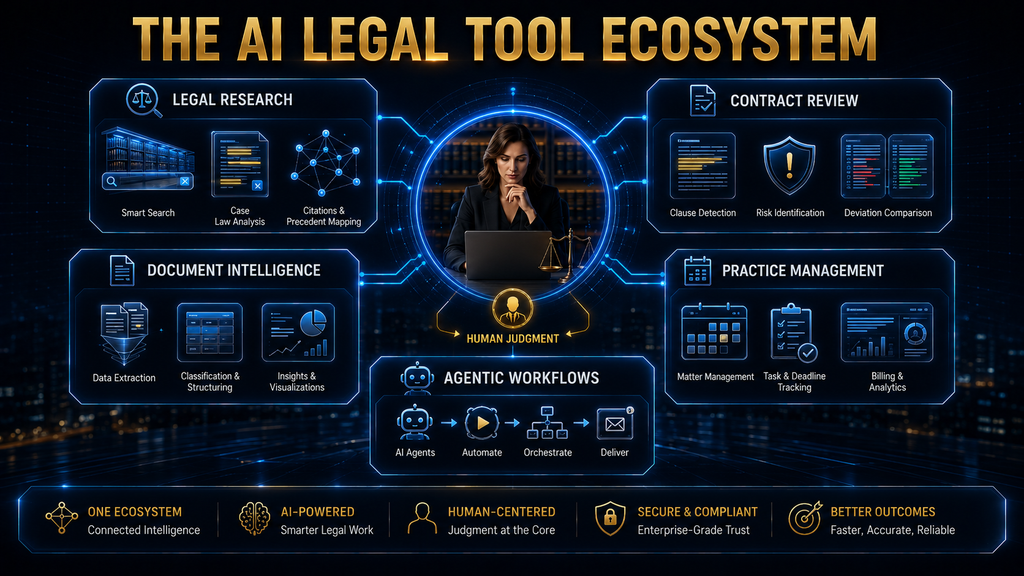
Purpose-built legal AI goes further. These platforms may be grounded in authoritative legal databases, designed for legal documents, built into legal workflows, or equipped with citation checking, contract analysis and matter management. A useful way to organize the market is into five broad categories, each solving a different problem for a different kind of legal team.
- Legal research AI: searches and analyzes legal authority. Examples include CoCounsel Legal, Lexis+ with Protégé and Vincent by vLex.
- Contract review and drafting AI: focuses on clauses, redlines, playbooks and negotiation. Spellbook is a leading example.
- Enterprise legal AI platforms: cover many workflows in one environment. Harvey and Legora are the best known.
- Contract intelligence: analyzes an organization’s whole contract portfolio. Luminance is the main example here.
- Practice management AI: automates billing, intake and administration. Clio is the largest player.
These products should not be compared as if they were interchangeable. A research platform and a contract tool may both use large language models, but their value comes from solving different problems. Buying a research tool for contract work, or the reverse, is one of the most common and expensive mistakes in legal technology.
How We Evaluated These Tools
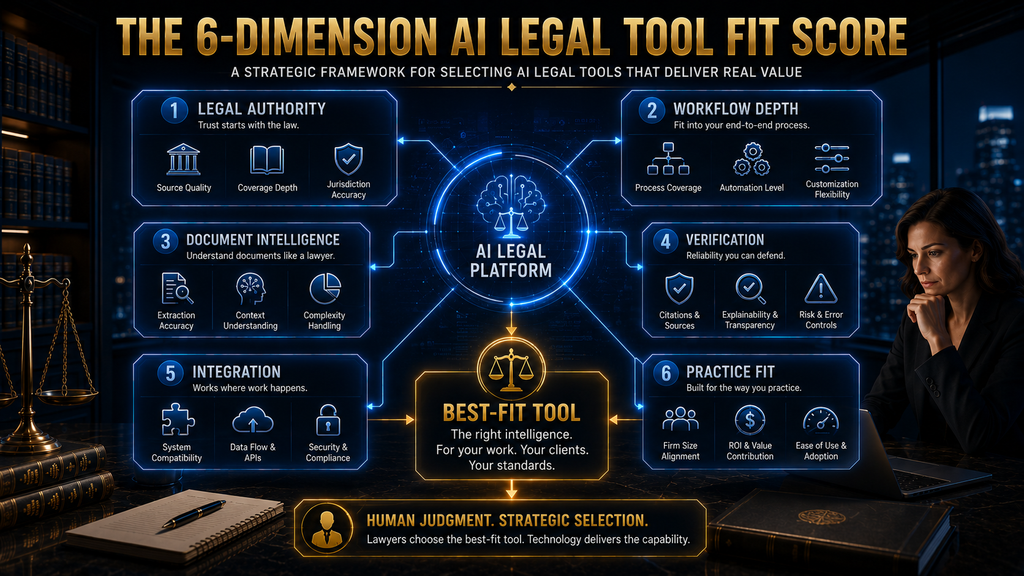
Rather than ranking tools by how many features they advertise, we use a six-dimension Fit Score, an AI Hustle World framework for legal AI. It asks where the legal information comes from, how much of the workflow the tool covers, how well it understands documents, how easily its output can be verified, how well it fits existing systems, and whether it suits the organization buying it.
Each tool also receives a W.O.R.T.H. score out of 100, our standard editorial assessment across all tool roundups. It weighs Workflow fit (25), Output quality (25), Risk and rights (15), Total cost (20) and Human effort saved (15). For legal tools, the Risk dimension carries particular weight, because confidentiality and accuracy failures have professional consequences.
This is a documentation-based comparison. We reviewed each vendor’s product pages and announcements in October 2026 but did not run the same legal tasks through every platform or measure accuracy ourselves. Most of these products use sales-led pricing, so few prices are public. None of the links in this guide are affiliate links, and no vendor paid for placement.
The Six-Dimension Fit Score
Legal authority asks where the information comes from. Legal work needs more than plausible language. A research answer may need primary law, current authority, the right jurisdiction and traceable citations. A tool grounded in an established legal database starts from a fundamentally different foundation than a general model generating text from learned patterns.
Workflow depth asks whether the tool handles one isolated task or connects several stages of work. Summarizing a case is very different from researching an issue, finding authority, analyzing matter documents, drafting an argument and producing source-backed work product. The market is moving toward the second model, and buyers should test for it.
Document intelligence asks how well the tool understands contracts, pleadings, evidence, exhibits and policies, especially across large collections. Verification asks whether a lawyer can see where an answer came from, check citations and inspect the original language. That second point is one of the clearest differences between professional legal AI and general chat tools.
Integration asks whether the tool fits where lawyers already work, such as Microsoft Word, document management systems, contract platforms and identity systems. Practice fit asks whether the tool makes sense for the organization. An enterprise platform may be excessive for a solo attorney, and a light contract tool may be inadequate for a global legal department.
The Best AI Legal Tools at a Glance
The table below summarizes where each tool is strongest and who it suits. It is a starting point, not a universal ranking. The sections that follow explain each tool’s strengths and, just as importantly, the situations where another option would serve you better. Prices and plans were checked on vendor sites in October 2026.
| Tool | Strongest use | Best fit | Pricing |
|---|---|---|---|
| CoCounsel Legal | Research, drafting and verified workflows | Firms on Westlaw and Practical Law | Sales-led |
| Lexis+ with Protégé | Research, drafting and analysis | LexisNexis users | Sales-led, free trial |
| Harvey | Broad agentic legal work | Large firms and legal departments | Sales-led |
| Legora | Agentic multi-step workflows | Sophisticated legal teams | Sales-led |
| Spellbook | Contract review and drafting | Transactional lawyers | Sales-led |
| Luminance | Contract intelligence at scale | Enterprise contract portfolios | Sales-led |
| Vincent by vLex | Research and legal intelligence | International research | Free trial available |
| Clio | Practice management with AI | Small and mid-sized firms | Published plans |
| Paxton | All-in-one legal AI assistant | Individual attorneys, litigation | $2,999/user/year |
Pricing in legal AI is mostly negotiated, and it often depends on firm size, seats, content bundles and usage. Where a vendor publishes prices, we note them. Where it does not, plan for a sales conversation and ask detailed questions about what is included, what is metered and what costs extra, which we cover later in this guide.
W.O.R.T.H. Scores for All Nine Tools
The W.O.R.T.H. scores below reflect a typical buyer for each tool’s core market, not a single ranking for every reader. Research platforms score highest on output and risk because of their authoritative content. Practice-management tools score well on cost and effort for small firms. Specialists score highly within their niche.
| Tool | Workflow (25) | Output (25) | Risk (15) | Cost (20) | Effort (15) | Total |
|---|---|---|---|---|---|---|
| CoCounsel Legal | 22 | 23 | 14 | 12 | 13 | 84 |
| Lexis+ with Protégé | 21 | 23 | 14 | 12 | 12 | 82 |
| Harvey | 22 | 21 | 13 | 11 | 14 | 81 |
| Legora | 21 | 21 | 13 | 11 | 14 | 80 |
| Clio | 20 | 18 | 12 | 16 | 12 | 78 |
| Luminance | 19 | 20 | 13 | 11 | 13 | 76 |
| Spellbook | 20 | 19 | 12 | 13 | 12 | 76 |
| Vincent by vLex | 18 | 21 | 13 | 12 | 11 | 75 |
| Paxton | 17 | 18 | 12 | 15 | 11 | 73 |
Use the scores to narrow your shortlist, then weight them for your own situation. A solo litigator may care most about cost and ease of use, which favors Paxton or Clio. A global legal department may weight risk and workflow depth above everything else, which favors CoCounsel, Harvey or Legora. Re-score the finalists after your pilot, using what you learned from your own documents.
1. CoCounsel Legal: Best for Authoritative Research and Connected Workflows
CoCounsel Legal from Thomson Reuters is one of the clearest examples of legal AI moving from isolated prompts to connected, agent-driven work. On August 20, 2026, Thomson Reuters announced general availability of the next generation of CoCounsel Legal, describing it as a fully agentic experience for moving from research to work product.
The launch introduced Westlaw Brief Builder, which helps litigators move from research and issue analysis to first-draft briefs in one workflow. It draws on Westlaw Deep Research, KeyCite and Practical Law, proposing facts, arguments and authority while leaving strategy, legal theory and final decisions with the lawyer. That framing reflects how the best legal AI is now designed.
CoCounsel also includes Workspaces, a dedicated environment for each matter that combines firm documents, precedents and institutional knowledge, so context carries across matters and teams. A Drafting Agent works inside CoCounsel for Word. Thomson Reuters has also released Deep Research Verify, which checks whether cited authority supports a report’s assertions, starting with UK products.
CoCounsel is strongest for litigation teams, firms already using Westlaw or Practical Law, and organizations that want to move from research into drafting in one environment. It may not be the best fit if your main need is contract redlining or practice administration. Its W.O.R.T.H. score of 84 reflects excellent authority and verification balanced against premium, sales-led pricing.
2. Lexis+ with Protégé: Best for LexisNexis-Grounded Research and Drafting
Lexis+ with Protégé is the other major research platform, and its strength comes from the LexisNexis content ecosystem. The Lexis+ with Protégé product page describes it as legal AI for drafting, research and analysis, built on authoritative case law, statutes, regulations and exclusive secondary sources. For many firms, the choice between it and CoCounsel comes down to which content ecosystem they already use.
Its research draws on primary law, Practical Guidance practice notes and annotated forms across 25 practice areas, and real-time web and news when timely context is needed. Shepard’s Citations is built into the research and drafting workflow, so lawyers can check the status and treatment of authorities without leaving the tool. That is a major advantage for any work headed to a court.
Lexis+ with Protégé can also connect to an organization’s own documents through iManage, SharePoint, NetDocuments and other document management systems, so lawyers can ask questions and draft from their firm’s knowledge. That combination of external authority and internal knowledge is what makes it a strong all-round research environment rather than a narrow search tool.
It suits litigation, research-heavy practices and organizations already using LexisNexis resources. A contract-heavy team may prefer a tool built around clause comparison and negotiation, and a small firm may find the depth more than it needs. Lexis+ with Protégé scores 82 on W.O.R.T.H., just behind CoCounsel, and LexisNexis offers a free trial for evaluation.
3. Harvey: Best for Broad Agentic Legal Work
Harvey aims to be a single environment for legal work rather than a point solution. Harvey’s website lists purpose-built agents that carry out complex legal work end to end, Vault for storing and bulk-analyzing documents, Knowledge for legal, regulatory and tax research, Spaces for working with other organizations, and Contract Intelligence for negotiations and reviews.
The platform also includes Command Center for analytics on AI adoption, Horizon Scanning for tracking regulatory change and an Intake product for routing legal requests from across a business. In May 2026, trade press reported that Harvey launched more than 500 ready-made legal agents and opened early access to an Agent Builder for customizing workflows.
That customization matters. A law firm does not only want an AI that knows law. It wants one that follows its own drafting style, review standards and processes. Third-party company profiles in 2026 put Harvey’s customer base at more than 2,400 organizations in over 70 countries, though such figures are company-reported and should be treated as indicators of momentum rather than proof of quality.
Harvey is strongest for large firms, legal departments that want a broad platform and teams interested in custom agents. A small firm looking for simple contract review may not need it, and organizations with an established research and contract stack should check for overlap. Harvey scores 81 on W.O.R.T.H., with top effort and workflow scores against premium pricing.
4. Legora: Best for Multi-Step Agentic Workflows
Legora is one of the clearest examples of the move to agentic legal work. Legora’s website presents the Legora aOS as an agentic operating system for legal work, combining language models, an agentic harness, data and integrations, context and knowledge, legal capabilities, products and security and governance in one system.
The intended workflow is objective, plan, multiple steps and finished work product. Early legal AI made lawyers break work into separate prompts: find cases, summarize them, compare them, draft the argument, check the citations. Agentic systems coordinate more of that sequence. That reduces manual orchestration but makes governance more important, because the lawyer needs to know what was done.
Legora reported in April 2026 that it had passed $100 million in annual recurring revenue and more than 1,000 customers, attributing growth partly to wider use of multi-step agentic workflows. Those are company-reported figures that show strong market momentum. They do not prove Legora is better than every competitor for every team.
Legora suits sophisticated legal teams, firms experimenting seriously with agentic AI and organizations that want research, document work and workflow orchestration connected. If you need a simple research tool or a straightforward contract review workflow, an agentic platform may add more complexity than value. Legora scores 80 on W.O.R.T.H.
5. Spellbook: Best for Contract Review and Drafting
Spellbook takes a narrower approach. Rather than trying to become the whole legal operating system, it concentrates on contract work. Its product pages in October 2026 list features for reviewing and redlining contracts and catching risks, multi-document workflows, drafting from scratch or saved libraries, comparing contracts to market standards, quick answers and playbooks that encode a team’s legal standards.
Spellbook has also introduced Autonomous Contract Management, which it describes as a system for handling contracts end to end. That signals the same shift seen across the market, from assisting with one document toward managing a wider contract process. Buyers should evaluate that newer capability carefully, as with any recently launched agentic feature.
Workflow placement matters a great deal for contract tools. A system that requires lawyers to upload a contract, wait, then copy results back into their draft adds friction. A tool that works where lawyers already draft and negotiate removes it. Even with similar AI underneath, the lower-friction tool often delivers more value. Our guide to AI contract review explains these workflows.
Spellbook is a strong fit for transactional lawyers, in-house teams handling frequent agreements and firms that want playbook-based review. It is not a substitute for a legal research platform, and very large organizations may need deeper portfolio intelligence. Spellbook scores 76 on W.O.R.T.H., with strong workflow fit for contract work.
6. Luminance: Best for Enterprise Contract Intelligence
Luminance focuses on the contract portfolio as a whole. Luminance describes itself as a single source of contract intelligence for the enterprise, built to accelerate legal work and make the value in contracts available across a business. Its platform covers drafting, negotiation, analysis and compliance for large volumes of agreements.
The key distinction is between asking “what does this contract say?” and “what do all our contracts say about this issue?” The second is a portfolio question. A company with thousands of supplier agreements may have the final documents but not the reasoning behind each negotiated exception. Contract intelligence aims to make that history searchable and useful.
That portfolio view supports work such as finding every agreement affected by a new regulation, tracking renewal dates and obligations, or checking how often a standard clause was accepted without changes. Our guides to extracting contract obligations with AI and AI contract management vs traditional CLM cover these uses.
Luminance is strongest for enterprise legal teams, procurement and commercial functions with large contract volumes. It is not designed to replace a full legal research platform, and a small firm with modest contract volume will rarely need it. Luminance scores 76 on W.O.R.T.H., reflecting strong document intelligence against enterprise pricing.
7. Vincent by vLex: Best for International Legal Research
Vincent is the AI legal assistant from vLex, which is now part of Clio. It focuses on legal research and analysis, drawing on vLex’s large legal library and related products such as Fastcase and Docket Alarm. Clio describes the combined library as more than a billion legal documents across more than 100 countries.
That breadth is Vincent’s main strength. A research tool can be excellent in one jurisdiction and weak in another, so coverage of the places you practice matters more than any global ranking. Firms with cross-border work or clients in many countries should test Vincent against the specific jurisdictions they handle most often.
Clio’s ownership also changes the buying picture. Vincent’s research capabilities now sit alongside Clio’s practice-management and legal work products, giving smaller firms a path to research AI from the same vendor that runs their billing and matters. For firms already on Clio, that integration may make Vincent the most practical research option.
Vincent suits research-heavy work, international matters and firms that want broad coverage at a lower cost than the largest platforms. If your work is mostly contract negotiation, a contract tool will create more value. Vincent scores 75 on W.O.R.T.H. Our guide to how lawyers use AI for legal research explains how to evaluate any research tool.
8. Clio: Best for Practice Management With AI
Clio is a reminder that not every valuable legal AI tool performs deep legal reasoning. For many small and mid-sized firms, the biggest time drain is administration: intake, scheduling, billing, collections, document management and deadlines. Clio’s platform applies AI to that operational work, alongside its legal research and drafting products.
Clio’s product line in October 2026 included Clio Manage for running matters, bills and deadlines, Clio Grow for intake, Clio Work for research, review and drafting grounded in a firm’s documents and the law, and Clio Draft. Clio describes Manage as using AI that moves work forward rather than waiting to be told, and offers free trials of its products.
The value proposition is different from CoCounsel or Lexis+. The goal is less “give me the strongest legal research answer” and more “reduce the administrative work around my practice.” AI that cuts time spent on billing entries, intake forms and status updates creates real economic value for a small firm, even without sophisticated legal reasoning.
Clio is a strong fit for solo practitioners and small firms where administration is the main bottleneck. Large firms with established systems may use it differently or not at all. Clio scores 78 on W.O.R.T.H., helped by published pricing and broad practice coverage. Pairing Clio Manage with Clio Work gives smaller firms both operations and research in one ecosystem.
9. Paxton: Best All-in-One Assistant for Individual Attorneys
Paxton is a legal AI platform focused on litigation teams and individual attorneys. It brings case files and legal research into one workspace, helping lawyers surface key facts, research in context and produce drafts grounded in sources they can check. It also offers medical chronologies and billing summaries, which are useful for personal injury and similar practices.
Paxton is one of the few legal AI vendors with published pricing. Its pricing page in October 2026 listed an Individual plan at $2,999 per user per year, which it described as 50% less than monthly billing, with a seven-day free trial. Enterprise plans for whole firms use volume-based pricing aligned to case volume.
The Individual plan includes legal drafting, a knowledge base of US federal regulations, state laws and case law across all 50 states, and AI file analysis. Paxton says the platform is SOC 2, ISO 27001 and HIPAA certified, which matters for firms handling medical records. As with all vendor claims, confirm the certifications directly during procurement.
Paxton suits individual attorneys and small litigation teams who want a dedicated legal AI tool without an enterprise rollout. Its value depends on how much you use it, so weigh the annual price against your caseload. Paxton scores 73 on W.O.R.T.H. Note that it is a different company from the access-control business with a similar name.
The Best Tool Depends on the Job
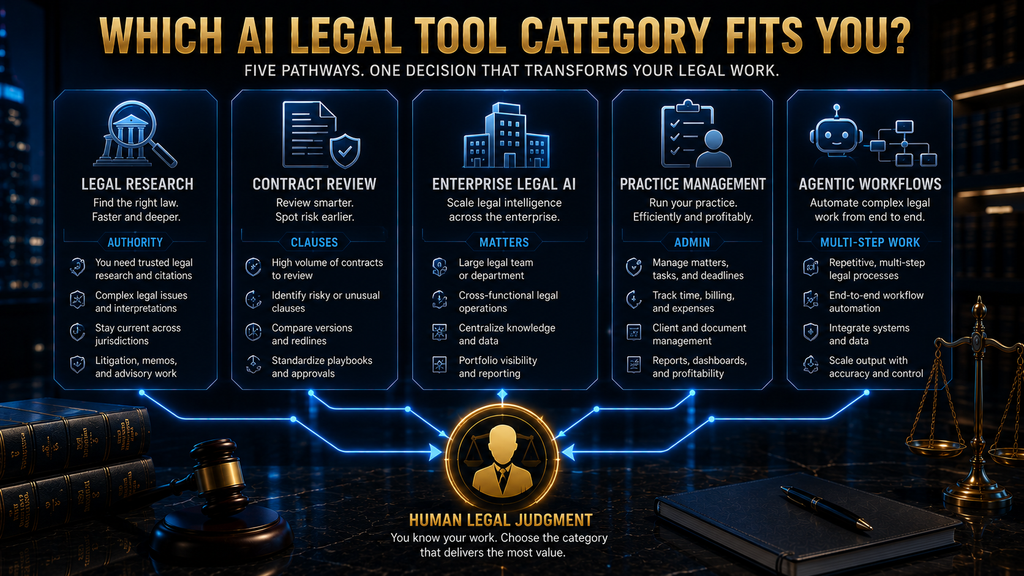
Many comparison articles become misleading at this point by naming one winner. A better approach is to start with the job and then look at the tools built for it. The table below maps common needs to the tools most worth evaluating first, which usually leaves a shortlist of two or three. Most firms need only one tool per job.
| Primary need | Start by evaluating |
|---|---|
| Legal research | CoCounsel Legal, Lexis+ with Protégé, Vincent by vLex |
| Research plus drafting | CoCounsel Legal, Lexis+ with Protégé |
| Contract review | Spellbook |
| Contract portfolio intelligence | Luminance |
| Broad legal AI workflows | Harvey, Legora |
| Large document review | CoCounsel Legal, Harvey, Legora |
| Practice management | Clio |
| Solo litigation practice | Paxton, Clio |
This is a much more useful decision model than a simple ranking. It also helps you avoid buying overlapping tools. If two products on your shortlist solve the same job, pick one and spend the savings on training and a proper pilot, which usually matter more to success than the extra features. It also makes renewal decisions easier, because each tool has a clear purpose.
Why Legal Authority Matters More Than Model Hype
A legal AI platform can produce fluent language without being reliable enough for legal work. The risk is well documented. Courts in several countries have sanctioned lawyers for filings containing citations invented by AI, and research in 2026 found more than 1,000 court filings with fabricated citations. Our guide to why AI hallucinates explains the causes.
The difference between a general assistant and a purpose-built research system starts with the information layer. A general answer might say “courts generally hold that…” A professional research answer identifies the authorities, links to them and shows whether they are still good law. The second is far more useful, because the lawyer can inspect the basis of every conclusion.
That is why authority should be one of the strongest buying criteria. Lexis+ with Protégé grounds research in LexisNexis content and Shepard’s. CoCounsel grounds research in Westlaw and Practical Law with KeyCite. Vincent draws on the vLex library. A tool without an authoritative source layer may still help with drafting, but it is not a substitute for a research platform.
The Verification Chain
A reliable legal AI workflow keeps a clear chain from the AI output back to the source: output, citation, source, current status, applicability and finally human judgment. Every link matters. A citation may exist but not support the proposition. A source may support it but be outdated. A valid case may come from another jurisdiction or be distinguishable on the facts.
AI can speed up each of these checks, and the best platforms build tools for exactly that purpose. But AI should not remove the checks. The American Bar Association’s Formal Opinion 512, its first ethics guidance on generative AI, says lawyers must fully consider their duties of competence, confidentiality, client communication and reasonable fees.
In practice, that means a lawyer remains responsible for every authority cited, whatever tool produced it. Our practical framework for verifying AI information covers a California appellate case where a lawyer was sanctioned after leaving citation checks to a paralegal. Process on paper is not the same as checking the source.
Why Legal AI Accuracy Is Not One Number
A common mistake is asking which tool is “the most accurate.” The question is too vague to be useful. A system can be excellent at extracting dates and parties while weaker at interpreting ambiguous clauses or finding every relevant provision in a long document set. Accuracy depends on the task, the document type, the jurisdiction and the standard of review.
Research on legal citation checking shows the same pattern. A 2026 benchmark of AI citation checkers found that even the best system caught many fabricated citations but struggled with subtle errors, such as a real case cited for a point it does not support. Detection also required many steps per document, which adds cost and time.
So the right question is how accurate a tool is for your specific workflow, using your documents and your standards. The only reliable way to answer it is a pilot with representative files and a human benchmark, which we describe below. Vendor accuracy figures, however impressive, rarely match the documents and tasks in your own practice.
The Fit Score in Practice
To apply the six dimensions, turn each into questions for vendors and your own team. For legal authority, ask which sources the tool uses, whether it separates primary from secondary authority and whether it covers your jurisdictions. A tool with excellent drafting but no reliable authority cannot replace a research platform.
For workflow depth, ask whether the tool performs one task or connects several, whether it keeps matter context and whether it can move from research to drafting. For document intelligence, ask how many documents it handles, whether it extracts structured data and how it copes with scanned, complex or very long files.
For verification, ask whether citations are linked, whether outputs trace back to documents and whether human corrections are recorded. For integration, ask whether it works in Word and connects to your document management system, contract platform and enterprise knowledge, and whether it fits your authentication and security setup.
For practice fit, ask whether the tool solves a high-value problem, whether lawyers will use it day to day, whether it suits your organization’s size and whether the pricing model is sustainable as usage grows. The best tool is rarely the one with the most advanced AI. It is the one with the strongest fit across all six dimensions.
Legal AI vs General-Purpose AI
General-purpose AI remains useful for many low-risk tasks, such as organizing thoughts, improving internal communications, creating plans and reducing everyday friction. The problem begins when a general assistant is treated as a legal research database or a controlled legal workflow system. It can produce fluent text and summarize documents, but that does not make its legal research authoritative.
A general tool may not provide verified authority, may not know current law in your jurisdiction, may not be approved for confidential client data and cannot produce defensible work product without careful review. Purpose-built platforms address some of those gaps with legal databases, citation tools, security controls and workflow design built for law.
The sensible strategy is not to ban general AI but to match the tool to the consequence of the task. Use general assistants for low-risk internal work where client data is not involved. Use purpose-built, approved legal tools for research, drafting and analysis that will reach clients or courts. Our guide to AI governance shows how to set those rules.
A Risk-Based Approach to Legal AI
Not every legal AI task needs the same level of scrutiny. Low-consequence tasks, such as brainstorming or rewriting a non-sensitive internal note, can rely heavily on AI with light review. Moderate-consequence tasks, such as internal document summaries or first-pass issue lists, need more deliberate human checking before anyone relies on them.
High-consequence tasks, such as research supporting an opinion or analysis that shapes advice, need source verification and substantive review by a qualified lawyer. Critical tasks, such as court filings and actions that affect a client’s rights, require AI to support the professional rather than make decisions. The checking effort should rise with the stakes every time.
This mirrors the broader principle of human oversight for automated decisions. Our guide to human-in-the-loop AI explains how to place review steps where they catch real problems instead of becoming a rubber stamp. In legal work, those checkpoints are also a professional obligation, not only good practice. Documenting who reviewed what also helps if a decision is later questioned.
Security and Confidentiality Are Buying Criteria
Legal teams handle some of the most sensitive information in any organization: pricing, liabilities, disputes, personal data, trade secrets and privileged advice. So whether a tool has good AI is only one question. The other is what happens to the data, and it deserves equal weight in any evaluation. A data incident involving privileged material can harm clients and the firm’s reputation alike.
Ask whether customer data is used to train models, where data is stored and processed, how long it is kept, whether the platform supports single sign-on and role-based access, how access is removed when someone leaves, what audit logs exist and which certifications are independently verified. Our guide to AI data retention lists what to check.
ABA Formal Opinion 512 emphasizes protecting client information when using generative AI, and in some cases obtaining informed client consent. A tool with brilliant output but inappropriate data handling is the wrong tool for client work. Security review should happen before any client document enters a pilot, not after a team has already grown used to the product.
The Integration Question
One of the best predictors of adoption is where the AI lives. If lawyers spend most of their day in Microsoft Word, an AI tool inside Word has a structural advantage. If a firm runs work through matter-management systems, the AI should understand matter context. Tools that force lawyers into a separate window often go unused after the first month.
Integration with document management systems matters for both convenience and security. Moving documents manually into an AI tool creates friction and can increase the risk of files ending up in the wrong place. Platforms that connect directly to iManage, NetDocuments, SharePoint or similar systems keep documents where governance already applies.
The broader rule is that the best tool often removes the most friction, not the one with the most impressive demo. CoCounsel’s drafting agent in Word, Lexis+ with Protégé’s document management connections and Clio’s combination of practice management and research all reflect this. Ask every vendor to demonstrate the tool inside your actual daily workflow.
One Platform or Several Specialized Tools?
This is becoming an important strategic choice. A best-of-breed stack might combine one research platform, one contract tool and one practice-management system, each chosen because it does its job very well. The advantage is specialization. The downside is fragmentation, as users move between systems, duplicate context and manage several vendors.
A unified platform aims to bring research, drafting, document analysis, contract work and workflows into one environment. The advantage is shared context, so the AI understands the whole matter. The downside is that a broad platform may not be the absolute best at every individual task, and it can deepen dependence on one vendor.
The right architecture depends on the organization. A large firm may benefit from consolidation around Harvey, Legora or CoCounsel. A specialized practice may prefer a best-of-breed stack. Either way, watch for tool sprawl: five AI products can mean five disconnected workflows and nobody sure which system holds the current analysis.
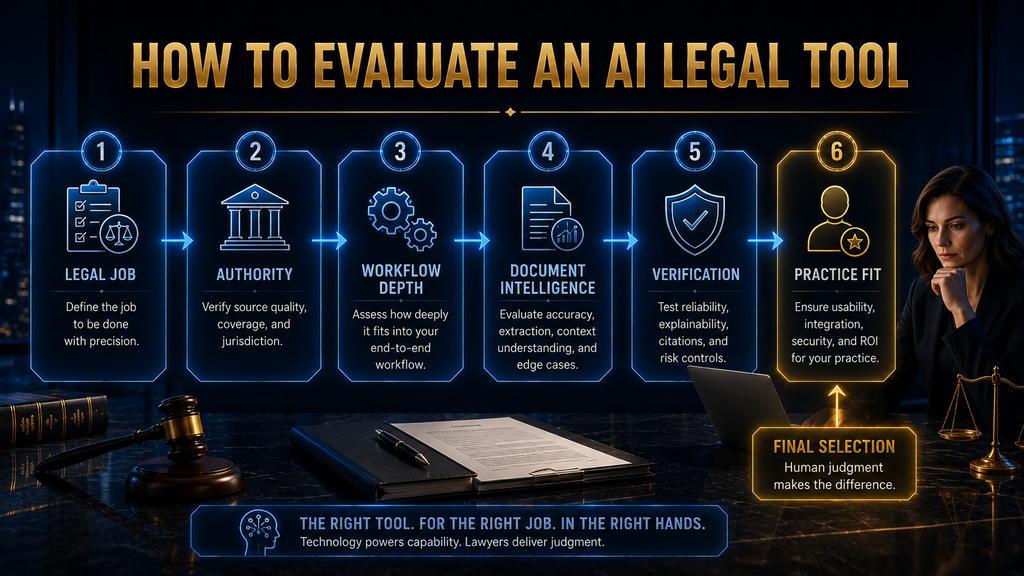
How to Test a Legal AI Tool Before Buying
Do not buy from a vendor demonstration. Run a controlled pilot with real, representative work. Start by defining the job in measurable terms, such as reducing first-pass contract review time by 40% without lowering quality, or producing research memos faster without weakening citation checks. A measurable goal makes a measurable evaluation possible.
- Define the job with a clear, measurable target.
- Select representative documents, including difficult and unusual ones.
- Create a human benchmark by having experienced lawyers do the task manually.
- Run the AI on the same task and record time, outputs and errors.
- Review difficult cases, not just averages, including edge cases and omissions.
- Measure correction time, because heavy rework can erase the time saved.
- Check security and governance against your organization’s requirements.
- Build the business case from time saved, risk reduced and total cost.
The correction step is crucial. A tool that produces a first draft in five minutes but needs 30 minutes of correction may save less than it appears. Measuring human correction effort honestly, across easy and hard documents, is what separates a useful pilot from an expensive demonstration of what the tool can do on its best day.
Questions to Ask Every Vendor
Ask every vendor the same core questions, so answers can be compared. What legal sources ground your answers? How can a lawyer verify a generated proposition? How do you measure performance, and on which tasks? What are the known failure modes? Is customer data used for model training? What is the data retention policy?
Then ask about operations. Which systems can the platform connect to? Can it preserve matter-specific context? How does a lawyer review, correct or override AI output? Can we see what the AI did and what the user changed? What is included in the price, what is metered and what costs extra as usage grows? Get the answers in writing where possible.
The quality of the answers is often more revealing than the demo. Vendors who answer clearly, admit limitations and provide documentation are usually easier partners after purchase. Vague answers about training data, accuracy or security are a warning sign, especially for tools that will handle privileged client information.
Common Mistakes When Choosing Legal AI
Choosing the tool with the biggest model is a common error. Model quality matters, but it is not the whole product. A slightly less powerful model connected to authoritative sources and strong workflow controls is often more useful than a frontier model with no legal context or verification tools around it. Other frequent mistakes are listed below.
- Choosing by feature count: more features can mean more complexity.
- Assuming all legal AI is research AI: the categories solve different problems.
- Ignoring source authority: fluent answers without authority are not enough.
- Ignoring verification: a tool you cannot check creates review work.
- Buying before testing: a demo is not a benchmark.
- Automating judgment too fast: consequential output needs strong review.
- Ignoring implementation: configuration, training and integration cost money.
- Buying overlapping tools: consolidation can beat another subscription.
Most of these mistakes come from starting with the technology instead of the work. Define the job, test on your own documents, measure correction effort and check security before committing. That sequence filters out most poor decisions and keeps the conversation focused on outcomes rather than features. It also gives lawyers confidence that the tool was chosen for good reasons.
From AI Assistant to AI Agent
The biggest shift in legal AI in 2026 is the move from assistants to agents. An assistant waits for each prompt. In a contract review, the lawyer asks it to review an indemnity clause, then to compare it with the playbook, then to draft an alternative, coordinating each step personally. That works, but the lawyer does all the coordination.
An agent can take a broader instruction, such as reviewing a contract against the firm’s playbook and preparing a first-pass issues list. It can read the agreement, extract the relevant clauses, compare them with the playbook and flag items that need human attention, all in one run. CoCounsel, Harvey and Legora are all moving explicitly in this direction.
The lawyer still reviews the result, but the system performs more of the orchestration. Persistent matter context makes this work better, because the agent can build on earlier documents and decisions instead of starting fresh each time. Our beginner’s guide to AI agents explains the technology behind this shift.
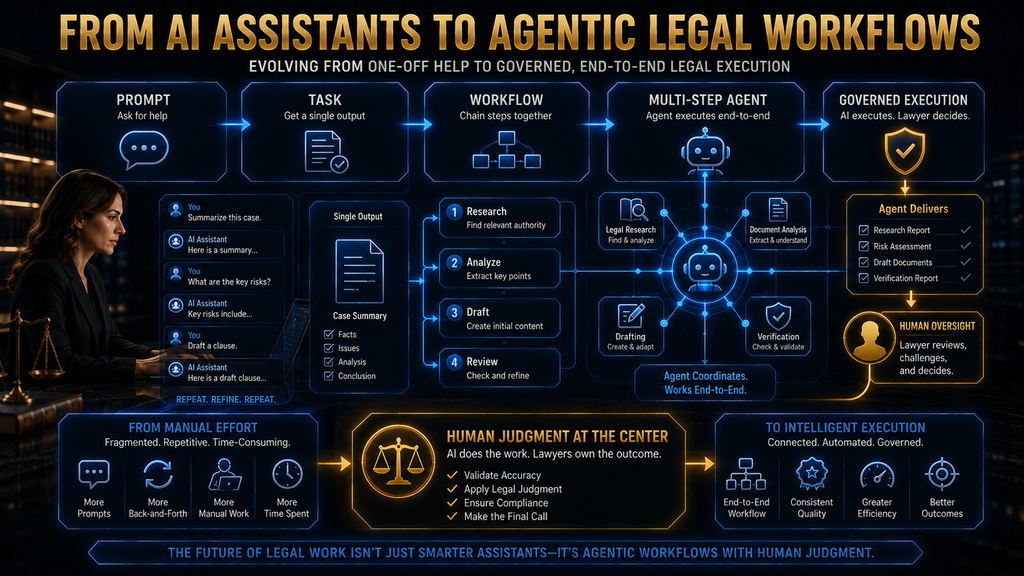
Agentic Does Not Mean Autonomous Judgment
This distinction is essential. An AI agent may carry out a sequence of tasks, but that does not mean it should decide legal strategy. The lawyer still decides which argument to pursue, whether a risk is acceptable, whether a contract should be signed, whether a client should settle, whether a position is defensible and whether a filing should be submitted.
The AI prepares, and the professional decides. ABA guidance is clear that lawyers remain responsible for AI-assisted work, and that verification, confidentiality and professional judgment remain essential. Thomson Reuters makes the same point in describing Brief Builder as keeping lawyers in control of strategy, legal theory and final decisions.
As agents take on more steps, the questions grow: what did the system do, what sources did it rely on, where might it be uncertain and where must a person step in? Platforms that answer those questions clearly, with logs, citations and approval points, will earn more trust than those that only promise speed. Ask vendors to show these controls in a live demonstration, not only in slides.
How Much Should You Pay for Legal AI?
There is no universal answer, because pricing models vary widely. Some products publish plans, such as Paxton’s Individual plan at $2,999 per user per year. Most enterprise platforms use sales-led pricing based on seats, content bundles and usage. Some vendors are experimenting with consumption-based pricing for heavy agentic work.
Usage patterns matter. A lawyer who uses AI occasionally has very different economics from a team running thousands of document analyses each month. Rather than comparing monthly subscriptions alone, estimate your expected annual usage and the effective cost per workflow, then compare that with the time and risk the tool removes.
A tool that costs more but removes a large amount of expensive manual work can be better value than a cheap tool that changes little. Include implementation costs, such as configuration, training, integration and the time lawyers spend in the pilot. Those costs are often larger than the first year’s subscription for enterprise platforms.
Who Should Choose What
A solo lawyer should start with simplicity: drafting help, research support and practice management in tools that are easy to adopt. Paxton and Clio are natural starting points, and a full enterprise agentic platform is rarely necessary. Focus on tools that save time on your most frequent tasks and that you can afford to keep using.
A small or mid-sized firm should prioritize legal research, document work, practice management and security, often through a focused combination rather than one large platform. Clio with Vincent, or a research platform plus a contract tool, can cover most needs. Pilot carefully, because small firms feel the cost of a poor choice more directly.
A large firm should prioritize authoritative research, document analysis at scale, matter context, agents, integration and governance. This is where CoCounsel, Harvey and Legora are most compelling. In-house teams should also think about the business, prioritizing contracts, compliance and intake, where Luminance, Spellbook, Harvey or Legora may fit. Our guide to AI due diligence covers large document reviews.
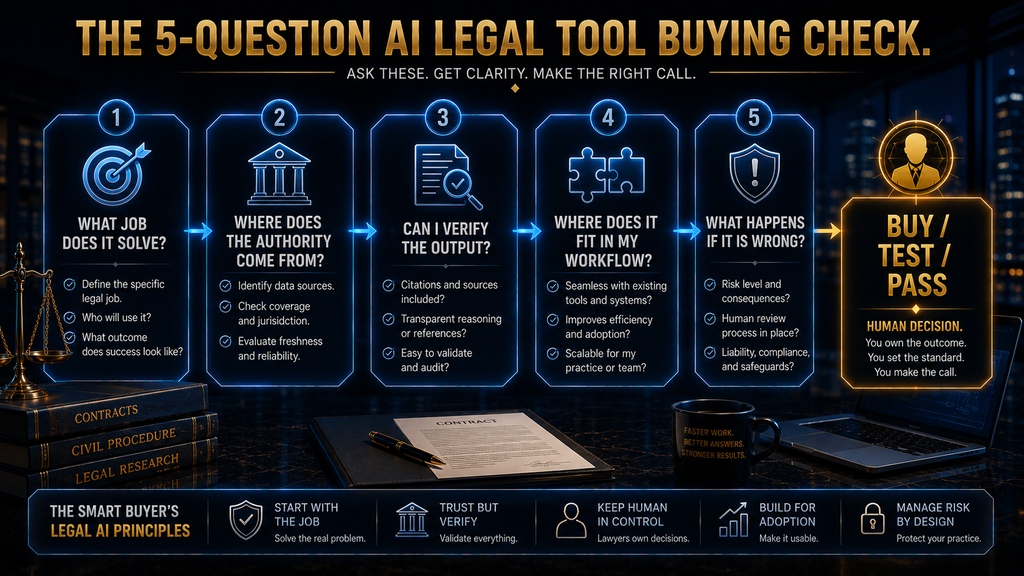
The Five-Question Buying Check
Before buying any legal AI platform, answer five questions. First, what exact legal job are we buying it to perform? If you cannot answer clearly, you are not ready to buy. Second, where does its legal authority come from? Know the source layer before trusting any answer the tool produces. Write the answer down and share it with everyone involved in the decision.
Third, can we verify the output? If not, review effort may stay high and risk may rise. Fourth, where does the tool fit into our existing workflow? A disconnected tool can create as many problems as it solves. Fifth, and most important, what happens if the AI is wrong? The answer determines how much human review the workflow needs.
If being wrong would mean nothing important, automation can be more aggressive. If it could mean a client losing money, a court filing containing false authority or the company accepting a serious contractual risk, the human review requirement should be much stronger. A tool with strong answers to all five questions deserves serious consideration.
How We Researched This Guide
This guide is based on vendor documentation and published announcements, not hands-on testing. In October 2026 we reviewed the Thomson Reuters CoCounsel Legal launch announcement, the Lexis+ with Protégé product page, and the websites of Harvey, Legora, Spellbook, Luminance, Vincent by vLex, Clio and Paxton, including Paxton’s pricing page.
We also reviewed ABA Formal Opinion 512, Legora’s April 2026 revenue announcement and trade coverage of Harvey’s agent launch. Company-reported figures are labeled as such. Most vendors use sales-led pricing, so few prices are quoted. The six-dimension Fit Score, the verification chain and the W.O.R.T.H. scores are AI Hustle World editorial frameworks and assessments.
Final Thoughts
Legal AI in 2026 is no longer a contest between chatbots. The competition is happening at the workflow level. Research platforms are more closely tied to authoritative content, contract tools are moving toward portfolio intelligence, enterprise platforms combine documents, matter context and agents, and practice-management systems automate the business of law.
That makes “best AI legal tool” less useful than it sounds. The best tool fits the job, the authority you need, your workflow, your evidence standards, your risk level and your organization. For research, authority and citation checking matter most. For contracts, document intelligence and playbooks matter most. For enterprise work, context, security and integration matter most.
Choose legal AI by asking which tool can make the most important part of your workflow better without weakening the controls that make legal work trustworthy. If a tool has strong answers to the five buying questions, it deserves a pilot. If it only has an impressive demo, keep looking. Our guide to AI compliance tools covers related governance needs.
Build a Smarter AI-Powered Workflow
The right AI tool is not always the one with the most features. It is the one that fits your workflow, saves meaningful time, and helps you work with greater clarity and control. Explore more practical AI tools, workflows, and strategies from AI Hustle World.
See How Lawyers Use AI for Research →Frequently Asked Questions
What is the best AI legal tool in 2026?
There is no single winner. CoCounsel Legal and Lexis+ with Protégé lead research, Harvey and Legora lead agentic platforms, Spellbook and Luminance lead contracts, and Clio leads practice management.
Is legal AI better than ChatGPT for legal work?
For research and client work, usually yes. Purpose-built tools add authoritative sources, citation checking and security controls that general assistants do not provide.
Can AI replace lawyers?
No. AI can speed up research, drafting and document review, but professional judgment, verification and responsibility for the work remain with lawyers.
What is the best AI for legal research?
CoCounsel Legal, grounded in Westlaw and Practical Law, and Lexis+ with Protégé, grounded in LexisNexis content with Shepard’s, are the strongest. Vincent by vLex suits international research.
What is the best AI for contract review?
Spellbook suits contract review, redlining and playbooks. Luminance suits large contract portfolios. Harvey and Legora also offer contract tools within broader platforms.
Are AI legal tools accurate?
They can be very useful, but accuracy varies by task, document type and jurisdiction. Test on your own documents and verify every citation before relying on it.
Should law firms use AI agents?
They can, with care. The more steps an agent performs, the more important permissions, verification, audit trails and human review become.
How do I choose an AI legal tool?
Start with the exact job, then evaluate legal authority, workflow depth, document intelligence, verification, integration and practice fit. Pilot before buying.
How much do AI legal tools cost?
Most use sales-led pricing based on seats and usage. Paxton publishes an Individual plan at $2,999 per user per year, and Clio publishes practice-management plans.
What should I test before buying legal AI?
Test with representative documents and measure accuracy, omissions, citation quality, correction time, security fit and total workflow time against a human benchmark.
Related Guides
- Best AI Product Management Tools in 2026: Research, Roadmaps & Product Ops
- How to Build an AI Risk Management Framework for Small and Mid-Sized Businesses
- AI Compliance Tools Compared: Features, Privacy Controls & Use Cases
Written by
Muntasir Ahmad Chowdhury
Founder, AI Hustle World
Muntasir Ahmad Chowdhury is the Founder of AI Hustle World, an independent publication dedicated to making Artificial Intelligence practical, trustworthy, and easy to understand. He researches AI tools, automation, customer service, productivity, and real-world business applications, helping readers make smarter technology decisions through research-driven, experience-backed content.
Expertise:
AI Tools • AI Automation • AI Customer Service • AI Productivity • Generative AI • AI Workflows
Get Smarter With AI
Enjoyed this guide? Get practical AI tools, tutorials, and honest reviews delivered to your inbox.