How to Clean Background Noise with AI Audio Tools
Picture a podcaster named Mara, recording a solo episode from a spare bedroom that doubles as a home office. The recording has a faint hum from the laptop fan and a little echo off the bare walls — nothing dramatic, but enough that she sounds like she’s talking from inside a box.
A few years ago, Mara’s options were limited: re-record in a better room, or run the file through a noise gate and accept the thin, slightly underwater voice that tool left behind. AI cleanup tools changed which of those choices she has to make — but not by making the old noise gate smarter.
This guide covers what actually changed, how to work with it well, and why getting this right — or skipping it — matters more than most creators assume. We’ll come back to Mara’s episode at a few points along the way.
What This Article Covers
To be specific about scope: this piece covers the mechanism behind AI noise cleanup, a framework for diagnosing what kind of noise you’re actually dealing with, and a practical workflow for using these tools well.
It does not rank or recommend specific tools against each other — that comparison is in our guide to the best AI audio editors. It also doesn’t cover narration tone and pacing, or the full podcast production pipeline; both have their own dedicated guides elsewhere on this site.
Why Old Noise Removal Doesn’t Work Like You Think
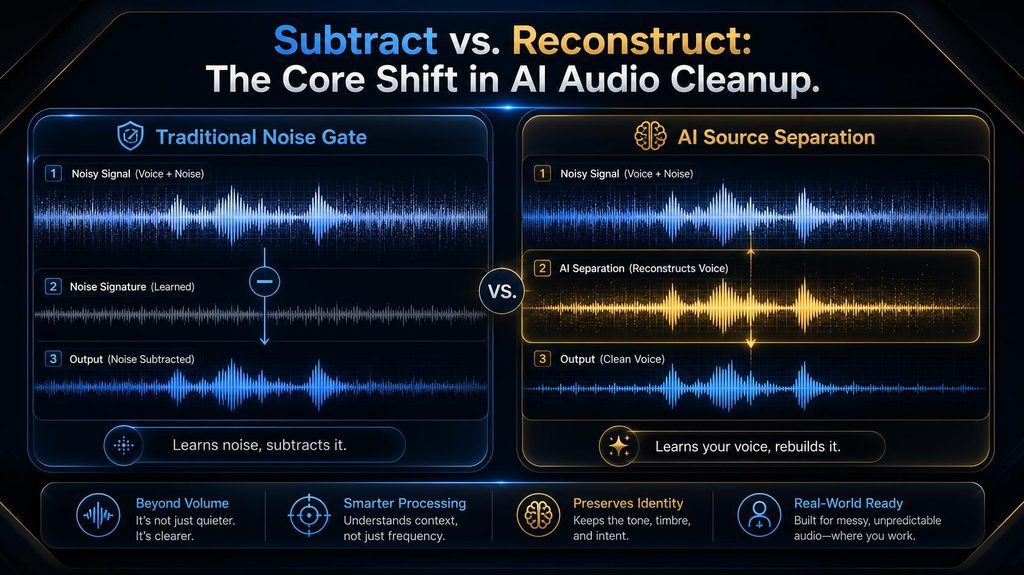
A traditional noise gate, or the classic Audacity-style noise reduction effect, works by subtraction: you show it a few seconds of pure noise, it learns that noise’s signature, and it subtracts that same signature from the entire file.
That works well for steady, unchanging noise like a fan or an air conditioner, because the signature it learned stays accurate for the whole recording. It falls apart the moment the noise isn’t steady — a passing car or a dog bark doesn’t match the signature, so the tool either misses it or over-corrects and takes a bite out of your voice.
Modern AI cleanup tools work on a different principle entirely, one our generative audio guide calls source separation: instead of learning what the noise sounds like, the model learns what a human voice sounds like and pulls that voice out of everything else in the recording.
In the Stack framework from our generative audio guide, that’s a Representation-Layer-and-Generation-Layer job — the model isolates the speech, then effectively reconstructs it, rather than filtering the whole waveform. That’s why AI tools handle unpredictable noise so much better than a noise gate ever could, and why they occasionally go wrong in a different way, covered later in this guide.
The research standardizing this shift has a name: Microsoft’s Deep Noise Suppression (DNS) Challenge, running since 2020 and feeding directly into the noise removal built into Teams and Zoom. It also set a real-time rule that explains a lot about the tools in this guide — a live processor gets a hard budget of roughly 40 milliseconds to clean each frame of audio, and can’t look ahead at audio that hasn’t happened yet.
That single constraint is why Krisp, built for live calls, and iZotope RX, built for offline repair, aren’t really competing products: one has to decide in under 40 milliseconds with no lookahead, the other can spend as long as it needs studying the whole file. The DNS Challenge’s own organizers have been candid that even strong models trained on huge datasets “still have a long way to go” once they meet messy real-world recordings rather than lab conditions — a research-backed version of the artifact problem covered later in this guide.
How We Got Here
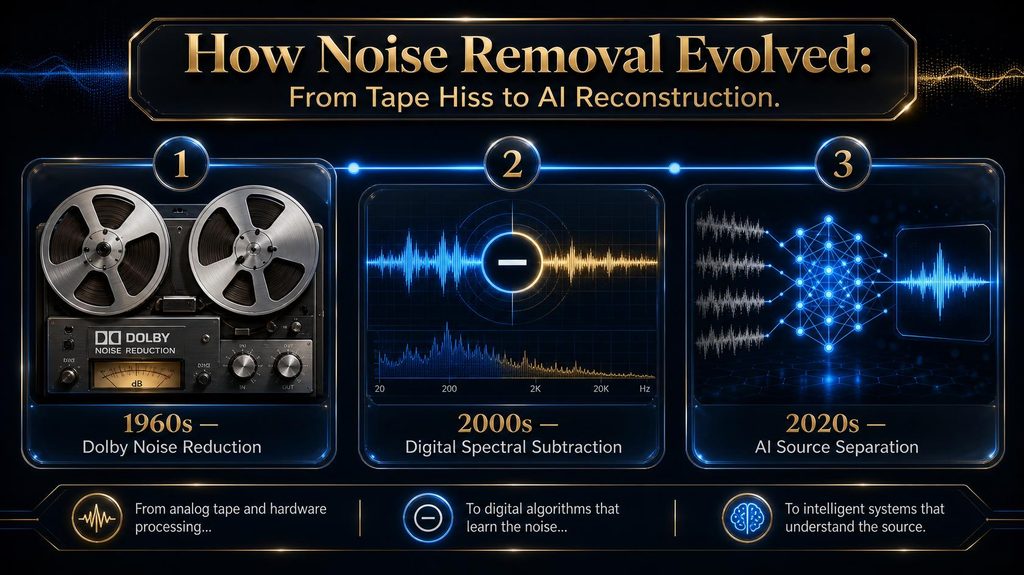
Removing unwanted noise from a recording isn’t a new problem — it’s just changed method three times. The earliest version was analog: Dolby noise reduction, developed for tape recording in the 1960s, used careful encoding and decoding to push tape hiss below what the ear notices, without ever touching the noise signal itself.
Digital audio brought spectral subtraction — the Audacity-style approach this guide’s mechanism section describes — which finally let software directly analyze and remove noise from a recording, but only if that noise held still. It’s the same subtraction logic Dolby NR side-stepped decades earlier, just automated rather than encoded.
The current era started when researchers stopped hand-coding what “noise” looks like and instead trained neural networks on paired examples of clean and noisy speech — tens of thousands of clips run through datasets like Microsoft’s DNS Challenge corpus — until the model learned to recognize a human voice on its own, in any noise, rather than following a rule written for one noise type at a time.
That’s the real difference this guide keeps returning to: every earlier method treated noise as something to detect and subtract; the current one treats voice as something to recognize and rebuild. It took roughly sixty years to get from one idea to the other.
The Noise Triage Framework
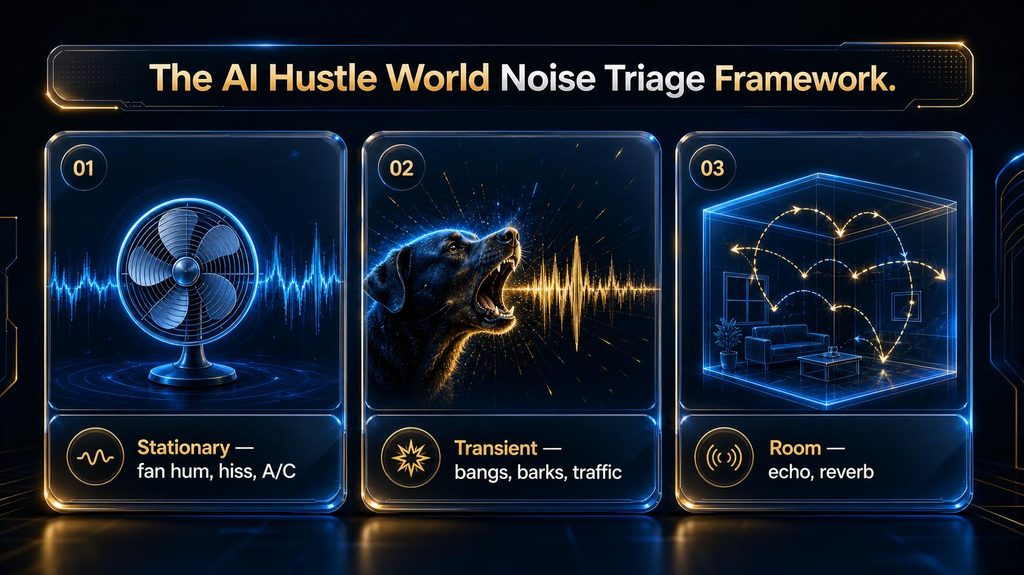
Before opening any tool, it helps to know what kind of noise you’re actually dealing with. We call this the AI Hustle World Noise Triage, and it sorts almost every noisy recording into one of three categories.
Stationary noise is anything constant and unchanging — fan hum, air conditioning, electrical buzz, room tone. This is the easiest category for both old and new tools, and the one place a free, basic tool will usually get you a clean result — it’s also exactly what’s in Mara’s recording.
Transient noise is anything sudden and unpredictable — a car horn, a slammed door, a dog barking. This is where AI source-separation tools pull decisively ahead of a traditional noise gate, which simply can’t react to a sound it never learned a signature for.
Room noise — echo and reverb from a hard-walled or untreated space — is its own category, and the one most cleanup tools handle worst. Reverb isn’t a separate sound layered on top of your voice; it’s your own voice bouncing back, which is the “boxy” quality making Mara sound like she’s talking from inside a closet.
Reverb has its own dedicated line of research for exactly this reason: dereverberation algorithms, most notably WPE (weighted prediction error), try to model and undo the way a room’s geometry smears a voice over time — a fundamentally different math problem than separating two sounds mixed at the same instant. iZotope RX’s Dialogue Isolate and De-reverb modules are built specifically around that distinction, which is part of why iZotope stays the professional’s choice for a genuinely bad room rather than a general noise tool that was never built to solve it. Knowing which category, or combination, you’re dealing with tells you which tool is actually worth reaching for, and sets your expectations for how clean the result can realistically get.
The Tools, Mapped to Each Noise Type
Adobe Podcast’s Enhance Speech is the free, browser-based starting point most people should try first, and it’s well-suited to stationary and moderate transient noise on a single-speaker recording — it’s also the tool most likely to fix most of what’s in Mara’s file. Krisp is built specifically for live calls rather than recorded files — it processes both sides of a Zoom or Teams conversation in real time, which makes it the pick for meetings and interviews rather than post-production cleanup.
Descript’s Studio Sound bundles cleanup into a full editing suite, which is convenient if you’re already editing there, though reviewers consistently note it’s “good, not surgical” and can introduce artifacts on heavily degraded audio. iZotope RX is the professional-grade option, built for engineers who need to surgically repair a specific, stubborn problem — a persistent hum, a click, a genuinely difficult reverb — rather than run one general-purpose cleanup pass. Auphonic and Cleanvoice both go beyond noise alone: Auphonic focuses on automated loudness leveling alongside cleanup, while Cleanvoice pairs noise removal with filler-word and dead-air trimming in the same pass.
ElevenLabs’ Voice Isolator is worth knowing about for the hardest transient case — pulling a voice out of music or genuinely chaotic background audio. Open-source options like RNNoise and DeepFilterNet sit at the developer end of the spectrum, useful mainly for understanding that the models powering consumer tools didn’t appear from nowhere.
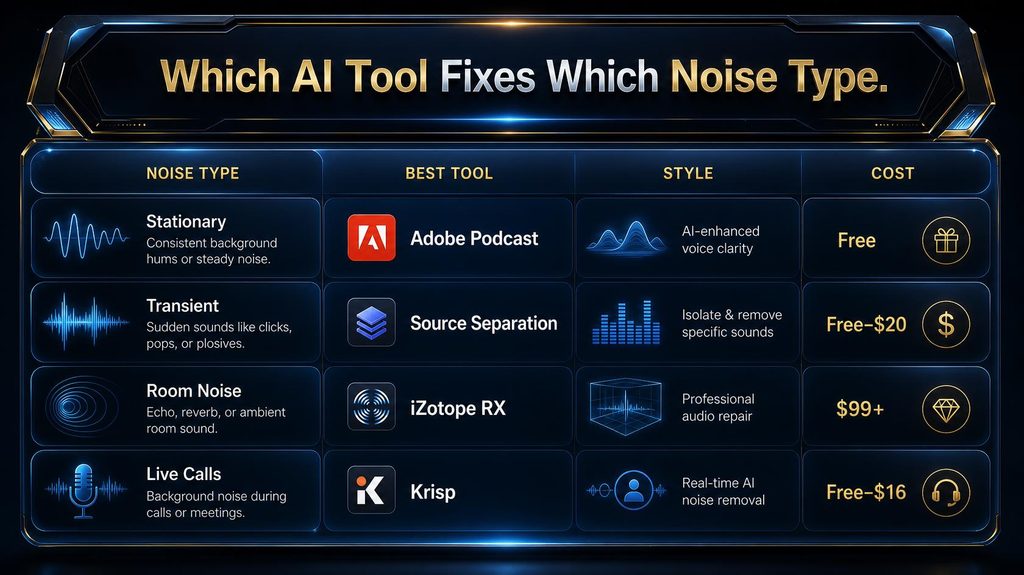
| Noise Triage Category | Reach for | Style | Typical Cost |
| Stationary (hum, fan, hiss) | Adobe Podcast Enhance Speech | File-based, offline | Free – $9.99/mo |
| Transient (bangs, barks, traffic) | AI source-separation tools; ElevenLabs Voice Isolator for extremes | File-based, offline | Free – ~$20/mo |
| Room noise (echo, reverb) | iZotope RX (Dialogue Isolate, De-reverb) | File-based, surgical | $99 – $399+ |
| Live calls and meetings | Krisp | Real-time, both sides | Free – ~$16/mo |
A quick note on how this section was put together: the tool descriptions above come from vendor documentation and independent tool-comparison reviews, not first-hand product testing. Hands-on testing of specific products belongs in our Best AI Audio Editors comparison, where a head-to-head comparison can be done properly rather than compressed into a mechanism guide.
Three Noisy Recordings, Triaged
Mara’s interview is mostly a Stationary case with a mild dose of Room noise — a free tool like Adobe Podcast will likely handle the fan hum well and leave a little echo intact, which is a realistic, good-enough outcome rather than a failure. A field recording with wind gusts and passing traffic is a Transient case almost by definition — exactly the scenario where AI source separation earns its reputation over a traditional noise gate, which would either miss the gusts or chew through the voice trying to catch them.
A multi-guest video call with cross-talk and each guest’s own room noise stacks two hard problems at once — overlapping speech and inconsistent per-speaker noise — and is the realistic case where even a good AI tool needs a second pass or a human review before publishing.
What an Actual Test Looks Like
Illustrative scenarios are useful, but a real published test is more convincing. Tech writer Kirk McElhearn ran an actual episode of his own podcast — a co-host recording in an untreated room, his own setup a proper Rode Procaster microphone through a Focusrite audio interface — through Adobe Podcast’s Enhance Speech and posted the before-and-after files publicly.
His verdict: a dramatic improvement on both a MacBook’s built-in microphone and his own studio-grade setup, with one specific, honest caveat — the output ran noticeably bass-heavy, which he attributed to the tool exaggerating the proximity effect of speaking close to a mic. That’s a real, named example of exactly the kind of trade-off this guide’s “What Still Goes Wrong” section describes: a genuine improvement, with a genuine and specific side effect, rather than the frictionless “upload, AI cleans, download” story most vendor pages tell.
A separate independent test, published on the creator site Feisworld across remote interviews, creator videos, and noisy footage recorded at an art exhibition, reached a similar conclusion on a different tool version: real, meaningful improvement on genuinely rough source audio, alongside a specific note that pushing the strength setting too far started to sound artificial rather than clean. Two unrelated testers, on different recordings, landing on the same trade-off is a stronger signal than either account alone.
Before You Even Hit Record
The single highest-leverage thing you can do costs nothing and happens before any tool gets involved: reduce the noise you’re capturing in the first place, because AI cleanup works better on a recording that needed less of it.
Soft furnishings — a rug, curtains, even a closet full of clothes — cut down room reflections more than people expect, which directly reduces the Room noise category cleanup tools handle worst. Moving the microphone closer to your mouth raises your voice relative to the room noise around it, giving any AI tool a cleaner signal to isolate.
Closing a window, turning off a fan, or simply checking a room before recording eliminates stationary noise at the source. If Mara had done this before her interview, there would have been almost nothing left for any tool to fix.
Monitoring through headphones while you record — rather than checking audio only after the fact — catches a problem while you can still fix it live, which is always cheaper than any cleanup tool. It’s a habit borrowed from professional audio engineers, and it costs nothing but attention.
A Step-by-Step Cleanup Workflow
Start by identifying which Noise Triage category you’re actually dealing with, since that decision drives everything else — don’t reach for a surgical tool like iZotope RX for a simple fan hum a free tool will fix in seconds. Run the recording through the tool that matches your category, and resist the urge to max out every slider — aggressive settings are exactly what causes the artifacts covered in the next section.
Listen back at real volume, on real speakers or headphones, before you call it done. Reviewers across nearly every tool comparison note that artifacts are easy to miss on a quick playback but obvious once an episode is published.
If the result still isn’t clean after one pass, that’s usually a sign you’re dealing with a harder category — reverb or heavy overlapping speech — rather than a sign to keep reprocessing the same file with the same tool. There’s a point where the honest answer is to stop reprocessing and re-record instead: if a file needs a second AI pass, a manual EQ pass, and still sounds compromised, that’s usually cheaper to fix by recording five more minutes in a better spot than by chasing a clean result through software that was never going to produce one.
What Still Goes Wrong
Over-processing is the most common failure, and it’s self-inflicted: pushing a noise-reduction slider past what a recording actually needs produces the same thin, robotic, “underwater” voice quality that gave old noise gates a bad reputation. Reverb and echo are handled worse than plain noise by almost every tool on this list, because a model built to separate voice from noise isn’t built to separate voice from the room it was recorded in — that’s a structurally different problem.
Overlapping speakers confuse source-separation models in a specific way: when two voices talk at once, the model has to guess which one is the “target” voice, and it doesn’t always guess right. Very short or very degraded clips give a model too little clean signal to learn from, which is why a 10-second voice memo recorded in a windstorm is a worse candidate for AI cleanup than a 30-minute interview with the same wind in the background.
This isn’t just a user complaint — it’s a documented research finding. The DNS Challenge’s own organizers have repeatedly noted that models scoring well on synthetic test data see their performance degrade on real recordings, which is the research-world version of the same gap between a tool’s polished demo and your actual noisy file.
What This Actually Costs
Hiring the noise-cleanup portion of podcast editing out to a freelancer typically runs $50 to $200 per episode for basic cleanup and levels, rising to $200–$400 for full-service editing that includes mastering and sound design. One 2026 podcast-production pricing guide puts the average cost of a professionally edited hour-long episode at roughly $199.
Against that, the AI tools covered above run from free up to roughly $9–$25 a month for ongoing use across most of them. The honest way to read that gap isn’t “AI replaced the editor” — it’s that AI absorbed one specific, previously time-consuming line item, while a human editor still adds value on pacing, structure and mixing a one-click tool doesn’t touch.
Put in real terms: a creator publishing four episodes a month who currently pays a freelancer $150 per episode for cleanup alone is spending roughly $600 a month on that one step. Swapping to an AI tool in the $9–$25 range doesn’t just cut that cost by more than ninety percent — it also turns a job with a multi-day turnaround into one measured in minutes, which matters as much as the money for anyone publishing on a fixed schedule.
The Honest Reality Check: You Might Not Need This
It’s worth saying plainly what most cleanup-tool marketing won’t: not every recording needs studio-level polish, and chasing that standard for content where it doesn’t matter is wasted effort. A listener survey run by Acast found that 63 percent of listeners accept “good enough” audio quality as long as the content itself meets their standards, while only 37 percent specifically prefer professional broadcast-level audio — a real data point against over-investing in cleanup for a casual internal recording or a solo update.
Where quality does matter more than people assume is anywhere credibility is on the line. Research reported through USC found that degrading audio quality alone, with the exact same speaker and content, made listeners rate that speaker as less intelligent and the material as less important.
So the real decision isn’t “clean or don’t clean.” It’s matching the effort to the stakes: light-touch for casual content, genuine cleanup for anything where a listener’s trust in you is being tested — which is closer to Mara’s situation than a quick voice memo to a friend.
Why a Human Editor Still Sometimes Wins
None of this makes a human audio editor obsolete, and it’s worth being specific about why. A one-click AI tool optimizes for “cleaner,” full stop — it has no sense of a show’s pacing, no opinion on whether a pause should stay for comic timing, and no ability to notice a joke needs the room tone left in to land.
A human editor also catches problems a cleanup tool isn’t looking for at all — an accidentally-included private remark, an inconsistency between episodes, a legal or brand concern in what was actually said. The realistic split is that AI now handles mechanical noise cleanup well enough that paying a human for that step alone rarely makes sense, but full-service editing still does.
Who Should Use This Now — and Who Should Still Hire an Editor
AI cleanup tools are the right call for solo podcasters and creators recording their own interviews, remote-work professionals cleaning up recorded meetings, and anyone whose noise problem is stationary or moderately transient rather than heavy reverb or constant overlapping speech — Mara is a textbook case. A human editor is still the better call for shows with a strict brand voice or legal review process, recordings with heavy, unavoidable reverb from the space itself, and any project where pacing and structure matter as much as clean audio.
There’s a middle case worth naming too: creators publishing at high volume — multiple episodes a week, dozens of clips a month — where even a good AI tool’s occasional artifact, multiplied across that volume, justifies a periodic human spot-check rather than full manual editing of everything.
Common Mistakes to Avoid
Maxing out the noise-reduction slider “to be safe” is the single most common mistake, and it’s the direct cause of the thin, robotic artifacts that make AI cleanup sound worse than the noise it removed. Assuming one tool handles every noise type equally well is a close second — a tool excellent on fan hum can still struggle badly on reverb, and picking based on the Noise Triage category matters more than picking based on brand reputation.
Skipping the real-volume playback check before publishing lets artifacts slip through that would have been obvious on proper speakers. Trying to fix heavy reverb with a noise tool instead of addressing the recording space itself wastes time on a problem post-production genuinely can’t fully solve.
Judging a tool entirely by its own demo audio is a mistake independent testers keep flagging — even a well-reviewed tool like Adobe Podcast produces real, specific side effects, as McElhearn’s bass-heavy result shows. The only way to know how a tool behaves on your voice and your room is to run your own file through it and listen critically, not to trust the vendor’s best-case example.
What Happens If You Skip This
Publishing noisy audio without any cleanup carries a cost that’s easy to underestimate, and it isn’t really about annoying a few sensitive listeners. The USC-reported credibility research covered earlier is the sharper way to state it: the same words, spoken by the same person, are judged as less credible purely because of how they sound.
For business use — client calls, training material, marketing video — that credibility tax lands directly on trust in the brand or the speaker, harder to win back than it would have been to avoid. If Mara publishes her episode as-is, strong content can still get quietly discounted for reasons that have nothing to do with what she actually said.
How to Know If Your Cleanup Actually Worked
“It sounds clean to me” isn’t a reliable test, because the person who processed the file is the person least likely to notice the artifacts they just introduced. A simple A/B listen — the original and the cleaned version back to back, ideally for someone who hasn’t heard either — catches over-processing far more reliably.
For anyone publishing regularly, tracking listener drop-off in the first few minutes is a useful downstream signal — a sudden spike across otherwise similar episodes is worth checking against a change in audio quality. None of this requires special tooling; a shared note of which tool, which setting, and whether it passed the A/B test is enough to catch a bad habit early.
What’s Next for AI Audio Cleanup
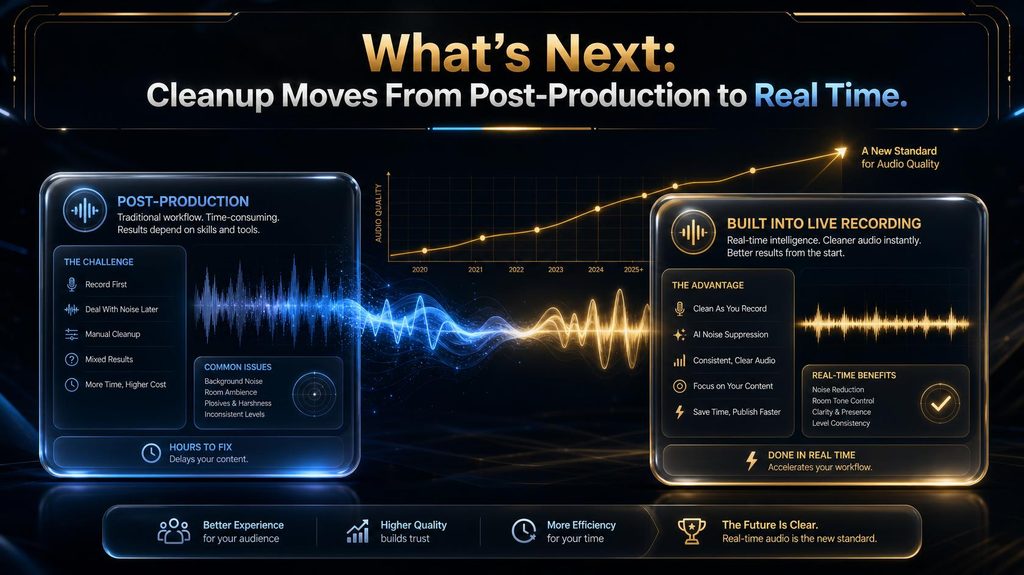
The clearest trend to watch is cleanup moving earlier in the pipeline — from a separate post-production step into something recording software does live, the way Krisp already does for calls. As that shift continues, the Noise Triage framework here gets more useful, not less: knowing which category of noise you’re dealing with still determines which built-in setting actually helps.
One second-order effect worth watching is on the freelance editing market: as the mechanical cleanup step keeps getting absorbed by AI, editors who differentiate on judgment, structure and pacing are likely to hold their value better than editors who compete purely on “I can make this sound clean.” A second is on hardware — as software cleanup improves, the pressure to buy an expensive microphone to sound professional eases, which is good for access but could hollow out the entry-level mic market that used to be the first fix people reached for.
A third is on platforms themselves: as Zoom, Meet and recording apps build cleanup in natively, the standalone tools in this guide face the same squeeze any separate utility faces once its one feature becomes a checkbox inside a bigger product rather than a reason to pay for a new one.
Final Thoughts
The old rule was simple and mostly wrong: noisy recording in, compromised recording out, unless you could afford to re-record it or hire someone who could fix it. The real shift with AI cleanup isn’t that tools got better at the old noise-gate trick — it’s that they stopped doing that trick at all, in favor of isolating and reconstructing a voice directly.
Mara’s episode, cleaned with the tool that actually matches her noise type and checked at real volume before publishing, ends up sounding like it was recorded somewhere else entirely — not because the room changed, but because the fix finally matched the problem. Match the tool to the Noise Triage category, don’t over-process, and remember the goal was never “perfectly clean” for its own sake — it was making sure the audio stops getting in the way of what you’re actually saying.
Noise Wasn’t the Only Problem AI Solved in Audio
Cleanup is one piece of a much bigger shift — see how the same AI reconstructing your voice is also composing music, designing sound effects, and generating speech from scratch.
See How Generative Audio Works →Frequently Asked Questions
How does AI remove background noise from audio? AI cleanup tools identify the human voice in a recording and isolate it from everything else, then reconstruct that voice cleanly, rather than learning what the noise sounds like and subtracting it the way older noise gates do. What’s the difference between a noise gate and AI noise removal?
A noise gate subtracts a learned noise signature from the whole recording, which works only for steady, unchanging noise. AI tools isolate the voice directly, which is why they handle unpredictable noise — barks, bangs, traffic — far better.
Can AI remove echo and reverb from audio?
Not as reliably as it removes noise. Reverb is your own voice reflecting off the room rather than a separate sound layered on top, which makes it structurally harder for a source-separation model to isolate cleanly.
What’s the best free AI tool for cleaning up podcast audio? Adobe Podcast’s Enhance Speech is the most commonly recommended free, browser-based starting point, and it handles stationary noise and moderate background noise on a single-speaker recording well. Why does my AI-cleaned audio sound robotic or underwater?
That’s a sign of over-processing — pushing the noise-reduction setting harder than the recording actually needed. Lowering the intensity setting and reprocessing usually resolves it.
Is it better to fix noisy audio in editing or prevent it while recording?
Prevention is more reliable, especially for room noise and reverb, which cleanup tools handle worst. Treating a room, moving the mic closer, and closing windows before recording will always beat cleaning up the same problem afterward.
How much does AI audio cleanup cost compared to hiring an editor? Most AI cleanup tools run free to roughly $9–$25 a month, against $50–$400 per episode for a freelance editor handling cleanup as part of a broader editing job — with one 2026 pricing guide citing about $199 as the average for a fully edited hour-long episode. Do AI noise removal tools work on overlapping voices?
Not reliably. When two people speak at once, a source-separation model has to guess which voice is the target, and it doesn’t always guess correctly, which makes overlapping speech one of the harder cases for these tools.
Is real-time noise cancellation the same as post-production cleanup?
No. Tools like Krisp process live calls in real time and are built for meetings, while tools like Adobe Podcast or iZotope RX process a recorded file after the fact and can apply more thorough, less time-constrained processing.
Does removing background noise actually make content more credible? Research reported through USC suggests yes: the same speaker and content were rated as less intelligent and less credible when the audio quality was degraded, independent of what was actually being said.
Related Guides
- How to Create an AI-Assisted Podcast Workflow from Script to Publish
- AI Music Generation Explained: How AI Composes, Arranges and Produces Original Tracks
- How to Ask AI Better Questions to Save Time and Get Useful Answers
Written by
Muntasir Ahmad Chowdhury
Founder, AI Hustle World
Muntasir Ahmad Chowdhury is the Founder of AI Hustle World, an independent publication dedicated to making Artificial Intelligence practical, trustworthy, and easy to understand. He researches AI tools, automation, customer service, productivity, and real-world business applications, helping readers make smarter technology decisions through research-driven, experience-backed content.
Expertise:
AI Tools • AI Automation • AI Customer Service • AI Productivity • Generative AI • AI Workflows
Get Smarter With AI
Enjoyed this guide? Get practical AI tools, tutorials, and honest reviews delivered to your inbox.
9 thoughts on “How to Clean Background Noise with AI Audio Tools”