Evidence: Documentation reviewed
Last checked: September 2026
What was done: Written from official documentation and the published sources linked in this article. Not hands-on tested.
Files: None
Affiliate links: No
Last updated: September 2026
How to Ask AI Better Questions to Save Time and Get Useful Answers
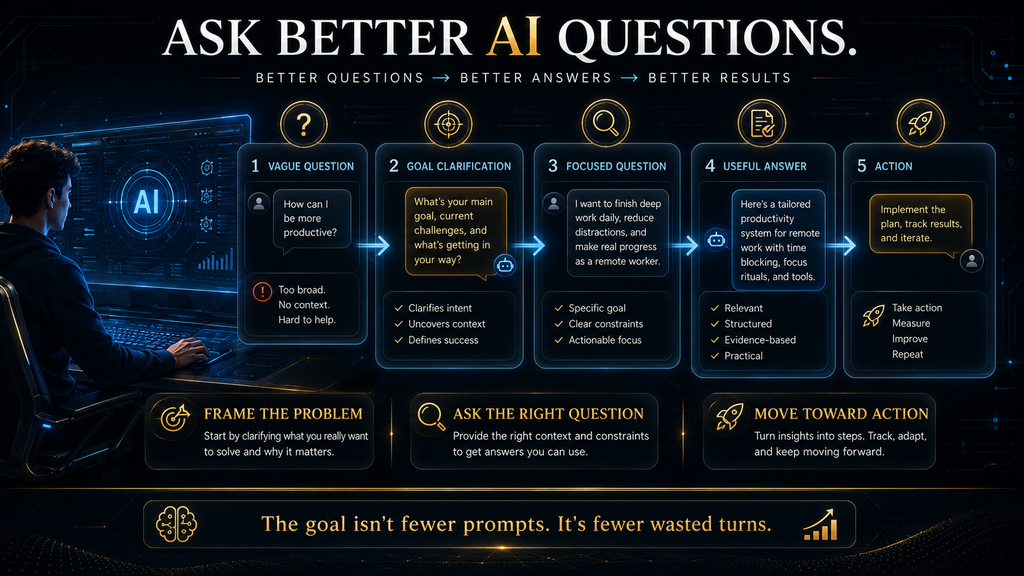
To ask AI better questions, start from the outcome you want, give only the context that would change the answer, ask the smallest question that moves the problem forward, and use targeted follow-ups instead of starting over. That approach sounds simple, but it runs against the way most people use AI.
Most people use AI like a search box. They type a question, read the response, notice it is not quite right and try again, and after a few rounds it becomes clear that the model could have helped all along if the conversation had established what the person needed.
A question such as “How can I grow my business?” leaves the AI to decide what “grow,” “business” and “useful” mean. Adding detail helps, but a larger improvement comes from designing the conversation so that each question brings the problem closer to a useful answer.
A well-structured prompt tells AI how to perform a task. A well-designed question helps decide which task should be performed in the first place, and that second skill is where most of the time savings come from.
The major AI developers agree on the basics. OpenAI’s prompt engineering guide stresses precise instructions and relevant context, and Google’s Gemini prompt design strategies open with clear and specific instructions.
Anthropic’s Help Center advice on prompts that are not giving helpful answers recommends explaining the request clearly, including context, breaking complex requests into substeps and giving follow-up feedback. The deeper skill sits above those rules: framing the goal, finding what is missing, asking the right question, inspecting the answer and choosing the right follow-up.
This guide turns that skill into a repeatable method. You will learn the AI Hustle World AI Question Loop, the minimum-sufficient-context rule, eight types of questions, a follow-up matrix for fixing weak answers and two practical measures of whether you are saving time.
What Makes an AI Question Better
A better AI question reduces the amount of guessing the model has to do before it can produce something useful. Length is only loosely related to that.
“Give me marketing ideas” forces the AI to guess the business, audience, budget, goal and format. “I run a small online clothing store with a limited advertising budget. What are five customer-retention strategies I can test over the next 30 days?” supplies the business type, problem, constraint, timeframe and output.
Even that improved question might be the wrong one. If the store has plenty of visitors but very few completed purchases, retention is probably not the main bottleneck, and five excellent retention ideas will not move revenue.
A stronger first question would be: “Before recommending anything, what information would you need to determine whether retention, conversion, acquisition or average order value is my biggest growth constraint?” Now you are asking AI to help define the problem before it solves one.
Why Vague Questions Feel Natural
Most people learned to ask computers questions through search engines, and search rewards short keyword queries. Typing “laptop for video editing” into a search box works because the engine returns many pages and you do the filtering yourself.
A chat assistant works differently. It returns one synthesized answer, so every gap in your question becomes an assumption the model makes on your behalf, and you often cannot see which assumptions it made.
There is also a social habit at play. In conversation with a person, we expect the listener to ask clarifying questions, but most AI assistants answer immediately unless you tell them to ask first.
Recognizing those habits is the first step to changing them. The rest of this guide gives you replacements that take a few seconds each and save many minutes of rework.
Prompt Quality and Question Quality Are Different Skills
Prompt quality concerns how effectively you instruct the model: a clear task, relevant context, constraints, output format, examples and source boundaries. Our guides to writing AI prompts for accurate and reliable answers and writing system instructions for consistent outputs cover that craft in depth.
Developer references such as Anthropic’s prompt engineering overview and Google Cloud’s introduction to prompting go further into technique. They are worth reading once you use AI daily.
Question quality concerns whether you are asking the right thing at the right stage of the problem. It covers what you are trying to accomplish, what information is missing, which assumption needs testing and whether you are ready to decide.
The distinction matters because you can write an excellent prompt that solves the wrong problem. A perfectly formatted request for a 30-day content calendar is wasted if the business’s real issue is that its product pages do not convert.
Start by Asking Yourself What You Are Trying to Accomplish
The most useful question in any AI session is often the one you ask yourself first: what outcome do I want? “I need help with my website” is a topic, while “I want to increase the percentage of visitors who become leads” is an outcome.
“I need to determine whether my biggest bottleneck is traffic, landing-page conversion, offer quality or follow-up” is a decision. Only at that point is the AI question clear: “Based on these metrics, which part of the funnel looks like the largest bottleneck, and what evidence would confirm or challenge that?”
That sequence, from topic to outcome to decision to question, takes a minute and removes most of the back-and-forth that makes AI feel slow. It also gives you a way to judge the answer, because you know which decision it is supposed to inform.
If you regularly use AI for planning and prioritizing, our simple AI decision-making framework applies the same idea to everyday choices. It pairs well with the loop described later in this guide.
The Minimum-Sufficient-Context Rule
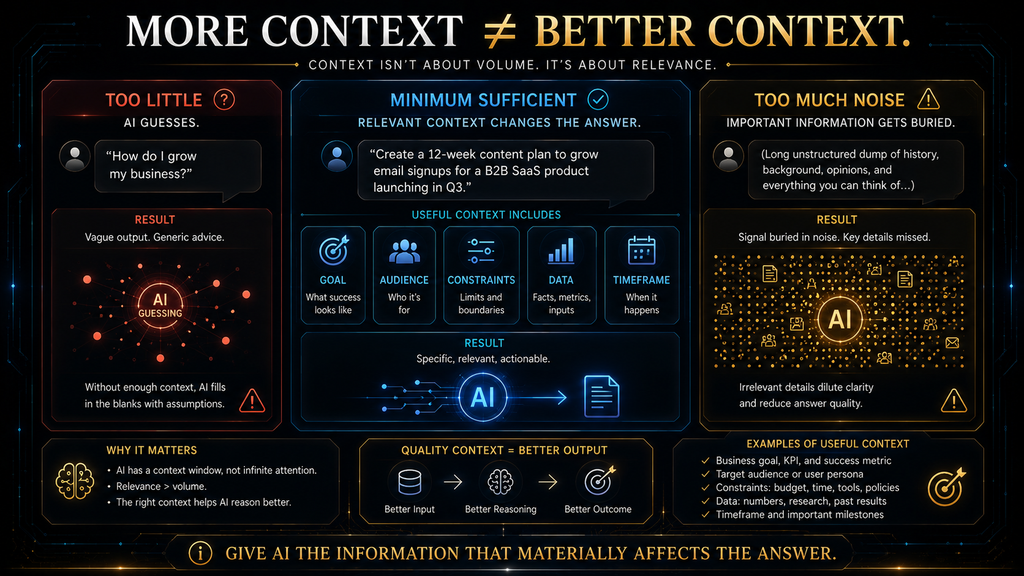
“Give AI more context” is common advice, and it is only half right. The AI Hustle World minimum-sufficient-context rule says: give the model the smallest amount of context needed to remove the ambiguity that would change the answer.
For “Which laptop should I buy?”, useful context includes budget, operating system, main workload, portability, battery expectations and required software. Your favorite color and what you had for breakfast add nothing.
Too little context forces the model to guess. “How should I price my service?” leaves it to invent the service, market, country, customer, experience level, costs and revenue target.
Compare: “I provide freelance graphic design to small businesses in Bangladesh. A typical project takes 8 to 12 hours, my average project value is $150, and I want higher-value clients. How should I structure my next three service packages?” The second version gives the AI a real decision to work on.
Too much irrelevant context creates noise, and research shows why that matters. The study Lost in the Middle found that language models used information at the beginning or end of a long input more reliably than information buried in the middle.
Sort what you know into information that changes the answer, background that adds perspective and noise that changes nothing, and send mostly the first. Our explainers on context engineering and how AI memory and context windows work go deeper into how models handle long inputs.
Eight Types of AI Questions
Instead of memorizing one universal prompt formula, learn to recognize the job your question needs to do. Choosing the right type of question usually matters more than the exact wording.
| Question type | Use it when | Weak version | Stronger version |
|---|---|---|---|
| Orientation | You do not understand a topic yet | “Explain AI agents.” | “What five concepts do I need before I can evaluate AI agents for a small business?” |
| Diagnostic | Something is not working | “Why are my sales low?” | “Traffic rose 25% but sales stayed flat. What are the likely bottlenecks, and what evidence would tell them apart?” |
| Clarifying | The problem itself is unclear | “Automate my business.” | “What do you need to know before identifying which workflow is worth automating?” |
| Comparative | You have several options | “Which AI tool is best?” | “Compare these three tools for a solo writer who needs research and long-form drafting. Prioritize workflow fit over feature count.” |
| Prioritization | You have too many options | “Give me 30 ways to improve my website.” | “Which three of these improvements are most likely to show results within 30 days, and why?” |
| Challenge | You have a recommendation | “Is this a good plan?” | “What is the strongest argument against this plan, and what assumption could make it fail?” |
| Follow-up | The first answer is not usable | “Tell me more.” | “Go deeper on the second point and apply it to a five-person ecommerce business.” |
| Decision | You are ready to choose | “What should I choose?” | “Which option best fits these constraints, what trade-off does it involve, and when would you choose the alternative?” |
Challenge questions deserve special attention because they are the most underused. AI assistants tend to agree with the framing they are given, a behavior researchers call sycophancy.
A study by Anthropic researchers, Towards Understanding Sycophancy in Language Models, found that five widely used AI assistants consistently showed sycophantic behavior across several tasks. It also found that people and the preference models used in training sometimes preferred convincingly written agreeable answers over correct ones.
Asking “what is the strongest argument against this?” or “what evidence would make you change your recommendation?” adds the friction that produces better reasoning. Our guide to what a large language model is explains why these systems generate answers the way they do.
The AI Question Loop
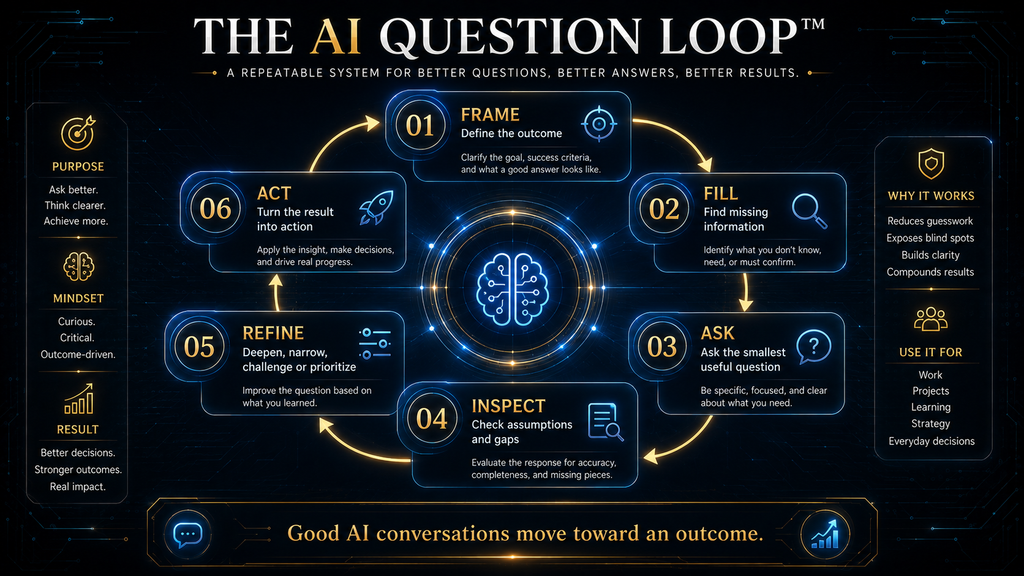
For complex problems, the AI Hustle World AI Question Loop gives each turn of the conversation a job. It is our framework, not an official method from any AI company, and its purpose is to reach a useful outcome in as few wasted turns as possible.
| Stage | What you do | Example question |
|---|---|---|
| 1. Frame | Define what you are trying to accomplish | “I want to raise my online income by $1,000 a month within six months.” |
| 2. Fill | Identify the information that is missing | “What information would most change your recommendation?” |
| 3. Ask | Ask the smallest useful question | “Given my $500 budget and 15 hours a week, which three business models fit best?” |
| 4. Inspect | Check the answer for assumptions, gaps and irrelevant material | “Which assumptions are you making about my situation?” |
| 5. Refine | Choose the right follow-up: narrow, deepen, challenge, compare or prioritize | “What could make your top recommendation fail?” |
| 6. Act | Turn the result into a decision or next step | “Turn this into the three actions I should take this week.” |
The loop works because each stage prevents a specific failure. Framing prevents answers to the wrong problem, filling prevents generic answers, and asking small questions prevents shallow answers to six problems at once.
Inspecting prevents blind acceptance, refining prevents aimless “tell me more” requests, and acting prevents conversations that never end. You will not need every stage for simple tasks, but complex ones benefit from all six.
Working Through the Loop: Frame, Fill and Ask
The frame and fill stages do most of the work. “I want to make more money online” could mean freelancing, a content business, an online store, a digital product, a new job or growing an existing business, and the AI cannot choose the objective for you.
A better start is: “I want to increase my monthly online income by $1,000 within six months. What information about my skills, time, audience and starting capital would you need before recommending a realistic path?” That question exposes the variables that matter.
For complex tasks, it often pays to tell the model not to answer yet. “Do not answer yet. First, list the information you need from me” works well for recommendations, troubleshooting, planning, product selection and learning plans.
Add “Ask me only the questions that would materially change your recommendation,” or the AI may ask ten questions when three would do. The goal is the fewest questions needed to remove the important uncertainty.
A useful permanent instruction, which we call a clarification gate, is: “If my request is underspecified, ask clarifying questions first. If the missing information would not materially change the answer, proceed and state your assumption.” You can save it in custom instructions so every conversation starts with it.
Once the gaps are filled, ask the smallest useful question. “Given my $500 budget, 15 hours per week, sales experience and lack of technical skills, which three online business models best fit my constraints?” has a clear decision boundary, while “What business should I start?” does not.
Inspect Before You Follow Up
When the answer arrives, resist the urge to fire off another question immediately. Check whether it answered your question, whether it assumed anything you did not say, whether it introduced facts that need checking and whether it ignored a constraint.
Also check whether it gave you a list when you needed a priority. A polished answer is not automatically a useful one, and this inspection takes less than a minute.
Three follow-up questions do most of the inspection work for you. “List the assumptions that materially affect your conclusion” surfaces hidden guesses, which you can correct instead of starting over.
“What information would most likely change your recommendation?” reveals the decision boundary, and “What is the strongest argument against your recommendation?” turns the AI into an analysis partner. Learning that Option B wins if battery life matters more than performance is more useful than knowing the AI prefers Option A.
Inspection also means checking facts before you rely on them. Our practical framework for checking whether AI information is accurate and our explainer on why AI gives wrong answers cover how to do that efficiently.
The Follow-Up Question Matrix
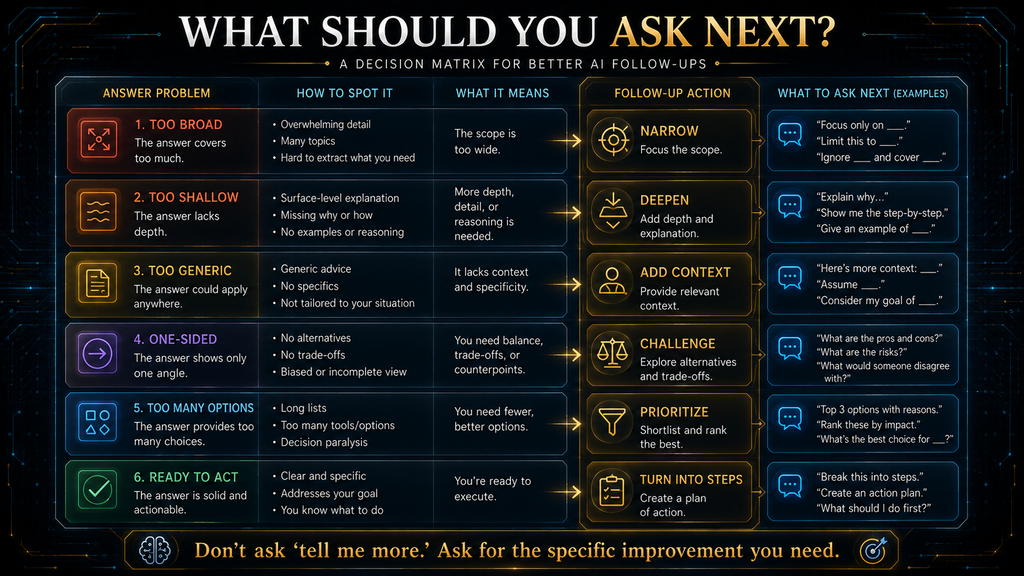
A follow-up should have a specific job, and matching it to the problem with the answer is the fastest way to improve results. “Can you explain more?” rarely helps because it does not say what is wrong.
| Problem with the answer | Best follow-up |
|---|---|
| Too broad | “Narrow this to the three points most relevant to my situation.” |
| Too shallow | “Go deeper on point two and explain why it matters.” |
| Too generic | “Apply this specifically to a five-person ecommerce business.” |
| Too many options | “Rank these by expected impact and difficulty, and keep the top two.” |
| One-sided | “Give me the strongest argument against this approach.” |
| Hidden assumptions | “List the assumptions behind your recommendation.” |
| Missing evidence | “Which claims in this answer need external verification?” |
| Missing information | “What do you need to know before answering this confidently?” |
| Hard to execute | “Turn this into step-by-step instructions for this week.” |
| Ready to act | “Give me the next three actions.” |
Depth is another dimension of follow-up. A conversation that moves from what (“What is customer acquisition cost?”) to why, how, which and finally what would change the answer covers definition, explanation, application, decision and uncertainty in five turns.
Repeating “tell me more” five times covers the same ground less well. Each deeper question tells the model exactly what kind of thinking you need next.
When to Split a Task and When to Keep It Together
Complex requests usually produce better results when broken into stages. “Research this market, identify competitors, create a business model, build a marketing plan, write the landing page and estimate earnings” is six jobs, and the answer will be shallow on each.
Working through market understanding, customer problems, opportunity comparison, evaluation, a practical plan and execution tasks gives each stage a clear purpose. It also lets you inspect intermediate results before building on them.
The opposite extreme wastes time too. “What is the difference between RAM and storage?” needs one good question, not six prompts.
The useful rule is to keep related questions together when they serve one objective and split them when they require different objectives. “Compare these three competitors by pricing, positioning and target customer, then identify the biggest gap” contains several questions but one objective, so it works as a single prompt.
Asking AI to Ask You Questions and Improve Your Prompt
One of the most effective techniques for complex work is to reverse the conversation. Instead of “Give me a business strategy,” try: “Before recommending anything, ask me the minimum number of questions needed to understand my skills, resources, market, goals and constraints.”
Answer the questions, then ask the AI to summarize its understanding of your situation before it recommends anything. That summary is your chance to correct misunderstandings before the AI builds a long answer on top of them.
Meta-prompting takes this further by asking the model to improve your question first: “Evaluate my question for ambiguity, missing context and hidden assumptions. Rewrite it into a clearer question, show me the rewrite and wait for my approval.” It is worth the extra turn when the problem is complex or the stakes are meaningful.
For “What is the capital of Japan?” it is wasted effort. Techniques such as role prompting and few-shot examples can be combined with the improved question once you have it.
Asking AI to Critique Your Own Work
Asking AI for feedback on your writing, plan or code is one of its most valuable uses, and one of the most often wasted. “What do you think of this?” usually returns polite praise followed by minor suggestions, because the model leans toward agreement.
Give the critique a reader, a standard and a severity order. “Review this proposal as a skeptical finance director. List the three weaknesses most likely to get it rejected, in order of severity, and quote the sentence behind each” produces feedback you can act on.
Ask for problems before praise, and tell the model that you want honesty over encouragement. You can also ask it to argue the opposite position, which exposes gaps in reasoning that a friendly review misses.
Finish by asking what a stronger version would change first. That keeps the critique practical and stops you from rewriting everything when two targeted fixes would do.
Question Patterns for Different Jobs
The best question depends on what you are using AI for, and a few patterns cover most everyday work. For learning, ask the AI to test you rather than lecture you: “Teach me search intent with three examples, then quiz me,” followed by “Identify the exact part of my reasoning that was wrong.”
For research, ask for structure and uncertainty: “What do we know, what remains uncertain, which claims are established and which are emerging, and what sources should I check?” Our comparison of the best AI research assistants covers tools built for that kind of work.
For troubleshooting, ask for causes plus the evidence that separates them: “My impressions rose 30% but clicks stayed flat. What are the likely explanations, what evidence would distinguish them, and what is the smallest test I can run?” That turns a vague worry into a diagnostic plan.
For writing, delay the draft: “Before drafting, ask me the five questions that would most improve this article for its reader.” Our guide to using ChatGPT for blogging applies this to long-form content.
For brainstorming, follow generation with organization, selection and challenge. Generate 20 ideas within stated constraints, group them into five models, pick the three strongest, ask what would make each fail and choose one for a low-cost test.
Asking Questions About Documents and Data
When you upload a report, contract, spreadsheet or transcript, the quality of your question decides whether the AI reads it carefully or skims it. “Summarize this” invites a generic overview, while “List every deadline in this contract with the clause number” produces something you can check.
Point the model to what matters and tell it what to do when the answer is not there. “Answer only from the attached document, quote the sentence you rely on, and say ‘not found’ if the document does not cover it” reduces invented answers considerably.
For long files, break the work into passes. First ask for a map of the document’s sections, then ask targeted questions about the sections that matter, which keeps important details out of the middle of a very long input.
Our guides on compressing long documents for AI and using structured prompts for reliable data extraction cover both techniques in more depth. For spreadsheets, ask the AI to state which columns and rows it used, so you can repeat the calculation yourself.
Keeping Long Conversations on Track
Long conversations drift. After twenty or thirty turns, early details can lose influence, the AI may contradict something it said before, and you may forget which assumptions you already corrected.
A simple habit fixes most of this. Every so often, ask: “Summarize what we have established so far, the decisions made and the open questions,” then correct the summary before continuing.
When a conversation has gone badly off course, start fresh rather than arguing with it. Paste the corrected summary into a new chat as the opening context, and the model starts from a clean, accurate state.
This also protects you from compounding errors. A wrong assumption accepted early in a long thread tends to shape every later answer, and a periodic summary is the easiest place to catch it.
Questions for Models That Reason Before Answering
Some AI assistants now offer modes that spend extra time working through a problem before replying. These modes are useful for multi-step analysis, planning, math and code, and they change how you should ask.
Give them the goal, the constraints and the definition of a good answer, and let them work out the steps. Detailed step-by-step instructions can get in the way, because the model may be better at planning the route than following yours.
Be precise about the final output instead. “Give me a one-page recommendation with the three options, the trade-offs and your pick” tells a reasoning mode where to land without dictating how to think.
Save these modes for problems that need them. A quick factual question or a simple rewrite does not benefit from extra reasoning and simply takes longer.
Questions for Chat Assistants, Research Tools and AI Agents
Different AI tools need different kinds of questions. A general chat assistant needs a clear goal, relevant context and a defined output, which is most of what this guide covers.
Research tools that search the web need scope and source rules. Tell them which time period, regions and types of sources matter, and ask them to separate established findings from claims they could not verify.
AI agents that take actions need something more: a goal, the boundaries of what they may do, and a clear stopping point. “Find three suppliers that meet these criteria, draft an email to each, and stop for my approval before sending anything” is a good agent instruction because it defines the finish line and the checkpoint.
Our explainer on how AI agents use tools to complete real tasks shows why those boundaries matter. The more an AI can do on its own, the more carefully the question needs to define what done looks like.
Before and After: A Career Decision Conversation
A before-and-after example shows how much the method changes a real conversation. Imagine someone deciding whether to move from marketing into data analysis.
The weak version starts with “Should I switch to data analysis?” The AI responds with general pros and cons, the person asks “Is it hard to learn?”, then “How much does it pay?”, and after six turns they have generic information and no clearer decision.
The stronger version starts with the frame: “I have six years in marketing, use spreadsheets daily and have basic SQL. I want a role with more analytical work within a year without a pay cut. Before advising me, what information would most change your recommendation?”
The AI asks about location, current salary, available study time and whether an internal move is possible. After those answers, the person asks for the three most realistic paths, the main risk in each and the evidence they should gather this month.
Finally they ask, “What would make you change this recommendation?” The answer shows the decision depends mostly on whether their company has an internal analytics team, which turns a vague career question into one concrete conversation with their manager.
Worked Example: Improving an Online Store
Here is the full loop applied to a business problem, showing how each turn builds on the last:
- Frame: “I want to increase completed purchases without significantly increasing advertising spend.”
- Fill: “What information do you need before diagnosing the biggest opportunity?”
- Ask: “Based on my traffic, conversion rate, cart abandonment and average order value, which part of the funnel looks like the biggest bottleneck?”
- Inspect: “Which assumptions are you making about my customers and my data?”
- Refine: “What evidence would distinguish your top two explanations?”
- Challenge: “What is the strongest argument against your recommendation?”
- Act: “Give me the smallest test I can run this week to validate it.”
That conversation takes seven turns, and each has a purpose. An unstructured session on the same problem might run through a generic answer, corrections and rewrites before reaching anything usable, and it would still lack the diagnostic evidence and the test.
Asking Better Questions as a Team
Teams that use AI heavily benefit from sharing good questions, not just good tools. When each person invents their own approach, quality varies widely and nobody learns from what worked.
Start by collecting the questions and instructions that produce reliable results for common tasks, such as summarizing customer calls, drafting proposals or analyzing survey data. Store them where everyone can find them, with a note on when to use each.
Shared system instructions help too. A team instruction that tells the AI to ask clarifying questions for underspecified requests and to separate facts from assumptions raises the floor for everyone.
As the library grows, a dedicated tool can help manage versions and access. Our comparison of the best prompt management tools for teams covers the options, and our comparison of ChatGPT, Claude and Gemini for prompt-heavy workflows helps if your team uses more than one model.
Measuring the Time You Save
The useful measure of AI efficiency is time to a useful answer, not the length of your first prompt. Workflow A runs question, generic answer, correction, clarification, rewrite and useful answer, which is six turns.
Workflow B runs goal, missing information, focused question, targeted follow-up and useful answer, which is four. It asks for more thought at the start and still finishes sooner, and the gap grows with the complexity of the task.
A second measure is editing distance: how much work remains between the AI’s answer and the output you need. Thirty unprioritized ideas might take an hour to reorganize, while five ranked options with criteria and next steps can be used immediately.
The first answer also has diagnostic value even when it is not final, because it often reveals an overlooked constraint or a question you did not know to ask. Our daily AI workflow shows how to build these habits into a working day.
Common Mistakes When Asking AI Questions
Most wasted AI time comes from a few repeated habits. Watch for these in your own conversations:
- asking about a topic instead of a task, such as “AI marketing” instead of a specific goal
- asking for “the best” without saying what best means for you
- giving too little context, or burying the important details in irrelevant ones
- asking the AI to answer before it understands the problem
- accepting the first response instead of inspecting it
- asking “can you explain more?” instead of saying what is missing
- combining several unrelated jobs in one prompt
- treating the AI’s recommendation as a decision rather than an input
Each mistake has a quick fix covered earlier in this guide. Fixing even two of them usually cuts the number of turns you need for complex tasks noticeably.
Five Questions That Check an Answer Quickly
Verification does not have to be slow. Five short questions catch most problems in an AI answer before you rely on it.
First, “What are you least certain about in this answer?” often surfaces the weakest claim immediately. Second, “Which of these statements would need a source, and what source would you check?” separates facts from reasoning.
Third, “Recalculate the numbers step by step” catches arithmetic and unit errors in estimates and budgets. Fourth, “Is any of this likely to have changed recently?” flags prices, laws, product features and statistics that may be out of date.
Fifth, ask a different AI tool or a trusted source the same core question and compare the answers. Where two independent sources disagree, you have found exactly the point that needs human checking.
Questions for Everyday Personal Tasks
The same method works outside work. For travel planning, “Plan a four-day trip to Kyoto for two adults in April on a mid-range budget, with no more than two major sights a day and one rest afternoon” produces a far more usable plan than “Plan a trip to Japan.”
For personal budgeting, give the AI your categories and constraints and ask it to find patterns rather than give generic advice. “Here are my last three months of spending by category. Which two categories changed most, and what are three realistic ways to cut 10% without touching rent or savings?”
For learning a new skill, ask for a plan tied to your available time and current level. “I can practice 30 minutes a day, know basic chords and want to play five songs in two months; build a weekly plan and tell me how to check progress.”
For health, legal or financial questions, use AI to prepare rather than decide. Ask it to explain terms and list questions to raise with a qualified professional, and do not share more personal information than the task needs.
What Better Questions Cannot Fix
Better questions improve relevance, reduce ambiguity and cut wasted turns, but they cannot guarantee factual accuracy. A clear question cannot correct outdated training data, missing evidence, an impossible task or a flawed assumption you did not notice.
The major developers’ guidance supports clear instructions and iteration without claiming that good prompting eliminates errors. Any claim you will act on still needs checking against a reliable source.
Better questions also do not transfer responsibility. AI can help you structure a problem, identify options, expose assumptions and plan next steps, but you remain responsible for judging the evidence and the consequences.
When the stakes involve health, money, legal rights or safety, treat AI as a starting point for a conversation with a qualified person. AI can support a decision, but it does not own it.
What Happens If You Keep Asking Vague Questions
Vague questions cost more than a few extra turns. Over weeks, they train you to expect generic answers, and many people conclude that AI is less useful than it is.
They also raise the risk of over-trust. When you do not state your constraints, the AI fills them with assumptions, and a confident answer built on the wrong assumptions is easy to act on without noticing.
The time cost compounds across a team. If each person wastes ten minutes a day on unfocused AI conversations, the lost hours add up quickly, while the fix takes only a change of habit.
Start with one change this week: before any important question, write one sentence describing the outcome you want. That single habit improves most AI conversations on its own.
A Reusable Question Template and Cheat Sheet
For important questions, run through eight fields before you press enter. You do not need to write the labels every time; treat them as a thinking checklist.
- Goal: what outcome do I want?
- Context: what information would change the answer?
- Question: what do I need to know right now?
- Criteria: what should the answer prioritize?
- Constraints: which boundaries matter?
- Output: what format would make the answer usable immediately?
- Uncertainty: what should the AI do if my information is insufficient?
- Follow-up: what will I ask if the answer is too broad, shallow, generic or uncertain?
When you do not know what to ask next, a few questions usually move the conversation forward. Try “What information are we missing?”, “What would change your answer?”, “What is the strongest argument against this?”, “What is the next most useful question?” or “What should I verify before relying on this?”
Who Benefits Most, and When to Keep It Simple
If you use AI repeatedly for complex work, as a researcher, writer, student, analyst, marketer, manager, consultant, freelancer or business owner, question design will save you more time than any single tool choice. The benefit grows with the complexity and consequence of the problem.
Our roundup of the best AI productivity tools for beginners pairs well with this method if you are still choosing where to apply it. Good questions make every one of those tools more useful.
If you are asking for the capital of Japan or a more professional version of one sentence, just ask. The sophistication of an AI conversation should match the sophistication of the problem.
The underlying skill is problem framing. It moves you from “What should I do?” to “What problem am I trying to solve?” and finally to “What evidence would show that my solution is working?”
How We Researched This Guide
This guide was researched and drafted with AI assistance and checked against the primary sources linked in the article. Those include OpenAI’s prompt engineering guide, Anthropic’s Help Center guidance, Google’s Gemini prompt design strategies, the Lost in the Middle study and Anthropic researchers’ study of sycophancy.
We did not run a controlled experiment comparing question styles for this article, and no benchmark is claimed. The turn counts, the career conversation and the other example conversations are illustrative.
The AI Question Loop, the minimum-sufficient-context rule, the follow-up matrix and the editing-distance measure are AI Hustle World frameworks. This version restructures the guide into shorter sections, adds the team, tool-type and career-example sections, and re-checks every source link.
Final Thoughts: Design the Conversation, Not Just the Prompt
The most common mistake people make with AI is believing the goal is to write the perfect prompt. The goal is a conversation that moves from what you want, to what you do not yet know, to what you need to ask, to what the answer reveals and finally to what you should do next.
Sometimes that takes one precise question. Sometimes it means asking the AI to clarify the problem first, challenging its recommendation or asking what would change its answer.
The strongest AI users do not necessarily ask more complicated questions. They ask the right question at the right stage: frame the goal, find the missing information, ask the smallest useful question, inspect the answer, refine it and act.
Judge your progress by how few turns are wasted between your goal and an answer you can use. And when the stakes are real, the smartest final question is often the simplest one: what should I verify before I rely on this?
Ask Better Questions. Then Check the Answers.
Better questions can make AI responses more useful, but important claims still need evidence. Learn how to check AI-generated information before you rely on it.
Learn How to Verify AI Information →Frequently Asked Questions
How do I ask AI better questions?
Start with the outcome you want, give only the context that changes the answer, state your constraints and format, and use targeted follow-ups. For complex problems, ask the AI what it needs to know first.
What makes a good AI question?
A clear purpose, enough relevant context, an appropriate scope and a defined output. For complex problems, it also tells the AI what to do when information is missing.
Should I give AI more context?
Give relevant context, not everything you know. Put the most important details first, because models can overlook information buried in the middle of long inputs.
Should I ask AI one question at a time?
Not always. Combine questions that serve one objective, and split them when they involve different objectives or stages of the problem.
How do I get less generic answers from AI?
Describe your situation, goal, audience, constraints and the result you need, then ask the AI to apply its answer to your circumstances rather than giving general advice.
What should I ask after the AI’s first answer?
Match the follow-up to the problem: narrow, deepen, add context, challenge or ask for next steps. “What would most likely change your answer?” is one of the most useful follow-ups.
Can I ask AI to ask me questions first?
Yes. Ask it for the minimum questions needed to understand your situation, then have it summarize its understanding before recommending anything.
Why does AI agree with me so easily?
Language models tend toward sycophancy, leaning toward answers that match your apparent views. Ask for the strongest counterargument and the assumptions behind each recommendation.
Does asking better questions make AI answers accurate?
No. Better questions improve relevance and reduce ambiguity, but they do not guarantee accuracy. Verify any claim you plan to act on.
Can better questions save time with AI?
Yes, when they cut clarification loops, unnecessary output and editing. Measure time to a useful answer rather than the number or length of prompts.
Related Guides
- How to Write AI Prompts for More Accurate and Reliable Answers
- A Beginner’s Guide to Writing AI Prompts That Generate Better Results
- How to Use ChatGPT for Blogging: Complete Beginner’s Guide
- How AI Answers Questions: From Prompt to Response Explained
Written by
Muntasir Ahmad Chowdhury
Founder, AI Hustle World
Muntasir Ahmad Chowdhury is the Founder of AI Hustle World, an independent publication dedicated to making Artificial Intelligence practical, trustworthy, and easy to understand. He researches AI tools, automation, customer service, productivity, and real-world business applications, helping readers make smarter technology decisions through research-driven, experience-backed content.
Expertise:
AI Tools • AI Automation • AI Customer Service • AI Productivity • Generative AI • AI Workflows
Get Smarter With AI
Enjoyed this guide? Get practical AI tools, tutorials, and honest reviews delivered to your inbox.