Evidence: Documentation reviewed
Last checked: August 2026
What was done: Written from official documentation and the published sources linked in this article. Not hands-on tested.
Files: None
Affiliate links: No
Last updated: October 2026
Best AI Resume Builders (Free and Paid): Quick Answer
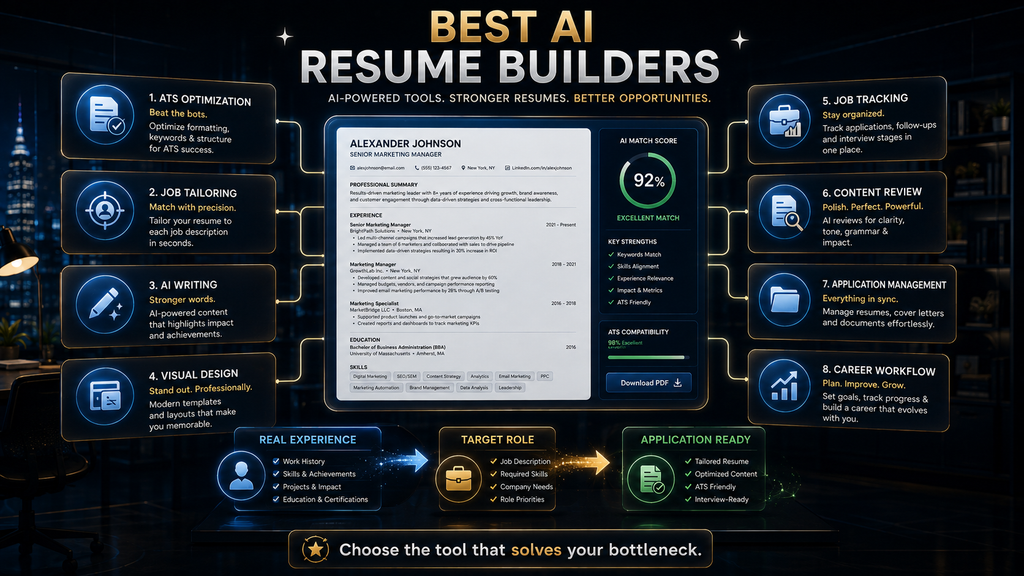
The best AI resume builder depends on the job you need it to do. Teal is the strongest all-round choice for active job seekers who want tailoring and job tracking together. Rezi suits ATS-focused applicants, Kickresume suits beginners on a budget, Enhancv suits design-conscious roles, and Jobscan is the best tool for checking a finished resume against one specific job.
Huntr is worth a look if you are applying to many jobs and want your resumes tied to an application tracker. Resume Worded is best for improving an existing resume’s content, and Resume.io is a simple guided builder for people who only need one clean document. Every tool on this list has a free option or a low-cost trial.
These tools do not all solve the same problem. A resume builder helps you create the document, an optimizer measures how well it matches a particular job, and a job-search platform helps you tailor and track many applications. Buying the wrong category is the most common way people waste money in this market.
So instead of asking which AI resume builder is number one, ask which part of your application process is slowing you down. This guide compares eight tools by use case, shows current pricing as checked in October 2026, scores each one with our W.O.R.T.H. Score and gives you a step-by-step method for using AI without inventing anything.
Best AI Resume Builders at a Glance
Here is the short version. Prices are taken from each vendor’s pricing page in October 2026 and can change at any time, so confirm the current price before you subscribe. “Paid from” shows the lowest regular monthly-equivalent price we found, and several tools charge more on month-to-month billing. Free options are listed in their own column.
| Tool | Best for | Product type | Free option | Paid from |
|---|---|---|---|---|
| Teal | Active job seekers | Builder + job tracker | Free forever plan | $13 per week; $79 per 90 days |
| Rezi | ATS-focused applications | Builder + optimizer | 1 resume, 3 PDF downloads | $29/month or $149 lifetime |
| Kickresume | Beginners and career changers | Builder | Basic free plan | $4.50/month billed yearly |
| Enhancv | Visual, design-led resumes | Visual builder | 7-day free plan | Paid Pro plans |
| Huntr | High-volume job searches | Builder + job tracker | Free plan with job tracker | $40/month billed monthly |
| Jobscan | Checking a resume against a job | Optimizer | 5 scans per month | $89.95 every 3 months |
| Resume Worded | Improving existing content | Reviewer + optimizer | Limited free review | $19/month billed yearly |
| Resume.io | Simple one-off resumes | Guided builder | 1 resume, TXT download only | $49.95 per quarter |
The ranking is deliberately based on use case rather than a single score from one to eight. A tool that is excellent for a senior professional polishing an existing resume can be a poor fit for a graduate writing a first one. Use the table to shortlist two tools, then read their sections below. Most people need only one or two of them.
How We Chose and Compared These Tools
We selected tools that are widely used for AI-assisted resume work and that publish clear product and pricing information. For each one, we reviewed the vendor’s own pricing and feature pages in October 2026, compared what the free tier includes, and looked at how the product fits into a real application workflow.
This is a documentation-based comparison, not a hands-on test. We did not create paid accounts or measure interview rates, and we do not accept vendor claims about success rates as evidence. Where a product’s feature list or price affects our recommendation, we say so, and we link to the pricing page so you can check it yourself.
None of the links in this article are affiliate links, and no vendor paid for placement. Rankings reflect fit for a specific type of job seeker, not commissions. If you work in hiring rather than job seeking, our guide to AI in HR and recruiting covers the employer side of the same process. Our goal is to help you choose, not to sell.
What an AI Resume Builder Does
The phrase “AI resume builder” sounds like one category, but these products now do several different jobs. At a basic level, they help you structure a resume, rewrite bullet points, write a summary, suggest skills, choose a template and format sections. Many also draft cover letters and tailor content to a job description.
More advanced platforms go further. They compare a resume with a specific job posting, highlight missing keywords, create multiple targeted versions, check formatting for applicant tracking systems and track where each application stands. Some add LinkedIn reviews, interview preparation and browser extensions that save jobs as you browse.
That creates three distinct product types. A builder answers “how do I create a better resume?” An optimizer answers “how well does this resume match this job?” A job-search platform answers “how do I find, tailor, track and manage all my applications?” Each is useful, but they are not substitutes for each other.
If you buy a builder when your real problem is tracking thirty applications, you will still be lost in spreadsheets. If you buy an optimizer when you do not yet have a resume, you will have nothing to optimize. Identifying your bottleneck first is the single most important buying decision in this category.
The Resume Application Readiness Loop
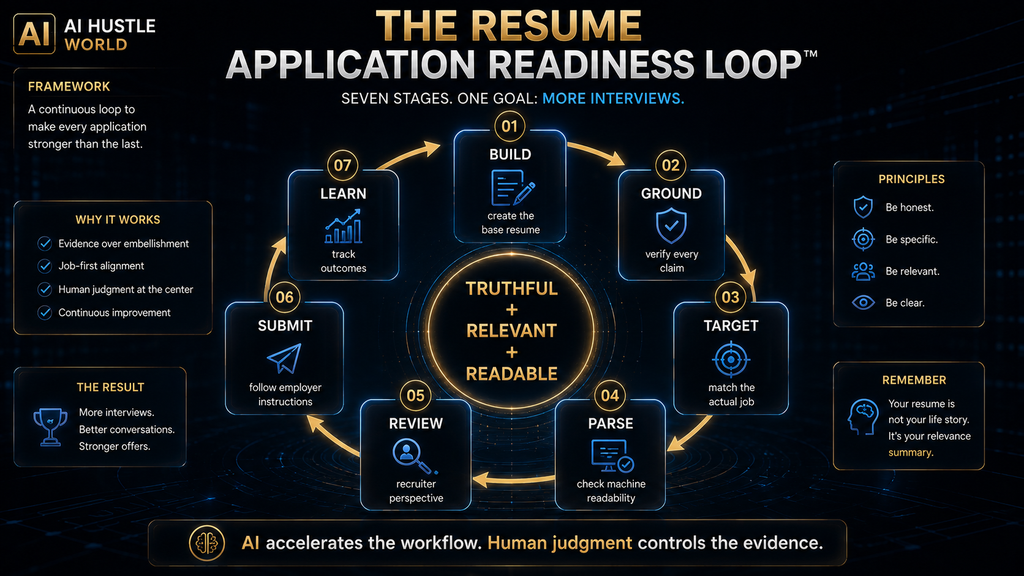
A good AI-assisted resume process does more than generate, download and apply. Speed matters, but only if each version is accurate and relevant. We recommend a seven-stage loop: build, ground, target, parse, review, submit and learn. This is AI Hustle World’s editorial framework, and every tool below fits into one or more of its stages.
Build a strong base resume from your real career history. Ground it by checking every claim, metric, title and skill against what you have done. Target it to the specific job description, emphasizing the evidence that matters most for that role. Parse it by making sure the format can be read correctly by applicant tracking software.
Review the final version the way a recruiter or hiring manager would read it, not only as a score. Submit it in the format the employer requests. Learn by tracking which versions and approaches lead to interviews, so each new application starts from what has worked before. That last stage is the one most job seekers skip.
The goal is a truthful, relevant document that software can read and people want to read, produced repeatedly without starting from scratch each time, and accurate enough to defend in any interview. Keep the loop in mind as you read the tool reviews, because the best tool for you is the one that removes your slowest stage.
1. Teal: Best for Active Job Seekers
Teal is best for people applying to several jobs who need resume tailoring, job tracking and application organization in one place. Its strength is connecting each resume to a job record, so you can see which version went to which company and what still needs doing. It works more like a job-search workspace than a document editor.
According to Teal’s pricing page, the free forever plan includes unlimited resumes and unlimited job tracking, with limited templates and keyword insights. Teal+ adds full keyword matching, unlimited templates and more analysis, and is priced at $13 per week, $29 every 30 days or $79 every 90 days. Longer billing periods lower the effective weekly cost.
Teal stands out because a serious job search quickly becomes a document-management problem. You might have a base resume, a sales version, an operations version and versions for different seniority levels. Teal’s tracker keeps those versions linked to the jobs they were sent to, which removes much of the admin that makes long searches exhausting.
The limitation is scope. If you only need one well-designed resume, Teal’s job-search features are more than you need, and a simpler builder will do. The weekly price also adds up if your search drags on, so the 90-day plan is better value for anyone expecting a search longer than a month. Check the plan length before you pay.
Verdict: choose Teal if your problem is managing and tailoring a whole job search, not just designing a single resume. The free plan is generous enough to test the workflow before you pay anything, and the tracker alone is useful even if you write resumes elsewhere. It is our top pick for most active job seekers.
2. Rezi: Best for ATS-Focused Resumes
Rezi is best for applicants who care most about applicant tracking system compatibility, job-specific keywords and a structured resume. It is one of the most ATS-oriented tools in this category, and its scoring and keyword features are designed around how screening software reads a document. That focus suits large employers with high application volumes.
Rezi’s pricing page lists a free plan with one resume, three PDF downloads and access to its AI writer and editor. Pro costs $29 a month and adds unlimited resumes and downloads, all templates, the Rezi Score and keyword targeting. A lifetime plan gives all features for a single payment of $149. The page also mentions a money-back guarantee period.
That lifetime option matters for buyers who dislike subscriptions. If you change jobs every few years, paying once may cost less over time than several months of subscriptions across different searches. It also removes the risk of forgetting to cancel after you land a role, which is a common hidden cost of monthly plans.
The limitation is that an ATS-oriented score is not a hiring prediction. A resume can match keywords perfectly and still be weak if the experience behind it is thin or poorly presented. Use Rezi’s score to fix structural and keyword gaps, then judge the content as a human reader would. Strong content still matters most.
Verdict: choose Rezi when ATS-friendly structure and job-specific optimization are central to your strategy, especially for corporate roles with high application volumes. Consider the lifetime plan if you expect to use it again in future searches, since it removes renewal worries entirely. It is our top pick for ATS-heavy corporate applications.
3. Kickresume: Best for Beginners and Career Changers
Kickresume is best for students, recent graduates, career changers and anyone who wants AI writing help combined with attractive templates. It takes an approachable, guided route, which suits people who do not yet know how a strong resume should look or what to include. Its templates also make a first resume look professional quickly.
Kickresume’s pricing page lists a free plan with basic templates. Paid plans add 40-plus resume and cover letter templates, the AI Writer, an ATS resume checker, a career map and LinkedIn or PDF import. Monthly billing costs $19, quarterly billing is $27 every three months and yearly billing is $54 a year, or $4.50 a month.
Beginners often do not know how to write a summary, phrase a bullet point, describe an internship or turn coursework into evidence of skills. AI suggestions remove that blank-page problem and give you a starting structure. For many first-time job seekers, that guidance is worth more than advanced optimization features.
The boundary matters here more than anywhere. AI should help you describe your experience, not invent it. It can turn a university project into a clear, professional bullet point, but it should never turn a class assignment into “led a $2 million enterprise transformation.” That sounds impressive and could end an interview the moment someone asks about it.
Verdict: choose Kickresume if you are starting from scratch and want guided creation without a complicated workflow. The yearly plan is one of the cheapest paid options in this comparison if you expect to keep using it, and the free plan is enough to try the editor first. It is our top value pick for beginners.
4. Enhancv: Best for Visual, Design-Led Resumes
Enhancv is best for applicants who want a highly customized, visually polished resume. It focuses on design and layout while also offering content suggestions, an ATS check and pro resume sections. It suits people whose resume is part of their professional brand, such as designers, marketers and communications specialists.
Enhancv’s pricing page lists a free plan that is valid for seven days, with all templates but Enhancv branding and a limit on section items. Paid Pro plans remove the branding, add the ATS check and real-time content suggestions, and allow unlimited section items. Prices are shown in local currency and vary by region and billing period.
Visual hierarchy helps human readers take in information quickly, which can be an advantage in creative, marketing and personal-brand-heavy roles. A well-designed resume shows taste and attention to detail before the reader reaches the first bullet point. In those fields, presentation is evidence of skill.
The trade-off is parsing. Greenhouse’s support documentation lists graphics, photos, word art, tables, headers and footers, text boxes, columned layouts and unclear sections among the things that can stop its resume parser reading a document correctly. Complex designs can work against you in ATS-heavy hiring.
Verdict: choose Enhancv when visual presentation is part of your professional positioning, and keep a simpler ATS-safe version for conventional applications. The seven-day free plan is short, so prepare your content in a document before you start the trial and use the week for design and layout only. It is our pick for design-led roles.
5. Huntr: Best for High-Volume Job Searches
Huntr is best for applicants who want resumes, job tracking, tailoring and application organization in one system. Like Teal, it treats the resume as one part of a larger job-search workflow, with a job tracker, a browser clipper for saving postings and tools for building tailored application packets. It suits people who apply to many roles each week.
Huntr’s pricing page lists a free plan with unlimited base resumes, PDF export, two job-tailored resumes, basic resume scoring and a job tracker for up to 100 jobs. Pro costs $40 a month on monthly billing and adds unlimited tailored resumes, cover letters, unlimited AI generations and more. Quarterly and biannual billing are also offered.
Imagine applying for thirty jobs without a system. You would soon lose track of which resume version you used, which keywords you targeted, which companies replied and which version led to an interview. Huntr’s tracker keeps that information together, which turns a chaotic search into a manageable process.
The limitation is cost and scope. At $40 a month on monthly billing, Huntr Pro is one of the more expensive monthly options here, and most of its value comes from volume. If you are applying to a handful of carefully chosen roles, the free plan or a simpler builder will cover what you need. Longer billing periods reduce the monthly cost.
Verdict: choose Huntr when your biggest problem is managing the job search around your resume rather than creating the resume itself. Start with the free tracker and upgrade only if you hit the tailored-resume limit. Choose quarterly or biannual billing if your search will run for months. It is our pick for high-volume searches.
6. Jobscan: Best for Checking a Resume Against a Job
Jobscan is best for applicants who already have a resume and want to compare it against a specific job description. It is better understood as an application optimizer than a traditional builder. It shows how your resume lines up with a posting on skills, keywords and formatting, and suggests specific changes.
Jobscan’s pricing page lists a free plan with five resume scans a month. Paid plans add unlimited scans, unlimited AI optimizations, an AI cover letter generator, a bullet point generator and a LinkedIn optimizer. Monthly billing costs $49.95, and quarterly billing costs $89.95 every three months after a seven-day free trial.
Jobscan matters because many applicants do not need another tool to rewrite everything. Their base resume is already solid, and the question is narrower: how well does this specific resume fit this specific job? Answering that question well is exactly what an optimizer is for, and it is a different job from building a resume.
A common two-tool workflow is to build and tailor in Rezi, Teal or Kickresume, then check the final version in Jobscan before you submit. The risk is score chasing. If you keep editing to push a match score higher, you can end up with a keyword-stuffed resume that reads badly to the human who opens it next.
Verdict: choose Jobscan when your resume already exists and job-specific optimization is your priority. Five free scans a month may be enough if you apply selectively, so use them on the applications that matter most. Upgrade only if you are scanning several versions every week, and choose quarterly billing if you do.
7. Resume Worded: Best for Improving Existing Content
Resume Worded is best for experienced professionals who already have a resume but are not confident it communicates their impact. It works as a reviewer and coach more than a builder, giving feedback on bullet points, wording and structure, and it also reviews LinkedIn profiles, which is useful because recruiters often check both.
Resume Worded’s Pro page lists unlimited resume and LinkedIn reviews, AI rewrites and more than 100 templates. Pro costs $49 a month on monthly billing, $99 every three months on quarterly billing or $229 for a year, which works out to about $19 a month. A limited free review is available before you pay.
Experienced professionals often have strong achievements and accurate metrics but weak bullet points. “Managed sales team and handled monthly reporting” is accurate but flat. If the evidence supports it, “Managed a regional sales team, improving target attainment through territory planning and weekly performance reviews” says far more about what you did and how.
That difference is not fabrication; it is better organization of real evidence. Resume Worded is designed for exactly that kind of improvement. Its limitation is that it is not the best starting point if you have no resume at all, and its monthly price is high for a short search, so the yearly plan suits ongoing career management better.
Verdict: choose Resume Worded when your resume exists but is not communicating your impact strongly enough, especially in mid-career and senior roles where content quality matters most. Use the free review first to see whether its feedback suits your field before committing to a paid plan. It is our pick for improving existing content.
8. Resume.io: Best for Simple Resume Creation
Resume.io is best for first-time resume writers who want simplicity and a guided, template-based process. Not everyone needs an AI job-search platform. Sometimes the problem is simply, “I need a professional resume and I do not know where to start,” and a clean guided builder solves that well. Its templates are clean and easy to follow.
Resume.io’s pricing page lists a free plan limited to one resume and one cover letter, with downloads only in TXT format. Paid access offers a seven-day trial for $2.95 that auto-renews to $29.95 every four weeks, or a quarterly plan at $49.95 every three months, both with unlimited resumes, cover letters and PDF downloads.
That auto-renewal is the main thing to watch. The low trial price is attractive, but if you forget to cancel or switch plans, you will be billed $29.95 every four weeks. Set a reminder the day you start the trial, or choose the quarterly plan if you expect your search to last more than a month. Read the renewal terms before you enter card details.
The other limitation is depth. Resume.io is not built for heavy ATS optimization or tracking dozens of applications. If your search grows into many targeted applications, a platform such as Teal or Huntr will provide more useful infrastructure, and an optimizer such as Jobscan will give more job-specific feedback.
Verdict: choose Resume.io when simplicity matters more than advanced workflow management, and you want a polished document quickly. Watch the trial renewal date carefully, and download a PDF copy of your finished resume before you cancel. For one-off needs, the free plan of Kickresume or Rezi may be enough.
W.O.R.T.H. Scores for All Eight Tools
We rate tools with the AI Hustle World W.O.R.T.H. Score: Workflow fit (25), Output quality (25), Risk and rights (15), Total cost (20) and Human effort (15). These scores are editorial assessments based on documentation and published pricing, not lab tests, and they assume a typical job seeker applying to 10 to 30 roles.
| Tool | Workflow fit /25 | Output /25 | Risk /15 | Cost /20 | Effort /15 | Total /100 |
|---|---|---|---|---|---|---|
| Teal | 23 | 19 | 11 | 15 | 11 | 79 |
| Rezi | 20 | 20 | 11 | 16 | 11 | 78 |
| Kickresume | 18 | 19 | 11 | 18 | 11 | 77 |
| Huntr | 22 | 18 | 11 | 14 | 11 | 76 |
| Jobscan | 19 | 19 | 11 | 13 | 12 | 74 |
| Enhancv | 17 | 21 | 10 | 14 | 11 | 73 |
| Resume Worded | 17 | 20 | 11 | 12 | 11 | 71 |
| Resume.io | 15 | 17 | 11 | 12 | 12 | 67 |
Teal scores highest because it fits the most stages of the readiness loop on a strong free plan. Rezi’s lifetime option lifts its cost score, and Kickresume’s yearly price makes it the best value builder. Enhancv’s lower risk score reflects parsing concerns with complex designs, while Resume.io loses points for its auto-renewing trial and narrow scope.
Treat the totals as a starting point, not a verdict. If you only need to check one resume against one job, Jobscan’s narrower workflow is a strength rather than a weakness, and if design matters in your field, Enhancv’s output score matters more than its total. Weight the factors by what matters most in your own search.
Builder vs Optimizer vs Job-Search Platform
Most buyers should understand this distinction before paying for anything. The table groups the eight tools by the main question each one answers, which makes it easier to see which products compete with each other and which can be combined. Start by deciding which question matters most to you right now.
| Product type | Main question | Examples |
|---|---|---|
| Resume builder | How do I create the document? | Kickresume, Resume.io |
| ATS-oriented builder | How do I create a structured, ATS-conscious resume? | Rezi |
| Job-search platform | How do I manage and tailor many applications? | Teal, Huntr |
| Resume optimizer | How well does this resume fit this job? | Jobscan |
| Resume reviewer | How strong is my existing content? | Resume Worded |
| Visual builder | How do I present my experience visually? | Enhancv |
This classification prevents a common mistake: comparing products that solve different problems as if they were direct substitutes. A builder and an optimizer often work best together, while two job-search platforms mostly duplicate each other. Pick one tool per job you need done, and no more. Fewer tools also means fewer logins and subscriptions to manage.
What “ATS-Friendly” Means
An applicant tracking system, or ATS, is software employers use to collect applications, parse resumes into structured fields and help recruiters search and filter candidates. “ATS-friendly” means the important information in your resume is easy for that software to read correctly. It does not simply mean a tool shows an ATS score.
In practice, ATS-friendly resumes use clear section headings, real text rather than images, a conventional structure, consistent dates, recognizable job titles and relevant keywords used naturally. They avoid decorative elements that confuse parsers, and they keep contact details in the main body of the document.
Greenhouse’s documentation on unsuccessful resume parses gives concrete examples of what goes wrong. It lists resumes uploaded as images, spaces between letters, graphics and word art, complex tables, contact details placed in headers, footers or text boxes, columned layouts and sections without clear structure.
That does not mean every designed resume will fail. Different systems parse differently, and many modern parsers handle simple layouts well. It does mean that the safest resume for a large corporate application is usually not the most visually elaborate one, and that a plain version is worth keeping on hand.
An ATS Score Is Not an Interview Probability
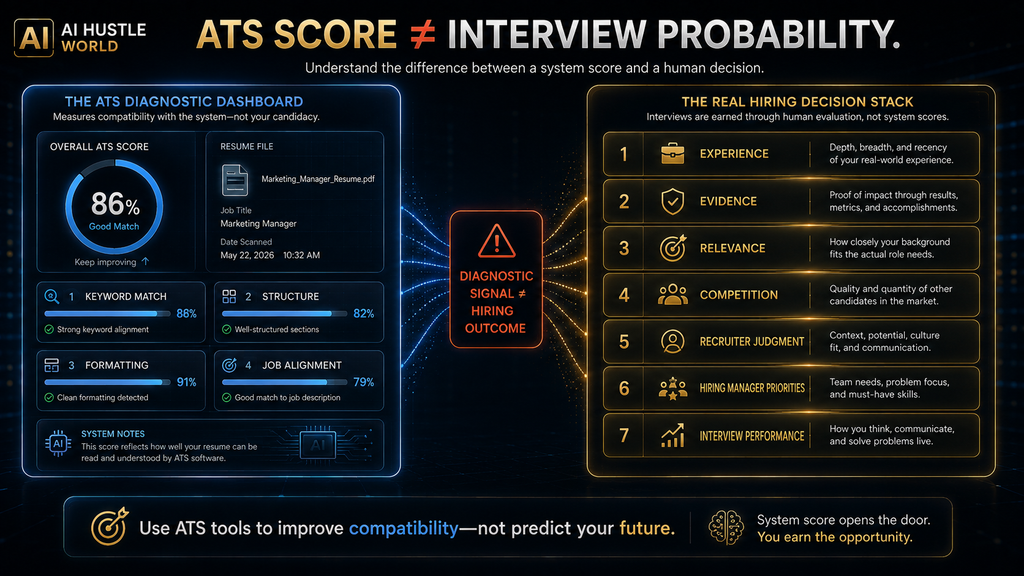
Suppose a tool tells you your match score is 92%. That does not mean you have a 92% chance of an interview, and it does not mean a resume scoring 70% elsewhere is worse. The score reflects that tool’s own criteria, such as keyword overlap, formatting and section structure, and different tools calculate it in different ways.
Your real chances depend on factors no resume tool can see: your actual experience, the other applicants, the hiring manager’s priorities, the company’s budget, location, seniority, timing and how you perform in interviews. A high score removes avoidable problems, but it cannot measure any of those. Treat the score as one input among many.
Hiring also involves people. Recruiters read resumes, sometimes with help from tools that check for bias in AI systems, and many employers use AI tools of their own to sort and match candidates, as our guide to how AI finds and screens candidates explains. A resume that games a score but reads badly to a person rarely gets far. Our overview of AI interviewing and screening shows what happens after the resume stage.
Use match scores as diagnostics. If a score is low because a skill you genuinely have is missing from your resume, add it. If it is low because the job asks for experience you do not have, leave it low and decide whether the role is right for you. That is a better use of the score than chasing a number. Honest gaps are information, not failure.
Keywords: Relevance Beats Stuffing
Imagine a job description asks for key account management, sales forecasting, CRM experience, territory planning and negotiation. A weak AI strategy simply inserts those phrases into your resume. A stronger strategy asks which of those skills your experience supports, and where the evidence for each one already sits.
If you managed key accounts, say so and show the result. If you used Salesforce, name it rather than writing “CRM.” If you forecast sales, explain how and for what. If you have never done territory planning, do not add it just because a tool flags it as missing. That keyword would only create a question you cannot answer in an interview.
Keywords also need context. A skills list full of terms with no supporting bullet points looks thin to a recruiter and can look suspicious. The strongest resumes connect each important keyword to a specific achievement, so the software finds the term and the human finds the proof right next to it. Context turns a keyword into evidence.
The goal is relevance, evidence and clarity, not maximum keyword density. Many employers now also use AI-driven matching that looks at skills more broadly than exact phrases, as our guide to AI job matching and skills-based hiring describes, which makes genuine evidence even more important. Real examples beat repeated phrases.
The AI Resume Hallucination Problem
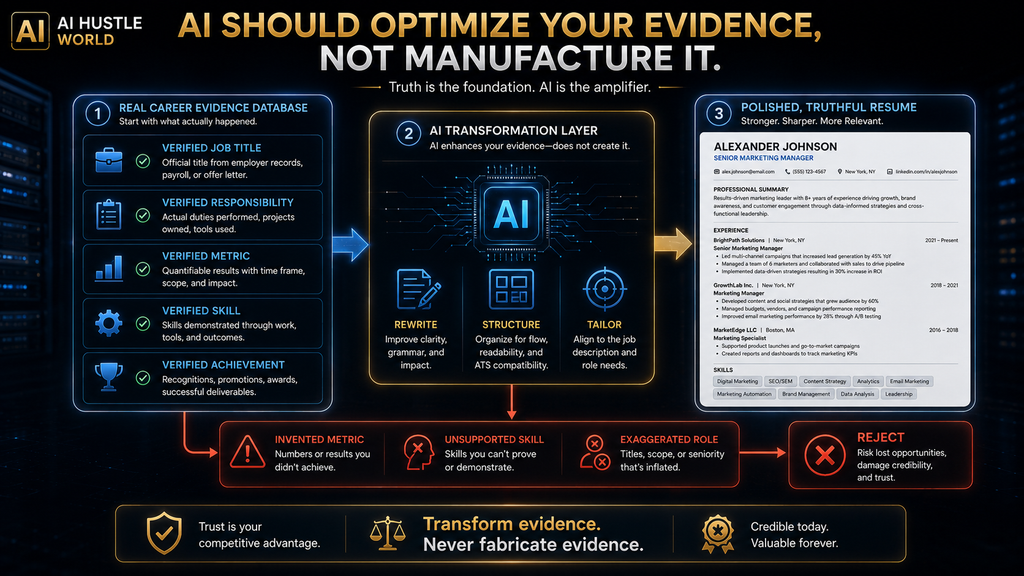
AI is very good at making weak language sound impressive. That is useful until the system crosses from rewriting into inventing, and the line between the two is easy to miss when the result sounds good. Language models generate plausible text, and plausible achievements are easy to produce. Our guide to AI hallucinations explains why this happens.
Consider a real line: “Managed a sales team and improved monthly target performance.” Acceptable AI help might produce “Managed a sales team, using weekly performance reviews and territory planning to improve target attainment,” if those methods are true. Dangerous AI invention would produce “Led a 25-person sales organization and increased annual revenue by 47%.”
If those numbers are not true, the second version is fabrication, however professional it sounds. You are responsible for every line on your resume, not the software. Invented metrics tend to unravel in interviews, reference checks or the first weeks of a new job, and the damage can follow you. Credibility is hard to rebuild once it is lost.
The risk is highest when you give the AI very little to work with. A prompt like “make my resume more impressive” invites invention, because the model has no facts to build on. The fix is to supply the evidence yourself and instruct the AI to keep every fact exactly as given. Our guide to asking AI better questions shows how to frame those requests.
The Evidence-Grounding Rule
Use one simple rule: AI may transform evidence, but it may not manufacture evidence. It can reorder, rephrase, shorten and emphasize what you give it. It cannot add numbers, titles, certifications, technologies or responsibilities that you did not provide and cannot prove. If a suggestion adds anything new, treat it as a question for you to answer, not a fact to accept.
Before you submit any AI-assisted resume, check every number, percentage, job title, certification, technology, responsibility, achievement and leadership claim against your own records. If you cannot prove a claim, take it out. If a number is an estimate, either remove it or describe it honestly as approximate.
This matters because a resume is a high-consequence document. A hallucinated detail in a blog post is embarrassing. A fabricated resume claim can cost you an offer, a reference or a job. Taking ten minutes to verify each version is cheap insurance against a problem that is very hard to fix later. Make verification part of every version you send.
How to Build an AI-Assisted Resume, Step by Step
Here is the workflow we recommend for anyone using these tools. It follows the readiness loop and works with any of the eight products, whether you use one tool or two. Each step builds on the last, so resist the temptation to jump straight to tailoring. The first two steps take an hour or two once and save time on every application after that.
Step 1: Create a Career Evidence Bank
Before you open any AI tool, collect your raw material: job titles, employers, dates, responsibilities, measurable results, major projects, technologies, certifications, awards, leadership examples and customer outcomes. Write them as plain notes, not polished sentences. This bank is the factual source that every resume version will draw from.
Step 2: Build One Truthful Master Resume
Create a comprehensive base resume from your evidence bank. It does not need to be the version you submit, and it can be longer than a final resume. Its job is to be your single source of truth, so every targeted version is derived from it rather than written from scratch. Update it whenever you finish a project or change roles.
Step 3: Analyze the Target Job
Paste the job description into your tool or assistant and identify the required skills, repeated terms, responsibilities, seniority signals and qualifications. Note which of those you can genuinely support with evidence. This step tells you what to emphasize, and it also tells you honestly whether the role fits.
Step 4: Tailor Without Inventing
Let AI suggest stronger wording, better ordering, more relevant evidence and a sharper summary for this job. Accept suggestions that are supported by your evidence bank and reject everything else. Keep a copy of each tailored version linked to the job it was sent to, which is where tools like Teal and Huntr help.
Step 5: Run a Match Check
For important applications, run the final draft through an optimizer such as Jobscan or a built-in score. Fix genuine gaps, such as a skill you have but forgot to mention, and ignore suggestions that would require claiming experience you lack. Stop editing once the resume is relevant and clear, not when the score is perfect.
Step 6: Review It as a Recruiter Would
Forget the score and read the resume as a person. Within a few seconds, can a reader tell what you do, what level you work at, what you achieved and why you fit this job? If not, keep editing. Reading it aloud or asking a friend in your field to skim it often reveals problems no tool flags. Fresh eyes catch what software misses.
Step 7: Check the File and Submit
Follow the employer’s file format instructions first. Different applicant tracking systems support different formats, and an image-based file can fail to parse. Name the file clearly, check that the text can be selected and copied, and keep contact details in the main body rather than a header. These small checks prevent avoidable parsing errors.
A Prompt for Tailoring Without Inventing
You can apply the evidence-grounding rule in any AI tool or general assistant with a clear prompt. The example below works in ChatGPT, Claude or Gemini as well as in built-in AI writers. Replace the bracketed parts with your own details and paste your real bullet points. Run it once per job rather than once for your whole resume.
Rewrite the resume bullet points below for a [JOB TITLE] role.
Use the job description to decide what to emphasize.
Rules:
- Keep every fact, number, title and date exactly as given.
- Do not add achievements, metrics, tools or skills that are not in my text.
- If a bullet is weak, suggest a question I could answer to strengthen it.
- Use concise, action-led language. Maximum 2 lines per bullet.
Job description: [PASTE]
My bullet points: [PASTE]
The key line is the instruction to keep facts exactly as given, combined with the request to ask questions instead of filling gaps. That turns the AI into an interviewer that helps you surface real achievements. Our guide to writing AI prompts for accurate answers explains why source boundaries like this work.
If you are new to prompting, our beginner’s guide to writing AI prompts covers the basics. The same skills that improve resume prompts also help with cover letters, follow-up emails and interview preparation, so the time you invest in learning them pays off across your whole job search. Clear prompts make every AI tool more useful.
One Tool or Two?
You do not need an eight-tool stack. For most applicants, one tool or a simple two-tool combination is enough. Add a second tool only when its specialist advantage outweighs the extra cost and the friction of moving documents between products. Here are the combinations that make the most sense. Each one pairs tools that do different jobs.
Builder plus optimizer (Rezi or Kickresume with Jobscan) suits people whose main concern is matching specific job descriptions, especially in competitive corporate hiring. Job platform plus optimizer (Teal with Jobscan) suits active applicants managing many roles who want a final check before important submissions.
Builder plus reviewer (Kickresume with Resume Worded) suits people who need both a document and stronger writing. A job-search platform alone (Teal or Huntr) suits people who value one organized workspace over specialist features, and its built-in tailoring is usually good enough. Pick the option that matches your biggest bottleneck.
Visual builder plus an ATS-safe version (Enhancv plus a simple plain document) suits creative applicants who need presentation for some roles and compatibility for others. Whatever combination you choose, keep your evidence bank and master resume outside any one tool, so switching later is easy. Your evidence should never be locked inside one product.
Free vs Paid: When to Upgrade
You do not need a paid plan just because one exists. Free tiers are usually enough when you are writing your first resume, applying to only a few jobs, comfortable tailoring by hand, happy with basic templates or still testing your job-search approach. Teal, Rezi, Kickresume, Huntr and Jobscan all have useful free options.
Paying becomes sensible when you apply frequently, tailor every application, need several resume versions, want unlimited match checks, track many applications or are changing careers and need more help with positioning. In those cases, the time saved can be worth far more than the subscription. Compare the cost with the hours you expect to save.
Watch billing terms closely. Some tools bill weekly or every four weeks, some offer cheap trials that auto-renew at a higher price and some offer lifetime deals. Check how cancellation works before you pay, set a reminder for renewal dates and cancel as soon as you accept an offer. A forgotten renewal can cost more than the plan itself.
Is an AI Resume Tool Worth the Money?
Do not judge value by the subscription price alone. Compare the time saved per application, multiplied by the number of applications, with the subscription cost plus your review time. A tool that saves time on applications you would send anyway is worth paying for; one that encourages you to send more low-quality applications is not.
Here is a simple illustration with estimated figures. If a tool saves you 20 minutes on each genuinely tailored application and you send 30 relevant applications, that is 600 minutes, or about 10 hours. Against a subscription of $29 to $50 for a month, that time saving is easy to justify if the applications stay high quality.
If you only apply to two jobs, the same subscription is hard to justify. You could tailor both by hand in less time than it takes to learn a new platform. The value of these tools rises with volume, which is why the right choice depends on how your search looks rather than on which tool is most popular. Let your application volume guide the decision.
Best Tool for Your Situation
If you are still unsure, match your situation to the starting point below. Each recommendation is the tool whose main strength addresses that situation most directly, and you can always add a second tool later if your needs change. Most people need only the first recommendation that fits. The table covers the most common situations.
| Your situation | Best starting point | Why |
|---|---|---|
| I do not know how to start | Kickresume | Guided structure and AI writing |
| My resume exists but feels weak | Resume Worded | Content critique and stronger bullets |
| I am worried about ATS compatibility | Rezi | ATS-oriented building and scoring |
| I tailor for every job | Teal or Rezi | Job-specific adaptation |
| I am applying to many jobs | Teal or Huntr | Resumes tied to application tracking |
| I want to check one resume against one job | Jobscan | Job-description comparison |
| My field values visual presentation | Enhancv | Design and customization |
| I just need one simple resume | Resume.io | Straightforward guided builder |
If you are a student or recent graduate, start with a free plan and spend your energy on the evidence bank, because good raw material matters more than the tool. Our list of free AI tools for students and our guide to AI tools for beginners include other tools that help with applications. Strong raw material makes any tool look better.
When Not to Use an AI Resume Builder
You may not need one at all. If your current resume consistently gets interviews, do not rebuild it because a new tool promises a better score. If you are applying to one highly specific role, tailoring by hand may be faster than learning a new platform, and it lets you focus entirely on that one employer.
If your career history is unusually complex, AI may flatten nuanced responsibilities that need careful human positioning. And if you are moving into a different industry, the hard problem is career strategy, deciding which experience to lead with and how to frame it, rather than document generation. Strategy should come before formatting.
Senior professionals often need narrative judgment more than automatic rewriting. In these cases, a strong human editor, a mentor in your target field or a career strategist may be worth more than another subscription. AI tools can still help with formatting and checks once the strategy is clear. Use AI to support the story, not to write it.
Design vs ATS Compatibility
There is no universal rule that simple is good and beautiful is bad, despite what some advice suggests. The right question is what this particular application environment requires and who will read the document first. For a design-led creative role, visual presentation can itself demonstrate relevant skill, and a plain document may undersell you.
For a conventional corporate role screened through an ATS, graphics, tables, columns, text boxes and unusual formatting create parsing risk, as Greenhouse’s documentation shows. In that setting, a clean single-column layout with standard headings is the safer choice, even if it looks less distinctive. Clarity usually beats decoration in these settings.
The practical answer is to keep two versions when your field calls for it: an ATS-first version for online applications and, where it helps, a visual version to share directly with people. Make sure the content is identical, so you never have to remember which version says what. Update both whenever your master resume changes.
Privacy: Your Resume Is Sensitive Data
A resume contains a lot of personal information: your full name, email, phone number, location, employment history, education, certifications, achievements and often a link to your LinkedIn profile. When you upload it to an AI tool, that information is stored on someone else’s servers. That makes the provider’s privacy practices important.
Before you upload, check what the service collects, how long it keeps documents, whether you can delete your data and whether your information is used for other purposes, such as training AI models, and whether you can opt out. Our guides to AI privacy risks and AI data retention explain what to look for.
Remove anything you do not need to share, such as your full street address, date of birth or ID numbers, which modern resumes rarely need. Never upload someone else’s resume without permission. A free tool is not truly free if the trade-off is more data exposure than you are comfortable with. Privacy is part of choosing the right tool.
Common AI Resume Mistakes
Chasing a Perfect Score
A score is a diagnostic signal, not an employment prediction. Pushing from 85% to 100% often means stuffing keywords that make the resume worse for human readers. Stop once the resume is relevant, accurate and clear. Your time is better spent on the next application or on preparing for interviews. Good enough is often the right target.
Adding Skills You Do Not Have
Adding a keyword because a tool says it is missing creates a misleading application. It may get you past a filter, but it will surface in the interview. Only add skills you can demonstrate with an example, and place that example close to the keyword. A recruiter should be able to find the proof in seconds.
Letting AI Invent Metrics
Never accept numbers you did not provide. If the AI adds a percentage or a team size, delete it or replace it with the real figure from your records. Invented metrics are among the most common and most damaging AI resume errors, because they are easy to check and hard to explain. Use only figures you can document.
Rewriting Everything
AI should strengthen your evidence, not erase your voice. If every bullet point is rewritten into the same polished pattern, the resume can sound generic. Keep phrases that are specific to you and edit only what needs improving. A resume should still sound like the person who will walk into the interview.
Sending One Resume Everywhere
A base resume is useful, but a single version sent to every job is usually weaker than a tailored one. Even small changes to the summary and the order of bullet points can make a resume far more relevant to a specific role. Tailoring the top third of the page usually matters most. A few minutes of tailoring per job is usually enough.
Overdesigning an ATS Resume
Visual flourishes can cause parsing problems in applicant tracking systems. Save complex designs for roles where design matters and for direct sharing with people, and use a clean layout for online applications. Test a plain version by copying its text into a simple editor and checking that nothing is scrambled.
Buying Too Many Tools
More subscriptions do not produce better applications. Each extra tool adds cost and friction, and duplicate features rarely help. Choose one tool per job you need done, and cancel anything you are not using. Review your subscriptions every month while you are searching, and cancel them all once you accept an offer.
Uploading Without Checking Privacy
Your resume holds personal and career data. Read the privacy terms before uploading, remove details you do not need to share and delete your documents from services you stop using. Five minutes of checking protects you for years. Employers handle candidate data carefully, and you should expect the same from your own tools.
What Happens When Everyone Has an AI Resume?
If AI makes resume writing easier for everyone, polished writing stops being a competitive advantage. Clean formatting, confident phrasing and good keyword coverage become the baseline. Recruiters will see many resumes that look equally professional, which makes them look harder for substance. Substance becomes the real differentiator.
The advantage shifts toward stronger evidence, clearer positioning, relevant experience, measurable outcomes and credible specialization. In other words, AI lowers the cost of producing a competent resume and raises the importance of having something meaningful to put on it. Projects, results and skills you can prove will carry more weight than ever.
Employers are adapting too, as our roundup of AI recruiting tools shows, using AI screening, structured interviews and skills assessments, as our comparison of AI recruiting and traditional recruiting explains. The candidates who stand out will be those who use AI to present real achievements clearly, not those with the fanciest builder.
How We Researched This Guide
This guide is based on vendor documentation and pricing pages, not hands-on testing. In October 2026 we reviewed the pricing and feature pages for Teal, Rezi, Kickresume, Enhancv, Huntr, Jobscan, Resume Worded and Resume.io, along with Greenhouse’s support documentation on resume parsing. We checked every price shown in this article during that review.
Prices and plan details are as listed on those pages at the time of checking and may differ by region or change without notice. The readiness loop, the evidence-grounding rule and the W.O.R.T.H. scores are AI Hustle World’s editorial frameworks and assessments. We have no affiliate relationship with any tool in this comparison.
Final Thoughts
The best AI resume builder is not the one that produces the most impressive-looking document. It is the one that helps you turn real experience into a truthful, relevant resume that software can read and people want to read, with less repetitive work. For most active job seekers, that means Teal, Rezi or Kickresume, with Jobscan as an optional final check.
Use AI to improve wording, surface relevant evidence, speed up tailoring and check your application before it goes out. Do not let it manufacture the achievements your application depends on. A resume is a record of your professional history, and every line should survive a follow-up question in an interview.
As AI makes resume creation easier for everyone, the edge will come from the strength and clarity of your evidence rather than the tool you used. Build your evidence bank first, choose the tool that removes your slowest step and let your real achievements do the work. For cover letters and follow-up emails, see our guide to the best AI email assistants.
Ready to Build a Better AI-Assisted Resume?
Once the resume is done, compare the AI writing tools that help with cover letters and other drafts.
Compare AI Writing Tools →Frequently Asked Questions
What is the best AI resume builder in 2026?
There is no single winner. Teal suits active job seekers, Rezi suits ATS-focused applicants, Kickresume suits beginners, Enhancv suits design-led roles and Jobscan is best for checking a resume against one job.
What is the best free AI resume builder?
Teal’s free forever plan is the most generous for tailoring and tracking. Kickresume, Rezi and Huntr also have useful free tiers, so the best choice depends on whether you need creation, ATS help or tracking.
Are AI resume builders worth paying for?
They are worth it when you apply often and tailor each application, because the time saved adds up. For one or two applications, a free plan or manual tailoring is usually enough.
Can an AI resume builder guarantee I pass the ATS?
No. Applicant tracking systems parse documents differently, and no tool can guarantee results. A clean layout, clear headings and relevant, truthful keywords give you the best chance.
Does a high ATS score guarantee an interview?
No. A match score measures how your resume compares with a posting on that tool’s criteria. Interviews depend on your experience, other applicants, recruiter judgment and many other factors.
Should I send my resume as a PDF or a Word file?
Follow the employer’s instructions first. If none are given, a text-based PDF or DOCX with a simple layout works for most systems. Never upload a scanned image of your resume.
Can AI write my entire resume?
It can draft most of it, but treat the result as a draft. Check every achievement, number, title, date and skill against your own records before you send it anywhere.
Is it okay to use AI-suggested keywords?
Yes, when they accurately describe your real experience. Do not add skills you do not have just because a tool says they are missing, because they will come up in interviews.
Should I use more than one AI resume tool?
Sometimes. A builder plus an optimizer, such as Rezi with Jobscan, can work well. Add a second tool only when it solves a real problem, because each one adds cost and friction.
Is it safe to upload my resume to AI tools?
It can be, if you check the privacy policy first. Remove details you do not need, such as your full address, and delete your data from services you stop using.
Related Guides
- Common Mistakes People Make When Using AI Website Builders
- Best AI Website Builders in 2026: 10 Tools Compared
- How AI Website Builders Work: A Beginner’s Guide
- AI in HR & Recruiting Explained: How AI Is Changing Talent Operations
- Best AI Email Assistants (Free & Paid): 10 Tools Compared
Written by
Muntasir Ahmad Chowdhury
Founder, AI Hustle World
Muntasir Ahmad Chowdhury is the Founder of AI Hustle World, an independent publication dedicated to making Artificial Intelligence practical, trustworthy, and easy to understand. He researches AI tools, automation, customer service, productivity, and real-world business applications, helping readers make smarter technology decisions through research-driven, experience-backed content.
Expertise:
AI Tools • AI Automation • AI Customer Service • AI Productivity • Generative AI • AI Workflows
Get Smarter With AI
Enjoyed this guide? Get practical AI tools, tutorials, and honest reviews delivered to your inbox.