Evidence: Documentation reviewed
Last checked: August 2026
What was done: Written from official documentation and the published sources linked in this article. Not hands-on tested.
Files: None
Affiliate links: No
Last updated: October 2026
Best AI Meeting Assistants (Free and Paid): 10 Tools Compared
The best AI meeting assistant for most teams is Fireflies, because it combines reliable transcription, useful summaries, searchable meeting history and broad integrations at a fair price. Fathom has the most generous free plan for individuals, Otter suits transcription-heavy work, and Granola and Krisp are the best choices if you want notes without a bot joining your calls.
For sales teams, Avoma and tl;dv add coaching and revenue insights on top of meeting notes. Read AI suits people who want analytics across meetings, email and chat, while MeetGeek automates follow-up work and Notta handles multilingual transcription well. Every tool here has a free plan or free trial, so you can test before paying anything.
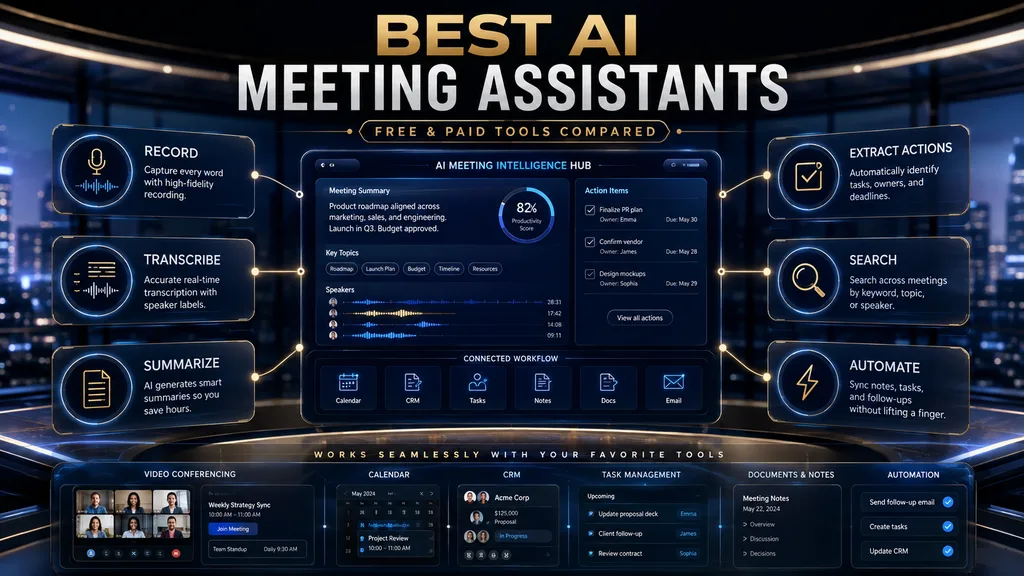
AI meeting assistants record or listen to your calls, turn speech into text, write summaries, list action items and make past meetings searchable. Used well, they save note-taking time, improve follow-through and give teams a shared memory of decisions. Used carelessly, they create privacy risks and spread inaccurate summaries.
This guide compares ten leading tools by the job each one does best, with prices checked on each vendor’s site in October 2026. You will also find a W.O.R.T.H. score for every tool, the built-in options in Zoom, Teams and Google Meet, the trade-off between bot-based and bot-free capture, and a 30-day plan for testing a tool properly.
The 10 Best AI Meeting Assistants at a Glance
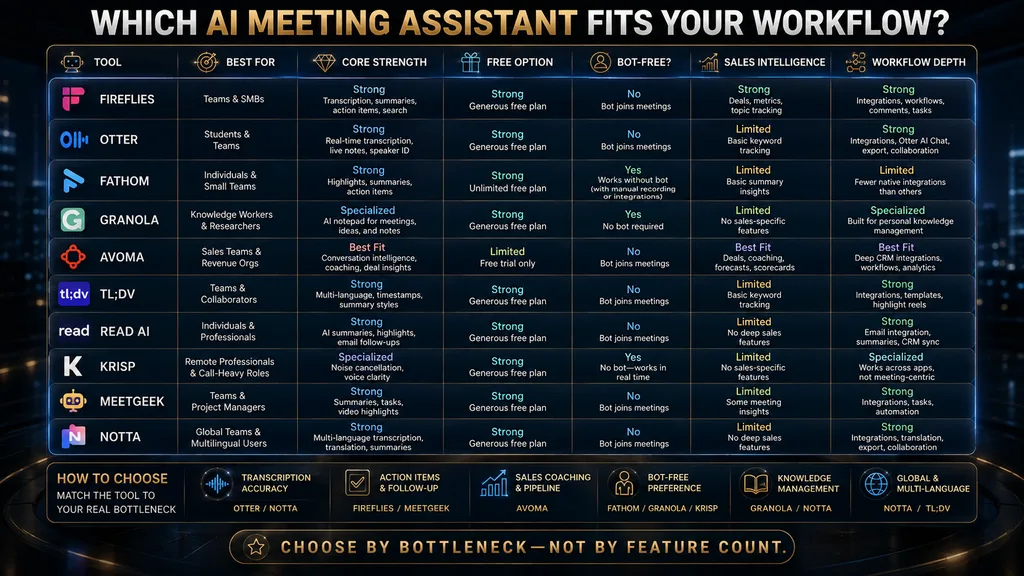
Here is the short version. Prices come from each vendor’s pricing page in October 2026 and change often, so check before you subscribe. “Paid from” shows the lowest per-user monthly price on annual billing unless noted. Monthly billing usually costs noticeably more for every tool listed. Annual plans also lock you in for a year, so test the tool on real meetings before you commit.
| Tool | Best for | Capture | Free option | Paid from |
|---|---|---|---|---|
| Fireflies | All-round team use | Bot joins call | Free forever plan | $10/seat/mo |
| Otter | Transcription-centered work | Bot or app | Basic free plan | $8.33/user/mo |
| Fathom | Generous free use | Bot joins call | Free forever plan | $15/user/mo (Team) |
| Granola | Bot-free personal notes | Device audio | Basic free plan | $14/user/mo |
| Avoma | Sales and revenue teams | Bot joins call | Trial | $19/recorder seat/mo |
| tl;dv | Sales and multi-meeting insights | Bot joins call | Free forever plan | $18/seat/mo |
| Read AI | Analytics across meetings and email | Bot or integration | Free plan | $15/user/mo |
| Krisp | Audio quality and bot-free notes | Device audio | Free trial | $8/user/mo |
| MeetGeek | Automated follow-up | Bot joins call | Basic free plan | $9.99/user/mo |
| Notta | Multilingual transcription | Bot or app | 120 minutes free | $8.17/mo |
Use the table to shortlist two or three tools that fit your situation, then read their sections. The cheapest tool is rarely the best value; what matters is how much manual work it removes from your meetings and how reliable its summaries are for the decisions your team makes. Two weeks of real use will tell you more than any feature list.
How We Chose and Compared These Tools
We selected widely used AI meeting assistants that cover the main needs: general team note-taking, transcription, free individual use, bot-free capture, sales intelligence, communication analytics, automated follow-up and multilingual meetings. For each, we reviewed the vendor’s pricing and feature pages in October 2026.
This is a documentation-based comparison, not a hands-on accuracy test. We did not record the same meetings in every tool or measure transcription error rates ourselves. Where a feature or price shapes our recommendation, we say so and link to the vendor’s pricing page so you can check the current details.
None of the links in this article are affiliate links, and no vendor paid for placement. If you mainly need written notes rather than meeting recordings, our comparison of AI note-taking apps covers a related category in more depth. Many people end up using one tool for meetings and another for personal notes.
What an AI Meeting Assistant Does
An AI meeting assistant captures meeting audio, converts speech to text, identifies speakers and uses a language model to produce summaries, action items, key decisions and follow-up drafts. Most also store transcripts so you can search past meetings or ask questions such as “what did we agree about the launch date?”
Many connect to calendars, so they join scheduled meetings automatically, and to tools such as Slack, CRM systems, project boards and email, so notes and tasks flow where your team works. Some add analytics, such as talk time, topics discussed and coaching suggestions for sales calls. These connections are what turn notes into action.
The value comes from removing manual work. Instead of typing notes while trying to listen, people can focus on the conversation. Instead of writing follow-up emails from memory, they can edit a draft. Instead of asking colleagues what was decided, they can search the record and find the exact moment. Those small savings add up across a busy week.
The risks come from the same features. Recordings contain sensitive information, summaries can be wrong and automation can push errors into other systems. The best teams treat AI notes as a fast first draft of the record, checked by the people responsible for decisions and actions. That mindset keeps the benefits while limiting the risks.
The Meeting Intelligence Ladder
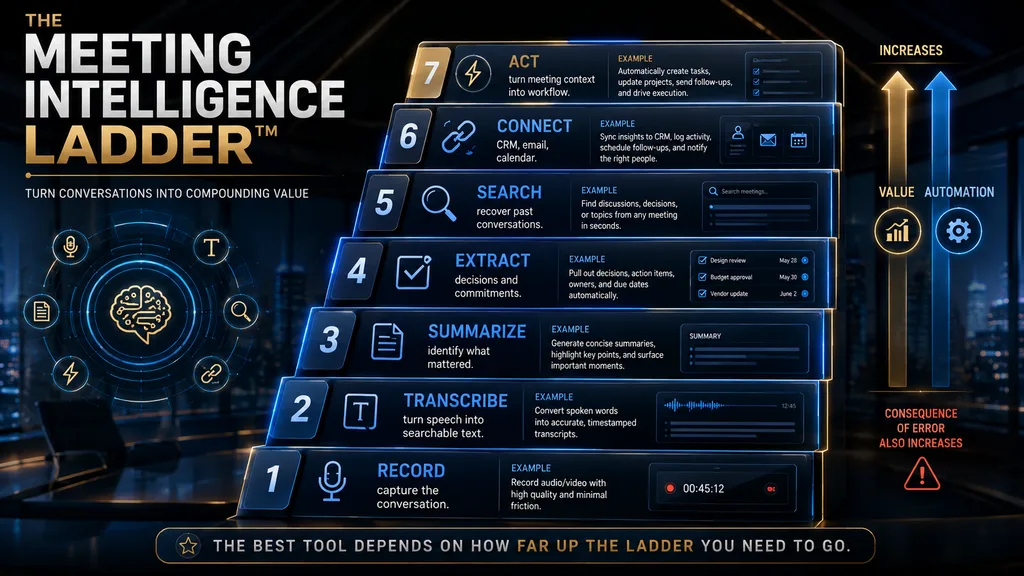
It helps to think of meeting AI as a ladder with six levels, an AI Hustle World editorial framework. Record captures audio or video. Transcribe turns speech into searchable text. Summarize condenses the conversation into key points. These first three levels are where most individual users get their value.
Extract pulls out action items, decisions, questions and owners. Connect sends that information to calendars, CRM systems, task boards and chat. Analyze looks across many meetings for patterns, such as recurring objections in sales calls, risks in projects or coaching opportunities for managers. These higher levels deliver the most value for teams with many similar meetings.
Choose a tool that reaches the highest level you need regularly, and no higher. An individual who wants searchable notes does not need revenue intelligence. A sales team that wants coaching across hundreds of calls will outgrow a simple transcription tool quickly. Matching the level to the need saves money and complexity.
What to Look For in an AI Meeting Assistant
Capture method is the first decision: does a bot join the call as a visible participant, or does the tool record device audio without joining? Bots work across platforms and for people who are not in the meeting, while bot-free capture is less intrusive but usually depends on your own device and operating system.
Transcription quality matters most when meetings include accents, jargon, crosstalk or poor audio. Summary quality decides whether notes are useful or generic. Action-item extraction shows whether the tool reliably identifies who promised what, by when. Test these on your own meetings, because vendor demos use ideal audio.
Search and history turn meetings into an organizational memory. Integrations decide whether notes reach the tools your team already uses. Privacy and administration cover consent, retention, access controls and compliance. Our guide to AI data retention explains what to check in vendor policies. Clear policies are essential for any tool that stores recordings.
Economics go beyond the monthly price. A $10 tool that saves little time is more expensive than a $20 tool that removes an entire manual workflow. Look at what the vendor meters, such as minutes, storage, AI credits or seats, and estimate the full cost for your team’s meeting volume. A short calculation before buying avoids surprises.
1. Fireflies: Best All-Round AI Meeting Assistant
Fireflies is the best all-round choice for most teams. It records and transcribes meetings across major video platforms, writes summaries and action items, makes every meeting searchable and connects to a wide range of tools, including CRMs, project boards and chat apps. Its AI assistant can answer questions across your meeting history.
Fireflies’ pricing page lists a free forever plan with unlimited transcription and limited storage and features. Pro costs $10 per seat per month billed annually, or $18 monthly, with unlimited transcripts, summaries and integrations. Business and Enterprise tiers add video recording, more AI capacity, admin controls and security features.
Fireflies stands out for breadth. It handles transcription, summaries, search, integrations and team collaboration well, which makes it a safe default when you are not sure exactly how your team will use meeting AI. Its search across meetings turns scattered calls into a useful knowledge base over time. That knowledge base becomes more valuable every month.
The limitation is that breadth can mean complexity, and some advanced AI features use credits on certain plans. Teams with specific needs, such as sales coaching or bot-free capture, may find specialist tools better suited. Check how AI credits work on your plan before relying heavily on advanced features. Verdict: choose Fireflies if you want a reliable, broadly capable meeting assistant for a team, with strong search and integrations at a reasonable price.
2. Otter: Best for Transcription-Centered Work
Otter is one of the best-known transcription tools, and it remains strong for people whose main need is an accurate, searchable record of what was said. It offers live transcription, AI summaries, an AI chat across meetings, and apps for recording in-person conversations as well as online calls. It also highlights key moments as the conversation happens.
Otter’s pricing page lists a free Basic plan, Pro at $8.33 per user per month and Business at $19.99 per user per month, with Enterprise available on request. Business adds unlimited meetings and integrations such as Salesforce, HubSpot and Zapier, subject to user limits. Discounted plans are available for students and teachers.
Otter stands out for live transcription and flexibility. You can follow the transcript in real time, highlight key moments and record lectures, interviews and in-person meetings from your phone. That makes it popular with students, journalists and researchers as well as business teams. Its mobile app is especially handy for interviews and lectures.
The limitation is that its sales and coaching features are less specialized than tools built for revenue teams, and the free plan has monthly minute limits. For teams that mainly want polished action items and deep integrations, Fireflies or a sales-focused tool may fit better. Verdict: choose Otter when transcription is the core of your workflow, especially for lectures, interviews and in-person conversations as well as online meetings.
3. Fathom: Best Free Starting Point
Fathom has one of the most generous free plans in the category. Fathom’s pricing page says the free plan includes unlimited recordings, instant call summaries and integrations with AI tools, free forever. For an individual who wants good notes without paying, it is hard to beat. Many people start here and never need to upgrade.
Paid plans add more. Premium for individuals costs $16 per user per month, adding advanced AI features. Team costs $15 per user per month with a two-user minimum and adds collaboration features, while Business costs $25 per user per month with deeper team and CRM capabilities. Fathom also advertises a 90-day guarantee.
Fathom stands out for simplicity and speed. Summaries arrive quickly after calls, the interface is clean and the free plan covers most individual needs. It is a good way to learn what meeting AI can do for you before committing to a paid tool for your whole team. Its clean design also makes it easy for colleagues to adopt.
The limitation is that teams with complex integration, analytics or admin needs will need paid plans, and some competitors offer more advanced cross-meeting analysis. As your needs grow, compare Fathom’s team plans with Fireflies and tl;dv on the features you use most. Verdict: choose Fathom if you are an individual or small team looking for strong meeting notes at no cost, with room to upgrade later.
4. Granola: Best for Bot-Free Personal Notes
Granola takes a different approach. Instead of sending a bot into your call, it captures audio from your own device and combines it with any notes you type during the meeting. The result is an AI-enhanced version of your own notes, which many people find more natural and less intrusive than a visible recorder.
Granola’s pricing page lists a free Basic plan with AI meeting notes, limited meeting history, AI chat within and across meetings, shared folders, custom templates and multi-language support. Business costs $14 per user per month and Enterprise $35 per user per month, adding longer history, admin controls and integrations.
Granola stands out because nobody sees a bot join the call, which avoids awkward moments with clients and keeps meetings feeling normal. Its approach of enhancing your own notes also keeps you engaged in the conversation rather than relying entirely on an automatic summary. That balance of human and AI notes suits thoughtful conversations.
The limitation is that device-based capture depends on your computer and setup, and it does not record meetings you are not attending. You still need to tell participants they are being recorded where consent rules apply. For shared team recordings, bot-based tools may be more practical. Verdict: choose Granola if you want discreet, high-quality personal meeting notes without a bot, especially for client calls and one-on-ones.
5. Avoma: Best for Sales and Revenue Teams
Avoma combines meeting notes with sales-focused intelligence. Beyond recording, transcription and summaries, it offers AI email follow-ups, CRM note syncing, scheduling and optional add-ons for conversation intelligence and revenue intelligence, such as call scoring, coaching recommendations, deal risks and forecasting.
Avoma’s pricing page lists Startup at $19 per recorder seat per month billed annually, Organization at $29 and Enterprise at $39, with viewers and collaborators always free. Conversation Intelligence and Revenue Intelligence are add-ons at $29 per seat per month each, billed annually. Free viewer seats make it easy to share recordings with managers and colleagues.
Avoma stands out for connecting meetings to the sales process. Managers can coach reps using real calls, spot recurring objections and see which deals are at risk based on what was said. Our guide to conversation intelligence tools explains this category in more depth. Coaching from real calls is one of the clearest returns on meeting AI.
The limitation is cost and focus. The add-ons that make Avoma powerful for sales raise the price considerably, and non-sales teams will not use much of that functionality. If you only need meeting notes, a general tool such as Fireflies or Fathom is better value. Verdict: choose Avoma if meetings are central to your sales process and you want coaching and revenue insights alongside notes.
6. tl;dv: Best for Sales Teams and Multi-Meeting Insights
tl;dv records and transcribes meetings on major platforms and focuses on turning many meetings into useful insights. It offers AI notes, CRM integrations, meeting templates and the ability to ask questions across many meetings, which helps sales and customer teams spot patterns over time. Templates help keep notes consistent across a team.
tl;dv’s pricing page lists a free forever plan with no credit card required. Pro costs $18 per seat per month billed annually for individuals and small teams wanting fast, accurate AI reporting, and Business costs $29 per seat per month billed annually with no usage-based AI fees, aimed at teams automating meeting insights.
tl;dv stands out for its generous free tier and its focus on cross-meeting intelligence. Being able to ask “what were the most common objections this month?” across many calls turns recordings into a real source of customer insight rather than a pile of individual summaries. That shift from notes to insight is where sales teams find the most value.
The limitation is that the most useful sales features sit on paid plans, and teams that do not run many similar meetings will not benefit as much from cross-meeting analysis. Compare it with Avoma if coaching and forecasting matter, or with Fireflies for general team use. Verdict: choose tl;dv if you want strong free meeting notes now and cross-meeting sales insights as your team grows.
7. Read AI: Best for Communication Analytics
Read AI goes beyond meetings into broader communication intelligence. It produces meeting summaries and reports, and it can connect to email and messaging to help you search and understand work across channels. It also offers meeting coaching, such as feedback on talk time and engagement. Coaching metrics can help both new and experienced managers.
Read AI’s pricing page lists a free plan with basic features, integrations and support for more than 20 languages. Pro costs $15 per user per month billed annually, with higher plans at $22.50 and $29.75 per user per month billed annually adding more features, controls and support. Paid plans include unlimited meeting reports and storage.
Read AI stands out for its cross-channel view. If your work is spread across meetings, emails and chats, a tool that can search and summarize all of them saves time. Its coaching metrics can also help people improve how they run and participate in meetings. It suits people who live across many communication tools.
The limitation is that connecting more channels means sharing more data, which raises privacy questions for some organizations. Review its permissions and data policies carefully, and limit connections to what you need. Teams that only want meeting notes may prefer a simpler tool. Verdict: choose Read AI if you want insights across meetings, email and chat, and your organization is comfortable with the data access that requires.
8. Krisp: Best for Audio Quality and Bot-Free Notes
Krisp started as a noise-cancellation tool and has grown into a full AI meeting assistant. It removes background noise and echo, offers accent conversion features, and adds bot-free note-taking, transcription, recording, summaries and action items. It works with most calling apps because it runs on your device.
Krisp’s pricing page lists a free trial to explore premium features, Core at $8 per user per month and Advanced at $15 per user per month, with annual billing offering up to 50% savings. Core includes unlimited AI note-taking, and Advanced adds features such as unlimited accent conversion and more controls.
Krisp stands out for combining clear audio with discreet notes. Better audio improves transcription quality, which improves summaries, so its noise cancellation has real downstream value. Bot-free capture also avoids the visible recorder that some clients dislike. It is a practical choice for people who work from busy homes or shared offices.
The limitation is that it depends on your device, like other bot-free tools, and its collaboration and analytics features are lighter than team-focused platforms. It is best for individuals and small teams who care about audio quality and discretion more than deep team analytics. Verdict: choose Krisp if you want clearer calls and bot-free AI notes in one affordable tool, especially for remote work in noisy environments.
9. MeetGeek: Best for Automated Follow-Up
MeetGeek focuses on automating the work that happens after meetings. It records and transcribes calls, writes summaries, extracts action items and can send follow-ups and push notes to other tools automatically. It also supports search across meetings, folders, tags and API access, including connections to AI assistants.
MeetGeek’s pricing page lists a free Basic plan, Pro at $9.99 per user per month and Business at $17 per user per month with a free trial, plus custom Enterprise pricing. Pro includes a set number of recording hours with extra hours available at $0.50 each, while Business gives teams a shared meeting memory.
MeetGeek stands out for follow-up automation. If your team often loses track of what happens after meetings, automatically sharing summaries and tasks can improve follow-through. Its pricing is also competitive for teams that want automation without paying for enterprise-level tools. Its API connections also make it easy to feed meeting notes into other AI tools.
The limitation is that automation spreads errors as easily as correct information. Start with summaries that people review before they are sent, and add automatic actions only once you trust the output. Watch the hour limits on Pro if your team meets often. Verdict: choose MeetGeek if you want meeting notes that automatically turn into follow-ups and tasks, at a moderate price.
10. Notta: Best for Multilingual Transcription
Notta specializes in transcription across languages and platforms. It records online meetings, transcribes audio and video files, translates transcripts and offers apps for web and mobile. That makes it useful for international teams, researchers and anyone who works with recordings in more than one language.
Notta’s pricing page lists a free plan with 120 transcription minutes for one seat. Pro costs $8.17 a month billed annually ($97.99 a year) with 1,800 transcription minutes a month, and Business costs $16.67 per seat per month billed annually with more minutes and team features. Annual billing gives a 40% discount.
Notta stands out for language coverage and file transcription. If you regularly transcribe interviews, webinars or recordings in different languages, its combination of transcription and translation saves a lot of manual work. Our guide to turning video transcripts into content shows one way to use those transcripts.
The limitation is that minute limits matter on lower plans, and its meeting analytics are lighter than team-focused tools. Estimate your monthly minutes before choosing a plan, and compare with Otter if transcription in one language is your main need. Verdict: choose Notta if multilingual transcription and translation are central to your work, or if you transcribe many recorded files.
W.O.R.T.H. Scores for All 10 Tools
We rate tools with the AI Hustle World W.O.R.T.H. Score: Workflow fit (25), Output quality (25), Risk and rights (15), Total cost (20) and Human effort (15). These scores are editorial assessments based on documentation and published pricing, not accuracy tests, and assume a typical small or mid-sized team.
| Tool | Workflow /25 | Output /25 | Risk /15 | Cost /20 | Effort /15 | Total /100 |
|---|---|---|---|---|---|---|
| Fireflies | 23 | 20 | 10 | 17 | 12 | 82 |
| Fathom | 19 | 19 | 10 | 19 | 13 | 80 |
| Otter | 20 | 19 | 10 | 17 | 12 | 78 |
| tl;dv | 20 | 19 | 10 | 16 | 12 | 77 |
| Granola | 17 | 19 | 12 | 16 | 12 | 76 |
| Krisp | 17 | 18 | 12 | 17 | 12 | 76 |
| Avoma | 21 | 20 | 10 | 13 | 11 | 75 |
| MeetGeek | 19 | 18 | 10 | 16 | 12 | 75 |
| Read AI | 19 | 18 | 9 | 16 | 12 | 74 |
| Notta | 17 | 18 | 10 | 17 | 11 | 73 |
Fireflies leads on workflow breadth, Fathom on free value, and Granola and Krisp on risk because bot-free capture is less intrusive. Read AI’s lower risk score reflects the extra data access its cross-channel features require, not a known security problem. Avoma’s cost score reflects its add-on pricing for sales features.
Weight the columns by your needs. A sales team should weight workflow and output heavily, which favors Avoma and tl;dv. A privacy-conscious professional should weight risk, which favors Granola and Krisp. A student or freelancer should weight cost, which favors Fathom, Otter’s free plan and Notta. The best tool is the one that scores well on your priorities.
Do Not Ignore the AI Already in Your Meeting Platform
Before buying a standalone tool, check what your video platform already offers. Google Meet includes Gemini features in eligible Google Workspace plans, such as taking notes for you. Zoom offers AI Companion features such as meeting summaries in eligible paid accounts. Microsoft Teams offers Copilot features in eligible Microsoft 365 plans.
Native features have clear advantages: no extra bot, no extra vendor, data stays within a platform your organization already approved and nothing new to install. For teams that use one platform for almost all meetings, the built-in option may be enough, or at least a good baseline to compare against. Test the built-in option before adding a new vendor.
Standalone tools still win in several cases: when you use several meeting platforms, need cross-meeting search and analytics, want deeper integrations with CRMs and task tools, or need features such as sales coaching. Check your existing licenses first, then decide whether a standalone tool adds enough value to justify the cost.
Bot-Based vs Bot-Free Capture
Bot-based tools join the meeting as a participant, usually through your calendar. They work across platforms, can record meetings even when you cannot attend and give everyone a visible signal that recording is happening. The downside is that some participants find bots distracting or intrusive, and some meetings block them.
Bot-free tools, such as Granola and Krisp, capture audio from your own device. They feel more natural, work with any calling app and avoid awkward bot moments with clients. The downside is that they depend on your device, only work for meetings you attend and do not automatically signal recording to others.
Neither approach removes the need for consent. Recording laws vary by location, and many require telling participants that a call is recorded. Whatever tool you choose, announce recording clearly, respect objections and follow your organization’s policies, especially for client and HR conversations. Clear communication protects trust with colleagues and clients.
Privacy Is a Buying Criterion
Meeting recordings can contain confidential strategy, personal details, health or HR information and client data. Before choosing a tool, check where recordings are stored, how long they are kept, who can access them, whether data is used to train AI models and whether the vendor meets your security and compliance requirements.
Look for admin controls such as retention policies, access permissions, single sign-on and the ability to exclude certain meetings from recording. For regulated industries, check specific certifications and agreements. Our guide to AI privacy risks explains what to look for in general terms. Business plans usually offer far stronger controls than free ones.
Set clear rules for your team: which meetings may be recorded, which may not, how long recordings are kept and who reviews AI notes before they are shared. Simple rules applied consistently prevent most problems and make it easier to keep the trust of colleagues and clients. Write the rules down and share them with everyone who records meetings.
The Accuracy Problem and the Reliability Chain
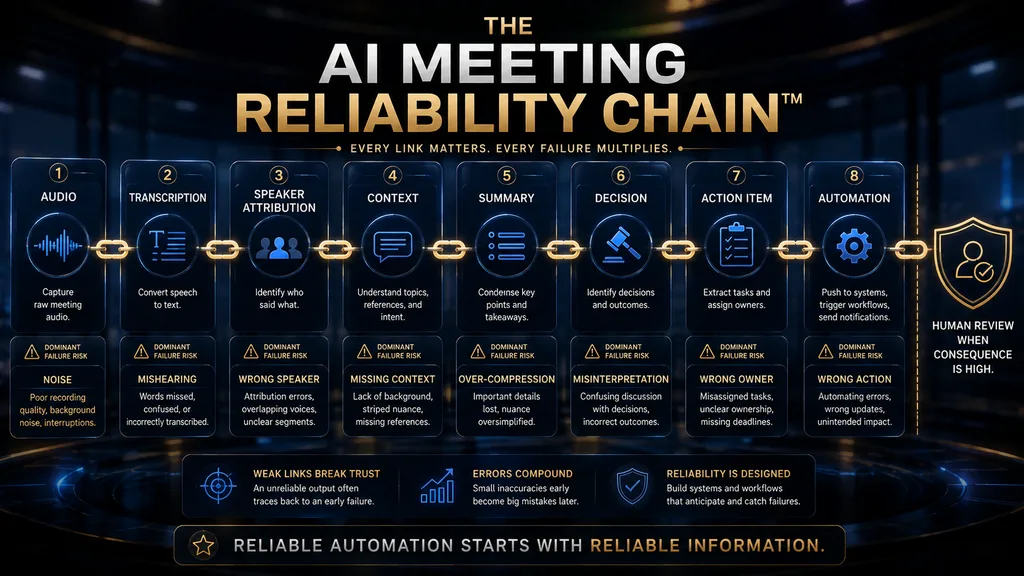
AI meeting notes depend on a chain of steps, each of which can introduce errors. Audio quality affects transcription. Transcription errors affect speaker labels and summaries. Summary compression can drop conditions and nuance. Action-item extraction can assign tasks to the wrong person or invent commitments that were only suggestions.
Common failure points include poor audio, crosstalk, speakers being confused with each other, ambiguous commitments such as “we should look into that,” missing context from earlier meetings and sensitive discussions that should not be summarized at all. Each failure is more likely in fast, informal conversations.
The language model behind summaries can also state things that were not said, a risk explained in our guide to AI hallucinations. Treat summaries as drafts, and check important decisions and commitments against the transcript or recording. Quick checks keep small errors from becoming big misunderstandings.
The Human Approval Rule
A simple rule prevents most problems: the person responsible for a meeting reviews AI notes before they become the official record or trigger actions. That review takes a few minutes and catches wrong action items, missing caveats and sensitive details that should not be shared widely. The habit takes minutes and protects the whole team.
Apply the rule most strictly for high-consequence meetings, such as client negotiations, HR conversations, board meetings and legal discussions. For routine internal stand-ups, a lighter check may be enough. Matching the level of review to the stakes keeps the time cost reasonable while protecting what matters.
Be especially careful with automation. If a tool pushes action items into a project board or updates a CRM automatically, a single error can spread quickly. Start with drafts that people approve, and enable automatic actions only after the tool has proven reliable for that type of meeting. Gradual automation builds trust and limits damage when mistakes happen.
How to Measure Whether a Tool Is Worth It
Track a few practical measures. Note-taking time saved per meeting. Follow-up completion, meaning how many agreed actions are done on time. Search time, or how quickly people find past decisions. CRM update time for sales teams. And meeting-to-action latency, the time from meeting end to tasks being assigned.
Also measure quality and adoption. Correction rate tracks how often people need to fix summaries or action items, which shows reliability. Adoption tracks whether people use the notes, search and follow-ups. A tool nobody uses has no value, however good its features look in a demo. Watch adoption closely in the first month.
A simple return-on-investment estimate multiplies time saved per meeting by meetings per month and an hourly cost, then subtracts the subscription and review time. Our guide to a daily AI workflow shows how meeting notes fit into a broader personal system. Our list of AI productivity tools for beginners covers related tools.
Free vs Paid: Where to Start
Start free. Fathom, Fireflies, Otter, tl;dv, Granola, Read AI, MeetGeek and Notta all have free plans, and Krisp offers a free trial. Use a free plan on your real meetings for two or three weeks to learn what you value most, whether that is summaries, search, integrations or bot-free capture. Real meetings are the best test.
Upgrade when you hit limits that matter: storage, minutes, integrations, team features or admin controls. Choose the paid plan of the tool you found most useful, rather than buying the most feature-rich option up front. Annual billing usually saves 30 to 50% but locks you in, so be confident before committing.
For teams, pilot with a small group first. Compare two tools on the same type of meeting, measure time saved and correction rates and ask users which they prefer. That evidence makes the team-wide decision easier and reduces the risk of paying for a tool people do not adopt. A short pilot is the cheapest way to avoid an expensive mistake.
Best AI Meeting Assistant by Use Case
| If you need | First choice | Strong alternative |
|---|---|---|
| Best free individual tool | Fathom | Otter |
| General team assistant | Fireflies | Otter |
| Bot-free notes | Granola | Krisp |
| Sales intelligence | Avoma | tl;dv |
| Cross-meeting insights | tl;dv | Fireflies |
| Communication analytics | Read AI | Fireflies |
| Automated follow-up | MeetGeek | Fireflies |
| Multilingual transcription | Notta | Otter |
| Best audio quality | Krisp | Granola |
| One-platform teams | Native Meet, Zoom or Teams AI | Fireflies |
If two options seem close, choose the one your team will use. The best AI meeting assistant is the one that fits naturally into how your team already works, not the one with the longest feature list. Adoption decides value. A tool people enjoy using will deliver more than a powerful tool they ignore.
What If You Already Have ChatGPT?
You can paste a transcript into ChatGPT, Claude or Gemini and ask for a summary and action items. That works well for occasional meetings, and these assistants are often better at nuanced summaries than built-in meeting tools. Our guide to AI email assistants covers turning summaries into follow-ups. It is a good option for people with only a few meetings a week.
What general assistants lack is the meeting workflow: automatic capture, speaker identification, a searchable meeting library, calendar integration and team sharing. If you have many meetings, a dedicated tool saves the repetitive work of recording, exporting and pasting transcripts. Automation is the main reason to pay for a dedicated tool.
A practical approach combines both: use a meeting assistant to capture and organize, and a general assistant for deeper analysis, such as comparing themes across several transcripts. Remove sensitive details before pasting transcripts into any general AI tool. That combination gives you capture and depth.
Common Mistakes When Choosing an AI Meeting Assistant
Choosing Based on Transcription Alone
Accurate transcripts are necessary but not sufficient. The value comes from summaries, action items, search and integrations. Test the full workflow on your own meetings, not just the transcript quality on a demo recording. Real meetings reveal real strengths and weaknesses. Test the full workflow before you decide.
Ignoring Your Existing Ecosystem
If your team already pays for Microsoft 365, Google Workspace or Zoom with AI features, start there. A standalone tool must add enough value to justify a second vendor, another bot and another place where data is stored. Built-in options are often good enough for single-platform teams, so compare them honestly before buying.
Looking Only at Monthly Price
Check what the vendor meters: minutes, storage, AI credits, seats or recorder seats. A cheap plan with tight limits can cost more than a pricier plan once your meeting volume grows. Estimate your real usage first. Limits matter more as teams grow. A quick estimate of monthly meeting hours prevents surprise upgrades later in the year.
Automating High-Consequence Actions Too Early
Automatically sending summaries to clients or updating CRMs from unreviewed notes spreads errors. Start with human review and add automation gradually, only for meeting types where the tool has proven reliable. Trust should be earned meeting type by meeting type. Patience prevents embarrassing mistakes.
Treating Every Meeting the Same
Not every meeting should be recorded. Sensitive HR, legal and personal conversations may need to stay off the record. Set clear rules for which meetings are recorded and how notes are shared. Some conversations are better left unrecorded. A short policy, shared with the whole team, makes these decisions quick and consistent.
A 30-Day Implementation Plan
Week 1: choose one meeting type and set a baseline. Pick a recurring meeting, such as weekly team calls or sales discovery calls. Record how long notes and follow-ups take today and how often actions are missed. This baseline lets you measure real improvement rather than relying on impressions. Write the numbers down so you can compare them later.
Week 2: test capture and summaries. Run the tool on that meeting type, compare summaries with what happened and note errors. Check speaker labels, action items and missing caveats. Involve the people who attend those meetings, because they know what matters. Their feedback is the best guide to quality.
Week 3: test action items and add one integration. Connect the tool to one destination, such as your task board or CRM, with human approval before anything is created. Measure whether follow-up completion improves and whether people find past decisions faster. For hiring teams, our guide to AI interviewing and scheduling covers related tools.
Week 4: review and decide. Compare results with your baseline, review correction rates and ask users for feedback. If the tool saves time and people trust it, expand to more meeting types. If not, try your second choice using the same plan. A structured trial makes the decision clear. Share the results with the team.
Meeting AI Is Becoming Organizational Memory
As teams record more meetings, those recordings become a searchable memory of decisions, reasons and commitments. New team members can catch up faster, managers can see how decisions evolved and customer insights can be found across hundreds of conversations instead of scattered notes. Customer feedback from calls can also feed product decisions, as our guide to AI customer feedback analysis explains.
That memory is valuable but needs care. It must be accurate, well organized, protected and pruned according to retention rules. Our guide to analyzing themes and sentiment across conversations shows how teams turn many recordings into insight. Good organization turns recordings into a lasting asset.
There is also a risk. If everything is recorded and summarized, people may skip meetings and rely on summaries that miss nuance, tone and context. Meeting AI should support good meetings, not replace attention to the conversations that matter most. Use AI to support attention rather than replace it, because well-run meetings still matter.
How We Researched This Guide
This guide is based on vendor documentation and pricing pages, not hands-on accuracy testing. In October 2026 we reviewed the pricing and feature pages for Fireflies, Otter, Fathom, Granola, Avoma, tl;dv, Read AI, Krisp, MeetGeek and Notta, and the general meeting AI features offered by Google, Zoom and Microsoft.
Prices and limits are as shown at the time of checking and may change or differ by region. The Meeting Intelligence Ladder, the Human Approval Rule, the 30-day plan and the W.O.R.T.H. scores are AI Hustle World’s editorial frameworks and assessments. We have no affiliate relationship with any tool in this comparison.
Final Thoughts
The best AI meeting assistant is the one that removes the most manual work from your meetings while staying accurate and trustworthy. For most teams, that is Fireflies. Fathom is the best free starting point, Otter suits transcription-heavy work, and Granola and Krisp are best for discreet, bot-free notes.
Sales teams should look at Avoma and tl;dv, Read AI suits cross-channel analytics, MeetGeek suits follow-up automation and Notta suits multilingual work. Before buying, check the AI already included in your Zoom, Teams or Google Meet plan, because it may be enough. Creators who record podcasts can also use these tools, as our AI podcast workflow shows.
Whatever you choose, treat AI notes as a fast first draft. Get consent, review important summaries, start automation slowly and measure whether follow-through improves. To build a broader system around your meetings, see our guide to planning your week with AI. Our roundup of AI workflow automation tools shows how to connect meeting notes to other apps.
Find the Right AI Meeting Assistant for Your Workflow
If you mostly need notes rather than full meeting management, compare the leading AI note-taking apps.
Compare AI Note-Taking Apps →Frequently Asked Questions
What is the best AI meeting assistant?
Fireflies is the best all-round choice for most teams. Fathom is best for free individual use, Granola for bot-free notes and Avoma for sales teams.
What is the best free AI meeting assistant?
Fathom’s free plan includes unlimited recordings and instant summaries. Fireflies, Otter, tl;dv and Granola also offer useful free plans with different limits.
Do AI meeting assistants need to join the call?
Bot-based tools such as Fireflies and Otter join as a participant. Bot-free tools such as Granola and Krisp capture audio from your own device instead.
Are AI meeting assistants accurate?
They are usually accurate on clear audio, but errors increase with accents, crosstalk and poor connections. Always check important decisions and action items against the transcript.
Is it legal to record meetings with AI?
It depends on where participants are located. Many places require consent. Always tell participants you are recording, and follow your organization’s policies.
Do I need a meeting assistant if I use Zoom, Teams or Meet?
Maybe not. Check the AI features in your existing plan first. Standalone tools add value for multi-platform teams, deeper search, integrations and sales analytics.
Which AI meeting assistant is best for sales?
Avoma offers conversation and revenue intelligence add-ons, and tl;dv offers strong cross-meeting insights. Both connect notes to CRM systems.
Can AI meeting assistants translate meetings?
Some can. Notta focuses on multilingual transcription and translation, and Read AI supports more than 20 languages on its free plan.
Are meeting recordings private?
It depends on the vendor and your settings. Check storage location, retention, access controls and AI training policies before recording sensitive meetings.
How much do AI meeting assistants cost?
Most offer free plans. Paid plans typically range from about $8 to $30 per user per month on annual billing, with sales and enterprise add-ons costing more.
Related Guides
- Best AI Conversation Intelligence Tools in 2026: Research, Customer Insights & Analysis
- Best AI PDF Tools (Free & Paid): Top 10 Tools Compared
- Daily AI Workflow for Managing Work Without Feeling Overwhelmed
Written by
Muntasir Ahmad Chowdhury
Founder, AI Hustle World
Muntasir Ahmad Chowdhury is the Founder of AI Hustle World, an independent publication dedicated to making Artificial Intelligence practical, trustworthy, and easy to understand. He researches AI tools, automation, customer service, productivity, and real-world business applications, helping readers make smarter technology decisions through research-driven, experience-backed content.
Expertise:
AI Tools • AI Automation • AI Customer Service • AI Productivity • Generative AI • AI Workflows
Get Smarter With AI
Enjoyed this guide? Get practical AI tools, tutorials, and honest reviews delivered to your inbox.