Evidence: Documentation reviewed
Last checked: September 2026
What was done: Written from official documentation and the published sources linked in this article. Not hands-on tested.
Files: None
Affiliate links: No
How to Use AI for Employee Onboarding, HR Helpdesks & Policy Questions
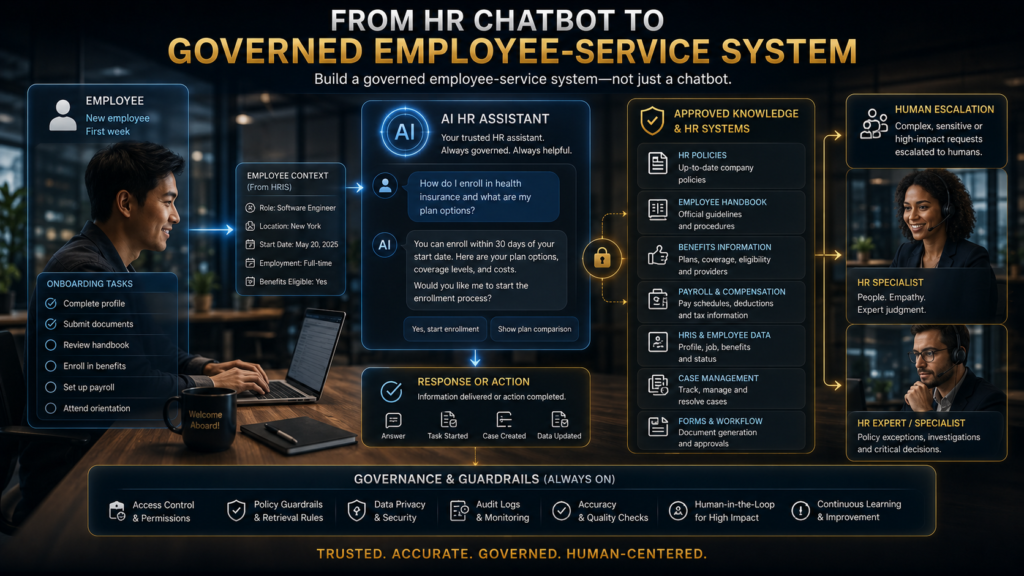
An AI HR helpdesk answers routine employee questions from your approved policies, walks people through standard HR processes, and hands anything sensitive to a qualified person. Most vendors sell it as a chatbot project, but the chatbot window is the smallest part of the system.
The hard work sits underneath it. The system has to know which policy is current, who is asking, what that person is allowed to see, and when a question has stopped being a lookup and become a judgment call.
The need is easy to see on any Tuesday after a Monday start. A new hire has a laptop, a welcome email, a stack of documents and three HR portals, and by lunch they want to know how expenses work, when benefits enrollment closes and who handles payroll questions.
Multiply that by every new hire and every open-enrollment season, and HR spends a large share of its week answering the same twenty questions. Gallup found that only 12% of employees strongly agree their organization does a great job onboarding new employees, so the traditional approach was never working particularly well either.
Employees are not waiting for HR to decide. The 2026 TalentLMS and BambooHR onboarding research found that 32% of employees used AI tools more often than they asked a manager, HR or colleagues to answer onboarding questions.
The same research found that 60% received no training on AI tools during onboarding and 42% felt overwhelmed by too much information at once. The practical choice is between new hires asking whatever public AI tool they happen to open, and new hires asking a governed assistant grounded in your own policies and escalation rules.
This guide covers how to build the second option. You will see the service stack behind a trustworthy HR answer, why outdated policy is a bigger risk than invented policy, and the AI Hustle World HR Escalation Ladder for deciding what AI should answer.
You will also find two KPIs that measure useful automation instead of raw volume, a cost model, a W.O.R.T.H. checklist for comparing platforms and a 90-day rollout plan.
What an AI HR Helpdesk and AI Onboarding Cover
An AI HR helpdesk is an employee-facing service that resolves routine HR questions, guides standard processes and routes cases that need a human. AI onboarding applies the same capability to a new hire’s first months.
The two overlap heavily because most onboarding friction is a stream of helpdesk questions from someone who does not yet know where anything lives. Typical categories include benefits, payroll, leave, employee data changes, HR systems, policy lookups and onboarding logistics.
Onboarding is often treated as a checklist of signed forms, delivered equipment and completed training. The employee’s experience is longer and messier, running from preboarding through the first 90 days and into the point where the person feels confident in the role.
Each stage creates a different kind of question, and each question calls for a different kind of AI help. That is why a single “HR bot” usually disappoints.
| Stage | What the new hire needs | Where AI helps | What stays human |
|---|---|---|---|
| Preboarding | Forms, equipment details, access instructions, first-day schedule | Reminders, document guidance, answers about logistics | Offer questions, contract terms, exceptions |
| Day one | Policies, systems, locations, key contacts | Finding the right policy or portal, explaining the day’s agenda | Welcome, team introductions, manager expectations |
| First week | Role-specific resources, required training, common processes | Surfacing relevant documents and training in the right order | Context about how the team works and who to trust |
| Days 30 to 90 | Learning plans, check-in preparation, process questions | Drafting check-in agendas, tracking tasks, answering policy questions | Feedback, performance conversations, career guidance |
The table shows the pattern this article keeps returning to. AI is strongest where the question has a documented answer and a wrong answer carries low stakes.
As questions become personal, contextual or consequential, the right role for AI shifts from answering to organizing and routing. Designing for that shift from the start is what separates a useful helpdesk from a risky one.
Why HR Built Ticket Queues in the First Place
The traditional HR service model, with its inbox, ticket queue and named specialists, exists for good reasons. It keeps sensitive conversations confidential, creates a record of what was asked and answered, and gives every case an accountable owner.
It also produces consistency, because the same specialist tends to answer the same kind of question the same way. Those properties are why employees trust HR with questions about pay, health and conflict at work.
The weakness of the model is speed and scale. A queue that works well for 50 employees becomes slow at 5,000, and specialists spend hours on questions that a well-written policy page already answers.
A good AI helpdesk should keep the strengths of the old model while removing the delay. Confidentiality, records, ownership and consistency need to be designed into the assistant, rather than lost in the rush to automate.
The HR Service Stack Behind a Trustworthy Answer
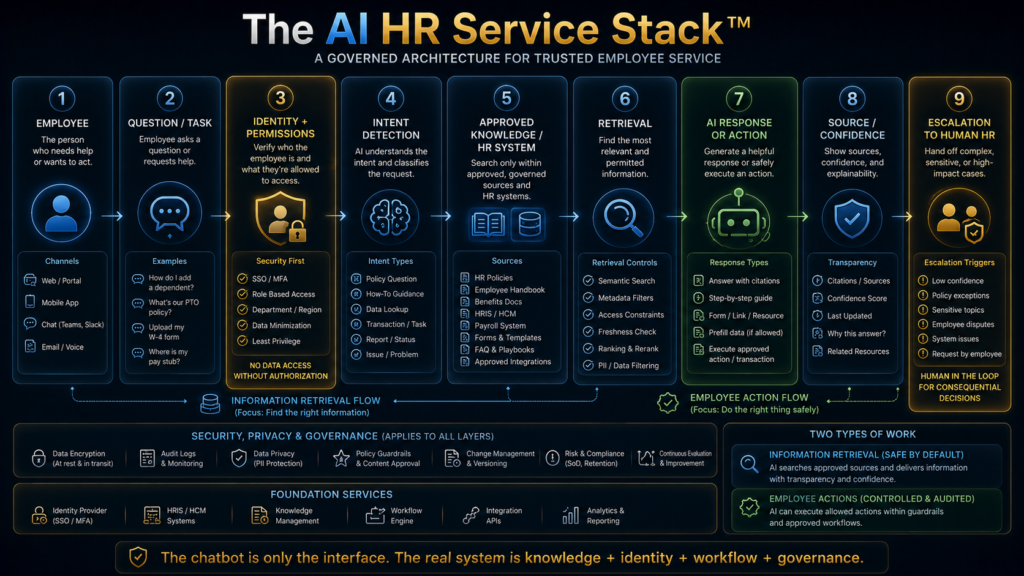
A reliable HR helpdesk is a stack of layers, and the conversational interface sits on top of all of them. When an employee types a question, the system first establishes identity and permissions, then detects intent, then retrieves information from approved knowledge or a connected HR system.
It then generates a response or takes an action, shows where the answer came from, and escalates when confidence or policy requires it. Remove any one layer and the experience degrades in a specific, predictable way.
Without identity, the assistant cannot answer “How much PTO do I have?” safely. Without approved knowledge, it answers from whatever documents were uploaded, including drafts and superseded versions, and without escalation, sensitive questions receive confident text instead of a person.
This is why AI Hustle World treats an HR helpdesk as a knowledge, identity, workflow and escalation problem first, and a chatbot problem last. If you are still deciding whether you need a conversational assistant or something that takes actions, our comparison of AI chatbots and AI agents explains the difference.
Enterprise vendors have been moving in this direction for some time. ServiceNow positions its HR Service Delivery product around an employee center, knowledge, case handling, lifecycle workflows and AI agents working together.
That is a service layer rather than a standalone bot. You do not need an enterprise platform to follow the same architecture, but you do need every layer, even if some of them start as simple spreadsheets and manual review.
How AI Answers Policy Questions From Your Own Documents
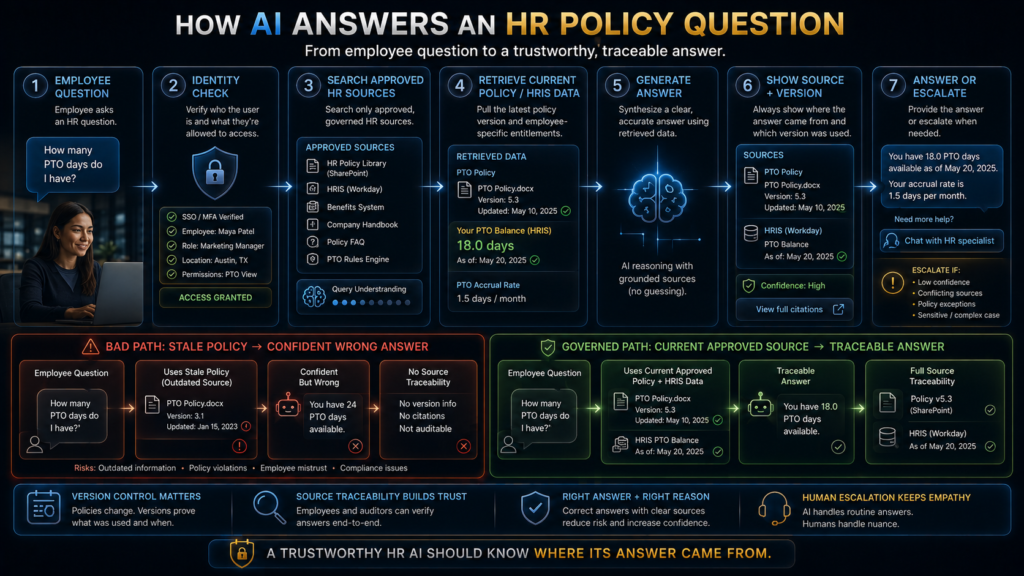
AI answers HR policy questions reliably when it retrieves the relevant passage from an approved source before it writes anything. The pattern is called retrieval-augmented generation, and it was formalized in the 2020 paper on retrieval-augmented generation for knowledge-intensive tasks.
The model searches your indexed handbook, policies and procedures, pulls the passages that match the question, and composes an answer constrained by that text. Our complete guide to retrieval-augmented generation covers the mechanics in detail.
The difference shows up clearly in the output. Ask a general chatbot how many vacation days you receive and it may offer a plausible industry average, which is useless and potentially misleading.
A governed assistant should instead reply along the lines of “Eligible full-time employees in the UK receive 25 days of annual leave under the Annual Leave Policy, version 3.2, updated March 2026,” with a link to the document. That answer gives the employee the information, the provenance and a way to verify it.
Retrieval quality depends on preparation that happens long before anyone asks a question. Policies need to be split into sensible sections and tagged with metadata such as region, employee group, owner and effective date, so that the right version is found first.
Our guide on how to chunk documents for RAG explains why a benefits policy split at the wrong boundary can separate an eligibility rule from the exception that modifies it. That kind of error produces answers that are confidently incomplete.
Grounding also has limits worth stating plainly. Retrieval answers informational questions such as “When does benefits enrollment close?” or “How do I request parental leave?” well.
It does not make the assistant competent to answer “Can my manager legally deny my leave?” or “I think I am being treated unfairly.” Those questions contain an employee-specific situation and possible legal exposure, so the correct response is a clear explanation of the relevant policy plus a route to the right person.
Stale Truth: The Failure Mode That Looks Trustworthy
Most discussions of AI risk focus on hallucination, where the model invents an answer. In HR, a quieter failure causes more damage: stale truth, where the assistant retrieves a real, outdated policy and presents it accurately.
Suppose the company revises its parental-leave policy in July. HR updates the handbook, payroll changes one system and the benefits portal changes another, but the knowledge index still contains last year’s version, so the assistant cites a genuine document and gives an answer that is well written, correctly sourced and wrong.
That answer is more dangerous than an obvious AI hallucination because every signal the employee would use to judge it looks trustworthy. The document is real, the citation is real and the tone is confident.
Retrieval reduces invented answers, as our guide on reducing hallucinations with RAG explains, but it cannot tell current text from superseded text unless your process tells it. Model accuracy and knowledge freshness are separate problems, and HR teams usually underinvest in the second.
AI Hustle World uses a simple control for this, the HR Knowledge Freshness Loop. A policy is created or updated, approved by its owner and published to a single authoritative location, and the knowledge index is refreshed from that location while superseded versions are retired.
The assistant then answers with the source name, version and last-updated date. Employees flag answers that look wrong, HR reviews those gaps on a fixed schedule, and the loop begins again, which turns a static bot into a governed knowledge system.
Conflicts deserve their own rule. If one document says employees receive 20 days of leave and another says 25, the assistant should not pick the figure that sounds more plausible; it should report the conflict, decline to guess and open a case for HR.
A source hierarchy makes this behavior predictable. It tells the assistant, and the people auditing it, which documents may be used for which kinds of answer.
| Source tier | Example | How the assistant should treat it |
|---|---|---|
| 1. Authoritative policy | Approved, current leave policy | Primary basis for answers; always cited |
| 2. Official process documentation | Approved steps for requesting leave | Used for “how do I” guidance |
| 3. HR knowledge articles | Explanatory FAQs written by HR | Supporting context; never overrides tier 1 |
| 4. Internal guidance | Manager reference notes | Only for authorized audiences |
| 5. General model knowledge | What the model learned in training | Never used silently for company policy |
Once you can point to a tier for every source, you can test the assistant against it. That is the basis for the evaluation methods in our guide to measuring RAG retrieval quality, which work as well for an HR knowledge base as for a customer-support one.
The HR AI Escalation Ladder
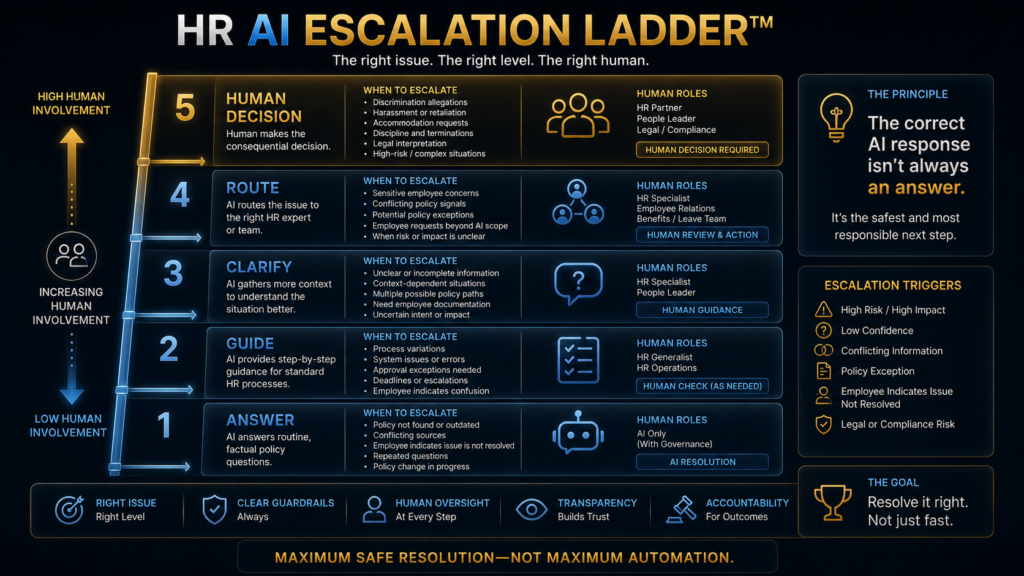
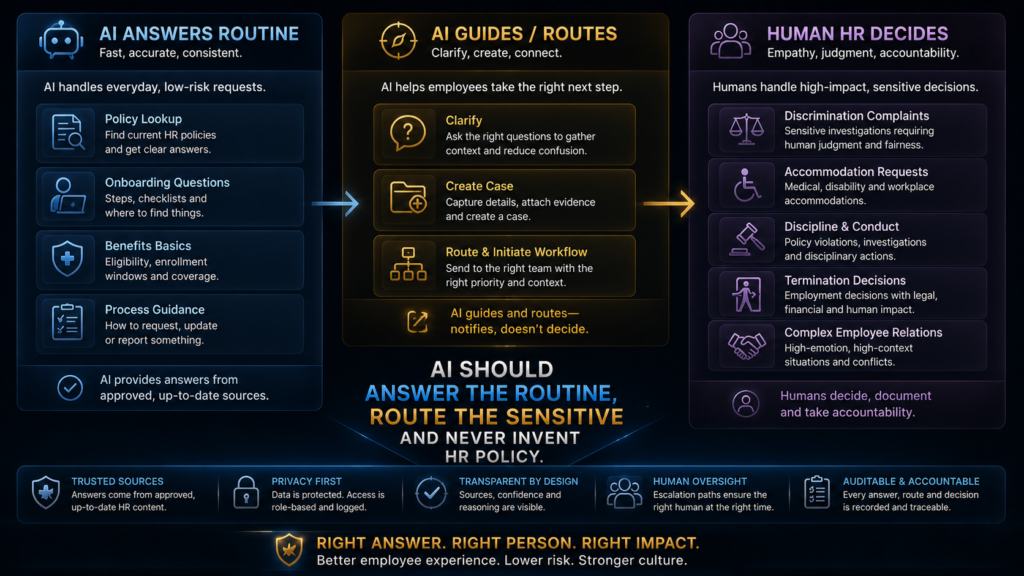
Not every HR question deserves an AI-generated answer, and the most useful design decision you can make is to define in advance which questions get which treatment. The AI Hustle World HR AI Escalation Ladder has five rungs, ordered by consequence.
Each rung describes what the assistant does and who owns the outcome. Agreeing on the ladder with HR, legal and employee representatives before launch prevents most of the arguments that come later.
| Rung | Example question | What the AI does | Who owns the outcome |
|---|---|---|---|
| 1. Answer | “Where is the expense policy?” | Retrieves and cites the approved source | AI, with HR owning the content |
| 2. Guide | “How do I request PTO?” | Walks through the standard process | AI, with HR owning the process |
| 3. Clarify | “What benefits am I eligible for?” | Asks for or checks location, status and tenure before answering | AI within permissions |
| 4. Route | “I have a problem with my manager.” | Captures the basics and opens a case with the right team | Human HR |
| 5. Human decision | Harassment, discrimination, accommodation, discipline, termination | Explains the process and connects the employee to a person | Qualified HR or legal professional |
The ladder changes what counts as success. An employee who asks “Can I take unpaid leave for this medical situation?” should receive a short explanation of the relevant policy and a direct route to the HR team that handles individual cases.
The answer depends on personal facts, possible accommodation duties and sensitive health information, so stopping at rung four is the assistant working as designed. Our guide to human-in-the-loop AI explains how to set similar review points for other automated decisions.
Uncertainty handling belongs on the ladder as well. Phrases such as “I could not verify this from the approved HR sources” and “The available policies appear to conflict, so I am routing this to HR” should be designed, tested before launch and counted as correct behavior.
In a function where answers affect pay, benefits, leave and legal exposure, honest uncertainty is safer than invented certainty. An assistant that says “I do not know, here is who does” earns more trust over time than one that always has an answer.
Identity and Permissions Come Before Intelligence
Once an HR assistant connects to live systems, authorization matters more than conversational ability. An employee who asks “What is my salary?” may legitimately see their own record, but the same employee asking what a coworker earns must be refused.
The same applies to a question about a disciplinary case involving their manager, however it is phrased. The model does not need to become less capable to handle this; it needs to be identity-aware, so retrieval only searches information the person asking may see.
A useful mental model is to treat the assistant as a bounded service identity: a system account with specific permissions, approved tools, limited data access, defined actions and explicit escalation rules. Its allowed scope might include policy documents, the employee’s own leave balance, benefits information and onboarding tasks.
Its escalation scope would include complaints, accommodation requests, discipline and termination. The alternative, connecting a chatbot to the entire HR database and hoping the prompt prevents misuse, fails the moment someone asks a cleverly worded question.
Several design principles follow from that model. Give the assistant least-privilege access, retrieve only the fields a task requires, log meaningful access and actions, and set retention limits so sensitive conversations are not stored indefinitely by default.
Vendor governance matters too, because HR conversations can contain health, family and compensation details. Our explainer on AI data retention covers the questions to ask about where prompts and files end up, and the goal is personalization that increases relevance without quietly increasing surveillance.
From Answers to Actions: Where Agentic HR Fits
The largest capability jump in HR AI is the move from answering questions to completing tasks. First the assistant explains the PTO policy, then it gives instructions for requesting leave, then it opens the request form, then it checks the balance and submits the request, and finally it coordinates approval.
Each step removes friction, and each step gives the system more power over real records. That trade-off should be made deliberately, one permission at a time.
Vendors are building for the later steps. AWS describes how HR teams can use Amazon Quick to create no-code onboarding agents that answer new-hire questions, track compliance across existing tools and clear tickets.
That is a vendor-described capability, so it shows the direction of the market rather than independent evidence of results. The underlying mechanics are covered in our guides to what an AI agent is and how AI agents use tools to complete real tasks.
More autonomy requires more governance. An agent that can inspect policy, read employee data, create a case, contact an approver and update a record needs explicit permissions, action limits, approval steps, complete logs, rollback where possible and a defined path for exceptions.
The OWASP project lists excessive agency among the top security risks for LLM applications for this reason: an assistant with more functions or permissions than its task requires can be manipulated into doing damage. Automate the boring actions first, and grant new permissions only after the earlier ones have proven reliable.
Personalizing Onboarding Without Burying New Hires
AI’s most useful onboarding contribution is filtering, because new hires rarely lack information and usually lack a sense of what matters first. The finding that 42% of employees felt overwhelmed by information during onboarding points to the same conclusion.
A software engineer in week one needs development-environment access, repository permissions, security training and technical documentation. A sales manager needs CRM access, territory details, the sales methodology and the forecasting process, and sending both the same 47-document welcome pack buries the few items each one needs.
An assistant with role, location and onboarding-stage context can answer “What do I need before my first customer meeting?” by prioritizing the product overview, the CRM process, the security policy and the customer-communication guidelines. The new hire gets four documents instead of forty.
Microsoft’s HR onboarding scenario for Microsoft 365 Copilot describes a similar pattern, using Copilot to draft onboarding plans and checklists and to identify people who can support the new hire. HR no longer has to build a separate path by hand for every role.
Onboarding is also a social process, and this is where automation needs restraint. A new employee is trying to work out who to trust, how decisions get made, where informal knowledge lives and what the culture feels like day to day.
An assistant can tell them where the handbook is. It cannot replace a manager saying “Let me introduce you to the person who will help you most in your first month,” so use AI to remove information friction and protect the time managers and buddies spend on relationships.
Multi-Country Policies and Multilingual Answers
Companies that employ people in several countries face a harder version of every problem above. Leave entitlements, notice periods, benefits and payroll rules differ by jurisdiction, so the same question can have five correct answers depending on who asks.
The assistant therefore needs the employee’s work location as a retrieval filter, not just as context. A German employee asking about parental leave should only ever receive the German policy, even if the US policy is written more clearly and ranks higher in search.
Language adds a second layer of risk. Many assistants can answer in the employee’s language while retrieving an English source, which is convenient but means the model is translating policy on the fly.
For routine questions that is usually acceptable, provided the answer links to the original document. For entitlements, deadlines and anything with legal weight, publish approved translations and let the assistant retrieve those directly, so the words an employee relies on are words HR has approved.
A New Hire’s First Week With a Governed Assistant
A short walkthrough shows how these pieces fit together in practice. Priya joins the finance team of a 1,200-person company on a Monday, and her onboarding assistant already knows her role, location, start date and manager from the HRIS.
Before day one, it reminds her to complete tax forms and explains, with a link to the IT policy, how to collect her laptop. On Monday morning she asks where to submit expenses, and the assistant answers from the current expense policy, shows the version date and links to the form.
On Wednesday she asks whether she can carry unused leave from her previous employer. The assistant finds no policy that covers the question, says so plainly, and opens a case with the HR benefits team, which replies the same afternoon.
On Friday she mentions that a colleague made an uncomfortable comment during a meeting. The assistant does not try to assess the situation; it explains the confidential reporting options, offers to connect her with an HR business partner and records nothing beyond what she chooses to share.
By the end of the week Priya has asked 23 questions, and 19 were answered instantly with a cited source. Three were routed to HR and one was escalated to a person, which is the Escalation Ladder working as designed, with every step leaving an auditable record.
Which HR Questions to Automate, Assist or Keep Human
The highest-return starting point is usually the least glamorous one. Questions such as “Where is the travel policy?”, “How do I reset my HR portal password?” and “Who do I contact about payroll?” are repetitive, predictable, high-volume and low-risk.
That makes them good automation candidates. Starting with employee relations because it sounds strategic gets the order backwards, and the matrix below is the AI Hustle World starting point for dividing work between the assistant and the HR team.
| Question or task | AI role | Human role |
|---|---|---|
| PTO policy | Answer from the approved source | Exceptions |
| Benefits basics | Explain and link to plan documents | Complex or disputed cases |
| Onboarding logistics | Guide step by step | Exceptions and special arrangements |
| Policy location | Retrieve and cite | None for routine requests |
| Payroll process | Explain the process | Investigate discrepancies |
| Equipment request | Initiate and route | Fulfill |
| Accommodation request | Route immediately with a clear explanation | HR specialist decides |
| Discrimination or harassment complaint | Capture basics and escalate | Human investigation |
| Termination question | Provide general process information | HR and legal decision |
| Compensation dispute | Gather information and route | Human resolution |
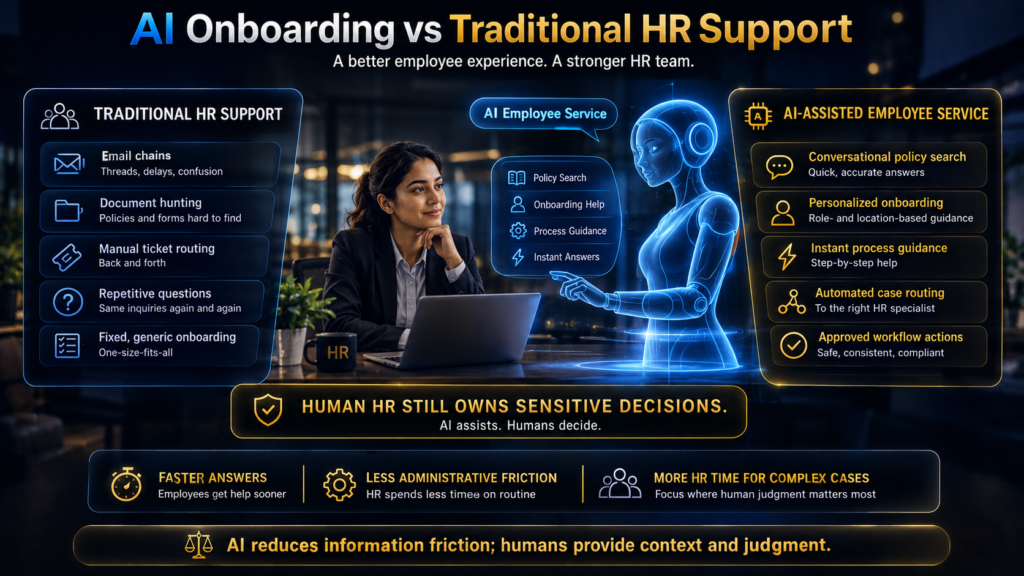
The best HR AI protects HR attention for the cases that need it most. When the assistant absorbs document hunting, routine explanations and ticket routing, HR professionals gain time for coaching, manager support and difficult cases.
That is a better use of experienced people than repeating the enrollment deadline for the fortieth time. It also answers the staffing question many teams ask quietly: the aim is to move HR effort toward judgment, not to remove HR.
Measuring Success: Safe Resolution Rate and Escalation Precision
Automation rate is the metric vendors quote most often and the one that tells you least. A claim that an assistant “handles 80% of employee questions” can hide a pattern where the AI replies, the employee does not understand, asks again and then opens a ticket anyway.
In that case the automation rate looks excellent while the employee experience and HR workload are both worse than before. You need measures that look at outcomes rather than replies.
AI Hustle World recommends two measures instead. Safe Resolution Rate is the number of routine questions correctly resolved divided by the routine questions the AI handled, confirmed through sampling and follow-up rather than assumed from the absence of a ticket.
Escalation Precision is the share of routed cases that genuinely needed a human, balanced against a check that sensitive cases were captured at all. An assistant that escalates everything is useless, and one that escalates nothing is dangerous.
A simple illustration shows why these measures matter. System A receives 100 questions, correctly resolves 85 routine ones and routes 15 complex cases to HR.
System B “answers” 98 of 100, but a later review finds 20 of those answers were incorrect or should have been escalated. System B looks more automated on a dashboard, while System A is far more useful to employees and far less risky for the company.
| Metric group | What to measure | Warning sign |
|---|---|---|
| Resolution | Safe Resolution Rate, repeat-question rate | Employees ask the same question twice within a week |
| Escalation | Escalation Precision, sensitive-case capture | Complaints or accommodation requests answered by the bot |
| Quality | Answer accuracy on a sampled set, share of answers with a current source | Answers citing retired or conflicting documents |
| Efficiency | HR ticket volume, time to answer, self-service rate | Tickets fall but reopened tickets rise |
| Experience | Onboarding confidence, satisfaction, time to productive work | New hires stop using the assistant after week two |
What an AI HR Helpdesk Costs and Where the Return Comes From
The cost of an AI HR helpdesk sits mostly outside the license. Budget for four items: the platform or model subscription, integration with your HRIS, identity provider and case system, the one-time knowledge cleanup, and the ongoing time of content owners who keep policies current.
The last item is the one most business cases leave out. A knowledge base that nobody maintains decays into stale truth within a year, so treat content ownership as a permanent operating cost.
The return comes from HR time and employee time. As an illustration, a 1,000-person company where each employee asks two routine HR questions a month generates 2,000 questions, and at eight minutes of HR effort each that is about 267 hours a month.
If the assistant safely resolves 60% of them, HR recovers roughly 160 hours a month, before counting the time employees save by getting answers in seconds. These are example figures to show the method, not benchmarks, so replace them with your own ticket data.
Subtract the maintenance effort from that gain before you declare victory. If content owners need 20 hours a month to keep sources current and review escalations, the net saving in this example is about 140 hours, which is still substantial for most HR teams.
The same arithmetic also shows where projects fail. If Safe Resolution Rate stays at 30% because the knowledge base is messy, the saving shrinks to a level that barely covers maintenance, which is why the knowledge cleanup deserves the first month of any rollout.
Choosing a Platform: Build, Buy or Start Smaller
The build-or-buy decision should follow your systems and your risk profile rather than the demo. Buying makes sense when your HR systems are already standardized, when you need case management and deep HRIS integration, and when engineering capacity is limited.
Building makes sense when policies and workflows are highly specialized, when you have strong engineering and security teams, and when existing systems are difficult to integrate through a vendor. Each path has different hidden costs, so compare them on your own data.
Starting smaller, often with a well-organized knowledge base and a retrieval assistant on a general RAG platform, makes sense for smaller companies, messy documentation or unclear policy ownership. Building an expensive AI system on top of a broken HR knowledge base only makes the confusion faster to reach.
When you do compare platforms, AI Hustle World uses its site-wide W.O.R.T.H. checklist, adapted here for HR helpdesks. Score each shortlisted platform against the same scripted test set of your own questions, including sensitive ones, so the comparison reflects your policies rather than the vendor’s sample data.
| W.O.R.T.H. criterion | Weight | What to test for an HR helpdesk |
|---|---|---|
| Workflow fit | 25 | Integration with your HRIS, identity provider, case system and knowledge base |
| Output quality | 25 | Accuracy on 50 real questions, source citation, version display, conflict handling |
| Risk and rights | 15 | Permission enforcement, audit logs, data retention controls, escalation of sensitive topics |
| Total cost | 20 | Licenses, implementation, knowledge cleanup, ongoing content ownership |
| Human effort | 15 | Hours HR needs each month to maintain content, review escalations and audit answers |
A platform that scores highly on output quality but poorly on risk and rights should not move forward, however impressive the demo. For HR, a permission failure or a mishandled complaint can outweigh months of efficiency gains.
The AI Onboarding Maturity Model
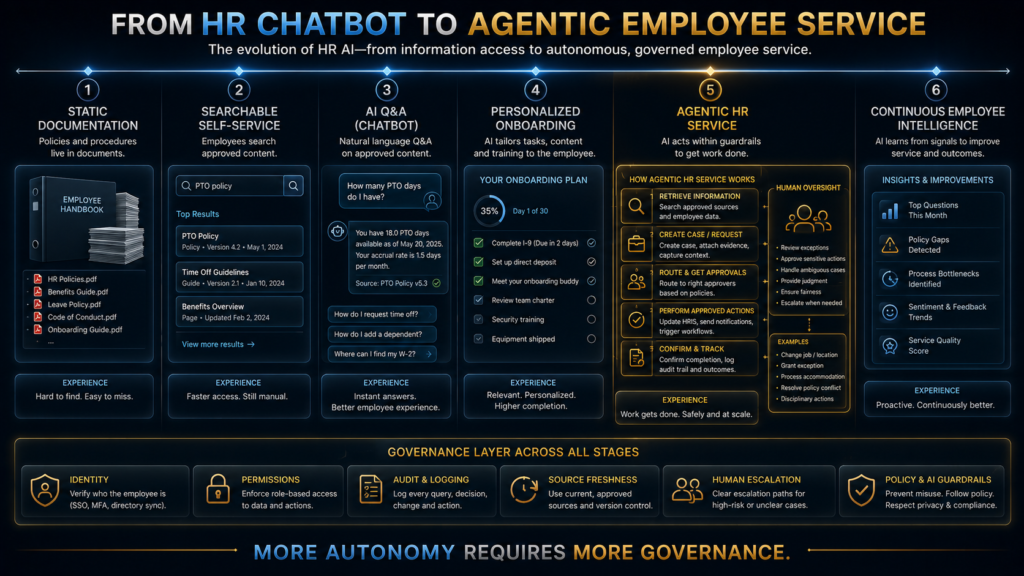
Most organizations should move through six levels of maturity in order, and few need to reach the top quickly. Level 1 is static documentation, level 2 is searchable self-service through an HR portal, and level 3 is AI question answering grounded in approved HR knowledge.
Level 4 personalizes onboarding content by role, location and stage. Level 5 is agentic HR service, where the assistant can retrieve information, create tasks, route cases and run approved workflows, and level 6 connects onboarding, learning, internal mobility and employee service into one layer.
Each level depends on the one below it. Personalization at level 4 fails if level 3 answers from stale sources, and agentic actions at level 5 are unsafe if permissions were never designed properly at level 3.
The broader shift toward AI across talent operations, covered in our explainer on AI in HR and recruiting and our guides to AI job matching and AI interviewing, makes the upper levels tempting. Organizations that skip steps usually rebuild the foundation after an embarrassing incident.
A 90-Day Implementation Plan
The first 30 days belong to the knowledge base, not the assistant. Inventory every policy, FAQ, procedure and form, assign an owner to each, and record the version and effective date.
Classify every document as authoritative, supporting, obsolete or uncertain, then retire obsolete documents from anywhere the AI can reach them and resolve the conflicts you find. If nobody owns half your policies, stop and fix that before you scale anything.
Days 31 to 60 are for low-risk self-service. Launch policy lookup, onboarding FAQs, process guidance and portal navigation to a pilot group, with the escalation ladder configured and a visible route to a person on every answer.
Measure answer accuracy on a weekly sample, the share of answers that cite a current source, employee satisfaction and escalation quality. Expect to spend much of this period fixing retrieval gaps and rewriting unclear source documents.
Days 61 to 90 add workflow once the knowledge assistant is reliable. Connect approved HR systems, add case creation, automate a few standard requests such as address changes or equipment requests, and test the human handoff with real edge cases.
Agentic actions that change records come after this period, and only for tasks whose failure you can detect and reverse. Wider AI governance policies should sign off each new permission before it goes live.
What Happens If You Do Nothing
Doing nothing is not a neutral choice, because employees are already using AI for HR questions. When a new hire pastes a benefits question into a public chatbot, they get a general answer that may not match your policy, and they may paste personal details they should not share.
Over time, that creates three problems. Answers become inconsistent across the workforce, sensitive information leaves the company through unmanaged tools, and HR loses visibility into what employees are confused about.
The cost of waiting also compounds inside HR. Every open-enrollment season and every hiring wave repeats the same question load, and the specialists who should be handling complex cases stay buried in routine ones.
A modest, governed assistant built on a clean knowledge base addresses all of these at once. It does not need to be ambitious to be valuable; it needs to be accurate, current and honest about its limits.
Where HR Helpdesk Projects Go Wrong
The most common mistakes are predictable, and most of them happen before a single employee uses the assistant. Watch for these in your own plan:
- Starting with the chatbot. The knowledge system should come first; an interface on top of messy content spreads the mess faster.
- Indexing every document. Drafts, old versions and personal notes compete with authoritative policy and win more often than you would expect.
- Ignoring versioning. Without effective dates and retirement, stale truth is guaranteed.
- Hiding sources. Employees cannot verify an answer that does not show where it came from.
- Over-permissioning. Broad data access turns a helpful assistant into a privacy incident waiting for the right question.
- No human handoff. Sensitive issues need a clear, fast route to a person.
- Measuring automation rate. A wrong answer delivered instantly is still a failure.
- Treating “I do not know” as a defect. In HR, uncertainty is often the correct output.
The contrarian view, and the one AI Hustle World holds, is that most HR helpdesk problems are knowledge-management problems wearing a chatbot costume. If employees cannot find the parental-leave policy today, the cause is usually three competing versions in three locations with no owner.
An AI project can force that cleanup, which is valuable, but the cleanup produces most of the benefit. We would begin by asking where employees repeatedly get stuck, automate the finding of policies first, automate the routing of payroll exceptions but not the judgment, and leave employee-relations decisions with people.
Is an AI HR Helpdesk Right for Your Organization?
If your HR team answers the same benefits-enrollment question hundreds of times every autumn, or your employees work across time zones and need answers outside office hours, an AI HR helpdesk is likely to pay for itself. The same applies if you operate in several countries with policies that vary by location.
It also helps when you already have well-maintained digital documentation and a mature HRIS, because the assistant has reliable sources and systems to connect to. High-volume, distributed and multi-country organizations see the clearest gains.
If your policies live mainly in people’s heads, HR data is fragmented, access controls are weak, or leadership cannot agree on which questions must reach a person, fix the foundation first. The same caution applies when sensitive cases are frequent or employees have no reliable human support channel today.
In those situations an AI layer amplifies existing problems, so the better first project is documentation, ownership and access control. Our guide to AI privacy risks and the NIST AI Risk Management Framework are both useful checklists for that preparation.
How We Researched This Guide
This guide was researched and drafted with AI assistance and checked against the primary sources linked throughout. Statistics come from the named reports: the TalentLMS and BambooHR employee onboarding research for 2026 and Gallup’s onboarding analysis.
Descriptions of ServiceNow, Microsoft and AWS capabilities come from those companies’ own product pages and documentation, so they are labeled as vendor-described rather than independently verified. We did not run a hands-on test of any HR helpdesk platform, and no benchmark or test result is claimed.
The HR Knowledge Freshness Loop, the HR AI Escalation Ladder, the source hierarchy, Safe Resolution Rate, Escalation Precision and the W.O.R.T.H. weights are AI Hustle World analysis. The first-week walkthrough and all cost and metric figures are illustrative examples.
Last updated September 2026. This version restructures the guide, adds the cost model, the multi-country section and the walkthrough, re-checks each statistic against its source and refreshes the reference links.
Final Thoughts: Build a Governed Employee Service, Then Add the Chatbot
The promise of AI in HR is easy to picture: a new hire asks how to request PTO and gets an instant, accurate answer, and HR spends its time on the conversations that need a person. That promise is achievable, and it depends far less on the model than on the knowledge, permissions and escalation rules around it.
The organizations that get this right follow a clear sequence. They start with boring, high-volume questions, fix the knowledge base, assign owners, retire old versions and ground every answer in an approved source that the employee can see.
They enforce permissions before they add personalization, measure safe resolution instead of raw automation, and design escalation before they design conversation. Only after those foundations are trustworthy do they give the assistant the ability to act.
Employees are already asking AI their onboarding questions, so the decision that matters is whether they ask a governed company assistant or whatever public tool opens first. Build the governed version and hold it to one standard: answer the routine, route the sensitive, and never invent HR policy.
Build a Smarter Employee Experience With AI
AI can remove enormous amounts of HR friction by answering routine questions, guiding onboarding, retrieving approved policies and automating standard employee-service workflows.
Compare AI vs Traditional Recruiting →FAQ
What is an AI HR helpdesk?
An employee-facing assistant that answers routine HR questions, guides standard processes and routes sensitive issues to HR staff. A good one answers from current, approved sources, shows where each answer came from and respects access permissions.
How does AI help with employee onboarding?
It answers new-hire questions, filters documents and training by role and stage, drafts onboarding checklists and points people to colleagues who can help. Managers and teammates remain responsible for relationships and belonging.
Can AI answer HR policy questions accurately?
Yes, when answers are grounded in current, approved policy documents and the assistant cites its source. Accuracy drops sharply when the knowledge base holds outdated or conflicting versions.
What is RAG in an HR helpdesk?
Retrieval-augmented generation means the assistant searches your approved HR documents for relevant passages before it writes an answer. It keeps responses tied to your policies instead of the model’s general knowledge.
Which HR questions should never be fully automated?
Harassment, discrimination, accommodation, discipline, termination, compensation disputes and legal questions should always reach a qualified person. The assistant can explain the process and route the case.
Can an AI HR assistant show employees their own salary or leave balance?
Yes, if your authorization model allows it and the assistant checks identity first. It should refuse questions about other employees’ pay or cases, however they are phrased.
What is stale truth in HR AI?
An answer drawn from a real but outdated policy. It is often more dangerous than a hallucination because it cites a genuine document, so retire old versions and show each source’s update date.
How do you measure whether an AI HR helpdesk is working?
Track Safe Resolution Rate for routine questions and Escalation Precision for sensitive ones. Add sampled answer accuracy, repeat questions and new-hire confidence, and treat raw automation rate with caution.
Should we build or buy an AI HR helpdesk?
Buy when your HR systems are standardized and you need integrations quickly. Build for unusual workflows with strong engineering support, and start smaller if your documentation is messy.
Will an AI HR helpdesk replace HR staff?
No. It absorbs routine questions, policy lookups and ticket routing, which frees HR professionals for employee relations, coaching and difficult cases that need judgment and empathy.
Related Guides
- AI Customer Service Explained: How It Works, Benefits, and Real Business Examples
- How AI Chatbots Work: From User Message to Intelligent Response
- AI in HR & Recruiting Explained: How AI Is Changing Talent Operations
- AI Customer Support vs Human Support: Which Is Better?
Written by
Muntasir Ahmad Chowdhury
Founder, AI Hustle World
Muntasir Ahmad Chowdhury is the Founder of AI Hustle World, an independent publication dedicated to making Artificial Intelligence practical, trustworthy, and easy to understand. He researches AI tools, automation, customer service, productivity, and real-world business applications, helping readers make smarter technology decisions through research-driven, experience-backed content.
Expertise:
AI Tools • AI Automation • AI Customer Service • AI Productivity • Generative AI • AI Workflows
Get Smarter With AI
Enjoyed this guide? Get practical AI tools, tutorials, and honest reviews delivered to your inbox.